Block 1 - trigger
- Type / Role
- n8n-nodes-base.webhook - webhook
- Config choices
- Version 2.1


 Early Deal
This workflow is provided as-is. Please review and test before using in production.
Description Automatically detect and escalate Product UAT critical bugs using AI, create Jira issues, notify engineering teams, and close the feedback loop with testers. This workflow analyzes raw ...
n8n-nodes-base.webhook, n8n-nodes-base.code, n8n-nodes-base.jira, n8n-nodes-base.slack, n8n-nodes-base.gmail, n8n-nodes-base.stickynote, n8n-nodes-base.respondtowebhook, n8n-nodes-base.if
This workflow is cataloged by N8N Workflows and links back to its original n8n.io source page by Yassin Zehar.
Original n8n.io sourceAutomatically detect and escalate Product UAT critical bugs using AI, create Jira issues, notify engineering teams, and close the feedback loop with testers.
This workflow analyzes raw UAT feedback submitted via a webhook, classifies it with an AI model, validates severity, and automatically escalates confirmed critical bugs to Jira and Slack. Testers are notified, and the original webhook receives a structured response for full traceability.
It is designed for teams that want fast, reliable critical bug handling during UAT without manual triage.
During Product UAT and beta testing, critical bugs are often buried in unstructured feedback coming from forms, Slack, or internal tools.
Missing or delaying these issues can block releases and create friction between Product and Engineering.
This workflow ensures:
Faster detection of critical bugs
Immediate escalation to engineering
Clear ownership and visibility
Consistent communication with testers
It combines AI-based classification with deterministic routing to keep UAT feedback actionable and production-ready.
Product Managers running UAT or beta programs
Project Managers coordinating QA and release readiness
Engineering teams who need fast, clean bug escalation
Product Ops teams standardizing feedback workflows
Any team handling high-volume UAT feedback
Perfect for teams that want speed, clarity, and traceability during UAT.
Webhook trigger (form, Slack integration, internal tool, etc.)
OpenAI account (for AI triage)
Jira (critical bug tracking)
Slack (engineering alerts)
Gmail or Slack (tester notifications)
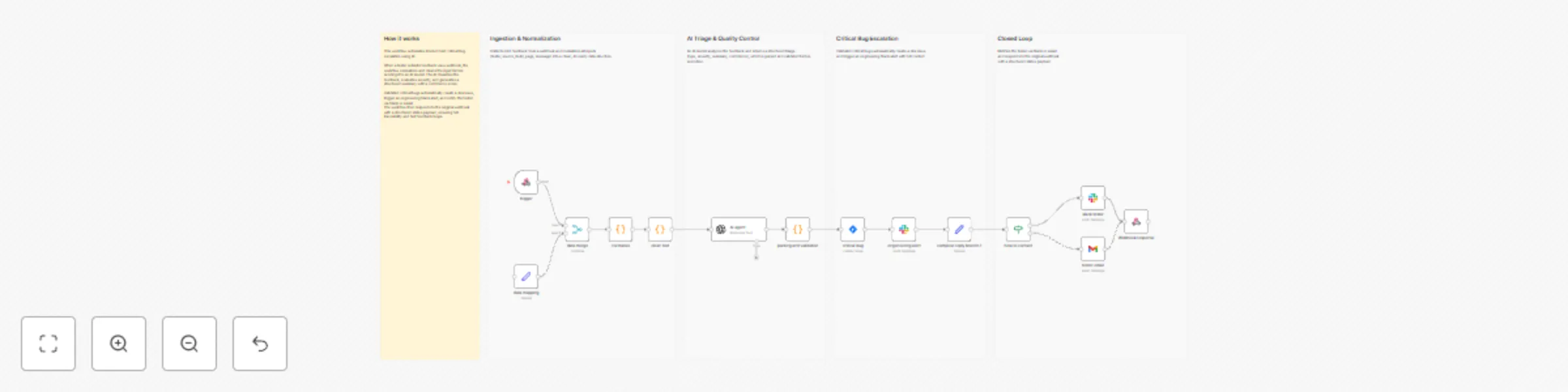
Trigger The workflow starts when UAT feedback is submitted via a webhook.
Normalize & Clean Incoming data is normalized (tester, build, page, message) and cleaned to ensure a consistent, AI-ready structure.
AI Triage & Validation An AI model analyzes the feedback and returns a structured triage result (type, severity, summary, confidence), which is parsed and validated.
Critical Bug Escalation Validated critical bugs automatically:
create a Jira issue with full context
trigger an engineering Slack alert
Closed Loop The tester is notified via Slack or email, and the workflow responds to the original webhook with a structured status payload.
Automated critical bug detection during UAT
Instant Jira ticket creation
Real-time engineering alerts in Slack
Automatic tester communication
Full traceability via structured webhook responses
I’m Yassin a Product Manager Scaling tech products with a data-driven mindset. 📬 Feel free to connect with me on Linkedin
This catalog entry is organized from the workflow JSON. The node-level section below shows the executable blocks available for review before importing the template.
| Workflow | Escalate product UAT critical bugs with OpenAI, Jira and Slack |
|---|---|
| Complexity | advanced |
| Nodes | 19 |
| Categories | Engineering, AI Summarization |
| Author | Yassin Zehar |
| Published | 27 Dec 2025 |
Use the JSON export at /data/workflows/12205/12205.json as the source template for this automation.
Open n8n, import the downloaded JSON, and review each node before activating the workflow.
Replace placeholder credentials, API keys, webhook URLs, account IDs, and environment-specific values with your own settings.
Run the workflow manually or in a staging workspace, inspect node output, and confirm downstream systems receive the expected data.
Enable the workflow only after testing, then monitor executions, errors, and rate limits during the first production runs.
Review imported nodes carefully before activation. This catalog entry is intended to help you inspect the workflow structure, understand required services, and find related templates faster.
Node names, credentials, schedules, webhook paths, and external service limits may need adjustment for your workspace.
Description Automatically detect and escalate Product UAT critical bugs using AI, create Jira issues, notify engineering teams, and close the feedback loop with testers. This workflow analyzes raw ...
Review the workflow JSON, configure any required credentials in n8n, and test the automation in a safe workspace before using it in production.
Yes. Use the block-by-block analysis and the downloadable JSON to inspect each node, then adjust credentials, prompts, schedules, filters, or destinations for your Engineering, AI Summarization use case.