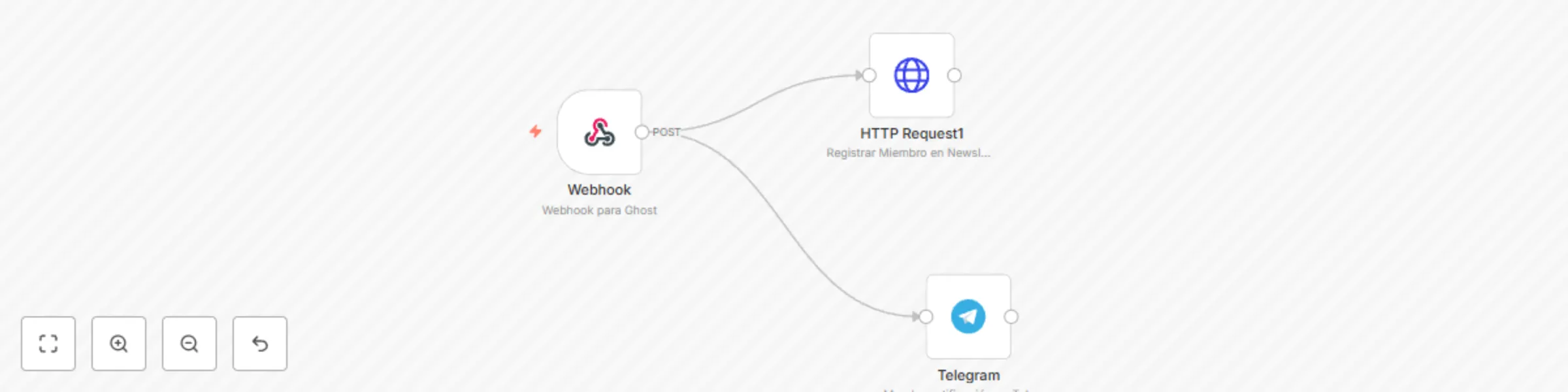
Block 1 - HTTP Request1
- Type / Role
- n8n-nodes-base.httpRequest - httpRequest
- Config choices
- Version 1


 Early Deal
This workflow is provided as-is. Please review and test before using in production.
Ghost + Sendy Integration Está es una integración del CMS Ghost hacia Sendy Sendy ( www.sendy.co ) Ghost ( www.ghost.org ) Con esta integración podrás importar los ...
n8n-nodes-base.httprequest, n8n-nodes-base.webhook, n8n-nodes-base.telegram
This workflow is cataloged by N8N Workflows and links back to its original n8n.io source page by The { AI } rtist.
Original n8n.io sourceEstá es una integración del CMS Ghost hacia Sendy
Con esta integración podrás importar los miembros del CMS Ghost en su nueva versión que incluye la parte de Membresía hacía el Software de newsletter sendy.
Está integración además nos avisa si se ha registrado un nuevo miembro via telegram.
Para realizar esta customización es necesaria la creación de una custom integration en Ghost.
Para ello desde el panel de Administración vamos a CUSTOM INTEGRATIONS / + Add custom Integration
Una vez allí nos solicitará un nombre le ponemos el que queramos y añadimos un nuevo Hook:
En Target URL debe ir La url que nos genera nuestro webhook dentro de n8n:
Pegamos la URL y acamos de rellenar los datos del HTTP REQUEST1 con los datos de nuestra lista rellenando los campos.
Que encontaras en tú instalación de Sendy
Por último faltara añadir las credenciales de Telegram de Nuestro BOT ( https://docs.n8n.io/credentials/telegram/ ) e indicar el grupo o usuario donde queremos que notifique.
Saludos,
This catalog entry is organized from the workflow JSON. The node-level section below shows the executable blocks available for review before importing the template.
| Workflow | Enviar miembros del CMS Ghost hacia Newsletter Sendy |
|---|---|
| Complexity | beginner |
| Nodes | 3 |
| Categories | Social Media |
| Author | The { AI } rtist |
| Published | 03 Sept 2020 |
Use the JSON export at /data/workflows/629/629.json as the source template for this automation.
Open n8n, import the downloaded JSON, and review each node before activating the workflow.
Replace placeholder credentials, API keys, webhook URLs, account IDs, and environment-specific values with your own settings.
Run the workflow manually or in a staging workspace, inspect node output, and confirm downstream systems receive the expected data.
Enable the workflow only after testing, then monitor executions, errors, and rate limits during the first production runs.
Review imported nodes carefully before activation. This catalog entry is intended to help you inspect the workflow structure, understand required services, and find related templates faster.
Node names, credentials, schedules, webhook paths, and external service limits may need adjustment for your workspace.
Ghost + Sendy Integration Está es una integración del CMS Ghost hacia Sendy Sendy ( www.sendy.co ) Ghost ( www.ghost.org ) Con esta integración podrás importar los ...
Review the workflow JSON, configure any required credentials in n8n, and test the automation in a safe workspace before using it in production.
Yes. Use the block-by-block analysis and the downloadable JSON to inspect each node, then adjust credentials, prompts, schedules, filters, or destinations for your Social Media use case.