Block 1 - Workflow Overview
- Type / Role
- n8n-nodes-base.stickyNote - stickyNote
- Config choices
- Version 1


 Early Deal
This workflow is provided as-is. Please review and test before using in production.
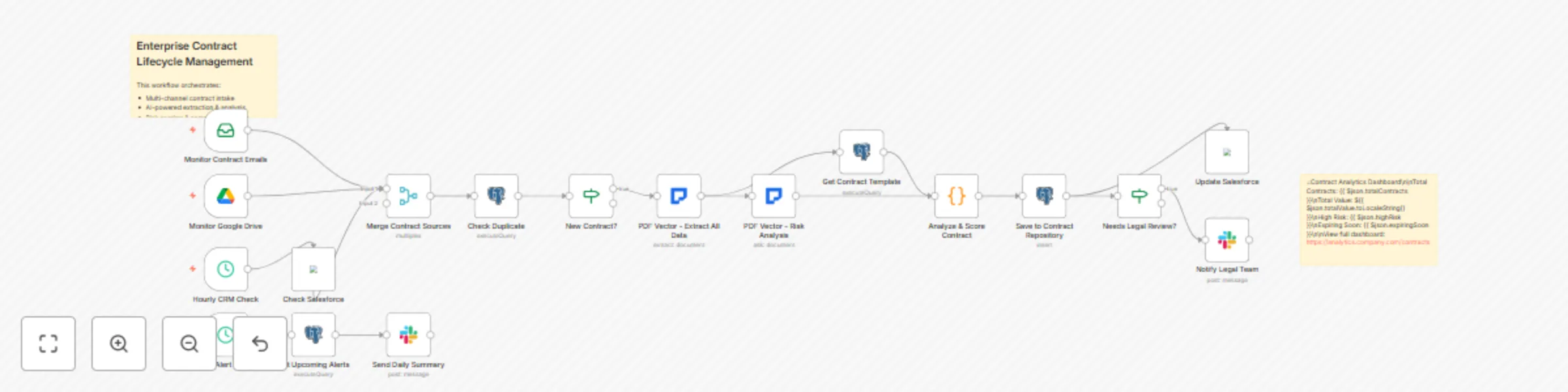
Transform your contract management process with this enterprise grade workflow that handles the complete contract lifecycle from initial intake through execution, monitoring, and renewal. This comp...
n8n-nodes-base.stickynote, n8n-nodes-base.emailreadimap, n8n-nodes-base.googledrivetrigger, n8n-nodes-base.scheduletrigger, n8n-nodes-base.salesforce, n8n-nodes-base.merge, n8n-nodes-base.postgres, n8n-nodes-base.if
This workflow is cataloged by N8N Workflows and links back to its original n8n.io source page by PDF Vector.
Original n8n.io sourceTransform your contract management process with this enterprise-grade workflow that handles the complete contract lifecycle - from initial intake through execution, monitoring, and renewal. This comprehensive solution combines AI-powered contract analysis with automated risk scoring, clause comparison, obligation tracking, and proactive alerts. It integrates with multiple data sources including email, SharePoint, contract CLM systems, and creates a centralized contract intelligence hub that prevents revenue leakage, ensures compliance, and accelerates deal velocity.
This advanced workflow orchestrates a complete contract management ecosystem that monitors multiple channels (email, Google Drive, SharePoint, APIs) for new contracts and amendments. It extracts and analyzes over 50 contract data points using AI, performs multi-dimensional risk assessment across legal, financial, and operational factors, compares clauses against your approved template library, tracks all obligations and key dates with automated reminders, integrates with Salesforce/CRM for deal alignment, routes contracts through dynamic approval workflows based on risk scores, generates executive dashboards with contract analytics, and maintains a searchable repository with version control. The system handles complex scenarios including multi-party agreements, framework contracts with statements of work, international contracts requiring jurisdiction analysis, and M&A due diligence requiring bulk contract review.
Designed for enterprise legal operations teams managing thousands of contracts annually, procurement departments negotiating complex vendor agreements, contract managers overseeing multi-million dollar portfolios, compliance teams ensuring regulatory adherence across jurisdictions, sales operations needing faster contract turnaround, and C-suite executives requiring contract intelligence for strategic decisions. Essential for organizations in regulated industries (healthcare, finance, government) and companies undergoing digital transformation of their legal operations.
Manual contract management creates massive operational risks and inefficiencies. Organizations typically have contracts scattered across emails, shared drives, and filing cabinets with no central visibility. This leads to missed renewal deadlines costing 5-10% of contract value, unauthorized contract variations creating compliance risks, obligation failures resulting in penalties and damaged relationships, and inability to leverage favorable terms across similar contracts. Studies show that inefficient contract management costs organizations up to 9% of annual revenue. This workflow creates a single source of truth for all contracts, automates tracking and compliance, and provides predictive insights to prevent issues before they occur.
Implement industry-specific modules for healthcare (BAAs, DPAs), financial services (ISDAs, loan agreements), technology (SaaS, licensing), or government contracting. Add AI models trained on your historical contracts for better extraction accuracy. Create custom risk factors for emerging regulations like AI governance or ESG compliance. Build integration with specific CLM systems (Ironclad, Docusign CLM, Icertis). Implement advanced analytics including contract similarity scoring, win-rate analysis by clause variations, and automatic playbook generation. Add blockchain integration for smart contract execution and configure automated contract assembly for standard agreements.
Note: This workflow uses the PDF Vector community node. Make sure to install it from the n8n community nodes collection before using this template.
This catalog entry is organized from the workflow JSON. The node-level section below shows the executable blocks available for review before importing the template.
| Workflow | Enterprise contract lifecycle management with AI risk analysis |
|---|---|
| Complexity | advanced |
| Nodes | 20 |
| Categories | Document Extraction, AI Summarization |
| Author | PDF Vector |
| Published | 12 Sept 2025 |
Use the JSON export at /data/workflows/8497/8497.json as the source template for this automation.
Open n8n, import the downloaded JSON, and review each node before activating the workflow.
Replace placeholder credentials, API keys, webhook URLs, account IDs, and environment-specific values with your own settings.
Run the workflow manually or in a staging workspace, inspect node output, and confirm downstream systems receive the expected data.
Enable the workflow only after testing, then monitor executions, errors, and rate limits during the first production runs.
Review imported nodes carefully before activation. This catalog entry is intended to help you inspect the workflow structure, understand required services, and find related templates faster.
Node names, credentials, schedules, webhook paths, and external service limits may need adjustment for your workspace.
Transform your contract management process with this enterprise grade workflow that handles the complete contract lifecycle from initial intake through execution, monitoring, and renewal. This comp...
Review the workflow JSON, configure any required credentials in n8n, and test the automation in a safe workspace before using it in production.
Yes. Use the block-by-block analysis and the downloadable JSON to inspect each node, then adjust credentials, prompts, schedules, filters, or destinations for your Document Extraction, AI Summarization use case.