Block 1 - Add table name to output
- Type / Role
- n8n-nodes-base.set - set
- Config choices
- Version 3.4


 Early Deal
This workflow is provided as-is. Please review and test before using in production.
Who is this for? 🏻 🏻 🏻 Humans and Robots alike. This workflow can be used as a Chat Trigger , as well as a Workflow Trigger . It will take a natural language request, and then generate a ...
n8n-nodes-base.set, n8n-nodes-base.converttofile, n8n-nodes-base.readwritefile, n8n-nodes-base.extractfromfile, @n8n/n8n-nodes-langchain.chattrigger, n8n-nodes-base.stickynote, n8n-nodes-base.manualtrigger, n8n-nodes-base.if
This workflow is cataloged by N8N Workflows and links back to its original n8n.io source page by Alfonso Corretti.
Original n8n.io source🧑🏻🫱🏻🫲🏻🤖 Humans and Robots alike.
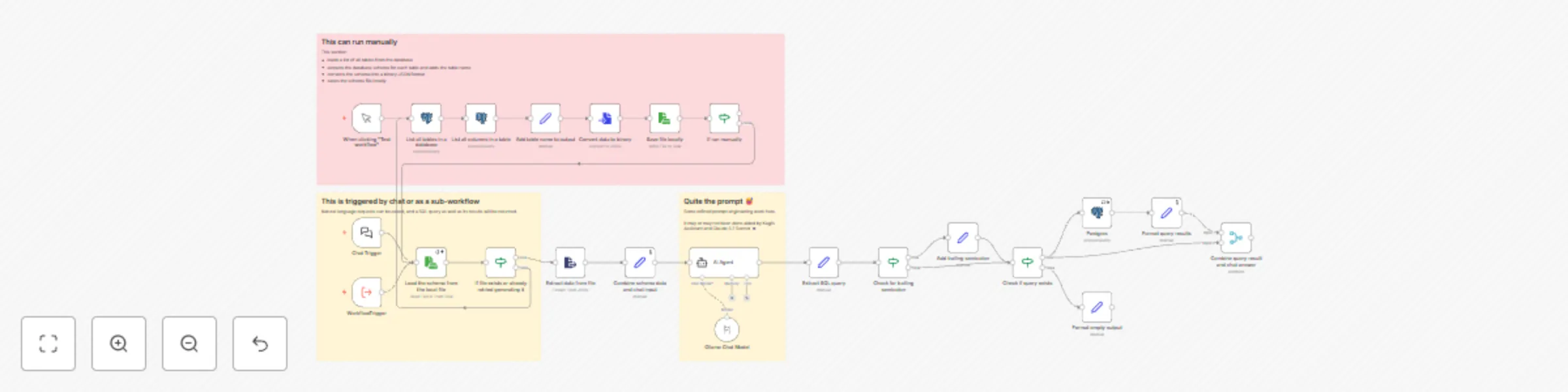
This workflow can be used as a Chat Trigger, as well as a Workflow Trigger.
It will take a natural language request, and then generate a SQL query. The resulting query parameter will contain the query, and a sqloutput parameter will contain the results of executing such query.
This template is most useful paired with other workflows that extract e-mail information and store it in a structured Postgres table, and use LLMs to understand inquiries about information contained in an e-mail inbox and formulate questions that needs answering.
Plus, the prompt can be easily adapted to formulate SQL queries over any kind of structured database.
As LLM provider I'm using Ollama locally, as I consider my e-mail extremely sensitive information. As model, phi4-mini does an excellent job balancing quality and efficiency.
Upon running for the first time, this workflow will automatically trigger a sub-section to read all tables and extract their schema into a local file.
Then, either by chatting with the workflow in n8n's interface or by using it as a sub-workflow, you will get a query and a sqloutput response.
If you want to work with just one particular table yet keep edits at bay, append a condition to the List all tables in a database step, like so:
WHERE table_schema='public' AND table_name='my_emails_table_name'
To repurpose this workflow to work with any other data corpus in a structured database, inspect the AI Agent user and system prompts and edit them accordingly.
This catalog entry is organized from the workflow JSON. The node-level section below shows the executable blocks available for review before importing the template.
Showing the first 24 of 26 workflow blocks. Download the JSON for the full node graph.
| Workflow | Email assistant: convert natural language to SQL queries with Phi4-mini and PostgreSQL |
|---|---|
| Complexity | advanced |
| Nodes | 26 |
| Categories | Engineering, AI RAG |
| Author | Alfonso Corretti |
| Published | 27 Apr 2025 |
Use the JSON export at /data/workflows/3761/3761.json as the source template for this automation.
Open n8n, import the downloaded JSON, and review each node before activating the workflow.
Replace placeholder credentials, API keys, webhook URLs, account IDs, and environment-specific values with your own settings.
Run the workflow manually or in a staging workspace, inspect node output, and confirm downstream systems receive the expected data.
Enable the workflow only after testing, then monitor executions, errors, and rate limits during the first production runs.
Review imported nodes carefully before activation. This catalog entry is intended to help you inspect the workflow structure, understand required services, and find related templates faster.
Node names, credentials, schedules, webhook paths, and external service limits may need adjustment for your workspace.
Who is this for? 🏻 🏻 🏻 Humans and Robots alike. This workflow can be used as a Chat Trigger , as well as a Workflow Trigger . It will take a natural language request, and then generate a ...
Review the workflow JSON, configure any required credentials in n8n, and test the automation in a safe workspace before using it in production.
Yes. Use the block-by-block analysis and the downloadable JSON to inspect each node, then adjust credentials, prompts, schedules, filters, or destinations for your Engineering, AI RAG use case.