Effortless task management: Create Todoist tasks directly from Telegram with AI

Workflow preview

Workflow preview
100%
Effortless task management: Create Todoist tasks directly from Telegram with AI preview
Open on n8n.io

Important notice

This workflow is provided as-is. Please review and test before using in production.

1. Workflow Overview

Effortless Task Management: Create Todoist Tasks Directly from Telegram with AI This n8n workflow empowers you to seamlessly manage your tasks by creating Todoist entries directly from Telegram, us...

Best for

  • Personal Productivity automation workflows
  • AI Summarization automation workflows
  • intermediate n8n builders looking for reusable templates

Tools used

@n8n/n8n-nodes-langchain.lmchatopenai, @n8n/n8n-nodes-langchain.chainllm, n8n-nodes-base.telegramtrigger, n8n-nodes-base.switch, n8n-nodes-base.telegram, @n8n/n8n-nodes-langchain.openai, n8n-nodes-base.set, @n8n/n8n-nodes-langchain.outputparserstructured

Source and attribution

This workflow is cataloged by N8N Workflows and links back to its original n8n.io source page by Onur.

Original n8n.io source

1.1 Workflow description

Title
Effortless task management: Create Todoist tasks directly from Telegram with AI
Workflow name
Effortless task management: Create Todoist tasks directly from Telegram with AI

Effortless Task Management: Create Todoist Tasks Directly from Telegram with AI

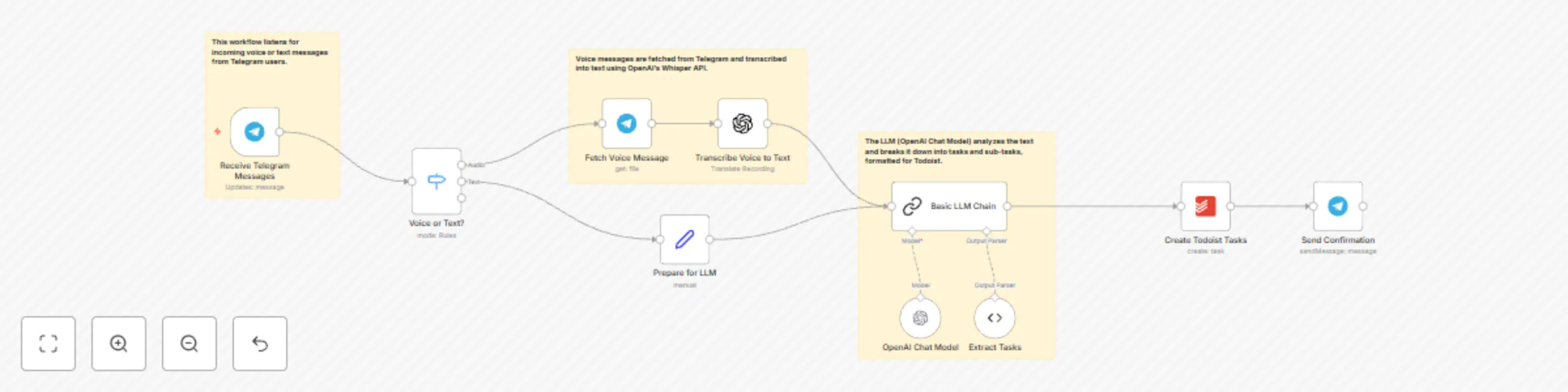
This n8n workflow empowers you to seamlessly manage your tasks by creating Todoist entries directly from Telegram, using the power of AI. Simply send a voice or text message to your Telegram bot, and this workflow will transform it into actionable tasks in your Todoist account.

Who is this for?

  • Busy professionals who need a quick and easy way to capture tasks on the go.
  • Students looking to streamline their assignments and project management.
  • Anyone who wants to leverage AI for effortless task management.

What Problem Does it Solve?

This workflow eliminates the need to manually enter tasks into Todoist. It automates the process of capturing, organizing, and prioritizing tasks, saving you time and effort.

What are the Benefits?

  • Seamless Integration: Connect your Telegram and Todoist accounts for a frictionless workflow.
  • AI-Powered Task Breakdown: LLM AI intelligently analyzes your messages and breaks them down into manageable sub-tasks.
  • Voice-to-Task: Create tasks with voice messages for hands-free convenience.
  • Increased Productivity: Capture and organize tasks quickly, keeping you focused and productive.
  • Accessibility: Access your tasks from anywhere with Todoist's mobile app and Google extension.

How it Works

  1. Send a message: Send a voice or text message describing your task to your Telegram bot.
  2. AI analysis: The workflow uses an LLM (OpenAI Chat Model) to analyze your message and break it down into sub-tasks.
  3. Task creation: The workflow creates tasks in your Todoist account based on the AI's analysis.
  4. Notification: You receive a Telegram notification with a link to your newly created tasks in Todoist.

Nodes in the Workflow

  • Telegram Trigger: Listens for incoming messages on Telegram.
  • Switch: Routes messages based on their type (voice or text).
  • Telegram: Fetches voice messages from Telegram.
  • OpenAI: Transcribes voice messages to text using OpenAI's Whisper API.
  • Edit Fields: Prepares the text for the LLM.
  • Basic LLM Chain: Analyzes messages and generates sub-tasks using OpenAI's GPT model.
  • Structured Output Parser: Extracts sub-tasks from the LLM's response.
  • Todoist: Creates tasks in your Todoist account.
  • Telegram: Sends a notification with a link to your Todoist tasks.

Requirements

  • Active n8n instance.
  • Telegram account with a bot.
  • Todoist account.
  • OpenAI API key.

Setup Information

  1. Import the workflow JSON into your n8n instance.
  2. Configure the Telegram Trigger node with your bot token.
  3. Set up the OpenAI credentials with your API key.
  4. Connect your Todoist account in the Todoist node.
  5. Customize the LLM prompt (optional) to fine-tune task creation.

Additional Tips

  • Explore Todoist's features to further organize and manage your tasks.
  • Experiment with different LLM prompts to optimize task breakdown.
  • Use n8n's features to automate other aspects of your workflow.

This workflow combines the convenience of Telegram with the power of AI and Todoist to provide a seamless task management experience. Start managing your tasks effortlessly today!

1.2 Logical Blocks

This catalog entry is organized from the workflow JSON. The node-level section below shows the executable blocks available for review before importing the template.

2. Block-by-Block Analysis

Block 1 - OpenAI Chat Model

Type / Role
@n8n/n8n-nodes-langchain.lmChatOpenAi - lmChatOpenAi
Config choices
Version 1.2

Block 2 - Basic LLM Chain

Type / Role
@n8n/n8n-nodes-langchain.chainLlm - chainLlm
Config choices
Version 1.5

Block 3 - Receive Telegram Messages

Type / Role
n8n-nodes-base.telegramTrigger - telegramTrigger
Config choices
Version 1.1

Block 4 - Voice or Text?

Type / Role
n8n-nodes-base.switch - switch
Config choices
Version 3.2

Block 5 - Fetch Voice Message

Type / Role
n8n-nodes-base.telegram - telegram
Config choices
Version 1.2

Block 6 - Transcribe Voice to Text

Type / Role
@n8n/n8n-nodes-langchain.openAi - openAi
Config choices
Version 1.8

Block 7 - Prepare for LLM

Type / Role
n8n-nodes-base.set - set
Config choices
Version 3.4

Block 8 - Extract Tasks

Type / Role
@n8n/n8n-nodes-langchain.outputParserStructured - outputParserStructured
Config choices
Version 1.2

Block 9 - Create Todoist Tasks

Type / Role
n8n-nodes-base.todoist - todoist
Config choices
Version 2.1

Block 10 - Send Confirmation

Type / Role
n8n-nodes-base.telegram - telegram
Config choices
Version 1.2

Block 11 - Sticky Note2

Type / Role
n8n-nodes-base.stickyNote - stickyNote
Config choices
Version 1

Block 12 - Sticky Note3

Type / Role
n8n-nodes-base.stickyNote - stickyNote
Config choices
Version 1

Block 13 - Sticky Note4

Type / Role
n8n-nodes-base.stickyNote - stickyNote
Config choices
Version 1

3. Summary Table

Workflow Effortless task management: Create Todoist tasks directly from Telegram with AI
Complexity intermediate
Nodes 13
Categories Personal Productivity, AI Summarization
Author Onur
Published 01 Mar 2025

4. Reproducing the Workflow from Scratch

  1. 1. Download the workflow JSON

    Use the JSON export at /data/workflows/3052/3052.json as the source template for this automation.

  2. 2. Import the template into n8n

    Open n8n, import the downloaded JSON, and review each node before activating the workflow.

  3. 3. Configure credentials and variables

    Replace placeholder credentials, API keys, webhook URLs, account IDs, and environment-specific values with your own settings.

  4. 4. Test with sample data

    Run the workflow manually or in a staging workspace, inspect node output, and confirm downstream systems receive the expected data.

  5. 5. Activate and monitor

    Enable the workflow only after testing, then monitor executions, errors, and rate limits during the first production runs.

5. General Notes & Resources

Review imported nodes carefully before activation. This catalog entry is intended to help you inspect the workflow structure, understand required services, and find related templates faster.

Node names, credentials, schedules, webhook paths, and external service limits may need adjustment for your workspace.

Frequently asked questions

What does Effortless task management: Create Todoist tasks directly from Telegram with AI do?

Effortless Task Management: Create Todoist Tasks Directly from Telegram with AI This n8n workflow empowers you to seamlessly manage your tasks by creating Todoist entries directly from Telegram, us...

What do I need before importing this workflow?

Review the workflow JSON, configure any required credentials in n8n, and test the automation in a safe workspace before using it in production.

Can I customize this workflow?

Yes. Use the block-by-block analysis and the downloadable JSON to inspect each node, then adjust credentials, prompts, schedules, filters, or destinations for your Personal Productivity, AI Summarization use case.