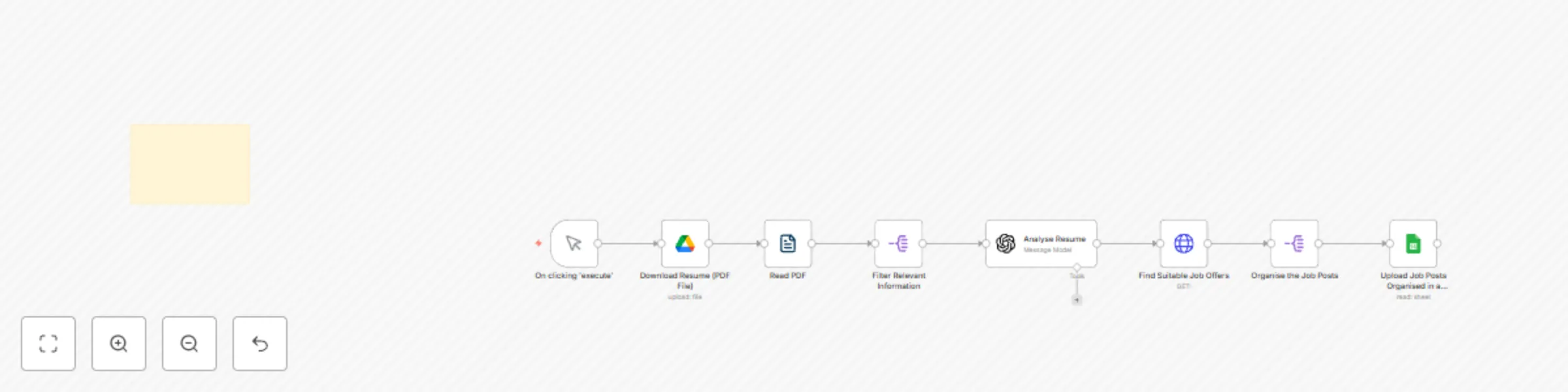
Effortless job hunting: Let this automation find your next role

Workflow preview

Workflow preview
100%
Effortless job hunting: Let this automation find your next role preview
Open on n8n.io

Important notice

This workflow is provided as-is. Please review and test before using in production.

1. Workflow Overview

Find Job Postings from LinkedIn, Indeed, and Glassdoor and Save Them to Google Sheets Using AI Overview Effortlessly discover and apply to jobs tailored to your profile—AI handles the search, you h...

Best for

  • Personal Productivity automation workflows
  • AI Summarization automation workflows
  • intermediate n8n builders looking for reusable templates

Tools used

n8n-nodes-base.manualtrigger, n8n-nodes-base.readpdf, n8n-nodes-base.googledrive, n8n-nodes-base.splitout, @n8n/n8n-nodes-langchain.openai, n8n-nodes-base.httprequest, n8n-nodes-base.googlesheets, n8n-nodes-base.stickynote

Source and attribution

This workflow is cataloged by N8N Workflows and links back to its original n8n.io source page by Matt F..

Original n8n.io source

1.1 Workflow description

Title
Effortless job hunting: Let this automation find your next role
Workflow name
Effortless job hunting: Let this automation find your next role

Find Job Postings from LinkedIn, Indeed, and Glassdoor and Save Them to Google Sheets Using AI

Overview

Effortlessly discover and apply to jobs tailored to your profile—AI handles the search, you handle the interviews.

Say goodbye to endless job board scrolling. This automation leverages AI to analyze your resume, identify your skills, experience, and more, to match you with the most relevant job opportunities. It sources job postings from LinkedIn, Indeed, Glassdoor, ZipRecruiter, Monster, and other public job sites on the web. With seamless integration and automatic organization of results, you can focus on applying rather than searching.

Key Features

Intelligent Resume Parsing

  • Extracts key information from your PDF resume using AI.
  • Identifies skills, experience, education, and job preferences.

Targeted Job Matching

  • Uses the parsed resume data to search for jobs that align with your profile.
  • Ensures relevance by analyzing job descriptions for matching criteria.

Automated Data Organization

  • Compiles job listings into a structured Google Spreadsheet.
  • Eliminates the need for manual data entry, saving valuable time.

Easy Access and Review

  • Stores results in a familiar Google Sheets format for easy tracking.
  • Allows for filtering and sorting to prioritize applications.

Setup Instructions

Prerequisites

  • A free API key for the job search service.
  • Google Drive and Google Sheets accounts.
  • An updated resume in PDF format.

Step 1: Connect Your Resume Parsing AI

  1. Upload your PDF resume to Google Drive.
  2. Configure the AI parser node in n8n to extract relevant information.
  3. Map the extracted fields (e.g., skills, job title, experience) for job searching.

Step 2: Automate the Job Search

  1. Use the extracted data to perform a job search on LinkedIn, Indeed, Glassdoor, and other supported job sites.
  2. Retrieve job postings based on relevant keywords and location preferences.

Step 3: Save Job Listings to Google Sheets

  1. Create a new Google Sheet to store job listings.
  2. Set up the automation to write job details (e.g., title, company, location, link) into the sheet.
  3. Format the sheet for better readability and tracking.

Step 4: Review and Apply to Jobs

  1. Open your Google Sheet to view job matches.
  2. Click on the links to apply directly on the respective job sites.
  3. Update the status of each job application as you progress.

Why Use This Automation?

  • Saves Time: Automates job searching and listing compilation.
  • Enhances Efficiency: Eliminates manual scrolling and data entry.
  • Improves Organization: Keeps all job opportunities in a structured format.
  • Optimizes Your Job Hunt: Increases chances of landing the perfect role.

Designed specifically for job seekers aiming to optimize their search process, this automation integrates with Google Drive and Sheets, streamlining your job hunt and enhancing your chances of finding the right opportunity. Get started today and accelerate your career growth!

1.2 Logical Blocks

This catalog entry is organized from the workflow JSON. The node-level section below shows the executable blocks available for review before importing the template.

2. Block-by-Block Analysis

Block 1 - On clicking 'execute'

Type / Role
n8n-nodes-base.manualTrigger - manualTrigger
Config choices
Version 1

Block 2 - Read PDF

Type / Role
n8n-nodes-base.readPDF - readPDF
Config choices
Version 1

Block 3 - Download Resume (PDF File)

Type / Role
n8n-nodes-base.googleDrive - googleDrive
Config choices
Version 3

Block 4 - Filter Relevant Information

Type / Role
n8n-nodes-base.splitOut - splitOut
Config choices
Version 1

Block 5 - Analyse Resume

Type / Role
@n8n/n8n-nodes-langchain.openAi - openAi
Config choices
Version 1.8

Block 6 - Find Suitable Job Offers

Type / Role
n8n-nodes-base.httpRequest - httpRequest
Config choices
Version 4.2

Block 7 - Organise the Job Posts

Type / Role
n8n-nodes-base.splitOut - splitOut
Config choices
Version 1

Block 8 - Upload Job Posts Organised in a Spreadsheet

Type / Role
n8n-nodes-base.googleSheets - googleSheets
Config choices
Version 4.5

Block 9 - Sticky Note6

Type / Role
n8n-nodes-base.stickyNote - stickyNote
Config choices
Version 1

3. Summary Table

Workflow Effortless job hunting: Let this automation find your next role
Complexity intermediate
Nodes 9
Categories Personal Productivity, AI Summarization
Author Matt F.
Published 01 Mar 2025

4. Reproducing the Workflow from Scratch

  1. 1. Download the workflow JSON

    Use the JSON export at /data/workflows/3051/3051.json as the source template for this automation.

  2. 2. Import the template into n8n

    Open n8n, import the downloaded JSON, and review each node before activating the workflow.

  3. 3. Configure credentials and variables

    Replace placeholder credentials, API keys, webhook URLs, account IDs, and environment-specific values with your own settings.

  4. 4. Test with sample data

    Run the workflow manually or in a staging workspace, inspect node output, and confirm downstream systems receive the expected data.

  5. 5. Activate and monitor

    Enable the workflow only after testing, then monitor executions, errors, and rate limits during the first production runs.

5. General Notes & Resources

Review imported nodes carefully before activation. This catalog entry is intended to help you inspect the workflow structure, understand required services, and find related templates faster.

Node names, credentials, schedules, webhook paths, and external service limits may need adjustment for your workspace.

Frequently asked questions

What does Effortless job hunting: Let this automation find your next role do?

Find Job Postings from LinkedIn, Indeed, and Glassdoor and Save Them to Google Sheets Using AI Overview Effortlessly discover and apply to jobs tailored to your profile—AI handles the search, you h...

What do I need before importing this workflow?

Review the workflow JSON, configure any required credentials in n8n, and test the automation in a safe workspace before using it in production.

Can I customize this workflow?

Yes. Use the block-by-block analysis and the downloadable JSON to inspect each node, then adjust credentials, prompts, schedules, filters, or destinations for your Personal Productivity, AI Summarization use case.