M

Matt F.

6
Workflows

Workflows by Matt F.

Workflow preview: Transform podcasts into viral social media clips with Gemini AI and multi-platform posting
Free advanced

Transform podcasts into viral social media clips with Gemini AI and multi-platform posting

# 🎯 Automatically Create and Post Engaging Clips (with Audience Retention Videos) from Podcasts Using AI! 🚀 Effortlessly transform long-form podcast content into highly engaging, viral-read clips with this end-to-end automation template. Designed for content creators already monetizing on TikTok/YouTube/Instagram/Twitter and those looking to start earning from the platform, this workflow streamlines the process of extracting highlights, editing clips, and posting to all your social media, allowing you to maximize reach while minimizing manual effort. ## Key Features ### 🔹 AI-Powered Podcast Highlight Extraction Automatically identifies the best moments from any podcast video, ensuring each clip is engaging and shareable. ### 🔹 Smart Video Editing & Captioning Combines podcast highlights with a copyright-free attention retainer video (e.g., Minecraft parkour, GTA 5 gameplay) for increased audience retention. Auto-generated captions make clips more dynamic and accessible. ### 🔹 Automated Title Generation A Large Language Model (LLM) analyzes the clips to generate compelling titles, optimized for TikTok/YouTube/Instagram/Twitter’s algorithm. ### 🔹 Hands-Free Multi Platform Posting Seamlessly schedules and automatically posts clips to your Soicual Media accounts at defined intervals, keeping your audience engaged without manual uploads. ### 🔹 Fully Automated Workflow From video download to content publishing 100% FREE, this template eliminates the need for time-consuming video editing, helping you scale your content strategy effortlessly, without having to pay for multiple subscriptions tediously. Simply find a podcast you like and a cool Minecraft parkour (or any engaging) video, send their YouTube URLs, and let the automation handle everything—from video downloading and audio processing to highlight extraction, editing, captions, and publishing. ## How It Works (Step-by-Step Guide) ### 1️⃣ Provide the YouTube URLs * One for the main podcast video (where highlights will be extracted). * One for the background attention retainer video (e.g., Minecraft parkour, GTA 5 gameplay). ### 2️⃣ Automation Downloads and Processes the Videos * Downloads both videos. * Extracts audio from the podcast for analysis. ### 3️⃣ AI Analyzes and Extracts Key Highlights * Detects the most engaging moments from the podcast. ### 4️⃣ Creates Fully Edited Clips * Merges podcast highlights with the attention retainer video. * Generates captions automatically. ### 5️⃣ Optimizes for Social Media * Uses AI to generate a compelling title for each clip. ### 6️⃣ Posts to your Social Media Channels Automatically * Uploads clips at your preferred intervals with zero manual effort. ## Who Is This For? ✅ Content creators already making money on TikTok/YouTube/Instagram/Twitter ✅ People looking to start earning with TikTok/YouTube/Instagram/Twitter ✅ Podcasters wanting to repurpose content into bite-sized, viral clips ## Get Started Today! 🚀 This AI-driven automation is perfect for scaling your TikTok/YouTube/Instagram/Twitter content effortlessly. To use this workflow, you’ll just need free accounts on Assembly, Andynocode, and Upload-Posts. ***Last Update: 4th of December, 2025***

M
Matt F.
Content Creation
5 Dec 2025
942
0

Workflow preview: Ai customer support assistant · WhatsApp ready · works for any business
Free intermediate

Ai customer support assistant · WhatsApp ready · works for any business

**AI Customer-Support Assistant that auto-maps any business site, answers WhatsApp in real time, and lets you earn or save thousands by replacing pricey SaaS chat tools.** --- ### ⚡ What the workflow does * **Live “AI employee”** - the bot crawls pages on demand (products, policies, FAQs) so you **never** upload documents or fine-tune a model. * **No-code setup** - Drop in API keys, paste your domain, publish the webhook—ready in \~15 min. * **Chat memory** - each conversation turn is written to Supabase/Postgres and automatically replayed into the next prompt, letting the assistant remember context so follow-up questions feel natural and coherent even across long sessions. * **WhatsApp ready** - Free-form replies inside the 24-hour service window, automatically switches to a template when required (recommended by Meta). --- ### 🚀 Why you’ll love it | Benefit | Impact | | ------------------------- | --------------------------------------------------------------------- | | **Zero content training** | Point the AI Agent at any domain → go live. | | **Save or earn money** | Replace pricey SaaS chat tools *or* sell white-label bots to clients. | | **Channel-agnostic** | Ships with WhatsApp; swap one node for Telegram, Slack, or web chat. | | **Flexible voice** | Adjust tone & language by editing one prompt line. | --- ### 🧰 Prerequisites (all free-tier friendly) * OpenAI key * Meta WhatsApp Cloud API number + permanent token (easy setup) * Supabase (or Postgres) URL for chat memory (easy setup) --- ### 🛠 5-step setup 1. Import the template into n8n. 2. Add credentials for OpenAI, WhatsApp, and Supabase. 3. Enter your root domain in the *root\_url* variable. 4. Point Meta’s Webhook to the n8n URL. 5. Hit **Execute Trigger** and send “Hi” from WhatsApp—watch the bot answer with live data. --- ### 🔄 Easy to extend * **Voice & language** – change wording in the System Prompt. * **Escalation** – add an “If fallback” branch → Zendesk, email, live agents. * **Extra channels** – duplicate the reply node for Telegram or Slack. * **Commerce API hooks** – plug in Shopify, Woo, Stripe for order status or payments. --- ### 💡 Monetization ideas * **Replace costly SaaS seats.** Deploy the bot on your own server and *stop paying \$300–\$500 every month* for third-party “AI support” platforms. * **Sell it as a service.** Spin up a branded instance for local shops, clinics, or e-commerce stores and **charge each client \$300–\$500 per month**—setup time is under 15 minutes. * Upsell premium coverage (24/7 human hand-off) once the bot handles routine questions. * Embed product links in answers and earn affiliate or upsell revenue automatically. --- Spin it up, connect a domain and a phone number, and you—or your customers—get enterprise-grade support without code, training, or ongoing licence fees.

M
Matt F.
Support Chatbot
4 May 2025
72496
0
Workflow preview: Stripe payment order sync – auto retrieve customer & product purchased
Free beginner

Stripe payment order sync – auto retrieve customer & product purchased

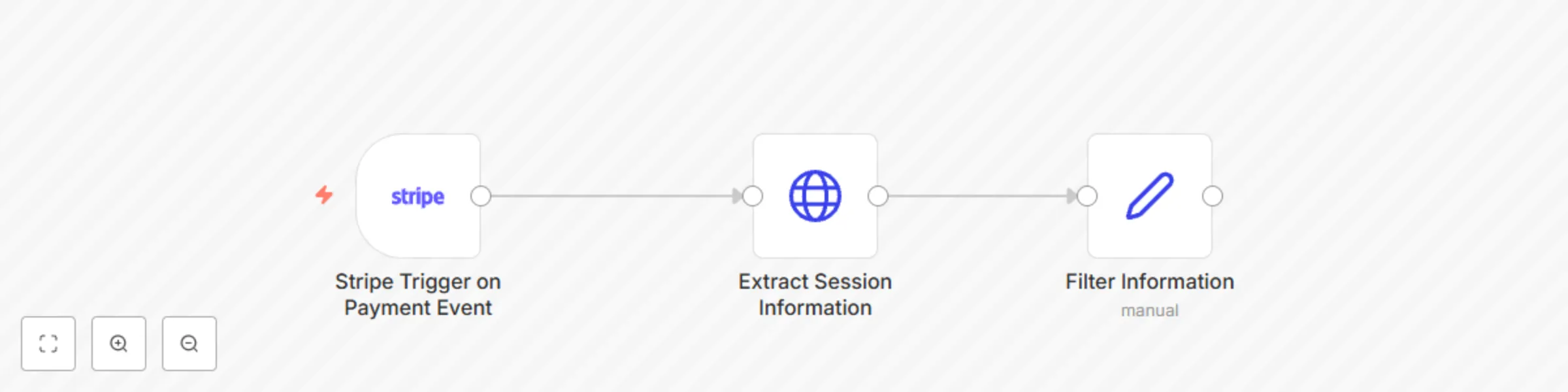
## Overview This automation template is designed to streamline your payment processing by automatically triggering upon a successful Stripe payment. The workflow retrieves the complete payment session and filters the information to display only the customer name, customer email, and the purchased product details. This template is perfect for quickly integrating Stripe transactions into your inventory management, CRM, or notification systems. ## Step-by-Step Setup Instructions 1. **Stripe Account Configuration:** - Ensure you have an active Stripe account. - Connect your Stripe Credentials. 2. **Retrieve Product and Customer Data:** - Utilize Stripe’s API within the automation to fetch the purchased product details. - Retrieve customer information such as: email and full name. 3. **Integration and Response:** - Map the retrieved data to your desired format. - Trigger subsequent nodes or actions such as sending a confirmation email, updating a CRM system, or logging the transaction. ## Pre-Conditions and Requirements - **Stripe Account:** A valid Stripe account with access to API keys and webhook configurations. - **API Keys:** Ensure you have your Stripe secret and publishable keys ready. ## Customization Guidance - **Data Mapping:** Customize the filtering node to match your specific data schema or to include additional data fields if needed. - **Additional Actions:** Integrate further nodes to handle post-payment actions like sending SMS notifications, updating order statuses, or generating invoices. Enjoy seamless integration and enhanced order management with this automation template!

M
Matt F.
CRM
1 Apr 2025
3522
0
Workflow preview: 🚀 Instagram reels automation - turn YouTube videos into viral Instagram reels ✨
Free advanced

🚀 Instagram reels automation - turn YouTube videos into viral Instagram reels ✨

# Automatically Create and Post Instagram Reels from Podcasts and Other Videos Using AI & Spikes Studio (Simplified) Transform podcasts and other videos into engaging, fully optimized Instagram Reels with this all-in-one automation solution—designed for content creators who love repurposing dynamic clips. --- ## Overview This automation transforms **YouTube videos** into engaging, professional-grade **Instagram Reels** using **AI-powered editing**. Perfect for content creators, podcasters, marketers, and brands, the workflow extracts your most captivating moments, enhances them with dynamic captions, transitions, and effects, and auto-schedules them for Instagram—all without manual editing or uploading. With just a YouTube link, this template automates the entire lifecycle of short-form content creation—from input to upload—so you can **repurpose long-form videos into viral clips** in minutes. --- ## Key Features - **Insights-Driven Highlight Extraction:** Automatically analyzes engagement metrics to select the most resonant moments from podcasts or other creators’ videos, ensuring each clip connects with your audience. - **AI-Powered Editing:** Utilizes professional-grade editing—adding captions, effects, transitions, and more—to produce visually stunning, high-impact reels. - **Auto-Generated Metadata:** Effortlessly creates dynamic titles, descriptions, and hashtags to optimize your clips for immediate upload on Instagram. - **Customizable Scheduling:** Allows you to set upload intervals that fit your content strategy, ensuring a consistent flow of engaging reels on your profile. - **Seamless Instagram Integration:** Directly connects with Instagram’s API, streamlining the posting process so your profile stays active and engaging with minimal effort. --- ## Customization Options - 🎨 **Style & Branding:** Modify the Spikes Studio API request to include your custom branding, text overlays, or templates. - 🎥 **Clips Length:** Previously adjust the length of each clip generated. - 🕒 **Scheduling Delay:** Adjust the time interval to control how often posts are made. - 🔁 **Multi-Platform Support:** Add additional nodes to also post to TikTok, Facebook, or LinkedIn. --- ## Step-by-Step Setup Instructions 1. **Prepare Prerequisites:** Ensure you have a Spikes Studio account (free at [spikes.studio](https://spikes.studio)), a YouTube video URL, an Upload-Post account (free at [Upload-Post](https://www.upload-post.com)), and a working n8n instance. 2. **Configure APIs:** - **Spikes Studio:** Obtain your API key and connect credentials. - **Upload-Post:** Obtain your API key and connect credentials and customize the request. 3. **Assemble the Workflow:** - **Trigger:** Trigger the workflow with a YouTube video URL and desired clip length. - **Output:** Auto-upload the formatted Reels to Instagram on a scheduled basis. --- Designed specifically for content creators repurposing YouTube videos—and requiring only a Spikes Studio account (it’s Free) for full functionality—this simplified automation template streamlines the conversion of long-form content into bite-sized, shareable clips. Elevate your content strategy, maximize audience engagement, and reclaim valuable time with a solution built to drive your channel’s growth.

M
Matt F.
Content Creation
30 Mar 2025
2771
0
Workflow preview: Effortless job hunting: Let this automation find your next role
Free intermediate

Effortless job hunting: Let this automation find your next role

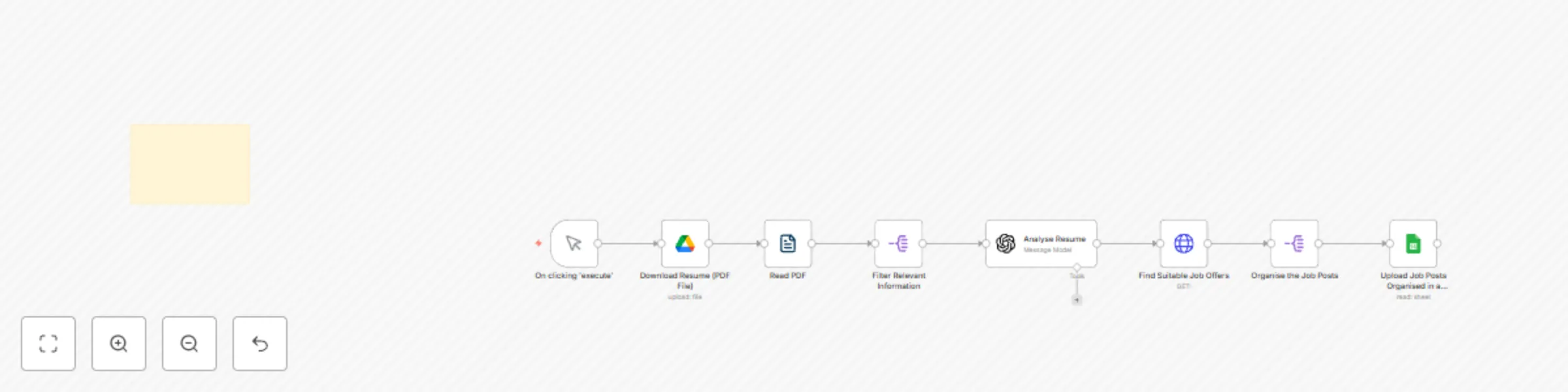
# Find Job Postings from LinkedIn, Indeed, and Glassdoor and Save Them to Google Sheets Using AI ## Overview Effortlessly discover and apply to jobs tailored to your profile—AI handles the search, you handle the interviews. Say goodbye to endless job board scrolling. This automation leverages AI to analyze your resume, identify your skills, experience, and more, to match you with the most relevant job opportunities. It sources job postings from LinkedIn, Indeed, Glassdoor, ZipRecruiter, Monster, and other public job sites on the web. With seamless integration and automatic organization of results, you can focus on applying rather than searching. ## Key Features ### **Intelligent Resume Parsing** - Extracts key information from your PDF resume using AI. - Identifies skills, experience, education, and job preferences. ### **Targeted Job Matching** - Uses the parsed resume data to search for jobs that align with your profile. - Ensures relevance by analyzing job descriptions for matching criteria. ### **Automated Data Organization** - Compiles job listings into a structured Google Spreadsheet. - Eliminates the need for manual data entry, saving valuable time. ### **Easy Access and Review** - Stores results in a familiar Google Sheets format for easy tracking. - Allows for filtering and sorting to prioritize applications. ## **Setup Instructions** ### **Prerequisites** - A free API key for the job search service. - Google Drive and Google Sheets accounts. - An updated resume in PDF format. ### **Step 1: Connect Your Resume Parsing AI** 1. Upload your PDF resume to Google Drive. 2. Configure the AI parser node in n8n to extract relevant information. 3. Map the extracted fields (e.g., skills, job title, experience) for job searching. ### **Step 2: Automate the Job Search** 1. Use the extracted data to perform a job search on LinkedIn, Indeed, Glassdoor, and other supported job sites. 2. Retrieve job postings based on relevant keywords and location preferences. ### **Step 3: Save Job Listings to Google Sheets** 1. Create a new Google Sheet to store job listings. 2. Set up the automation to write job details (e.g., title, company, location, link) into the sheet. 3. Format the sheet for better readability and tracking. ### **Step 4: Review and Apply to Jobs** 1. Open your Google Sheet to view job matches. 2. Click on the links to apply directly on the respective job sites. 3. Update the status of each job application as you progress. ## **Why Use This Automation?** - **Saves Time**: Automates job searching and listing compilation. - **Enhances Efficiency**: Eliminates manual scrolling and data entry. - **Improves Organization**: Keeps all job opportunities in a structured format. - **Optimizes Your Job Hunt**: Increases chances of landing the perfect role. Designed specifically for job seekers aiming to optimize their search process, this automation integrates with Google Drive and Sheets, streamlining your job hunt and enhancing your chances of finding the right opportunity. Get started today and accelerate your career growth!

M
Matt F.
Personal Productivity
1 Mar 2025
11493
0

Workflow preview: YouTube shorts automation - the game-changer in scroll-stopping short clips
Free advanced

YouTube shorts automation - the game-changer in scroll-stopping short clips

### Automatically Create and Post YouTube Shorts from Podcasts and Other Videos Using AI (Simplified). Transform podcasts and other videos into captivating, fully optimized YouTube Shorts with this all-in-one automation solution—designed for content creators who repurpose engaging clips. By leveraging advanced YouTube analytics, this template identifies the most compelling moments from your source material and automatically crafts them into scroll-stopping shorts. With intelligent editing, auto-generated titles and descriptions, and customizable scheduling, your clips become instantly post-ready, helping you expand your reach while saving hours on manual editing. #### Key Features - **Analytics-Driven Highlight Extraction:** Automatically analyzes engagement metrics to select the best moments from podcasts or other creators' videos, ensuring each clip resonates with your audience. - **AI-Powered Editing:** Applies professional-grade editing—adding captions, effects, transitions, and more—to create visually stunning, high-impact shorts. - **Auto-Generated Metadata:** Seamlessly creates dynamic titles and descriptions, fully optimizing your clips for immediate upload. - **Customizable Scheduling:** Enables you to set upload intervals that align with your strategy, ensuring a steady stream of content on your channel. - **Seamless YouTube Integration:** Directly connects with YouTube’s API, streamlining the process so your channel remains active and engaging with minimal effort. Designed specifically for content creators repurposing YouTube videos—and requiring only a Sipkes Studio account (it's Free) for full functionality—this simplified automation template streamlines the conversion of long-form content into bite-sized, shareable clips. Elevate your content strategy, maximize audience engagement, and reclaim valuable time with a solution built to drive your channel's growth.

M
Matt F.
Content Creation
25 Feb 2025
3614
0