Block 1 - Save Audio Chucks
- Type / Role
- n8n-nodes-base.readWriteFile - readWriteFile
- Config choices
- Version 1


 Early Deal
This workflow is provided as-is. Please review and test before using in production.
Ebook to Audiobook Converter ️ Watch Full Demo Video What It...
n8n-nodes-base.readwritefile, n8n-nodes-base.code, n8n-nodes-base.executecommand, n8n-nodes-base.stickynote, n8n-nodes-base.formtrigger, n8n-nodes-base.extractfromfile, n8n-nodes-base.splitinbatches, n8n-nodes-base.wait
This workflow is cataloged by N8N Workflows and links back to its original n8n.io source page by Jay Emp0.
Original n8n.io sourceTurn any PDF ebook into a professional audiobook automatically. Upload a PDF, get an MP3 audiobook in your Google Drive. Perfect for listening to books, research papers, or documents on the go.
Example: Input PDF → Output Audiobook
| Component | Details |
|---|---|
| n8n | Self-hosted ONLY (cannot run on n8n Cloud) |
| FFmpeg | Must be installed in your n8n environment |
| Replicate API | For MiniMax TTS (Sign up here) |
| Google Drive | OAuth2 credentials + "Audiobook" folder |
⚠️ Important: This workflow does NOT work on n8n Cloud because FFmpeg installation is required.
Docker users:
docker exec -it <n8n-container-name> /bin/bash
apt-get update && apt-get install -y ffmpeg
Native installation:
sudo apt-get install ffmpeg  # Linux
brew install ffmpeg          # macOS
n8n.json into your n8n instance| Component | Cost |
|---|---|
| MiniMax TTS API | $0.15 per 1000 characters ($3-5 for average book) |
| Google Drive Storage | Free (up to 15GB) |
| Processing Time | ~1-2 minutes per 10 pages |
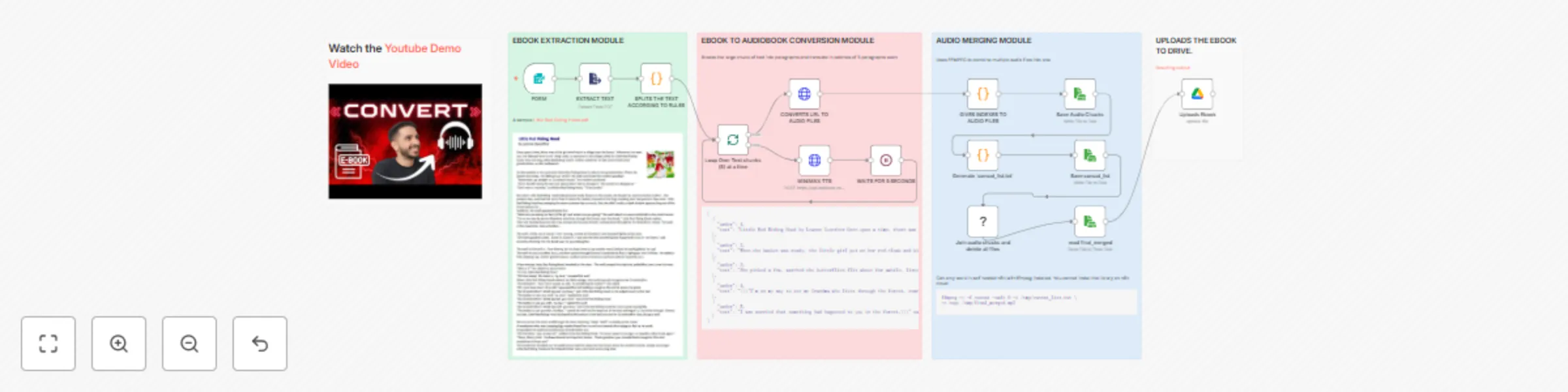
PDF Upload → Extract Text → Split into Chunks → Convert to Speech (batches of 5)
→ Merge Audio Files (FFmpeg) → Upload to Google Drive
The workflow uses four main modules:
{
  "voice_id": "Friendly_Person",
  "emotion": "happy",
  "speed": 1,
  "pitch": 0
}
Available emotions: happy, neutral, sad, angry, excited
FFmpeg not found?
docker exec -it <container> /bin/bash then apt-get install ffmpegsudo apt-get install ffmpeg (Linux) or brew install ffmpeg (macOS)Rate limit errors?
Google Drive upload fails?
Created by emp0 | More workflows: n8n Gallery
This catalog entry is organized from the workflow JSON. The node-level section below shows the executable blocks available for review before importing the template.
| Workflow | Ebook to audiobook converter using MiniMax and FFmpeg |
|---|---|
| Complexity | advanced |
| Nodes | 19 |
| Categories | Content Creation, Multimodal AI |
| Author | Jay Emp0 |
| Published | 20 Oct 2025 |
Use the JSON export at /data/workflows/9944/9944.json as the source template for this automation.
Open n8n, import the downloaded JSON, and review each node before activating the workflow.
Replace placeholder credentials, API keys, webhook URLs, account IDs, and environment-specific values with your own settings.
Run the workflow manually or in a staging workspace, inspect node output, and confirm downstream systems receive the expected data.
Enable the workflow only after testing, then monitor executions, errors, and rate limits during the first production runs.
Review imported nodes carefully before activation. This catalog entry is intended to help you inspect the workflow structure, understand required services, and find related templates faster.
Node names, credentials, schedules, webhook paths, and external service limits may need adjustment for your workspace.
Ebook to Audiobook Converter ️ Watch Full Demo Video What It...
Review the workflow JSON, configure any required credentials in n8n, and test the automation in a safe workspace before using it in production.
Yes. Use the block-by-block analysis and the downloadable JSON to inspect each node, then adjust credentials, prompts, schedules, filters, or destinations for your Content Creation, Multimodal AI use case.