Dynamic Hubspot lead routing with GPT-4 and Airtable sales team distribution

Workflow preview

Workflow preview
100%
Dynamic Hubspot lead routing with GPT-4 and Airtable sales team distribution preview
Open on n8n.io

Important notice

This workflow is provided as-is. Please review and test before using in production.

1. Workflow Overview

AI Agent for Dynamic Lead Distribution (HubSpot + Airtable) AI Powered Lead Routing and Sales Team Distribu...

Best for

  • CRM automation workflows
  • AI RAG automation workflows
  • advanced n8n builders looking for reusable templates

Tools used

n8n-nodes-base.hubspottrigger, n8n-nodes-base.hubspot, n8n-nodes-base.code, n8n-nodes-base.airtable, @n8n/n8n-nodes-langchain.agent, @n8n/n8n-nodes-langchain.memorybufferwindow, @n8n/n8n-nodes-langchain.outputparserstructured, n8n-nodes-base.airtabletool

Source and attribution

This workflow is cataloged by N8N Workflows and links back to its original n8n.io source page by MANISH KUMAR.

Original n8n.io source

1.1 Workflow description

Title
Dynamic Hubspot lead routing with GPT-4 and Airtable sales team distribution
Workflow name
Dynamic Hubspot lead routing with GPT-4 and Airtable sales team distribution

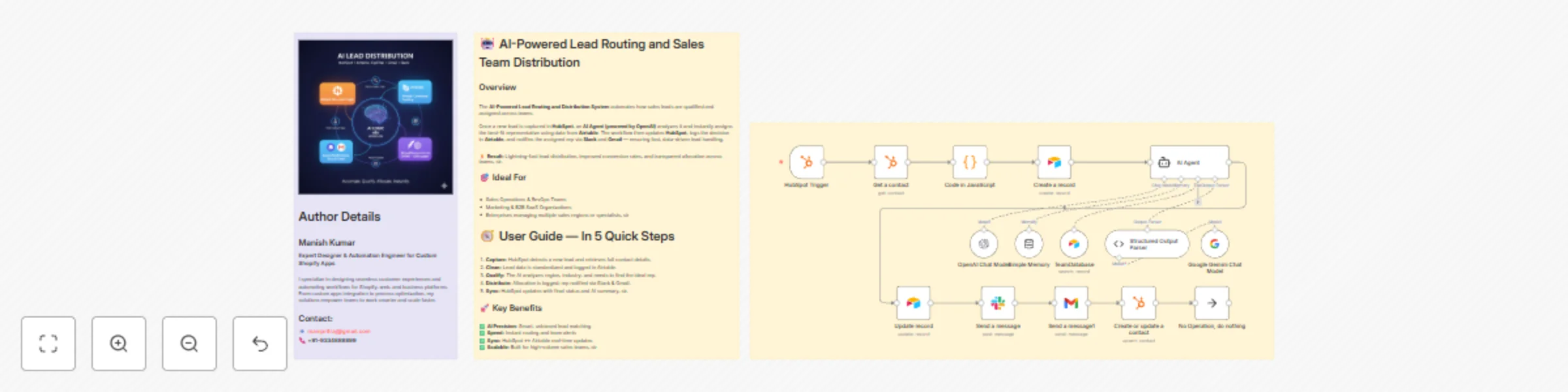
AI Agent for Dynamic Lead Distribution (HubSpot + Airtable)

๐Ÿง  AI-Powered Lead Routing and Sales Team Distribution

This intelligent n8n workflow automates end-to-end lead qualification and allocation by integrating HubSpot, Airtable, OpenAI, Gmail, and Slack.

The system ensures that every new lead is instantly analyzed, scored, and routed to the best-fit sales representative โ€” all powered by AI logic, sir.


๐Ÿ’ก Key Advantages
โšก Real-Time Lead Routing
Automatically assigns new leads from HubSpot to the most relevant sales rep based on region, capacity, and expertise.

๐Ÿง  AI Qualification Engine
An OpenAI-powered Agent evaluates the leadโ€™s industry, region, and needs to generate a persona summary and routing rationale.

๐Ÿ“Š Centralized Tracking in Airtable
Every lead is logged and updated in Airtable with AI insights, rep details, and allocation status for full transparency.

๐Ÿ’ฌ Instant Notifications
Slack and Gmail integrations alert the assigned rep immediately with full lead details and AI-generated notes.

๐Ÿ” Seamless CRM Sync
Updates the original HubSpot record with lead persona, routing info, and timeline notes for audit-ready history, sir.


โš™๏ธ How It Works

  1. HubSpot Trigger โ€“ Captures a new lead as soon as itโ€™s created in HubSpot.
  2. Fetch Contact Data โ€“ Retrieves all relevant fields like name, company, and industry.
  3. Clean & Format Data โ€“ A Code node standardizes and structures the data for consistency.
  4. Airtable Record Creation โ€“ Logs the lead data into the โ€œLeadsโ€ table for centralized tracking.
  5. AI Agent Qualification โ€“ The AI analyzes the lead using the TeamDatabase (Airtable) to find the ideal rep.
  6. Record Update โ€“ Updates the same Airtable record with the assigned team and AI persona summary.
  7. Slack Notification โ€“ Sends a real-time message tagging the rep with lead info.
  8. Gmail Notification โ€“ Sends a personalized handoff email with context and follow-up actions.
  9. HubSpot Sync โ€“ Updates the original contact in HubSpot with the assignment details and AI rationale, sir.

๐Ÿ› ๏ธ Setup Steps

  • Trigger Node: HubSpot โ†’ Detect new leads.
  • HubSpot Node: Retrieve complete lead details.
  • Code Node: Clean and normalize data.
  • Airtable Node: Log lead info in the โ€œLeadsโ€ table.
  • AI Agent Node: Process lead and match with sales team.
  • Slack Node: Notify the designated representative.
  • Gmail Node: Email the rep with details.
  • HubSpot Node: Update CRM with AI summary and allocation status, sir.

๐Ÿ” Credentials Required

  • HubSpot OAuth2 API โ€“ To fetch and update leads.
  • Airtable Personal Access Token โ€“ To store and update lead data.
  • OpenAI API โ€“ To power the AI qualification and matching logic.
  • Slack OAuth2 โ€“ For sending team notifications.
  • Gmail OAuth2 โ€“ For automatic email alerts to assigned reps, sir.

๐Ÿ‘ค Ideal For

  • Sales Operations and RevOps teams managing multiple regions
  • B2B SaaS and enterprise teams handling large lead volumes
  • Marketing teams requiring AI-driven, bias-free lead assignment
  • Organizations optimizing CRM efficiency with automation, sir

๐Ÿ’ฌ Bonus Tip
You can easily extend this workflow by adding lead scoring logic, language translation for follow-ups, or Salesforce integration.
The entire system is modular โ€” perfect for scaling across global sales teams, sir.

1.2 Logical Blocks

This catalog entry is organized from the workflow JSON. The node-level section below shows the executable blocks available for review before importing the template.

2. Block-by-Block Analysis

Block 1 - HubSpot Trigger

Type / Role
n8n-nodes-base.hubspotTrigger - hubspotTrigger
Config choices
Version 1

Block 2 - Get a contact

Type / Role
n8n-nodes-base.hubspot - hubspot
Config choices
Version 2.2

Block 3 - Code in JavaScript

Type / Role
n8n-nodes-base.code - code
Config choices
Version 2

Block 4 - Create a record

Type / Role
n8n-nodes-base.airtable - airtable
Config choices
Version 2.1

Block 5 - AI Agent

Type / Role
@n8n/n8n-nodes-langchain.agent - agent
Config choices
Version 2.2

Block 6 - Simple Memory

Type / Role
@n8n/n8n-nodes-langchain.memoryBufferWindow - memoryBufferWindow
Config choices
Version 1.3

Block 7 - Structured Output Parser

Type / Role
@n8n/n8n-nodes-langchain.outputParserStructured - outputParserStructured
Config choices
Version 1.3

Block 8 - TeamDatabase

Type / Role
n8n-nodes-base.airtableTool - airtableTool
Config choices
Version 2.1

Block 9 - OpenAI Chat Model

Type / Role
@n8n/n8n-nodes-langchain.lmChatOpenAi - lmChatOpenAi
Config choices
Version 1.2

Block 10 - Google Gemini Chat Model

Type / Role
@n8n/n8n-nodes-langchain.lmChatGoogleGemini - lmChatGoogleGemini
Config choices
Version 1

Block 11 - Update record

Type / Role
n8n-nodes-base.airtable - airtable
Config choices
Version 2.1

Block 12 - Send a message

Type / Role
n8n-nodes-base.slack - slack
Config choices
Version 2.3

Block 13 - Send a message1

Type / Role
n8n-nodes-base.gmail - gmail
Config choices
Version 2.1

Block 14 - Create or update a contact

Type / Role
n8n-nodes-base.hubspot - hubspot
Config choices
Version 2.2

Block 15 - No Operation, do nothing

Type / Role
n8n-nodes-base.noOp - noOp
Config choices
Version 1

Block 16 - Sticky Note

Type / Role
n8n-nodes-base.stickyNote - stickyNote
Config choices
Version 1

Block 17 - Sticky Note1

Type / Role
n8n-nodes-base.stickyNote - stickyNote
Config choices
Version 1

Block 18 - Sticky Note5

Type / Role
n8n-nodes-base.stickyNote - stickyNote
Config choices
Version 1

3. Summary Table

Workflow Dynamic Hubspot lead routing with GPT-4 and Airtable sales team distribution
Complexity advanced
Nodes 18
Categories CRM, AI RAG
Author MANISH KUMAR
Published 24 Oct 2025

4. Reproducing the Workflow from Scratch

  1. 1. Download the workflow JSON

    Use the JSON export at /data/workflows/10102/10102.json as the source template for this automation.

  2. 2. Import the template into n8n

    Open n8n, import the downloaded JSON, and review each node before activating the workflow.

  3. 3. Configure credentials and variables

    Replace placeholder credentials, API keys, webhook URLs, account IDs, and environment-specific values with your own settings.

  4. 4. Test with sample data

    Run the workflow manually or in a staging workspace, inspect node output, and confirm downstream systems receive the expected data.

  5. 5. Activate and monitor

    Enable the workflow only after testing, then monitor executions, errors, and rate limits during the first production runs.

5. General Notes & Resources

Review imported nodes carefully before activation. This catalog entry is intended to help you inspect the workflow structure, understand required services, and find related templates faster.

Node names, credentials, schedules, webhook paths, and external service limits may need adjustment for your workspace.

Frequently asked questions

What does Dynamic Hubspot lead routing with GPT-4 and Airtable sales team distribution do?

AI Agent for Dynamic Lead Distribution (HubSpot + Airtable) AI Powered Lead Routing and Sales Team Distribu...

What do I need before importing this workflow?

Review the workflow JSON, configure any required credentials in n8n, and test the automation in a safe workspace before using it in production.

Can I customize this workflow?

Yes. Use the block-by-block analysis and the downloadable JSON to inspect each node, then adjust credentials, prompts, schedules, filters, or destinations for your CRM, AI RAG use case.