MANISH KUMAR
Workflows by MANISH KUMAR
Turn new Shopify products into SEO blogs with Perplexity, Gemini and Sheets
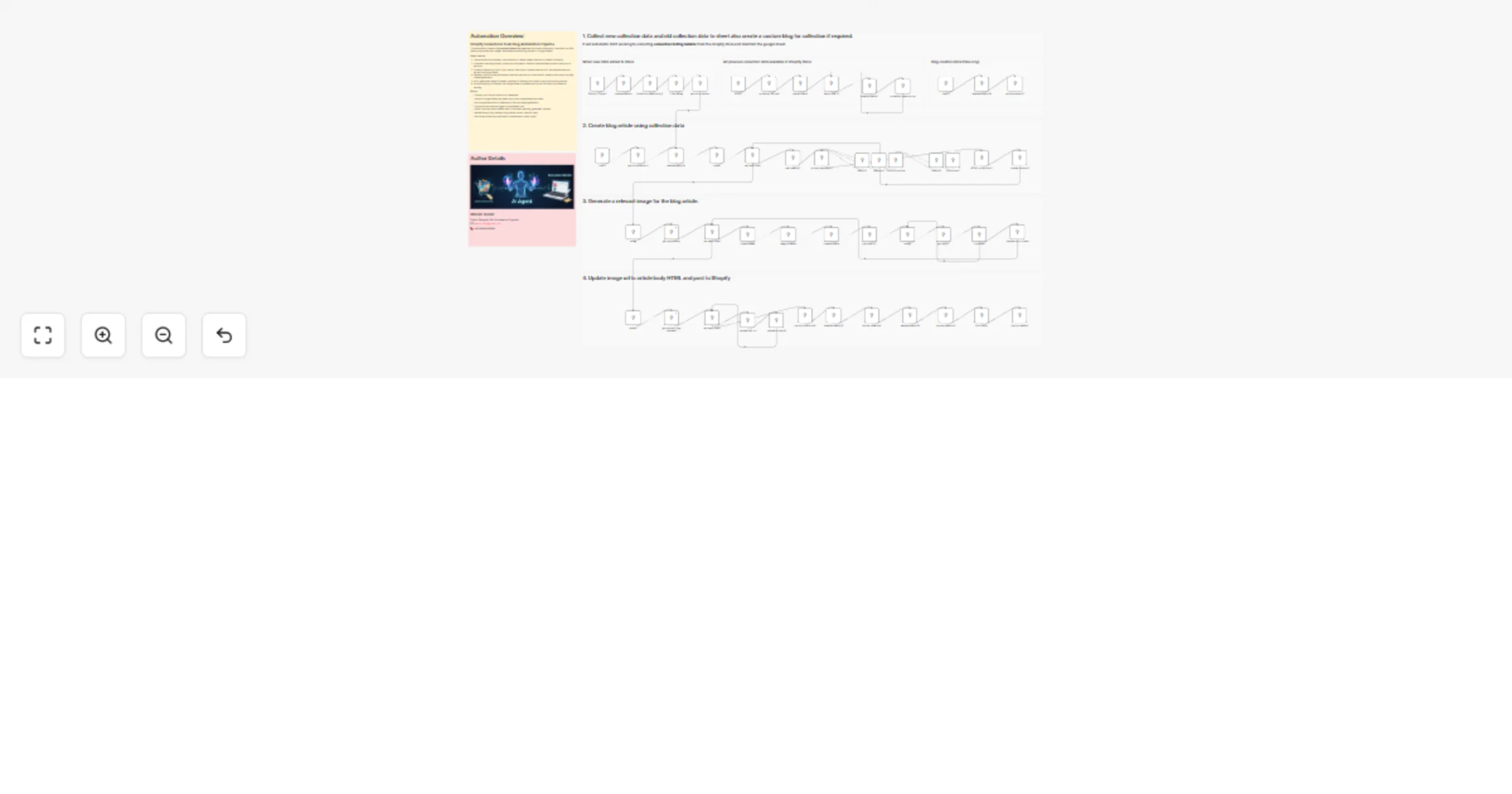
 # Shopify Product-to-Blog Automation with Perplexity web search, Gemini AI Agent & Google Sheets ## Shopify Blog Automation *(From Shopify product to SEO-optimized blog post — fully automated)* This workflow is an advanced **n8n-powered automation** that transforms newly created Shopify products into **professionally written, SEO-ready blog posts** using AI. By combining **Shopify Webhooks, Google Sheets, AI research, structured content generation, and automated HTML formatting**, this workflow removes all manual work from product-based content marketing. --- ## 💡 Key Advantages This Shopify Product-to-Blog Automation delivers the following benefits: 🛍️ **Shopify Product Sync** Automatically captures new product data (title, description, vendor, type, images) the moment a product is created. 🧠 **AI-Powered Research & Writing** Uses AI to perform market analysis, identify customer intent, and generate structured, high-quality blog content. 📊 **Google Sheets Tracking** Maintains a clear audit trail of products, generated blogs, and publishing status to prevent duplication. 🧩 **Structured Content Output** Generates strict JSON-based blog sections (problem, solution, features, usage, comparison, CTA) for consistency and scalability. 📤 **End-to-End Automation** Handles everything — from product detection to blog publishing — with zero manual writing. --- ## ⚙️ How It Works ### Step-by-Step Process 1. **Shopify Trigger** Listens for `products/create` events in Shopify. 2. **Product Data Extraction** Normalizes product fields and selects the primary product image. 3. **Google Sheets Storage** Stores raw product data and sets initial processing status. 4. **AI Market & SEO Research** Analyzes product intent, audience, use cases, FAQs, and keyword opportunities. 5. **AI Blog Content Generation** Creates structured, SEO-focused blog content using a LangChain AI agent. 6. **HTML Structuring** Cleans, escapes, and formats content into Shopify-safe, responsive HTML. 7. **Shopify Blog Publishing** Automatically posts the article to the Shopify Blog via Admin API. 8. **Status Update & Tracking** Updates Google Sheets to reflect successful blog publication. --- ## 🛠️ Setup Steps ### Required Node Configuration To run this workflow, configure the following nodes: - **Shopify Trigger** – Detect new product creation - **Set Node** – Normalize Shopify product fields - **Google Sheets Nodes** – Store and track workflow state - **AI Research Node** – Market & SEO analysis - **LangChain / Gemini Agent** – Blog content generation - **Code Node** – HTML formatting and safety handling - **HTTP Request Node** – Publish blog post to Shopify - **Error Handling Logic** – Retry and fail-safe routing --- ## 🔐 Credentials Required Before enabling the workflow, configure these credentials: - **Shopify Admin API Access Token** – For blog publishing - **Google Sheets OAuth** – For data tracking - **Google Gemini API Key** – For AI content generation - **Perplexity API Key** – For research and SEO insights --- ## 👤 Ideal For This automation is ideal for: - Shopify store owners using content marketing - Ecommerce teams managing large product catalogs - SEO teams scaling product-driven blog content - Agencies offering automated Shopify SEO solutions --- ## 💬 Bonus Tip This workflow is fully modular and extensible. You can easily enhance it to: - Auto-link blogs to products - Generate multilingual blog posts - Schedule delayed publishing - Route content by product category - Add internal linking or schema markup All extensions can be implemented within the same n8n workflow. --- ## ✅ Result Every new Shopify product automatically becomes: - Research-backed - SEO-optimized - Professionally structured - Automatically published **No manual writing. No copy-paste. Fully automated.** ## Keywords - shopify ai - shopify automation - shopify marketing automation - shopify blog automation - shopify content automation - ai blog generator shopify - shopify seo automation - ecommerce automation - ai ecommerce automation - shopify workflow automation - shopify product to blog - auto generate shopify blogs - shopify ai content - how to automate shopify
Automate Shopify product CSV from images using Gemini, GPT-4o, Google Drive & Sheets
 # Shopify AI Automation # Image-to-Product CSV Bulk Upload Automation This **Shopify AI automation** is an advanced n8n-powered workflow that converts raw product images into a **Shopify-ready product CSV**. It uses AI image analysis, Google Drive, Google Sheets, and Shopify APIs to fully automate product onboarding — from images to structured ecommerce data. Built for scalable **ecommerce automation**, this workflow is especially effective for image-first catalogs such as jewelry, fashion, and accessories. --- ## 🚀 Features - 🖼️ **AI Image Analysis** — Analyzes product images one by one for higher accuracy and lower risk - 🧠 **Automatic Category Detection** — Identifies main product category (e.g. Jewelry), easily customizable for any niche - ✍️ **AI Product Content Generation** — Creates product names, descriptions (HTML), tags, and attributes - 📄 **Google Sheets Orchestration** — Structures data and outputs a clean Shopify-compatible CSV - 🛍️ **Shopify Asset Upload** — Uploads images to Shopify and retrieves CDN URLs --- ## 🧩 Workflow Preparation Before running the workflow: 1. Upload all product images to **Google Drive** 2. Name images using the format: <SKU><ColorCode> Example: 12345GR 3. Place all images inside a folder named:<Brand Name> 4. Root folder name : pending Example : - Google_Drive/pending/Manish Collection/All Images Each image represents one product variant. --- ## ⚙️ How It Works The workflow follows a **6-step automation pipeline** designed for reliability and scalability. **Notes :** You may connect all these step to make it **fully automatic** or shecdule it according to your suitable time. --- ## 🔄 Step-by-Step Process ### Step 1: Fetch Images from Google Drive - Scans the `pending/<brand_name>` folder - Fetches all images - Extracts SKU and color code - Stores references in Google Sheets --- ### Step 2: AI Image Analysis (One-by-One) - Images are analyzed individually - Slower than batch processing, but far more reliable - Reduces hallucinations and incorrect attributes Ideal for production-grade Shopify automation. --- ### Step 3: Main Category Identification - AI determines the primary product category (example: Jewelry) - Prompts can be modified for any ecommerce niche --- ### Step 4: Conditional Product Content Generation Based on category: - Product titles are generated - Descriptions are written in Shopify-ready HTML - Tags and attributes are created This replaces repetitive work typically handled via **Shopify Flow** or manual data entry. --- ### Step 5: Shopify Image Upload - Images are uploaded to Shopify assets - Shopify returns CDN URLs - URLs are mapped back to product data --- ### Step 6: Shopify CSV Generation - All enriched data is compiled into a new Google Sheet - Output matches Shopify’s product import CSV format - File is ready for bulk upload --- ## 🛠️ n8n Nodes Used - Trigger Node (Manual / Schedule) - Google Drive Node - Google Sheets Node - AI Agent Node (Image Analysis + Content) - Switch Node (Category-based logic) - Code Node (Formatting & CSV structure) - Shopify Node / HTTP Node --- ## 🔐 Credentials Required Before running the workflow, configure the following credentials in n8n: - **Shopify Access Token** — For asset uploads and API calls - **AI Provider API Key** — For image analysis and content generation - **Google Drive OAuth** — To access product images - **Google Sheets OAuth** — To store and export data --- ## 👤 Ideal For This workflow is ideal for: - Shopify store owners handling bulk product uploads - Ecommerce teams managing image-heavy catalogs - Agencies building scalable Shopify automation systems - Anyone exploring **how to automate Shopify** product onboarding --- ## 💬 Extensibility This workflow is modular and easy to extend. You can add: - Multi-language product descriptions - Pricing and margin automation - Shopify marketing automation triggers - Shopify Flow integrations after product import - Marketplace exports (Google Shopping, Meta, Amazon) --- ## 🔑 Keywords shopify ai shopify flow shopify marketing automation shopify automation ecommerce automation how to automate shopify --- ## 📌 Notes - No AI fine-tuning required - No fragile prompt chaining - Designed for accuracy over speed - Safe for production ecommerce workflows --- ## 📞 Support If you’re looking to customize or extend this workflow, feel free to reach out or fork the project. Happy automating 🚀
Dynamic Hubspot lead routing with GPT-4 and Airtable sales team distribution
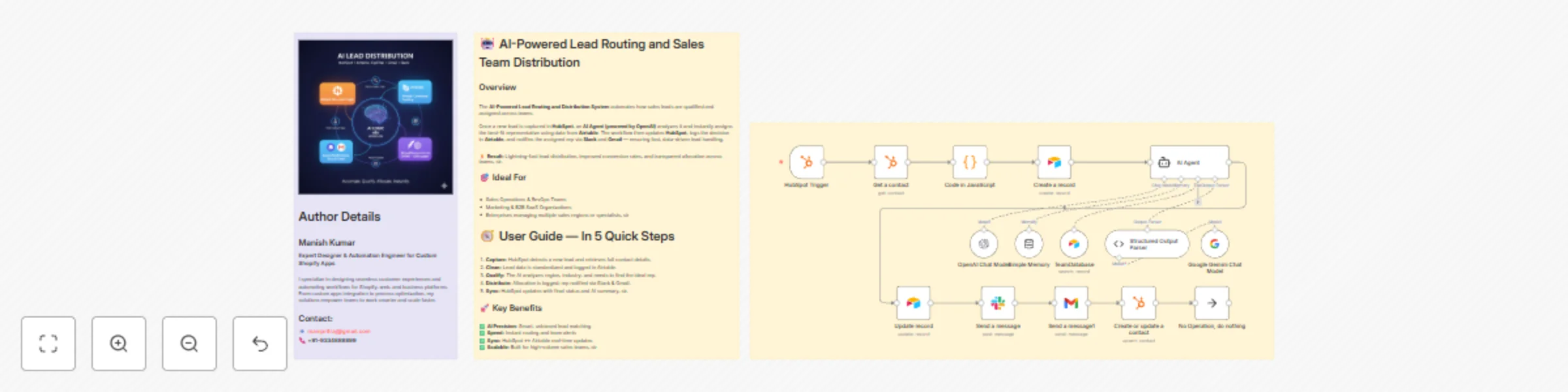
# AI Agent for Dynamic Lead Distribution (HubSpot + Airtable)  🧠 **AI-Powered Lead Routing and Sales Team Distribution** This intelligent n8n workflow automates end-to-end **lead qualification and allocation** by integrating **HubSpot, Airtable, OpenAI, Gmail, and Slack**. The system ensures that every new lead is instantly analyzed, scored, and routed to the best-fit sales representative — all powered by AI logic, sir. --- 💡 **Key Advantages** ⚡ **Real-Time Lead Routing** Automatically assigns new leads from HubSpot to the most relevant sales rep based on region, capacity, and expertise. 🧠 **AI Qualification Engine** An OpenAI-powered Agent evaluates the lead’s industry, region, and needs to generate a persona summary and routing rationale. 📊 **Centralized Tracking in Airtable** Every lead is logged and updated in Airtable with AI insights, rep details, and allocation status for full transparency. 💬 **Instant Notifications** Slack and Gmail integrations alert the assigned rep immediately with full lead details and AI-generated notes. 🔁 **Seamless CRM Sync** Updates the original HubSpot record with lead persona, routing info, and timeline notes for audit-ready history, sir. --- ⚙️ **How It Works** 1. **HubSpot Trigger** – Captures a new lead as soon as it’s created in HubSpot. 2. **Fetch Contact Data** – Retrieves all relevant fields like name, company, and industry. 3. **Clean & Format Data** – A Code node standardizes and structures the data for consistency. 4. **Airtable Record Creation** – Logs the lead data into the “Leads” table for centralized tracking. 5. **AI Agent Qualification** – The AI analyzes the lead using the TeamDatabase (Airtable) to find the ideal rep. 6. **Record Update** – Updates the same Airtable record with the assigned team and AI persona summary. 7. **Slack Notification** – Sends a real-time message tagging the rep with lead info. 8. **Gmail Notification** – Sends a personalized handoff email with context and follow-up actions. 9. **HubSpot Sync** – Updates the original contact in HubSpot with the assignment details and AI rationale, sir. --- 🛠️ **Setup Steps** * **Trigger Node:** HubSpot → Detect new leads. * **HubSpot Node:** Retrieve complete lead details. * **Code Node:** Clean and normalize data. * **Airtable Node:** Log lead info in the “Leads” table. * **AI Agent Node:** Process lead and match with sales team. * **Slack Node:** Notify the designated representative. * **Gmail Node:** Email the rep with details. * **HubSpot Node:** Update CRM with AI summary and allocation status, sir. --- 🔐 **Credentials Required** * **HubSpot OAuth2 API** – To fetch and update leads. * **Airtable Personal Access Token** – To store and update lead data. * **OpenAI API** – To power the AI qualification and matching logic. * **Slack OAuth2** – For sending team notifications. * **Gmail OAuth2** – For automatic email alerts to assigned reps, sir. --- 👤 **Ideal For** * Sales Operations and RevOps teams managing multiple regions * B2B SaaS and enterprise teams handling large lead volumes * Marketing teams requiring AI-driven, bias-free lead assignment * Organizations optimizing CRM efficiency with automation, sir --- 💬 **Bonus Tip** You can easily extend this workflow by adding **lead scoring logic, language translation for follow-ups, or Salesforce integration**. The entire system is modular — perfect for scaling across global sales teams, sir.
Generate Shopify product listings from images with Gemini AI and Airtable
# Shopify Digital Product Automation (from just and image to complete Shopify product page.) This **Shopify Digital Product Automation** is an advanced **n8n-powered workflow** that leverages **AI (Google Gemini)**, **Airtable**, and **Shopify API** to generate product details from images and automatically post them to Shopify. It fully automates the process — from uploading images to publishing Shopify products — with minimal manual effort. --- ## 💡 Key Advantages Our Shopify Digital Product Automation offers five core advantages: - 🔗 **Shopify Product Sync** — Automatically posts product details including title, description, SEO fields, and matched category to Shopify. - ✍️ **AI-Powered Product Generation** — Gemini analyzes uploaded images and generates engaging, SEO-friendly product titles, descriptions, and metadata. - 🗂️ **Structured Output** — Outputs JSON-ready product data compatible with Shopify, ensuring smooth automation. - 📄 **Airtable Integration** — Tracks uploaded images, analyzed data, and generated products to prevent duplication. - 📤 **End-to-End Automation** — Handles the complete workflow from image upload to Shopify posting without manual intervention. --- ## ⚙️ How It Works The workflow follows a **step-by-step automated process**: ### Step-by-Step Process 1. **Upload Images** – Add your digital artwork or poster images to Google Drive and record them in Airtable. 2. **Image Analysis** – AI fetches new images and analyzes visual elements like characters, series, poster text, and style. 3. **Store Analysis Results** – Updates analyzed data in Airtable and marks images as `Used`. 4. **Fetch Shopify Collections** – Retrieves current collections from your Shopify store for category matching. 5. **Generate Product Details** – Gemini generates product title, description, matched category, SEO page title, meta description, and URL handle. 6. **Save Generated Products** – Stores generated product details in Airtable and marks them as `generated`. 7. **Post Products to Shopify** – Automatically creates new products in Shopify using the API. 8. **Update Status** – Marks products as `posted` in Airtable after successful posting. --- ## 🛠️ Setup Steps ### Required Node Configuration To implement this workflow, configure the following n8n nodes: - **Trigger Node** – Start workflow manually or via scheduler. - **Airtable Node** – Fetch raw images and store processed product details. - **Google Drive Node** – Access image files. - **HTTP Request Node** – Fetch Shopify collections. - **Code Node** – Refine AI outputs and format product data. - **Split & Limit Nodes** – Process images and products in batches. - **LangChain / Gemini Node** – Generate product titles, descriptions, and SEO data. - **Shopify Node** – Create products via Shopify API. - **Status Update Node** – Update Airtable with processing and posting status. --- ### 🔐 Credentials Required Before running the workflow, ensure you have the following credentials configured: - **Shopify Access Token** – For posting products and fetching collections. - **Gemini API Key** – For AI-powered product generation. - **Airtable API Key** – For storing and tracking workflow data. - **Google Drive OAuth** – To access image files. --- ## 👤 Ideal For This automation workflow is designed for: - Shopify store owners managing hundreds of digital products - Ecommerce teams automating product listings - Marketing teams needing scalable, AI-driven product content workflows --- ## 💬 Bonus Tip The workflow is **fully modular** and customizable. You can extend it to: - Automatically assign prices or discounts - Multi-language product description generation - Social media promotion of new products - Email campaign integration All extensions can be implemented within the **same n8n flow**, making it a complete digital product automation solution.
Ai blog generator for Shopify products using Google Gemini and Google Sheets
This AI Blog Generator is an advanced n8n-powered automation workflow that leverages Google Gemini and Google Sheets to generate SEO-friendly blog articles for Shopify products. It automates the entire process — from fetching product data to creating structured HTML content — with zero manual effort. ## 💡 Key Advantages Our AI Blog Generator offers five core advantages that make it the perfect solution for automated content creation: - **🔗 Shopify Product Sync** — Automatically pulls product data (titles, descriptions, images, etc.) via Shopify API. - **✍️ SEO Blog Generation** — Gemini generates blog titles, meta descriptions, and complete articles using product information. - **🗂️ Structured Content Output** — Creates well-formatted HTML with headers and bullet points for seamless Shopify blog integration. - **📄 Google Sheets Integration** — Tracks blog creation and prevents duplicate publishing using a centralized Google Sheet. - **📤 Shopify Blog API Integration** — Publishes the generated blog to Shopify with a single API call. ## ⚙️ How It Works The workflow follows a systematic 8-step process that ensures quality and efficiency: ### Step-by-Step Process 1. **Manual Trigger** – Start the workflow via a test trigger or scheduler. 2. **Fetch Products from Shopify** – Retrieves all product details, including images and descriptions. 3. **Fix Input Format** – Organizes and updates the input table using Code and Google Sheet nodes. 4. **Filter Duplicates** – Ensures no previously used rows are processed again. 5. **Limit Control** – Processes one row at a time and loops until all blogs are posted. 6. **Gemini AI Generation** – Creates SEO-friendly blog content in HTML format from product data. 7. **HTML Structure Fix** – Adjusts content for JSON compatibility by cleaning unsupported HTML tags. 8. **Article API Posting** – Sends finalized blog content to Shopify for publishing or drafting. ## 🛠️ Setup Steps ### Required Node Configuration To implement this workflow, you'll need to configure the following n8n nodes: - **Trigger Node:** Start the workflow instantly. - **Shopify Node:** Fetch product details. - **Google Sheet Node:** Store input/output data and track blog creation status. - **Code Node:** Format data as required. - **Filter Node:** Remove used rows to avoid duplication. - **Limit Node:** Process one blog at a time. - **Agent Node:** Sends prompt to Gemini and returns parsed SEO-ready content. - **HTTP Node:** Posts content to Shopify via the API. ## 🔐 Credentials Required ### Authentication Setup Before running the workflow, ensure you have the following credentials configured: - **Shopify Access Token** – For fetching products and posting blogs - **Gemini API Key** – For AI-powered blog generation - **Google Sheets OAuth** – For logging and tracking workflow data ## 👤 Ideal For ### Target Users This automation workflow is specifically designed for: - **Ecommerce teams** automating blogs for hundreds of products - **Shopify store owners** boosting organic traffic effortlessly - **Marketing teams** building scalable, AI-driven content workflows ## 💬 Bonus Tip ### Extensibility Features The workflow is fully modular and highly customizable. You can easily extend it for: - **Internal linking** between related products - **Multi-language translation** for global markets - **Social media sharing** automation - **Email marketing** integration All extensions can be implemented within the same n8n flow, making it a comprehensive content automation solution. ---
Automated YouTube shorts creator with yt-dlp & FFmpeg
# Automated YouTube Shorts Creator with yt-dlp & FFmpeg ## Description ### How It Works • Downloads videos/music from YouTube using yt-dlp • Merges assets with dynamic text overlays • Automatically uploads to YouTube as Shorts (9:16 format) • Tracks everything in Google Sheets ### Set Up Steps (~10 minutes) - Install yt-dlp and FFmpeg in your n8n environment - Connect Google Sheets (for video/music pools) - Set up YouTube OAuth credentials - Configure text overlay font (NotoSerif included) ### Key Features #### Dual Pipeline System - Video Downloader (MP4) + Music Downloader (MP3 with thumbnails) - Random pairing for endless combinations #### Professional Text Overlays - Dynamic line wrapping for perfect 9:16 formatting - Customizable fonts/colors #### YouTube API Integration - Automatic upload with metadata (titles/descriptions) - Privacy/license controls #### Google Sheets Tracking - Logs download paths, YouTube URLs, timestamps - Prevents duplicate processing