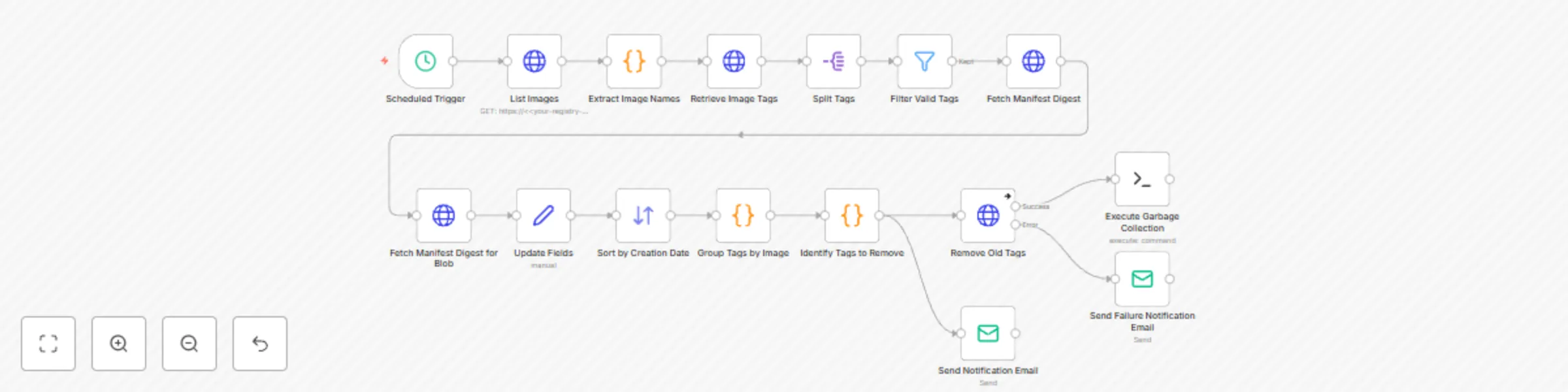
Docker registry cleanup workflow

Workflow preview

Workflow preview
100%
Docker registry cleanup workflow preview
Open on n8n.io

Important notice

This workflow is provided as-is. Please review and test before using in production.

1. Workflow Overview

Docker Registry Cleanup Template This template is designed to automatically clean up old image tags in the Docker registry and perform garbage collection. Features List all images in the registry P...

Best for

  • DevOps automation workflows
  • advanced n8n builders looking for reusable templates

Tools used

n8n-nodes-base.httprequest, n8n-nodes-base.code, n8n-nodes-base.scheduletrigger, n8n-nodes-base.emailsend, n8n-nodes-base.splitout, n8n-nodes-base.filter, n8n-nodes-base.set, n8n-nodes-base.sort

Source and attribution

This workflow is cataloged by N8N Workflows and links back to its original n8n.io source page by Muzaffer AKYIL.

Original n8n.io source

1.1 Workflow description

Title
Docker registry cleanup workflow
Workflow name
Docker registry cleanup workflow

Docker Registry Cleanup Template

This template is designed to automatically clean up old image tags in the Docker registry and perform garbage collection.

Features

  • List all images in the registry
  • Preserve the last 10 tags for each image (latest tag is always preserved)
  • Delete old tags
  • Email notification for Successful/Excused cancellation
  • Registry garbage collection automation
  • Failure notification in error conditions

Prerequisites

  1. Docker Registry v2 API access
  2. Basic Authentication credentials
  3. SMTP email settings (for notifications)
  4. SSH node installed on n8n (for garbage collection)

Installation

1. Identity Information

Add the following credentials in n8n:

  • HTTP Basic Auth: For Registry access
  • SSH Private Key: For Garbage collection command
  • Email SMTP: For notifications

2. Set Variables

Replace your-registry-url with your actual registry URL on all nodes:

‘url": ‘https://your.registry.com/v2/_catalog’.

Customisation

Retention Policy:

Set the number of tags to be retained by changing the slice(0, 10) value in the Identify Tags to Remove node

Schedule:

Change the frequency of operation at the Trigger node

Notification Content:

Customise email templates according to your needs

Notes

  • Check DELETE operations before running in a test environment

  • Make sure that the registry is not in read-only mode

  • The registry may need to be put into maintenance mode for garbage collection

Step Details:

  • Retrieving image information: The workflow starts by fetching a list of images and their associated tags from the Docker registry.
  • Filtering and sorting: The retrieved tags are then filtered and sorted based on specific criteria, such as creation date and tag name.
  • Deleting old tags: The workflow identifies old or unused tags and attempts to delete them from the registry.
  • Sending notifications: The workflow sends email notifications to inform the user about the status of the cleanup process, including any errors or successes.
  • Executing additional cleanup tasks: Finally, the workflow executes an SSH command on the Docker registry server to perform additional cleanup tasks, such as garbage collection.

TL;DR

In summary, this n8n template provides a robust and automated solution for managing and cleaning up Docker registries. By regularly running this workflow, users can ensure that their registry remains organized and efficient, and avoid running out of storage space.-

1.2 Logical Blocks

This catalog entry is organized from the workflow JSON. The node-level section below shows the executable blocks available for review before importing the template.

2. Block-by-Block Analysis

Block 1 - Fetch Manifest Digest

Type / Role
n8n-nodes-base.httpRequest - httpRequest
Config choices
Version 2

Block 2 - Remove Old Tags

Type / Role
n8n-nodes-base.httpRequest - httpRequest
Config choices
Version 2

Block 3 - Retrieve Image Tags

Type / Role
n8n-nodes-base.httpRequest - httpRequest
Config choices
Version 2

Block 4 - List Images

Type / Role
n8n-nodes-base.httpRequest - httpRequest
Config choices
Version 2

Block 5 - Extract Image Names

Type / Role
n8n-nodes-base.code - code
Config choices
Version 2

Block 6 - Identify Tags to Remove

Type / Role
n8n-nodes-base.code - code
Config choices
Version 2

Block 7 - Scheduled Trigger

Type / Role
n8n-nodes-base.scheduleTrigger - scheduleTrigger
Config choices
Version 1.2

Block 8 - Send Notification Email

Type / Role
n8n-nodes-base.emailSend - emailSend
Config choices
Version 2.1

Block 9 - Split Tags

Type / Role
n8n-nodes-base.splitOut - splitOut
Config choices
Version 1

Block 10 - Filter Valid Tags

Type / Role
n8n-nodes-base.filter - filter
Config choices
Version 2.2

Block 11 - Fetch Manifest Digest for Blob

Type / Role
n8n-nodes-base.httpRequest - httpRequest
Config choices
Version 2

Block 12 - Update Fields

Type / Role
n8n-nodes-base.set - set
Config choices
Version 3.4

Block 13 - Group Tags by Image

Type / Role
n8n-nodes-base.code - code
Config choices
Version 2

Block 14 - Sort by Creation Date

Type / Role
n8n-nodes-base.sort - sort
Config choices
Version 1

Block 15 - Send Failure Notification Email

Type / Role
n8n-nodes-base.emailSend - emailSend
Config choices
Version 2.1

Block 16 - Execute Garbage Collection

Type / Role
n8n-nodes-base.ssh - ssh
Config choices
Version 1

3. Summary Table

Workflow Docker registry cleanup workflow
Complexity advanced
Nodes 16
Categories DevOps
Author Muzaffer AKYIL
Published 01 Feb 2025

4. Reproducing the Workflow from Scratch

  1. 1. Download the workflow JSON

    Use the JSON export at /data/workflows/2835/2835.json as the source template for this automation.

  2. 2. Import the template into n8n

    Open n8n, import the downloaded JSON, and review each node before activating the workflow.

  3. 3. Configure credentials and variables

    Replace placeholder credentials, API keys, webhook URLs, account IDs, and environment-specific values with your own settings.

  4. 4. Test with sample data

    Run the workflow manually or in a staging workspace, inspect node output, and confirm downstream systems receive the expected data.

  5. 5. Activate and monitor

    Enable the workflow only after testing, then monitor executions, errors, and rate limits during the first production runs.

5. General Notes & Resources

Review imported nodes carefully before activation. This catalog entry is intended to help you inspect the workflow structure, understand required services, and find related templates faster.

Node names, credentials, schedules, webhook paths, and external service limits may need adjustment for your workspace.

Frequently asked questions

What does Docker registry cleanup workflow do?

Docker Registry Cleanup Template This template is designed to automatically clean up old image tags in the Docker registry and perform garbage collection. Features List all images in the registry P...

What do I need before importing this workflow?

Review the workflow JSON, configure any required credentials in n8n, and test the automation in a safe workspace before using it in production.

Can I customize this workflow?

Yes. Use the block-by-block analysis and the downloadable JSON to inspect each node, then adjust credentials, prompts, schedules, filters, or destinations for your DevOps use case.