M

Muzaffer AKYIL

1
Workflow

Workflows by Muzaffer AKYIL

Workflow preview: Docker registry cleanup workflow
Free advanced

Docker registry cleanup workflow

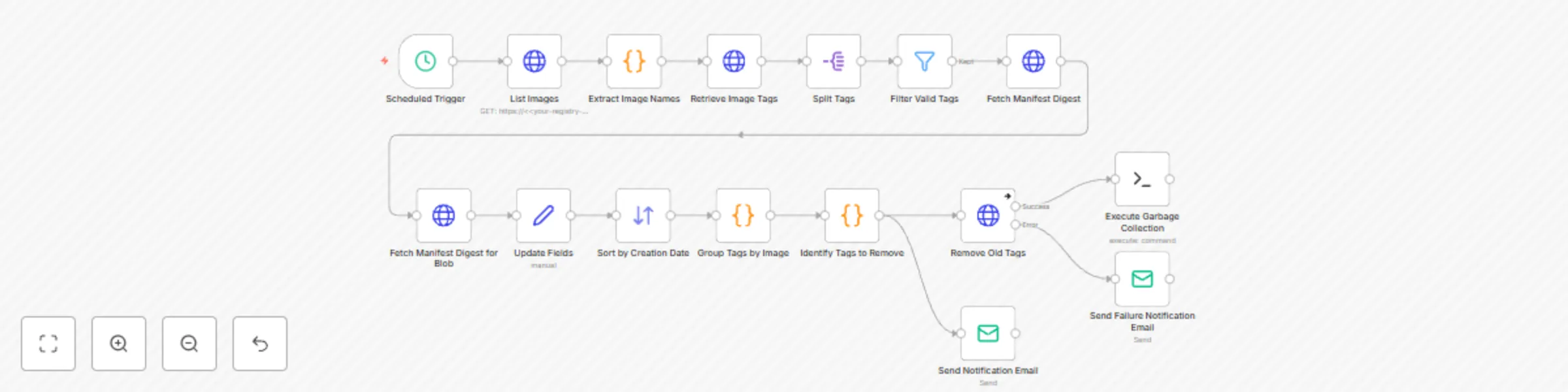
# Docker Registry Cleanup Template This template is designed to automatically clean up old image tags in the Docker registry and perform garbage collection. ## Features - List all images in the registry - Preserve the last 10 tags for each image (latest tag is always preserved) - Delete old tags - Email notification for Successful/Excused cancellation - Registry garbage collection automation - Failure notification in error conditions ## Prerequisites 1. Docker Registry v2 API access 2. Basic Authentication credentials 3. SMTP email settings (for notifications) 4. SSH node installed on n8n (for garbage collection) ## Installation ### 1. Identity Information Add the following credentials in n8n: - **HTTP Basic Auth**: For Registry access - **SSH Private Key**: For Garbage collection command - **Email SMTP**: For notifications ### 2. Set Variables Replace `your-registry-url` with your actual registry URL on all nodes: ```json ‘url": ‘https://your.registry.com/v2/_catalog’. ``` ### Customisation #### Retention Policy: Set the number of tags to be retained by changing the **slice(0, 10)** value in the **Identify Tags to Remove** node #### Schedule: Change the frequency of operation at the Trigger node #### Notification Content: Customise email templates according to your needs ### Notes - Check DELETE operations before running in a test environment - Make sure that the registry is not in read-only mode - The registry may need to be put into maintenance mode for garbage collection ### Step Details: - **Retrieving image information:** The workflow starts by fetching a list of images and their associated tags from the Docker registry. - **Filtering and sorting:** The retrieved tags are then filtered and sorted based on specific criteria, such as creation date and tag name. - **Deleting old tags:** The workflow identifies old or unused tags and attempts to delete them from the registry. - **Sending notifications:** The workflow sends email notifications to inform the user about the status of the cleanup process, including any errors or successes. - **Executing additional cleanup tasks:** Finally, the workflow executes an SSH command on the Docker registry server to perform additional cleanup tasks, such as garbage collection. ### TL;DR In summary, this n8n template provides a robust and automated solution for managing and cleaning up Docker registries. By regularly running this workflow, users can ensure that their registry remains organized and efficient, and avoid running out of storage space.-

M
Muzaffer AKYIL
DevOps
2 Feb 2025
3659
0