Block 1 - When clicking ‘Execute workflow’
- Type / Role
- n8n-nodes-base.manualTrigger - manualTrigger
- Config choices
- Version 1


 Early Deal
This workflow is provided as-is. Please review and test before using in production.
Key Features Implements a simple round robin distribution mechanism using a Data Table to track the last route used. Supports multiple downstream workflows or resources, balancing workload across t...
n8n-nodes-base.manualtrigger, n8n-nodes-base.code, n8n-nodes-base.noop, n8n-nodes-base.switch, n8n-nodes-base.stickynote, n8n-nodes-base.datatable, n8n-nodes-base.merge
This workflow is cataloged by N8N Workflows and links back to its original n8n.io source page by Adrian Kendall.
Original n8n.io sourceImplements a simple round-robin distribution mechanism using a Data Table to track the last route used.
Supports multiple downstream workflows or resources, balancing workload across them sequentially.
Uses Switch and Code nodes for flexible routing logic.
Designed for easy customization — replace placeholder “Route” nodes with sub-workflow calls or API triggers.
Works with any trigger type, and includes merge logic to preserve input data.
| Node Name | Type | Purpose |
|---|---|---|
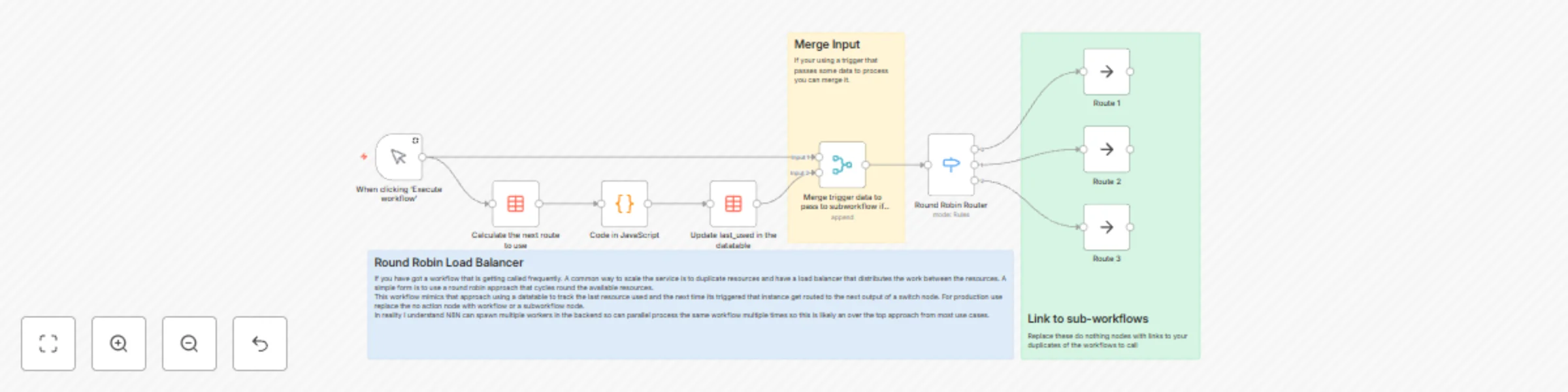
| When clicking ‘Execute workflow’ | Manual Trigger | Test entry point for manual execution. |
| Calculate the next route to use | Data Table | Retrieves the last used route number. |
| Code in JavaScript | Code | Increments the route counter (0–3 cycle). |
| Update last_used in the datatable | Data Table | Updates the “Last_Used” field to track next route. |
| Round Robin Router | Switch | Routes workflow execution to the correct path based on Last_Used value. |
| Route 1 / Route 2 / Route 3 | NoOp | Placeholder routes — replace with your own workflows. |
| Merge trigger data to pass to subworkflow if needed | Merge | Combines trigger data with routing data for sub-workflows. |
| Sticky Notes | Annotations | Explain workflow logic and intended replacements. |
The workflow starts when triggered manually (or by another workflow).
The Data Table node fetches the current value of Last_Used, which identifies which route was last used.
The Code node increments that value, resetting to 0 after 3, creating a round-robin cycle.
The Data Table update node stores the new Last_Used value.
The Switch node reads Last_Used and routes execution to the correct downstream branch.
Each route can represent a duplicated workflow, resource, or API endpoint.
Optionally, the Merge node reattaches trigger data before sending it to sub-workflows.
Trigger the workflow manually or via webhook/cron/etc.
Retrieve current route index using the Data Table node.
Increment route counter with the JavaScript Code node:
If Last_Used = 3, it resets to 0.
Otherwise, increments by 1.
Update Data Table with the new Last_Used value.
Route execution using the Switch node based on that value.
Send data to corresponding subworkflow (Route 1, Route 2, Route 3).
Replace the NoOp nodes with your target workflow or HTTP call nodes for real routing.
Distribute load across multiple API endpoints to prevent throttling.
Run identical sub-workflows on different worker instances for parallel processing.
Simulate load balancing during testing of N8N workflows.
Sequentially alternate between external systems or servers handling similar tasks.
Act as a proof-of-concept for balancing strategies before scaling up.
This catalog entry is organized from the workflow JSON. The node-level section below shows the executable blocks available for review before importing the template.
| Workflow | Distribute workflow execution with round-robin logic using data tables |
|---|---|
| Complexity | intermediate |
| Nodes | 12 |
| Categories | DevOps |
| Author | Adrian Kendall |
| Published | 22 Oct 2025 |
Use the JSON export at /data/workflows/10048/10048.json as the source template for this automation.
Open n8n, import the downloaded JSON, and review each node before activating the workflow.
Replace placeholder credentials, API keys, webhook URLs, account IDs, and environment-specific values with your own settings.
Run the workflow manually or in a staging workspace, inspect node output, and confirm downstream systems receive the expected data.
Enable the workflow only after testing, then monitor executions, errors, and rate limits during the first production runs.
Review imported nodes carefully before activation. This catalog entry is intended to help you inspect the workflow structure, understand required services, and find related templates faster.
Node names, credentials, schedules, webhook paths, and external service limits may need adjustment for your workspace.
Key Features Implements a simple round robin distribution mechanism using a Data Table to track the last route used. Supports multiple downstream workflows or resources, balancing workload across t...
Review the workflow JSON, configure any required credentials in n8n, and test the automation in a safe workspace before using it in production.
Yes. Use the block-by-block analysis and the downloadable JSON to inspect each node, then adjust credentials, prompts, schedules, filters, or destinations for your DevOps use case.