Distribute summarized meeting notes with Microsoft Teams and ClickUp

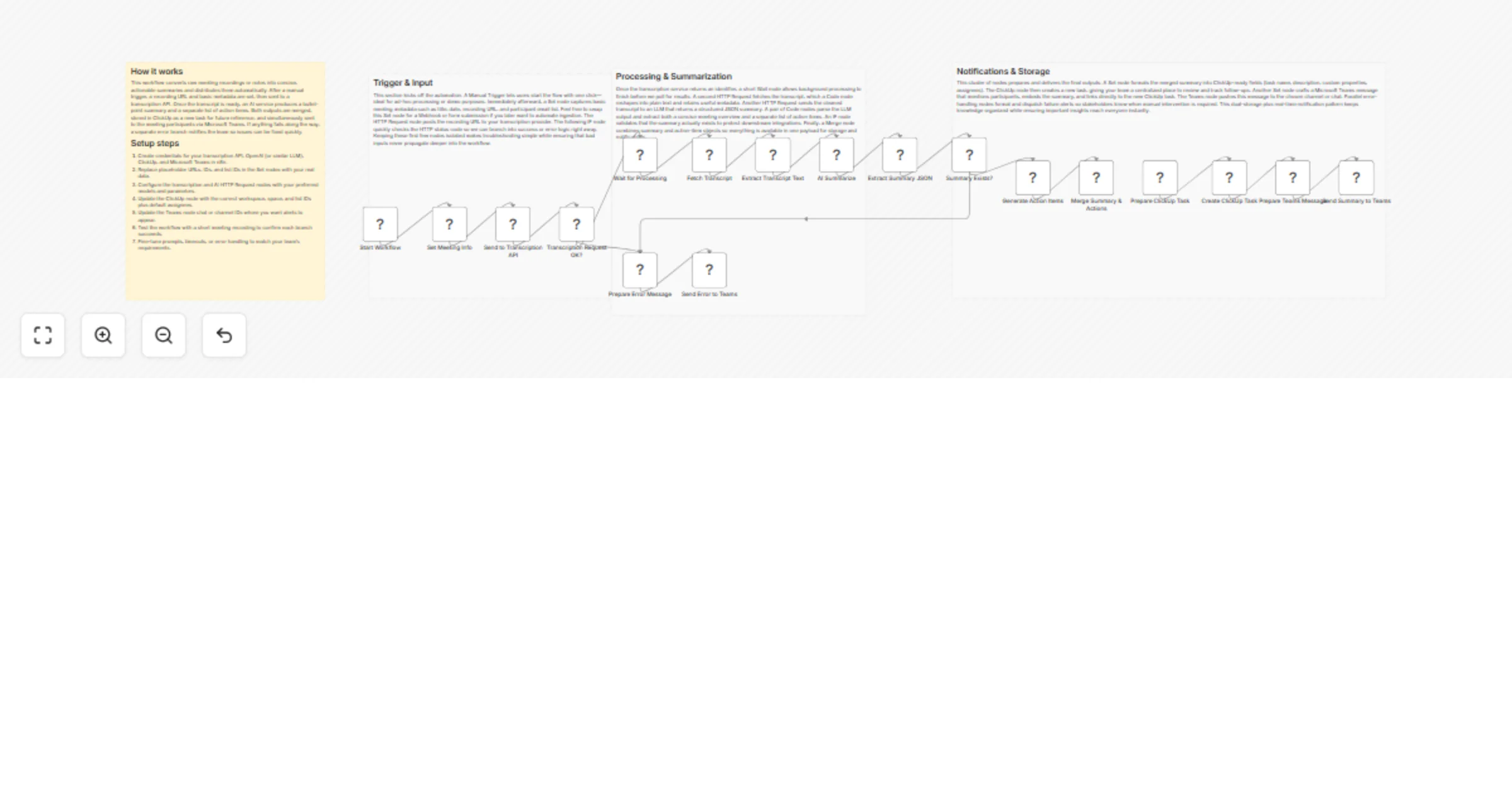
Workflow preview

Workflow preview
100%
Distribute summarized meeting notes with Microsoft Teams and ClickUp preview
Open on n8n.io

1. Workflow Overview

This workflow processes raw meeting recordings or handwritten notes, automatically transcribes and summarizes them, and then distributes the concise summary to all meeting participants via Microsof...

Best for

  • Document Extraction automation workflows
  • AI Summarization automation workflows
  • advanced n8n builders looking for reusable templates

Tools used

n8n-nodes-base.stickynote, n8n-nodes-base.manualtrigger, n8n-nodes-base.set, n8n-nodes-base.httprequest, n8n-nodes-base.if, n8n-nodes-base.wait, n8n-nodes-base.code, n8n-nodes-base.merge

Source and attribution

This workflow is cataloged by N8N Workflows and links back to its original n8n.io source page by vinci-king-01.

Original n8n.io source

1.1 Workflow description

Title
Distribute summarized meeting notes with Microsoft Teams and ClickUp
Workflow name
Distribute summarized meeting notes with Microsoft Teams and ClickUp

This workflow processes raw meeting recordings or handwritten notes, automatically transcribes and summarizes them, and then distributes the concise summary to all meeting participants via Microsoft Teams while also creating an action-item task in ClickUp. The goal is to save time, keep everyone aligned, and ensure follow-up tasks are tracked in your project management workspace.

Pre-conditions/Requirements

Prerequisites

  • n8n instance (self-hosted or n8n.cloud)
  • ScrapeGraphAI community node installed
  • Microsoft Teams tenant with permissions to create Incoming Webhooks or use Bot Framework
  • ClickUp workspace and a target List to hold meeting action items
  • Optional: OpenAI or any LLM API account for high-quality summarization

Required Credentials

  • Microsoft Teams Webhook URL – to post summary messages
  • ClickUp Personal Access Token – to create tasks
  • OpenAI API Key (optional but recommended) – for AI-powered summarization
  • ScrapeGraphAI API Key – placeholder key to satisfy the template requirement

Specific Setup Requirements

Item Description Example
Teams Channel Webhook Create an Incoming Webhook in the desired Teams channel and copy the URL https://outlook.office.com/webhook/...
ClickUp List ID The numeric ID of the list where tasks will be created 90123456
Summarization Model The LLM model or API you prefer to use gpt-3.5-turbo

How it works

This workflow transcribes or parses meeting content, leverages an LLM to generate a concise summary and action items, then distributes the results to participants in Microsoft Teams and creates a follow-up task in ClickUp. Everything runs in a single automated flow triggered manually or on a schedule.

Key Steps:

  • Manual Trigger: Start the workflow after a meeting ends.
  • Sticky Note: Provides on-canvas documentation for quick reference.
  • Set Node – Upload Metadata: Define meeting title, date, and participants.
  • HTTP Request – Transcription: Send audio/video file to a transcription service (e.g., Azure Speech-to-Text).
  • Wait: Pause until the transcription is complete.
  • Code – Summarize: Use OpenAI to summarize the transcript and extract action items.
  • IF Node – Validate Output: Ensure the summary exists; handle errors otherwise.
  • Merge: Combine summary with participant list.
  • Microsoft Teams Node: Send the summary to each participant or channel via webhook.
  • ClickUp Node: Create a task containing the summary and action items.

Set up steps

Setup Time: 10-15 minutes

  1. Create Teams Webhook: In Microsoft Teams, navigate to the target channel → Manage channel → Connectors → Incoming Webhook → give it a name (e.g., “MeetingBot”) and copy the generated URL.

  2. Generate ClickUp Personal Access Token: ClickUp → Settings → Apps → Generate Token → copy and store it securely.

  3. Get ClickUp List ID: Open the list in ClickUp and copy the numeric ID from the URL bar.

  4. Optional – Obtain OpenAI API Key: Sign in to OpenAI → API Keys → Create new secret key.

  5. Add Credentials in n8n: In n8n, go to Credentials → New → add Microsoft Teams, ClickUp, and OpenAI (Generic HTTP).

  6. Import Workflow: Paste the JSON workflow into n8n or use “Templates → Import”.

  7. Configure Nodes:

  • In the Set Node: update meeting_title, date, and participants array.
  • In HTTP Request: set the transcription service endpoint and authentication.
  • In Code – Summarize: paste your OpenAI key or select credential.
  • In Microsoft Teams Node: select the Teams credential and webhook URL.
  • In ClickUp Node: select ClickUp credential and enter the List ID.
  1. Test: Click “Execute Workflow” on the Manual Trigger node. Verify that a message appears in Teams and a task is created in ClickUp.

Node Descriptions

Core Workflow Nodes:

  • Manual Trigger – Initiates the workflow manually or on a schedule.
  • Sticky Note – Documentation block outlining purpose and credential usage.
  • Set – Stores meeting metadata and participants list.
  • HTTP Request – Sends meeting recording to a transcription service and fetches results.
  • Wait – Holds the workflow until transcription is ready.
  • Code – Summarizes transcript and extracts action items via OpenAI.
  • IF – Validates summarization success; branches on failure.
  • Merge – Combines summary text with participant emails/usernames.
  • Microsoft Teams – Posts summary to Teams channel or direct messages.
  • ClickUp – Creates a task containing summary and action items.

Data Flow:

  1. Manual TriggerSetHTTP RequestWaitCodeIFMergeMicrosoft Teams
  2. MergeClickUp

Customization Examples

Change summarization prompt

// Inside the Code node
const prompt = `
You are an expert meeting assistant.
Summarize the following transcript in under 150 words.
List action items in bullet points with owners.
Transcript:
${items[0].json.transcript}
`;

Send summary as a PDF attachment

// Add Convert & Save node before Teams
// Convert markdown summary to PDF and attach in Teams node

Data Output Format

The workflow outputs structured JSON data:

{
 "meeting_title": "Q3 Strategy Sync",
 "date": "2024-05-10",
 "participants": ["[email protected]", "[email protected]"],
 "summary": "We reviewed Q3 OKRs, decided to ...",
 "action_items": [
 { "owner": "John", "task": "Prepare budget draft", "due": "2024-05-20" },
 { "owner": "Jane", "task": "Compile market research", "due": "2024-05-25" }
 ],
 "clickup_task_id": "abcd1234",
 "teams_message_id": "msg7890"
}

Troubleshooting

Common Issues

  1. Teams message not sent – Verify the Incoming Webhook URL and that the Teams node uses the correct credential.
  2. ClickUp task missing – Ensure the List ID is correct and the ClickUp token has tasks:write scope.
  3. Empty summary – Check that the transcription text is populated and the OpenAI prompt is valid.

Performance Tips

  • Compress large audio/video files before sending to the transcription service.
  • Use batching in the Teams node if participant list is >20 to avoid rate limits.

Pro Tips:

  • Schedule the workflow to auto-run 5 minutes after recurring meeting end-times.
  • Customize the ClickUp task description template to include embedded links.
  • Add a “Send Email” node for participants not on Teams.

1.2 Logical Blocks

This catalog entry is organized from the workflow JSON. The node-level section below shows the executable blocks available for review before importing the template.

2. Block-by-Block Analysis

Block 1 - 📋 Meeting Notes Distributor

Type / Role
n8n-nodes-base.stickyNote - stickyNote
Config choices
Version 1

Block 2 - Trigger & Input

Type / Role
n8n-nodes-base.stickyNote - stickyNote
Config choices
Version 1

Block 3 - Processing & Summarization

Type / Role
n8n-nodes-base.stickyNote - stickyNote
Config choices
Version 1

Block 4 - Notifications & Storage

Type / Role
n8n-nodes-base.stickyNote - stickyNote
Config choices
Version 1

Block 5 - Start Workflow

Type / Role
n8n-nodes-base.manualTrigger - manualTrigger
Config choices
Version 1

Block 6 - Set Meeting Info

Type / Role
n8n-nodes-base.set - set
Config choices
Version 3.4

Block 7 - Send to Transcription API

Type / Role
n8n-nodes-base.httpRequest - httpRequest
Config choices
Version 4.2

Block 8 - Transcription Request OK?

Type / Role
n8n-nodes-base.if - if
Config choices
Version 2

Block 9 - Wait for Processing

Type / Role
n8n-nodes-base.wait - wait
Config choices
Version 1

Block 10 - Fetch Transcript

Type / Role
n8n-nodes-base.httpRequest - httpRequest
Config choices
Version 4.2

Block 11 - Extract Transcript Text

Type / Role
n8n-nodes-base.code - code
Config choices
Version 2

Block 12 - AI Summarize

Type / Role
n8n-nodes-base.httpRequest - httpRequest
Config choices
Version 4.2

Block 13 - Extract Summary JSON

Type / Role
n8n-nodes-base.code - code
Config choices
Version 2

Block 14 - Summary Exists?

Type / Role
n8n-nodes-base.if - if
Config choices
Version 2

Block 15 - Generate Action Items

Type / Role
n8n-nodes-base.code - code
Config choices
Version 2

Block 16 - Merge Summary & Actions

Type / Role
n8n-nodes-base.merge - merge
Config choices
Version 2.1

Block 17 - Prepare ClickUp Task

Type / Role
n8n-nodes-base.set - set
Config choices
Version 3.4

Block 18 - Create ClickUp Task

Type / Role
n8n-nodes-base.clickUp - clickUp
Config choices
Version 1

Block 19 - Prepare Teams Message

Type / Role
n8n-nodes-base.set - set
Config choices
Version 3.4

Block 20 - Send Summary to Teams

Type / Role
n8n-nodes-base.microsoftTeams - microsoftTeams
Config choices
Version 2

Block 21 - Prepare Error Message

Type / Role
n8n-nodes-base.set - set
Config choices
Version 3.4

Block 22 - Send Error to Teams

Type / Role
n8n-nodes-base.microsoftTeams - microsoftTeams
Config choices
Version 2

3. Summary Table

Workflow Distribute summarized meeting notes with Microsoft Teams and ClickUp
Complexity advanced
Nodes 22
Categories Document Extraction, AI Summarization
Author vinci-king-01
Published 12 Jan 2026

4. Reproducing the Workflow from Scratch

  1. 1. Download the workflow JSON

    Use the JSON export at /data/workflows/12664/12664.json as the source template for this automation.

  2. 2. Import the template into n8n

    Open n8n, import the downloaded JSON, and review each node before activating the workflow.

  3. 3. Configure credentials and variables

    Replace placeholder credentials, API keys, webhook URLs, account IDs, and environment-specific values with your own settings.

  4. 4. Test with sample data

    Run the workflow manually or in a staging workspace, inspect node output, and confirm downstream systems receive the expected data.

  5. 5. Activate and monitor

    Enable the workflow only after testing, then monitor executions, errors, and rate limits during the first production runs.

5. General Notes & Resources

Review imported nodes carefully before activation. This catalog entry is intended to help you inspect the workflow structure, understand required services, and find related templates faster.

Node names, credentials, schedules, webhook paths, and external service limits may need adjustment for your workspace.

Frequently asked questions

What does Distribute summarized meeting notes with Microsoft Teams and ClickUp do?

This workflow processes raw meeting recordings or handwritten notes, automatically transcribes and summarizes them, and then distributes the concise summary to all meeting participants via Microsof...

What do I need before importing this workflow?

Review the workflow JSON, configure any required credentials in n8n, and test the automation in a safe workspace before using it in production.

Can I customize this workflow?

Yes. Use the block-by-block analysis and the downloadable JSON to inspect each node, then adjust credentials, prompts, schedules, filters, or destinations for your Document Extraction, AI Summarization use case.