Discovering and analyzing conferences for networking with ScrapeGraphAI

Workflow preview

Workflow preview
100%
Discovering and analyzing conferences for networking with ScrapeGraphAI preview
Open on n8n.io

Important notice

This workflow is provided as-is. Please review and test before using in production.

1. Workflow Overview

AI Conference Intelligence & Networking Optimizer with ScrapeGraphAI ️ IMPORTANT: This template requires a self hosted n8n instance with ScrapeGraphAI integration. It cannot be used with n8n ...

Best for

  • Content Creation automation workflows
  • Multimodal AI automation workflows
  • intermediate n8n builders looking for reusable templates

Tools used

n8n-nodes-base.scheduletrigger, n8n-nodes-scrapegraphai.scrapegraphai, n8n-nodes-base.code, n8n-nodes-base.stickynote

Source and attribution

This workflow is cataloged by N8N Workflows and links back to its original n8n.io source page by vinci-king-01.

Original n8n.io source

1.1 Workflow description

Title
Discovering and analyzing conferences for networking with ScrapeGraphAI
Workflow name
Discovering and analyzing conferences for networking with ScrapeGraphAI

AI Conference Intelligence & Networking Optimizer with ScrapeGraphAI

> ⚠️ IMPORTANT: This template requires a self-hosted n8n instance with ScrapeGraphAI integration. It cannot be used with n8n Cloud due to web scraping capabilities.

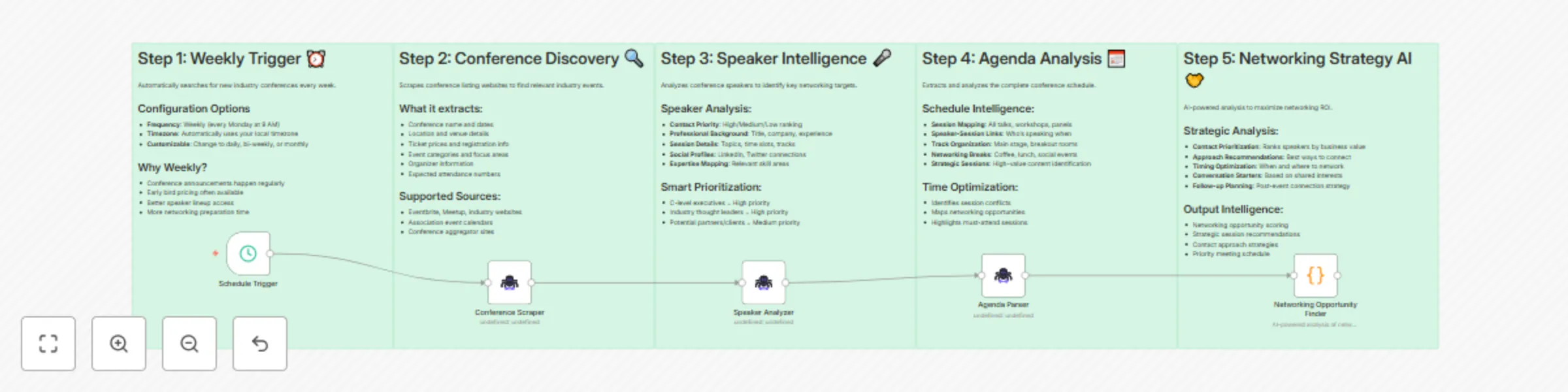
This workflow automatically discovers industry conferences and provides AI-powered networking intelligence to maximize your event ROI.

How it works

This workflow automatically discovers industry conferences and provides AI-powered networking intelligence to maximize your event ROI.

Key Steps

  1. Scheduled Discovery - Runs weekly to find new industry conferences from Eventbrite and other sources.
  2. AI-Powered Scraping - Uses ScrapeGraphAI to extract comprehensive conference information including speakers, agenda, and networking opportunities.
  3. Speaker Intelligence - Analyzes speakers to identify high-priority networking targets based on their role, company, and expertise.
  4. Agenda Analysis - Extracts and maps the complete conference schedule to optimize your time and networking strategy.
  5. Networking Strategy - Generates AI-powered recommendations for maximizing networking ROI with prioritized contact lists and approach strategies.

Set up steps

Setup time: 10-15 minutes

  1. Configure ScrapeGraphAI credentials - Add your ScrapeGraphAI API key for web scraping capabilities.
  2. Customize conference sources - Update the Eventbrite URL to target specific industries or locations.
  3. Adjust monitoring frequency - Modify the weekly trigger to match your conference discovery needs.
  4. Review networking priorities - The system automatically prioritizes speakers, but you can customize the criteria.

Technical Configuration

Prerequisites

  • Self-hosted n8n instance (version 1.0+)
  • ScrapeGraphAI API credentials
  • Eventbrite API access (optional, for enhanced data)

API Configuration

# ScrapeGraphAI Setup
1. Sign up at https://scrapegraph.ai
2. Generate API key from dashboard
3. Add credentials in n8n: Settings > Credentials > Add Credential > ScrapeGraphAI

Customization Examples

Modify Conference Sources:

// In Eventbrite Scraper node, update the URL:
const targetUrl = "https://www.eventbrite.com/d/united-states/technology/";
const industryFilter = "?q=artificial+intelligence";

Adjust Networking Priorities:

// In Speaker Intelligence node, modify scoring weights:
const priorityWeights = {
  executive_level: 0.4,
  company_size: 0.3,
  industry_relevance: 0.2,
  speaking_topic: 0.1
};

Customize Output Format:

// In Networking Strategy node, modify output structure:
const outputFormat = {
  high_priority: speakers.filter(s => s.score > 8),
  medium_priority: speakers.filter(s => s.score > 6 && s.score <= 8),
  networking_plan: generateApproachStrategy(speakers)
};

Data Storage & Output Formats

Storage Options

  • Local JSON files - Default storage for conference data
  • Google Drive - For sharing reports with team
  • Database - PostgreSQL/MySQL for enterprise deployments
  • Cloud Storage - AWS S3, Google Cloud Storage

Output Formats

  • JSON - Raw data for API integration
  • CSV - For spreadsheet analysis
  • PDF Reports - Executive summaries
  • Markdown - Documentation and sharing

Sample Output Structure

{
  "conference_data": {
    "event_name": "AI Summit 2024",
    "date": "2024-06-15",
    "location": "San Francisco, CA",
    "speakers": [
      {
        "name": "Dr. Sarah Chen",
        "title": "CTO, TechCorp",
        "company": "TechCorp Inc",
        "networking_score": 9.2,
        "priority": "high",
        "approach_strategy": "Connect via LinkedIn, mention shared AI interests"
      }
    ],
    "networking_plan": {
      "high_priority_targets": 5,
      "recommended_approach": "Focus on AI ethics panel speakers",
      "schedule_optimization": "Attend morning keynotes, network during breaks"
    }
  }
}

Key Features

  • Automated Conference Discovery - Finds relevant industry events from multiple sources
  • Speaker Intelligence Analysis - Identifies high-value networking targets with contact priority scoring
  • Strategic Agenda Mapping - Optimizes your conference schedule for maximum networking impact
  • AI-Powered Recommendations - Provides personalized networking strategies and approach methods
  • Priority Contact Lists - Ranks speakers by business value and networking potential

Troubleshooting

Common Issues

  1. ScrapeGraphAI Rate Limits - Implement delays between requests
  2. Website Structure Changes - Update scraping prompts in ScrapeGraphAI nodes
  3. API Authentication - Verify credentials and permissions

Performance Optimization

  • Adjust trigger frequency based on conference season
  • Implement caching for repeated data
  • Use batch processing for large conference lists

Support & Customization

For advanced customization or enterprise deployments, consider:

  • Custom speaker scoring algorithms
  • Integration with CRM systems (Salesforce, HubSpot)
  • Advanced analytics and reporting dashboards
  • Multi-language support for international conferences

1.2 Logical Blocks

This catalog entry is organized from the workflow JSON. The node-level section below shows the executable blocks available for review before importing the template.

2. Block-by-Block Analysis

Block 1 - Schedule Trigger

Type / Role
n8n-nodes-base.scheduleTrigger - scheduleTrigger
Config choices
Version 1.2

Block 2 - Conference Scraper

Type / Role
n8n-nodes-scrapegraphai.scrapegraphAi - scrapegraphAi
Config choices
Version 1

Block 3 - Speaker Analyzer

Type / Role
n8n-nodes-scrapegraphai.scrapegraphAi - scrapegraphAi
Config choices
Version 1

Block 4 - Agenda Parser

Type / Role
n8n-nodes-scrapegraphai.scrapegraphAi - scrapegraphAi
Config choices
Version 1

Block 5 - Networking Opportunity Finder

Type / Role
n8n-nodes-base.code - code
Config choices
Version 2

Block 6 - Sticky Note 1

Type / Role
n8n-nodes-base.stickyNote - stickyNote
Config choices
Version 1

Block 7 - Sticky Note 2

Type / Role
n8n-nodes-base.stickyNote - stickyNote
Config choices
Version 1

Block 8 - Sticky Note 3

Type / Role
n8n-nodes-base.stickyNote - stickyNote
Config choices
Version 1

Block 9 - Sticky Note 4

Type / Role
n8n-nodes-base.stickyNote - stickyNote
Config choices
Version 1

Block 10 - Sticky Note 5

Type / Role
n8n-nodes-base.stickyNote - stickyNote
Config choices
Version 1

3. Summary Table

Workflow Discovering and analyzing conferences for networking with ScrapeGraphAI
Complexity intermediate
Nodes 10
Categories Content Creation, Multimodal AI
Author vinci-king-01
Published 31 Jul 2025

4. Reproducing the Workflow from Scratch

  1. 1. Download the workflow JSON

    Use the JSON export at /data/workflows/6728/6728.json as the source template for this automation.

  2. 2. Import the template into n8n

    Open n8n, import the downloaded JSON, and review each node before activating the workflow.

  3. 3. Configure credentials and variables

    Replace placeholder credentials, API keys, webhook URLs, account IDs, and environment-specific values with your own settings.

  4. 4. Test with sample data

    Run the workflow manually or in a staging workspace, inspect node output, and confirm downstream systems receive the expected data.

  5. 5. Activate and monitor

    Enable the workflow only after testing, then monitor executions, errors, and rate limits during the first production runs.

5. General Notes & Resources

Review imported nodes carefully before activation. This catalog entry is intended to help you inspect the workflow structure, understand required services, and find related templates faster.

Node names, credentials, schedules, webhook paths, and external service limits may need adjustment for your workspace.

Frequently asked questions

What does Discovering and analyzing conferences for networking with ScrapeGraphAI do?

AI Conference Intelligence & Networking Optimizer with ScrapeGraphAI ️ IMPORTANT: This template requires a self hosted n8n instance with ScrapeGraphAI integration. It cannot be used with n8n ...

What do I need before importing this workflow?

Review the workflow JSON, configure any required credentials in n8n, and test the automation in a safe workspace before using it in production.

Can I customize this workflow?

Yes. Use the block-by-block analysis and the downloadable JSON to inspect each node, then adjust credentials, prompts, schedules, filters, or destinations for your Content Creation, Multimodal AI use case.