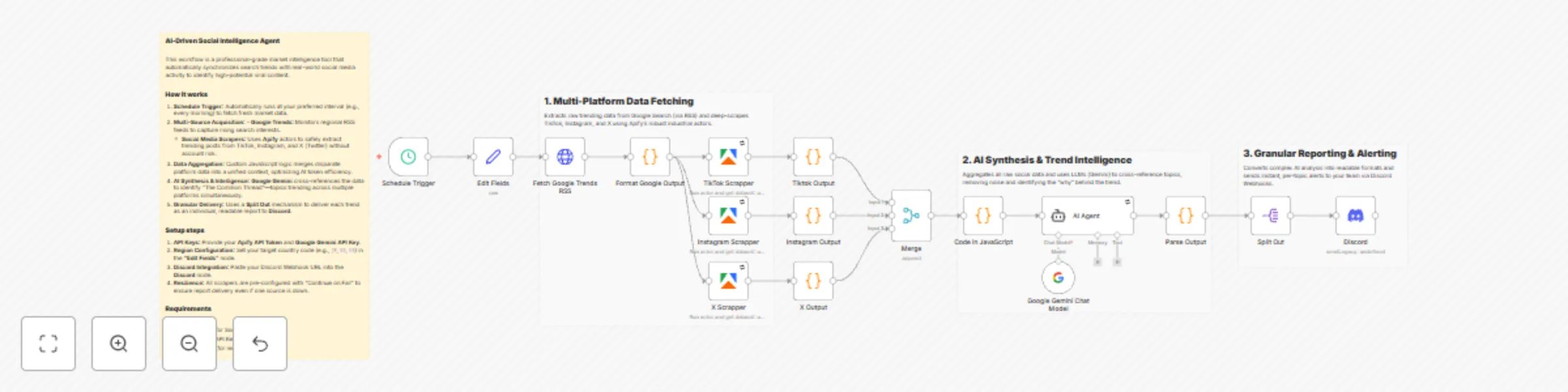
Discover viral social media trends with Gemini Flash & Apify scraping

Workflow preview

Workflow preview
100%
Discover viral social media trends with Gemini Flash & Apify scraping preview
Open on n8n.io

Important notice

This workflow is provided as-is. Please review and test before using in production.

1. Workflow Overview

How it works This workflow is a professional grade market intelligence tool designed to bridge the gap between search interest and social media engagement. It automates the end to end process of tr...

Best for

  • Market Research automation workflows
  • AI Summarization automation workflows
  • advanced n8n builders looking for reusable templates

Tools used

n8n-nodes-base.scheduletrigger, n8n-nodes-base.set, n8n-nodes-base.httprequest, @n8n/n8n-nodes-langchain.agent, @n8n/n8n-nodes-langchain.lmchatgooglegemini, n8n-nodes-base.code, @apify/n8n-nodes-apify.apify, n8n-nodes-base.merge

Source and attribution

This workflow is cataloged by N8N Workflows and links back to its original n8n.io source page by Aslamul Fikri Alfirdausi.

Original n8n.io source

1.1 Workflow description

Title
Discover viral social media trends with Gemini Flash & Apify scraping
Workflow name
Discover viral social media trends with Gemini Flash & Apify scraping

How it works

This workflow is a professional-grade market intelligence tool designed to bridge the gap between search interest and social media engagement. It automates the end-to-end process of trend discovery and content strategy.

  1. Detection: Polls Google Trends RSS daily for rising regional search queries.
  2. Parallel Extraction: Concurrently triggers industrial-grade Apify actors to scrape TikTok, Instagram, and X (Twitter) without the risk of account bans.
  3. Data Aggregation: Uses custom JavaScript logic to clean and merge disparate data points, optimizing them for LLM processing.
  4. AI Analysis: Google Gemini Flash analyzes the data to identify core topics, sentiment, and trend strength.
  5. Granular Delivery: Delivers individual, structured reports for each identified trend directly to Discord via Webhooks.

Set up steps

  1. API Credentials: Prepare your Apify API Token and Google Gemini API Key.
  2. Discord Setup: Create a Webhook in your Discord server and paste the URL into the Discord node.
  3. Regional Configuration: Set your target country code (e.g., JP, ID, US) in the "Edit Fields" node at the start of the workflow.
  4. Node Settings: Ensure all scraper nodes are set to "Continue on Fail" to maintain workflow resilience.

Requirements

  • Apify Account.
  • Google Gemini API Key.
  • Discord Server for report delivery.

1.2 Logical Blocks

This catalog entry is organized from the workflow JSON. The node-level section below shows the executable blocks available for review before importing the template.

2. Block-by-Block Analysis

Block 1 - Schedule Trigger

Type / Role
n8n-nodes-base.scheduleTrigger - scheduleTrigger
Config choices
Version 1.3

Block 2 - Edit Fields

Type / Role
n8n-nodes-base.set - set
Config choices
Version 3.4

Block 3 - Fetch Google Trends RSS

Type / Role
n8n-nodes-base.httpRequest - httpRequest
Config choices
Version 4.3

Block 4 - AI Agent

Type / Role
@n8n/n8n-nodes-langchain.agent - agent
Config choices
Version 3.1

Block 5 - Google Gemini Chat Model

Type / Role
@n8n/n8n-nodes-langchain.lmChatGoogleGemini - lmChatGoogleGemini
Config choices
Version 1

Block 6 - Format Google Output

Type / Role
n8n-nodes-base.code - code
Config choices
Version 2

Block 7 - TikTok Scrapper

Type / Role
@apify/n8n-nodes-apify.apify - apify
Config choices
Version 1

Block 8 - Instagram Scrapper

Type / Role
@apify/n8n-nodes-apify.apify - apify
Config choices
Version 1

Block 9 - X Scrapper

Type / Role
@apify/n8n-nodes-apify.apify - apify
Config choices
Version 1

Block 10 - Merge

Type / Role
n8n-nodes-base.merge - merge
Config choices
Version 3.2

Block 11 - Tiktok Output

Type / Role
n8n-nodes-base.code - code
Config choices
Version 2

Block 12 - Instagram Output

Type / Role
n8n-nodes-base.code - code
Config choices
Version 2

Block 13 - X Output

Type / Role
n8n-nodes-base.code - code
Config choices
Version 2

Block 14 - Code in JavaScript

Type / Role
n8n-nodes-base.code - code
Config choices
Version 2

Block 15 - Parse Output

Type / Role
n8n-nodes-base.code - code
Config choices
Version 2

Block 16 - Discord

Type / Role
n8n-nodes-base.discord - discord
Config choices
Version 2

Block 17 - Split Out

Type / Role
n8n-nodes-base.splitOut - splitOut
Config choices
Version 1

Block 18 - Sticky Note

Type / Role
n8n-nodes-base.stickyNote - stickyNote
Config choices
Version 1

Block 19 - Sticky Note1

Type / Role
n8n-nodes-base.stickyNote - stickyNote
Config choices
Version 1

Block 20 - Sticky Note2

Type / Role
n8n-nodes-base.stickyNote - stickyNote
Config choices
Version 1

Block 21 - Sticky Note3

Type / Role
n8n-nodes-base.stickyNote - stickyNote
Config choices
Version 1

3. Summary Table

Workflow Discover viral social media trends with Gemini Flash & Apify scraping
Complexity advanced
Nodes 21
Categories Market Research, AI Summarization
Author Aslamul Fikri Alfirdausi
Published 26 Dec 2025

4. Reproducing the Workflow from Scratch

  1. 1. Download the workflow JSON

    Use the JSON export at /data/workflows/12178/12178.json as the source template for this automation.

  2. 2. Import the template into n8n

    Open n8n, import the downloaded JSON, and review each node before activating the workflow.

  3. 3. Configure credentials and variables

    Replace placeholder credentials, API keys, webhook URLs, account IDs, and environment-specific values with your own settings.

  4. 4. Test with sample data

    Run the workflow manually or in a staging workspace, inspect node output, and confirm downstream systems receive the expected data.

  5. 5. Activate and monitor

    Enable the workflow only after testing, then monitor executions, errors, and rate limits during the first production runs.

5. General Notes & Resources

Review imported nodes carefully before activation. This catalog entry is intended to help you inspect the workflow structure, understand required services, and find related templates faster.

Node names, credentials, schedules, webhook paths, and external service limits may need adjustment for your workspace.

Frequently asked questions

What does Discover viral social media trends with Gemini Flash & Apify scraping do?

How it works This workflow is a professional grade market intelligence tool designed to bridge the gap between search interest and social media engagement. It automates the end to end process of tr...

What do I need before importing this workflow?

Review the workflow JSON, configure any required credentials in n8n, and test the automation in a safe workspace before using it in production.

Can I customize this workflow?

Yes. Use the block-by-block analysis and the downloadable JSON to inspect each node, then adjust credentials, prompts, schedules, filters, or destinations for your Market Research, AI Summarization use case.