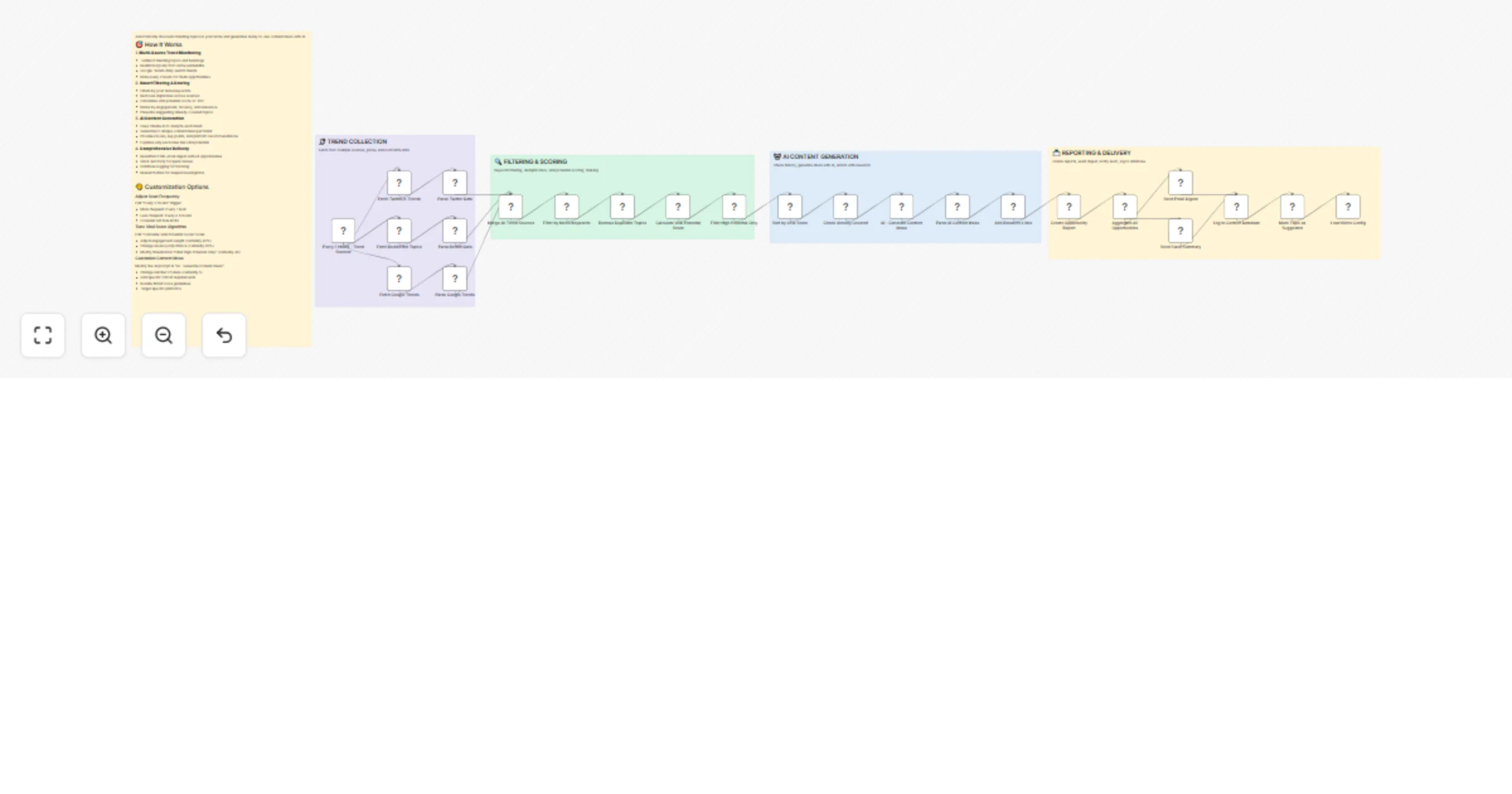
Discover viral content opportunities from Twitter, Reddit and Google Trends with Claude AI

Workflow preview

Workflow preview
100%
Discover viral content opportunities from Twitter, Reddit and Google Trends with Claude AI preview
Open on n8n.io

1. Workflow Overview

Automatically discovers trending topics in your niche and generates ready to use content ideas with AI. How It Works 1. Multi Source Trend Monitoring Twitter/X trending topics and hashtags Reddi...

Best for

  • Market Research automation workflows
  • Multimodal AI automation workflows
  • advanced n8n builders looking for reusable templates

Tools used

n8n-nodes-base.scheduletrigger, n8n-nodes-base.httprequest, n8n-nodes-base.code, n8n-nodes-base.merge, n8n-nodes-base.filter, n8n-nodes-base.emailsend, n8n-nodes-base.slack, n8n-nodes-base.postgres

Source and attribution

This workflow is cataloged by N8N Workflows and links back to its original n8n.io source page by Oneclick AI Squad.

Original n8n.io source

1.1 Workflow description

Title
Discover viral content opportunities from Twitter, Reddit and Google Trends with Claude AI
Workflow name
Discover viral content opportunities from Twitter, Reddit and Google Trends with Claude AI

Automatically discovers trending topics in your niche and generates ready-to-use content ideas with AI.

šŸŽÆ How It Works

1. Multi-Source Trend Monitoring

  • Twitter/X trending topics and hashtags
  • Reddit hot posts from niche subreddits
  • Google Trends daily search trends
  • Runs every 2 hours for fresh opportunities

2. Smart Filtering & Scoring

  • Filters by your niche keywords
  • Removes duplicates across sources
  • Calculates viral potential score (0-100)
  • Ranks by engagement, recency, and relevance
  • Prevents suggesting already-covered topics

3. AI Content Generation

  • Uses Claude AI to analyze each trend
  • Generates 5 unique content ideas per trend
  • Provides hooks, key points, and platform recommendations
  • Explains why each idea has viral potential

4. Comprehensive Delivery

  • Beautiful HTML email digest with all opportunities
  • Slack summary for quick review
  • Database logging for tracking
  • Research links for deeper investigation

āš™ļø Configuration Guide

Step 1: Configure Your Niche

Edit the "Load Niche Config" node:

niche: 'AI & Technology', // Your industry
keywords: [ // Topics to track
 'artificial intelligence',
 'machine learning',
 'AI tools',
 // Add your keywords
],
subreddits: 'artificial+machinelearning', // Relevant subreddits
thresholds: {
 minTwitterLikes: 1000, // Minimum engagement
 minRedditUpvotes: 500,
 minComments: 50
}

Step 2: Connect Data Sources

Twitter/X API:

  • Sign up for Twitter Developer Account
  • Get API credentials (OAuth 2.0)
  • Add credentials to "Fetch Twitter/X Trends" node

Reddit API:

Google Trends:

  • No authentication needed (public API)
  • Already configured in workflow

Step 3: Configure AI Integration

Anthropic Claude API:

  • Get API key from: https://console.anthropic.com/
  • Add credentials to "AI - Generate Content Ideas" node
  • Alternative: Use OpenAI GPT-4 by modifying the node

Step 4: Setup Notifications

Email:

  • Configure SMTP in "Send Email Digest" node
  • Update recipient email address
  • Customize HTML template if desired

Slack:

Step 5: Database (Optional)

  • Create PostgreSQL database with schema below
  • Add credentials to "Log to Content Database" node
  • Skip if you don't need database tracking

Database Schema

CREATE TABLE content.viral_opportunities (
 id SERIAL PRIMARY KEY,
 opportunity_id VARCHAR(255) UNIQUE,
 detected_at TIMESTAMP,
 topic TEXT,
 source VARCHAR(50),
 source_url TEXT,
 engagement BIGINT,
 viral_score INTEGER,
 opportunity_level VARCHAR(20),
 niche VARCHAR(100),
 content_ideas JSONB,
 research_links JSONB,
 urgency TEXT,
 status VARCHAR(50),
 created_at TIMESTAMP DEFAULT NOW()
);

šŸŽØ Customization Options

Adjust Scan Frequency

Edit "Every 2 Hours" trigger:

  • More frequent: Every 1 hour
  • Less frequent: Every 4-6 hours
  • Consider API rate limits

Tune Viral Score Algorithm

Edit "Calculate Viral Potential Score" node:

  • Adjust engagement weight (currently 40%)
  • Change recency importance (currently 30%)
  • Modify threshold in "Filter High Potential Only" (currently 40)

Customize Content Ideas

Modify the AI prompt in "AI - Generate Content Ideas":

  • Change number of ideas (currently 5)
  • Add specific format requirements
  • Include brand voice guidelines
  • Target specific platforms

šŸ“Š Expected Results

Typical scan finds:

  • 5-15 opportunities per scan (2 hours)
  • 3-5 HIGH priority (score 75+)
  • 25+ content ideas generated
  • Email sent with full digest
  • Slack alert for quick review

šŸ’” Pro Tips

  1. Timing Matters: Create content within 24-48 hours of detection
  2. High Priority First: Focus on opportunities scoring 75+
  3. Platform Match: Choose platforms where your audience is active
  4. Add Your Voice: Use AI ideas as starting points, not final copy
  5. Track Performance: Note which opportunity types perform best
  6. Refine Keywords: Regularly update your niche keywords based on results
  7. Mix Formats: Try different content formats for same trend

🚨 Important Notes

āš ļø API Rate Limits:

  • Twitter: Monitor rate limits closely
  • Reddit: 60 requests per minute
  • Claude AI: Tier-based limits
  • Consider caching results

šŸ’° Cost Considerations:

  • Twitter API: May require paid tier
  • Reddit API: Free for reasonable use
  • Claude AI: ~$0.50-1.00 per scan
  • Total: ~$15-30/month estimated

šŸŽÆ Best Practices:

  • Start with 1-2 sources, add more later
  • Test with broader keywords initially
  • Review first few reports to tune scoring
  • Don't create content for every opportunity
  • Quality over quantity

šŸ”„ What Happens Next?

  1. Workflow runs every 2 hours
  2. Scans Twitter, Reddit, Google Trends
  3. Filters by your keywords
  4. Scores viral potential
  5. Generates AI content ideas
  6. Sends digest to email + Slack
  7. Logs to database
  8. Marks topics as suggested
  9. Repeat!

1.2 Logical Blocks

This catalog entry is organized from the workflow JSON. The node-level section below shows the executable blocks available for review before importing the template.

2. Block-by-Block Analysis

Block 1 - Every 2 Hours - Trend Scanner

Type / Role
n8n-nodes-base.scheduleTrigger - scheduleTrigger
Config choices
Version 1.2

Block 2 - Fetch Twitter/X Trends

Type / Role
n8n-nodes-base.httpRequest - httpRequest
Config choices
Version 4.2

Block 3 - Fetch Reddit Hot Topics

Type / Role
n8n-nodes-base.httpRequest - httpRequest
Config choices
Version 4.2

Block 4 - Fetch Google Trends

Type / Role
n8n-nodes-base.httpRequest - httpRequest
Config choices
Version 4.2

Block 5 - Load Niche Config

Type / Role
n8n-nodes-base.code - code
Config choices
Version 2

Block 6 - Parse Twitter Data

Type / Role
n8n-nodes-base.code - code
Config choices
Version 2

Block 7 - Parse Reddit Data

Type / Role
n8n-nodes-base.code - code
Config choices
Version 2

Block 8 - Parse Google Trends

Type / Role
n8n-nodes-base.code - code
Config choices
Version 2

Block 9 - Merge All Trend Sources

Type / Role
n8n-nodes-base.merge - merge
Config choices
Version 3

Block 10 - Filter by Niche Keywords

Type / Role
n8n-nodes-base.code - code
Config choices
Version 2

Block 11 - Remove Duplicate Topics

Type / Role
n8n-nodes-base.code - code
Config choices
Version 2

Block 12 - Calculate Viral Potential Score

Type / Role
n8n-nodes-base.code - code
Config choices
Version 2

Block 13 - Filter High Potential Only

Type / Role
n8n-nodes-base.filter - filter
Config choices
Version 2

Block 14 - Sort by Viral Score

Type / Role
n8n-nodes-base.code - code
Config choices
Version 2

Block 15 - Check Already Covered

Type / Role
n8n-nodes-base.code - code
Config choices
Version 2

Block 16 - AI - Generate Content Ideas

Type / Role
n8n-nodes-base.httpRequest - httpRequest
Config choices
Version 4.2

Block 17 - Parse AI Content Ideas

Type / Role
n8n-nodes-base.code - code
Config choices
Version 2

Block 18 - Add Research Links

Type / Role
n8n-nodes-base.code - code
Config choices
Version 2

Block 19 - Create Opportunity Report

Type / Role
n8n-nodes-base.code - code
Config choices
Version 2

Block 20 - Aggregate All Opportunities

Type / Role
n8n-nodes-base.code - code
Config choices
Version 2

Block 21 - Send Email Digest

Type / Role
n8n-nodes-base.emailSend - emailSend
Config choices
Version 2.1

Block 22 - Send Slack Summary

Type / Role
n8n-nodes-base.slack - slack
Config choices
Version 2.1

Block 23 - Log to Content Database

Type / Role
n8n-nodes-base.postgres - postgres
Config choices
Version 2.4

Block 24 - Mark Topic as Suggested

Type / Role
n8n-nodes-base.code - code
Config choices
Version 2

Showing the first 24 of 29 workflow blocks. Download the JSON for the full node graph.

3. Summary Table

Workflow Discover viral content opportunities from Twitter, Reddit and Google Trends with Claude AI
Complexity advanced
Nodes 29
Categories Market Research, Multimodal AI
Author Oneclick AI Squad
Published 25 Feb 2026

4. Reproducing the Workflow from Scratch

  1. 1. Download the workflow JSON

    Use the JSON export at /data/workflows/13707/13707.json as the source template for this automation.

  2. 2. Import the template into n8n

    Open n8n, import the downloaded JSON, and review each node before activating the workflow.

  3. 3. Configure credentials and variables

    Replace placeholder credentials, API keys, webhook URLs, account IDs, and environment-specific values with your own settings.

  4. 4. Test with sample data

    Run the workflow manually or in a staging workspace, inspect node output, and confirm downstream systems receive the expected data.

  5. 5. Activate and monitor

    Enable the workflow only after testing, then monitor executions, errors, and rate limits during the first production runs.

5. General Notes & Resources

Review imported nodes carefully before activation. This catalog entry is intended to help you inspect the workflow structure, understand required services, and find related templates faster.

Node names, credentials, schedules, webhook paths, and external service limits may need adjustment for your workspace.

Frequently asked questions

What does Discover viral content opportunities from Twitter, Reddit and Google Trends with Claude AI do?

Automatically discovers trending topics in your niche and generates ready to use content ideas with AI. How It Works 1. Multi Source Trend Monitoring Twitter/X trending topics and hashtags Reddi...

What do I need before importing this workflow?

Review the workflow JSON, configure any required credentials in n8n, and test the automation in a safe workspace before using it in production.

Can I customize this workflow?

Yes. Use the block-by-block analysis and the downloadable JSON to inspect each node, then adjust credentials, prompts, schedules, filters, or destinations for your Market Research, Multimodal AI use case.