Detect unused Android feature flags with GitLab, LaunchDarkly, Jira & Slack

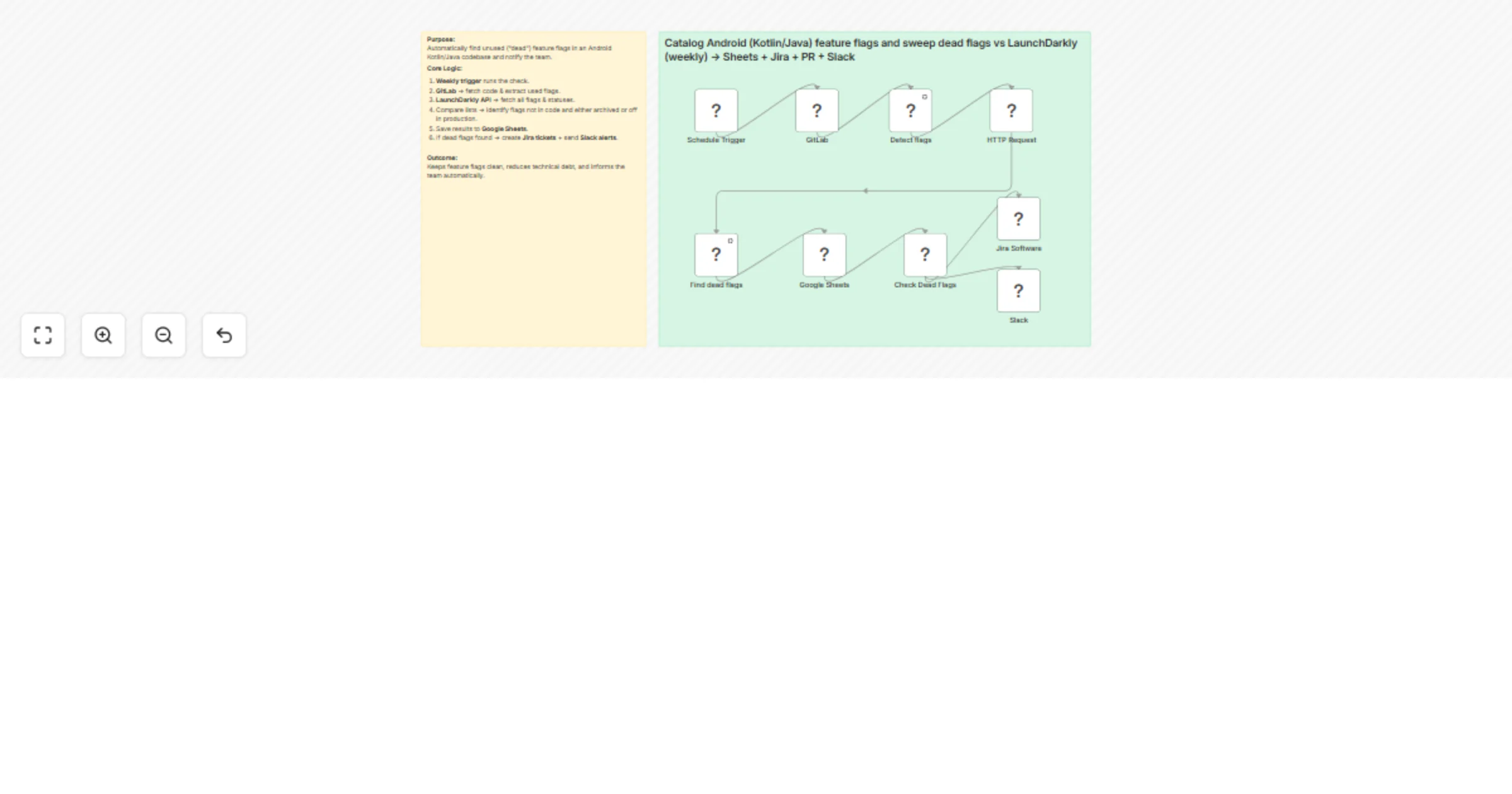
Workflow preview

Workflow preview
100%
Detect unused Android feature flags with GitLab, LaunchDarkly, Jira & Slack preview
Open on n8n.io

Important notice

This workflow is provided as-is. Please review and test before using in production.

1. Workflow Overview

Android Feature Flag Cleanup Bot (GitLab + LaunchDarkly) This n8n automation detects unused (“dead”) feature flags in an Android Kotlin/Java codebase by comparing your GitLab repository code agains...

Best for

  • DevOps automation workflows
  • Multimodal AI automation workflows
  • intermediate n8n builders looking for reusable templates

Tools used

n8n-nodes-base.if, n8n-nodes-base.scheduletrigger, n8n-nodes-base.gitlab, n8n-nodes-base.googlesheets, n8n-nodes-base.slack, n8n-nodes-base.jira, n8n-nodes-base.httprequest, n8n-nodes-base.code

Source and attribution

This workflow is cataloged by N8N Workflows and links back to its original n8n.io source page by WeblineIndia.

Original n8n.io source

1.1 Workflow description

Title
Detect unused Android feature flags with GitLab, LaunchDarkly, Jira & Slack
Workflow name
Detect unused Android feature flags with GitLab, LaunchDarkly, Jira & Slack

Android Feature Flag Cleanup Bot (GitLab + LaunchDarkly)

This n8n automation detects unused (“dead”) feature flags in an Android Kotlin/Java codebase by comparing your GitLab repository code against LaunchDarkly’s feature flag list.

It logs results in Google Sheets, creates Jira tickets for cleanup and sends Slack alerts automatically.

Who’s it for

  • Android engineering teams using Kotlin/Java.
  • Teams managing feature flags in LaunchDarkly.
  • DevOps/QA teams wanting to reduce technical debt from stale flags.

How it works

  1. Weekly Trigger runs the process.
  2. GitLab Node fetches repository code.
  3. Regex Extraction finds all feature flags in code.
  4. LaunchDarkly API retrieves all configured flags.
  5. Comparison Logic marks flags as “dead” if unused in code and archived or off in production.
  6. Google Sheets stores flagged results.
  7. Jira creates a ticket for each dead flag.
  8. Slack notifies the team.

How to set up

  1. Import JSON into n8n.

  2. Connect credentials for:

    • GitLab OAuth2
    • Google Sheets
    • Jira
    • Slack webhook URL
  3. Update:

    • GitLab repo details in the GitLab node.
    • LaunchDarkly API key in HTTP Request node.
    • Google Sheet ID in Google Sheets node.
    • Jira project & issue type in Jira node.
    • Slack message formatting in Slack node.
  4. Activate workflow.

Requirements

  • n8n (self-hosted or cloud)
  • GitLab repository with Kotlin/Java code
  • LaunchDarkly account + API token
  • Google Sheets API access
  • Jira API access
  • Slack incoming webhook

How to customize

  • Change regex pattern in “Detect flags” node if your flag naming convention differs.
  • Adjust dead flag logic in “Find dead flags” node (e.g., treat test env separately).
  • Modify Slack message to include more details (e.g., description from LaunchDarkly).
  • Add email notifications for broader distribution.

Add-ons

  • Email Alerts via Gmail/SMTP.
  • GitHub / GitLab MR to remove dead flags automatically.
  • Confluence Integration to document flag cleanup history.

Use Case Examples

  • Weekly automated cleanup alerts for large engineering teams.
  • Maintaining clean feature flag lists in high-traffic apps.
  • Compliance-driven projects requiring flag lifecycle tracking.

Common troubleshooting

Issue Possible Cause Solution
Workflow fails at GitLab node Invalid repo path or missing OAuth scope Update repo path & check GitLab OAuth permissions
LaunchDarkly API request returns 401 Invalid or expired API key Generate a new API key in LaunchDarkly & update node
Google Sheets node fails Wrong Sheet ID or missing sharing permissions Confirm Sheet ID and share with connected Google account
Jira ticket not created Missing required fields Set project key, issue type, and summary in Jira node
Slack alert not sent Webhook URL invalid or revoked Regenerate Slack webhook and update in node

Need Help?

If you’d like, we can help set up and customize this workflow for your exact repo, flag rules and team notification preferences — including regex adjustments, extra reporting or adding automatic cleanup PRs.

Contact our n8n automation team at WeblineIndia.

1.2 Logical Blocks

This catalog entry is organized from the workflow JSON. The node-level section below shows the executable blocks available for review before importing the template.

2. Block-by-Block Analysis

Block 1 - Check Dead Flags

Type / Role
n8n-nodes-base.if - if
Config choices
Version 1

Block 2 - Schedule Trigger

Type / Role
n8n-nodes-base.scheduleTrigger - scheduleTrigger
Config choices
Version 1.2

Block 3 - GitLab

Type / Role
n8n-nodes-base.gitlab - gitlab
Config choices
Version 1

Block 4 - Google Sheets

Type / Role
n8n-nodes-base.googleSheets - googleSheets
Config choices
Version 4.6

Block 5 - Slack

Type / Role
n8n-nodes-base.slack - slack
Config choices
Version 2.3

Block 6 - Jira Software

Type / Role
n8n-nodes-base.jira - jira
Config choices
Version 1

Block 7 - HTTP Request

Type / Role
n8n-nodes-base.httpRequest - httpRequest
Config choices
Version 4.2

Block 8 - Find dead flags

Type / Role
n8n-nodes-base.code - code
Config choices
Version 2

Block 9 - Detect flags

Type / Role
n8n-nodes-base.code - code
Config choices
Version 2

Block 10 - Sticky Note

Type / Role
n8n-nodes-base.stickyNote - stickyNote
Config choices
Version 1

Block 11 - Sticky Note1

Type / Role
n8n-nodes-base.stickyNote - stickyNote
Config choices
Version 1

3. Summary Table

Workflow Detect unused Android feature flags with GitLab, LaunchDarkly, Jira & Slack
Complexity intermediate
Nodes 11
Categories DevOps, Multimodal AI
Author WeblineIndia
Published 28 Aug 2025

4. Reproducing the Workflow from Scratch

  1. 1. Download the workflow JSON

    Use the JSON export at /data/workflows/7985/7985.json as the source template for this automation.

  2. 2. Import the template into n8n

    Open n8n, import the downloaded JSON, and review each node before activating the workflow.

  3. 3. Configure credentials and variables

    Replace placeholder credentials, API keys, webhook URLs, account IDs, and environment-specific values with your own settings.

  4. 4. Test with sample data

    Run the workflow manually or in a staging workspace, inspect node output, and confirm downstream systems receive the expected data.

  5. 5. Activate and monitor

    Enable the workflow only after testing, then monitor executions, errors, and rate limits during the first production runs.

5. General Notes & Resources

Review imported nodes carefully before activation. This catalog entry is intended to help you inspect the workflow structure, understand required services, and find related templates faster.

Node names, credentials, schedules, webhook paths, and external service limits may need adjustment for your workspace.

Frequently asked questions

What does Detect unused Android feature flags with GitLab, LaunchDarkly, Jira & Slack do?

Android Feature Flag Cleanup Bot (GitLab + LaunchDarkly) This n8n automation detects unused (“dead”) feature flags in an Android Kotlin/Java codebase by comparing your GitLab repository code agains...

What do I need before importing this workflow?

Review the workflow JSON, configure any required credentials in n8n, and test the automation in a safe workspace before using it in production.

Can I customize this workflow?

Yes. Use the block-by-block analysis and the downloadable JSON to inspect each node, then adjust credentials, prompts, schedules, filters, or destinations for your DevOps, Multimodal AI use case.