Block 1 - When clicking ‘Execute workflow’
- Type / Role
- n8n-nodes-base.manualTrigger - manualTrigger
- Config choices
- Version 1


 Early Deal
This workflow helps you quickly identify and disavow harmful backlinks without spending hours on man...
n8n-nodes-base.manualtrigger, n8n-nodes-base.googledrive, n8n-nodes-base.gmail, n8n-nodes-base.stickynote, n8n-nodes-dataforseo.dataforseobacklinksapi, n8n-nodes-base.set, n8n-nodes-base.if, n8n-nodes-base.code
This workflow is cataloged by N8N Workflows and links back to its original n8n.io source page by DataForSEO.
Original n8n.io sourceThis workflow helps you quickly identify and disavow harmful backlinks without spending hours on manual exports and backlink reports.
This workflow helps you discover new SEO content opportunities by automatically identifying keyword gaps between your website and a competing domain.
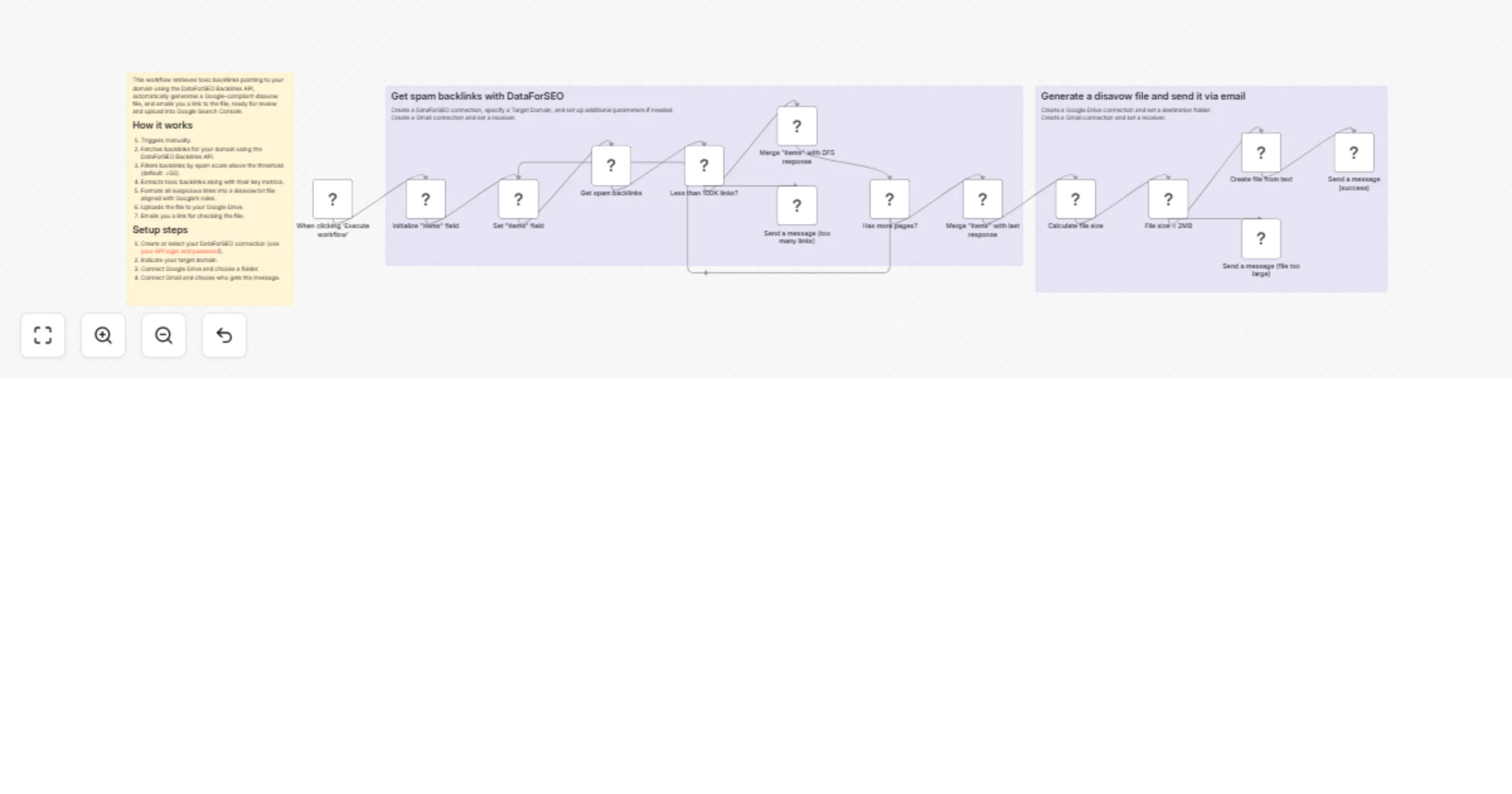
On each manual run, the workflow retrieves backlink data for your selected domain or URL using the DataForSEO Backlinks API, automatically filtering backlinks based on a defined spam score threshold (default: >50). As it identifies suspicious or toxic backlinks that may negatively impact your SEO, the workflow automatically formats those links into a valid Google-compliant disavow.txt file. After that, the workflow uploads the file directly to your Google Drive, generates a ready-to-download shareable link, and sends it to you via Gmail.
The result is a fast and reliable toxic backlink audit system that helps you maintain a clean backlink profile with minimal effort.
This workflow is perfect for SEO and link-building specialists and website owners who want to automatically detect toxic backlinks, reduce SEO risks, and speed up their backlink audit.
This workflow automatically identifies backlinks with a high spam score pointing to your domain, formats them into a Google-compliant disavow file, uploads it to Google Drive, and sends you a link to the ready-for-review file via Gmail.
Triggers manually whenever you want to perform a spam backlink audit.
Fetches backlink data for your domain using the DataForSEO Backlinks API.
Filters backlinks by spam score above the defined threshold (default: >50).
Extracts toxic backlinks pointing to your domain or URL, along with their key metrics.
Formats all suspicious links into a valid disavow.txt file in accordance with Google’s rules.
Uploads the file to your Google Drive. Emails you the link for checking the file before uploading it to Google Search Console.
You can easily customize this workflow by adjusting the spam score threshold, changing the number of backlinks analyzed, switching between domain-level and URL-level audits, exporting results to other storage tools, or scheduling it rather than using a manual trigger.
This catalog entry is organized from the workflow JSON. The node-level section below shows the executable blocks available for review before importing the template.
| Workflow | Detect toxic backlinks and build a disavow file with DataForSEO, Google Drive, and Gmail |
|---|---|
| Complexity | advanced |
| Nodes | 17 |
| Categories | Market Research |
| Author | DataForSEO |
| Published | 20 Feb 2026 |
Use the JSON export at /data/workflows/13538/13538.json as the source template for this automation.
Open n8n, import the downloaded JSON, and review each node before activating the workflow.
Replace placeholder credentials, API keys, webhook URLs, account IDs, and environment-specific values with your own settings.
Run the workflow manually or in a staging workspace, inspect node output, and confirm downstream systems receive the expected data.
Enable the workflow only after testing, then monitor executions, errors, and rate limits during the first production runs.
Review imported nodes carefully before activation. This catalog entry is intended to help you inspect the workflow structure, understand required services, and find related templates faster.
Node names, credentials, schedules, webhook paths, and external service limits may need adjustment for your workspace.
This workflow helps you quickly identify and disavow harmful backlinks without spending hours on man...
Review the workflow JSON, configure any required credentials in n8n, and test the automation in a safe workspace before using it in production.
Yes. Use the block-by-block analysis and the downloadable JSON to inspect each node, then adjust credentials, prompts, schedules, filters, or destinations for your Market Research use case.