Block 1 - Workflow Overview
- Type / Role
- n8n-nodes-base.stickyNote - stickyNote
- Config choices
- Version 1


 Early Deal
This workflow is provided as-is. Please review and test before using in production.
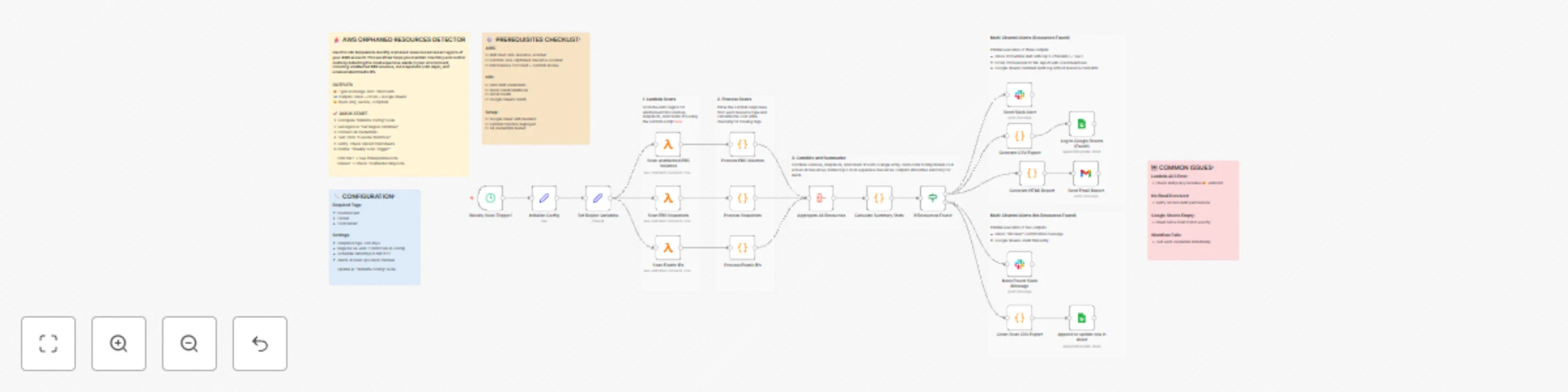
How it works This workflow automatically scans AWS accounts for orphaned resources (unattached EBS volumes, old snapshots 90 days, unassociated Elastic IPs) that waste money. It calculates cost...
n8n-nodes-base.stickynote, n8n-nodes-base.scheduletrigger, n8n-nodes-base.set, n8n-nodes-base.aggregate, n8n-nodes-base.code, n8n-nodes-base.slack, n8n-nodes-base.gmail, n8n-nodes-base.awslambda
This workflow is cataloged by N8N Workflows and links back to its original n8n.io source page by Chad M. Crowell.
Original n8n.io sourceThis workflow automatically scans AWS accounts for orphaned resources (unattached EBS volumes, old snapshots >90 days, unassociated Elastic IPs) that waste money. It calculates cost impact, validates compliance tags, and sends multi-channel alerts via Slack, Email, and Google Sheets audit logs.
Key Features:
What gets detected:
Typical savings: $50-10K/month depending on account size
AWS Configuration:
n8n-resource-scanner with these permissions:ec2:DescribeVolumesec2:DescribeSnapshotsec2:DescribeAddressesec2:DescribeInstanceslambda:InvokeFunctionaws-orphaned-resource-scanner (Node.js 18+)Lambda Function Code: See sticky notes in workflow for complete implementation using @aws-sdk/client-ec2
Credentials Required:
Initialize Config Node: Update these settings:
awsRegions: Your AWS regions (default: us-east-1)emailRecipients: FinOps team emailsslackChannel: Alert channel (e.g., #cloud-ops)requiredTags: Compliance tags to validatesnapshotAgeDays: Age threshold (default: 90)Set Region Variables: Choose regions to scan
Lambda Function: Deploy function with provided code (see workflow sticky notes)
Google Sheet: Create spreadsheet with headers:
Credentials: Connect all four credential types in n8n
Schedule: Enable "Weekly Scan Trigger" (default: Mondays 8 AM UTC)
This catalog entry is organized from the workflow JSON. The node-level section below shows the executable blocks available for review before importing the template.
Showing the first 24 of 29 workflow blocks. Download the JSON for the full node graph.
| Workflow | Detect AWS Orphaned Resources & Send Cost Reports to Slack, Email, and Sheets |
|---|---|
| Complexity | advanced |
| Nodes | 29 |
| Categories | DevOps |
| Author | Chad M. Crowell |
| Published | 08 Dec 2025 |
Use the JSON export at /data/workflows/11612/11612.json as the source template for this automation.
Open n8n, import the downloaded JSON, and review each node before activating the workflow.
Replace placeholder credentials, API keys, webhook URLs, account IDs, and environment-specific values with your own settings.
Run the workflow manually or in a staging workspace, inspect node output, and confirm downstream systems receive the expected data.
Enable the workflow only after testing, then monitor executions, errors, and rate limits during the first production runs.
Review imported nodes carefully before activation. This catalog entry is intended to help you inspect the workflow structure, understand required services, and find related templates faster.
Node names, credentials, schedules, webhook paths, and external service limits may need adjustment for your workspace.
How it works This workflow automatically scans AWS accounts for orphaned resources (unattached EBS volumes, old snapshots 90 days, unassociated Elastic IPs) that waste money. It calculates cost...
Review the workflow JSON, configure any required credentials in n8n, and test the automation in a safe workspace before using it in production.
Yes. Use the block-by-block analysis and the downloadable JSON to inspect each node, then adjust credentials, prompts, schedules, filters, or destinations for your DevOps use case.