C

Chad M. Crowell

1
Workflow

Workflows by Chad M. Crowell

Workflow preview: Detect AWS Orphaned Resources & Send Cost Reports to Slack, Email, and Sheets
Free advanced

Detect AWS Orphaned Resources & Send Cost Reports to Slack, Email, and Sheets

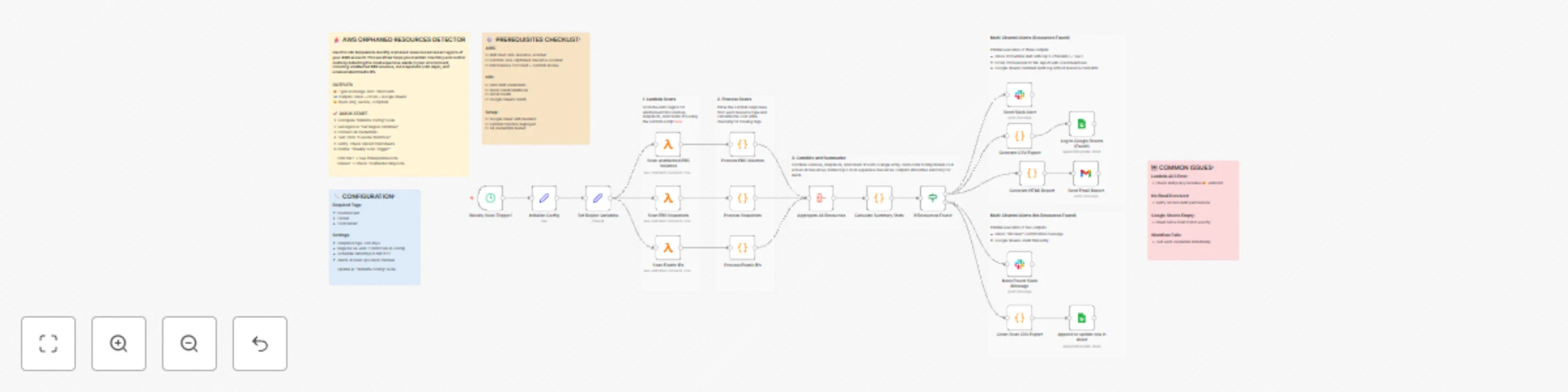
## How it works This workflow automatically scans AWS accounts for orphaned resources (unattached EBS volumes, old snapshots >90 days, unassociated Elastic IPs) that waste money. It calculates cost impact, validates compliance tags, and sends multi-channel alerts via Slack, Email, and Google Sheets audit logs. **Key Features:** - 🔍 Multi-region scanning with parallel execution - 💰 Monthly/annual cost calculation with risk scoring - 📊 Professional HTML reports with charts and tables - 🏷️ Tag compliance validation (SOC2/ISO27001/HIPAA) - ✅ Conditional alerting (only alerts when resources found) - 📈 Google Sheets audit trail for trend analysis **What gets detected:** - Unattached EBS volumes ($0.10/GB/month waste) - Snapshots older than 90 days ($0.05/GB/month) - Unassociated Elastic IPs ($3.60/month each) **Typical savings:** $50-10K/month depending on account size ## Set up steps ### Prerequisites **AWS Configuration:** 1. Create IAM user `n8n-resource-scanner` with these permissions: - `ec2:DescribeVolumes` - `ec2:DescribeSnapshots` - `ec2:DescribeAddresses` - `ec2:DescribeInstances` - `lambda:InvokeFunction` 2. Deploy Lambda function `aws-orphaned-resource-scanner` (Node.js 18+) 3. Add EC2 read-only permissions to Lambda execution role 4. Generate AWS Access Key + Secret Key **Lambda Function Code:** See sticky notes in workflow for complete implementation using `@aws-sdk/client-ec2` **Credentials Required:** - AWS IAM (Access Key + Secret) - Slack (OAuth2 or Webhook) - Gmail (OAuth2) - Google Sheets (OAuth2) ### Configuration 1. **Initialize Config Node:** Update these settings: - `awsRegions`: Your AWS regions (default: us-east-1) - `emailRecipients`: FinOps team emails - `slackChannel`: Alert channel (e.g., #cloud-ops) - `requiredTags`: Compliance tags to validate - `snapshotAgeDays`: Age threshold (default: 90) 2. **Set Region Variables:** Choose regions to scan 3. **Lambda Function:** Deploy function with provided code (see workflow sticky notes) 4. **Google Sheet:** Create spreadsheet with headers: - Scan Date | Region | Resource Type | Resource ID | Monthly Cost | Compliance | etc. 5. **Credentials:** Connect all four credential types in n8n 6. **Schedule:** Enable "Weekly Scan Trigger" (default: Mondays 8 AM UTC) ### Testing 1. Click "Execute Workflow" to run manual test 2. Verify Lambda invokes successfully 3. Check Slack alert appears 4. Confirm email with HTML report received 5. Validate Google Sheets logging works ### Customization Options - **Multi-region:** Add regions in "Initialize Config" - **Alert thresholds:** Modify cost/age thresholds - **Additional resource types:** Extend Lambda function - **Custom tags:** Update required tags list - **Schedule frequency:** Adjust cron trigger ## Use Cases - **FinOps Teams:** Automated cloud waste detection and cost reporting - **Cloud Operations:** Weekly compliance and governance audits - **DevOps:** Resource cleanup automation and alerting - **Security/Compliance:** Tag validation for SOC2/ISO27001/HIPAA - **Executive Reporting:** Monthly cost optimization metrics ## Resources - [AWS IAM Best Practices](https://docs.aws.amazon.com/IAM/latest/UserGuide/best-practices.html) - [Lambda Function Code](https://github.com/chadmcrowell/lambda-function-for-aws-orphaned-resource-scanner)

C
Chad M. Crowell
DevOps
9 Dec 2025
69
0