Detect and route cybersecurity threats with SIEM, Slack, email and PagerDuty

Workflow preview

Workflow preview
100%
Detect and route cybersecurity threats with SIEM, Slack, email and PagerDuty preview
Open on n8n.io

1. Workflow Overview

This n8n workflow proactively scans and aggregates threat intelligence, network logs, and vulnerability data every 15 minutes to detect emerging risks across the infrastructure. It analyzes anomali...

Best for

  • SecOps automation workflows
  • AI Summarization automation workflows
  • advanced n8n builders looking for reusable templates

Tools used

n8n-nodes-base.stickynote, n8n-nodes-base.scheduletrigger, n8n-nodes-base.httprequest, n8n-nodes-base.merge, n8n-nodes-base.code, n8n-nodes-base.if, n8n-nodes-base.slack, n8n-nodes-base.emailsend

Source and attribution

This workflow is cataloged by N8N Workflows and links back to its original n8n.io source page by Oneclick AI Squad.

Original n8n.io source

1.1 Workflow description

Title
Detect and route cybersecurity threats with SIEM, Slack, email and PagerDuty
Workflow name
Detect and route cybersecurity threats with SIEM, Slack, email and PagerDuty

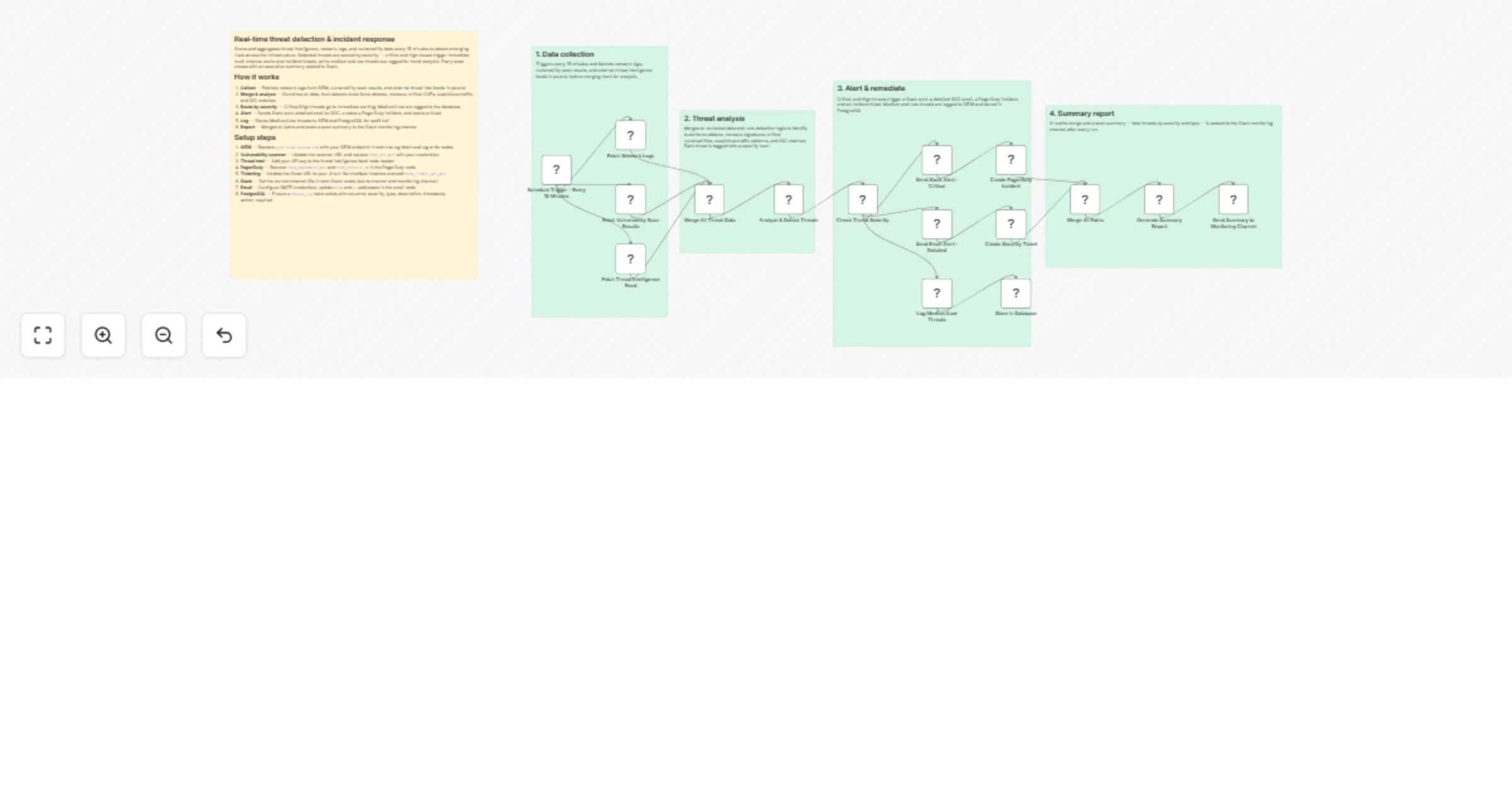
This n8n workflow proactively scans and aggregates threat intelligence, network logs, and vulnerability data every 15 minutes to detect emerging risks across the infrastructure. It analyzes anomalies, correlates indicators, assigns severity, triggers critical alerts, and generates executive-ready summaries—enabling security teams to act before threats escalate.

How it works

  1. Collect — Fetches network logs from SIEM, vulnerability scan results, and external threat intel feeds in parallel
  2. Merge & analyze — Combines all data, then detects brute force attacks, malware, critical CVEs, suspicious traffic, and IOC matches
  3. Route by severity — Critical/High threats go to immediate alerting; Medium/Low are logged to the database
  4. Alert — Sends Slack alert, detailed email to SOC, creates a PagerDuty incident, and opens a ticket
  5. Log — Stores Medium/Low threats to SIEM and PostgreSQL for audit trail
  6. Report — Merges all paths and posts a scan summary to the Slack monitoring channel

Setup steps

  1. SIEM — Replace your-siem-system.com with your SIEM endpoint in both the log fetch and log write nodes
  2. Vulnerability scanner — Update the scanner URL and replace YOUR_API_KEY with your credentials
  3. Threat intel — Add your API key to the threat intelligence feed node header
  4. PagerDuty — Replace YOUR_PAGERDUTY_KEY and YOUR_SERVICE_ID in the PagerDuty node
  5. Ticketing — Update the ticket URL to your Jira or ServiceNow instance and add YOUR_TICKET_API_KEY
  6. Slack — Set the correct channel IDs in both Slack nodes (alerts channel and monitoring channel)
  7. Email — Configure SMTP credentials; update from and to addresses in the email node
  8. PostgreSQL — Ensure a threat_log table exists with columns: severity, type, description, timestamp, action_required

Industries That Benefit

  • Enterprise IT/SOC: Scale threat detection without alert fatigue.
  • MSP/MSSP: Offer proactive monitoring to clients with automated reporting.
  • Finance & Banking: Meet FFIEC and PCI DSS continuous monitoring requirements.
  • Healthcare: Detect ransomware precursors before patient data is locked.
  • Critical Infrastructure (OT): Bridge IT/OT visibility with unified alerting.

Prerequisites

  • SIEM with API access (Splunk, QRadar, ELK)
  • Vulnerability scanner API (Qualys, Nessus, OpenVAS)
  • Threat intelligence feed (OTX, MISP, commercial)
  • n8n instance with Schedule, HTTP Request, Slack, and Database nodes
  • Slack workspace, SMTP, or Twilio for notifications
  • ITSM system (Jira, ServiceNow) with create permission

Modification Options

  • Add UEBA (User Entity Behavior Analytics) integration.
  • Integrate with SOAR for auto-containment on Critical alerts.
  • Enable geo-mapping of malicious IPs.
  • Add CVE trend dashboard via Grafana export.
  • Trigger on-demand scans via webhook (e.g., post-pen-test).
  • Export to security data lake for ML training.

Explore More Proactive Security Automations: Contact us to build AI-driven threat hunting, automated patching, and zero-trust enforcement workflows with n8n.

1.2 Logical Blocks

This catalog entry is organized from the workflow JSON. The node-level section below shows the executable blocks available for review before importing the template.

2. Block-by-Block Analysis

Block 1 - Sticky Note

Type / Role
n8n-nodes-base.stickyNote - stickyNote
Config choices
Version 1

Block 2 - Sticky Note1

Type / Role
n8n-nodes-base.stickyNote - stickyNote
Config choices
Version 1

Block 3 - Sticky Note2

Type / Role
n8n-nodes-base.stickyNote - stickyNote
Config choices
Version 1

Block 4 - Sticky Note3

Type / Role
n8n-nodes-base.stickyNote - stickyNote
Config choices
Version 1

Block 5 - Sticky Note4

Type / Role
n8n-nodes-base.stickyNote - stickyNote
Config choices
Version 1

Block 6 - Schedule Trigger - Every 15 Minutes

Type / Role
n8n-nodes-base.scheduleTrigger - scheduleTrigger
Config choices
Version 1.2

Block 7 - Fetch Network Logs

Type / Role
n8n-nodes-base.httpRequest - httpRequest
Config choices
Version 4.2

Block 8 - Fetch Vulnerability Scan Results

Type / Role
n8n-nodes-base.httpRequest - httpRequest
Config choices
Version 4.2

Block 9 - Fetch Threat Intelligence Feed

Type / Role
n8n-nodes-base.httpRequest - httpRequest
Config choices
Version 4.2

Block 10 - Merge All Threat Data

Type / Role
n8n-nodes-base.merge - merge
Config choices
Version 3

Block 11 - Analyze & Detect Threats

Type / Role
n8n-nodes-base.code - code
Config choices
Version 2

Block 12 - Check Threat Severity

Type / Role
n8n-nodes-base.if - if
Config choices
Version 2

Block 13 - Send Slack Alert - Critical

Type / Role
n8n-nodes-base.slack - slack
Config choices
Version 2.2

Block 14 - Send Email Alert - Detailed

Type / Role
n8n-nodes-base.emailSend - emailSend
Config choices
Version 2.1

Block 15 - Create PagerDuty Incident

Type / Role
n8n-nodes-base.httpRequest - httpRequest
Config choices
Version 4.2

Block 16 - Create Security Ticket

Type / Role
n8n-nodes-base.httpRequest - httpRequest
Config choices
Version 4.2

Block 17 - Log Medium/Low Threats

Type / Role
n8n-nodes-base.httpRequest - httpRequest
Config choices
Version 4.2

Block 18 - Store in Database

Type / Role
n8n-nodes-base.postgres - postgres
Config choices
Version 2.5

Block 19 - Merge All Paths

Type / Role
n8n-nodes-base.merge - merge
Config choices
Version 3

Block 20 - Generate Summary Report

Type / Role
n8n-nodes-base.code - code
Config choices
Version 2

Block 21 - Send Summary to Monitoring Channel

Type / Role
n8n-nodes-base.slack - slack
Config choices
Version 2.2

3. Summary Table

Workflow Detect and route cybersecurity threats with SIEM, Slack, email and PagerDuty
Complexity advanced
Nodes 21
Categories SecOps, AI Summarization
Author Oneclick AI Squad
Published 07 Nov 2025

4. Reproducing the Workflow from Scratch

  1. 1. Download the workflow JSON

    Use the JSON export at /data/workflows/10591/10591.json as the source template for this automation.

  2. 2. Import the template into n8n

    Open n8n, import the downloaded JSON, and review each node before activating the workflow.

  3. 3. Configure credentials and variables

    Replace placeholder credentials, API keys, webhook URLs, account IDs, and environment-specific values with your own settings.

  4. 4. Test with sample data

    Run the workflow manually or in a staging workspace, inspect node output, and confirm downstream systems receive the expected data.

  5. 5. Activate and monitor

    Enable the workflow only after testing, then monitor executions, errors, and rate limits during the first production runs.

5. General Notes & Resources

Review imported nodes carefully before activation. This catalog entry is intended to help you inspect the workflow structure, understand required services, and find related templates faster.

Node names, credentials, schedules, webhook paths, and external service limits may need adjustment for your workspace.

Frequently asked questions

What does Detect and route cybersecurity threats with SIEM, Slack, email and PagerDuty do?

This n8n workflow proactively scans and aggregates threat intelligence, network logs, and vulnerability data every 15 minutes to detect emerging risks across the infrastructure. It analyzes anomali...

What do I need before importing this workflow?

Review the workflow JSON, configure any required credentials in n8n, and test the automation in a safe workspace before using it in production.

Can I customize this workflow?

Yes. Use the block-by-block analysis and the downloadable JSON to inspect each node, then adjust credentials, prompts, schedules, filters, or destinations for your SecOps, AI Summarization use case.