Design and post LinkedIn content with AI captions and custom templates

Workflow preview

Workflow preview
100%
Design and post LinkedIn content with AI captions and custom templates preview
Open on n8n.io

Important notice

This workflow is provided as-is. Please review and test before using in production.

1. Workflow Overview

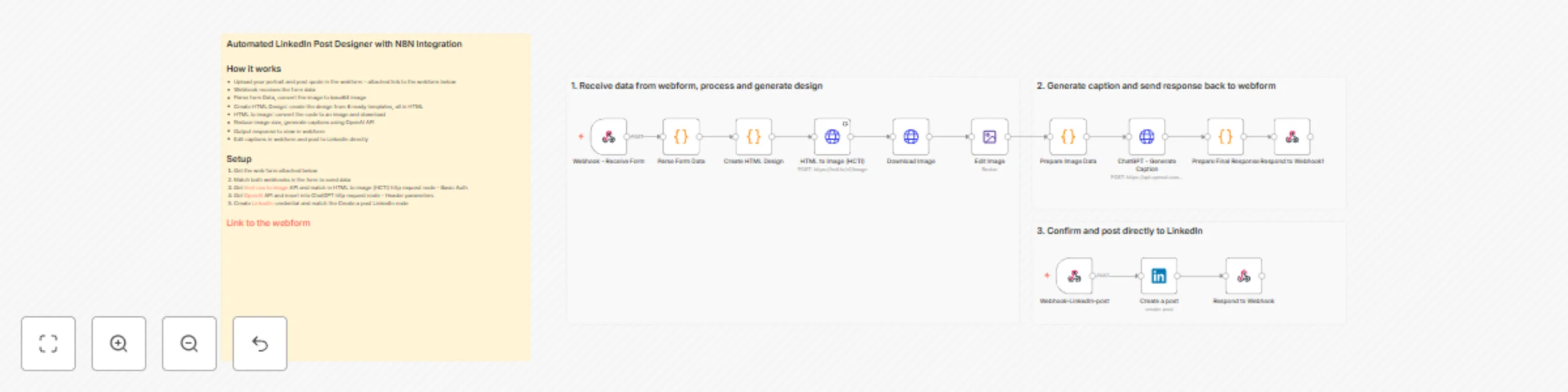
This workflow leverages n8n to automate LinkedIn content creation from start to finish. Upload an image and quote through a web form, and get a professionally designed post with AI generated captio...

Best for

  • Content Creation automation workflows
  • Multimodal AI automation workflows
  • advanced n8n builders looking for reusable templates

Tools used

n8n-nodes-base.webhook, n8n-nodes-base.code, n8n-nodes-base.httprequest, n8n-nodes-base.respondtowebhook, n8n-nodes-base.linkedin, n8n-nodes-base.editimage, n8n-nodes-base.stickynote

Source and attribution

This workflow is cataloged by N8N Workflows and links back to its original n8n.io source page by Gilbert Onyebuchi.

Original n8n.io source

1.1 Workflow description

Title
Design and post LinkedIn content with AI captions and custom templates
Workflow name
Design and post LinkedIn content with AI captions and custom templates

This workflow leverages n8n to automate LinkedIn content creation from start to finish. Upload an image and quote through a web form, and get a professionally designed post with AI-generated captions, ready to publish in seconds.

Features

  • Randomly selects from 6 professional design templates for visual variety
  • Converts HTML designs to high-quality images (90-95% JPEG quality)
  • Generates engaging captions using OpenAI's GPT models
  • Built-in caption editor for customization before posting
  • Direct publishing to LinkedIn profiles or company pages
  • Auto-compresses images for optimal LinkedIn upload

Prerequisites

  1. N8N Instance: A running n8n instance (cloud or self-hosted)
  2. OpenAI API: Active account with API access for caption generation
  3. LinkedIn Account: Profile or company page with API access
  4. Image Conversion API: HTML CSS to Image account
  5. Web Hosting: Platform to host the web form (Netlify, Vercel, or custom server)

Setup Instructions

1. Deploy Web Form

  • Download the provided web form template
  • Host on your preferred platform
  • Copy both webhook URLs from your n8n workflow
  • Update form's webhook endpoints with your n8n URLs

2. Configure Image Conversion

  • Sign up at htmlcsstoimage.com
  • Get your API credentials (User ID + API Key)
  • Add to HTTP Request node as Basic Auth credentials

3. Connect OpenAI API

  • Create API key at OpenAI Platform
  • In the ChatGPT HTTP Request node, add Header parameter:
    • Key: Authorization
    • Value: Bearer YOUR_API_KEY
  • Recommended model: gpt-4 or gpt-3.5-turbo

4. Authenticate LinkedIn

  • Create LinkedIn OAuth2 credential in n8n
  • Follow the authentication flow and grant required permissions
  • Select the credential in the "Create a post" LinkedIn node
  • Choose post destination (personal profile or company page)

5. Test the Workflow

  • Submit test data through the web form
  • Monitor n8n execution panel for successful completion
  • Verify image generation, caption quality, and LinkedIn posting
  • Adjust settings as needed based on results

Notes

  • Processing time averages 10-20 seconds from upload to preview
  • All 6 design templates are fully responsive and LinkedIn-optimized
  • Caption editor allows full customization before publishing to LinkedIn

For questions or issues, please contact me for consulting and support : Linkedin.

🔗 Test with sample data first.

Access Web Form Template

1.2 Logical Blocks

This catalog entry is organized from the workflow JSON. The node-level section below shows the executable blocks available for review before importing the template.

2. Block-by-Block Analysis

Block 1 - Webhook - Receive Form

Type / Role
n8n-nodes-base.webhook - webhook
Config choices
Version 1.1

Block 2 - Create HTML Design

Type / Role
n8n-nodes-base.code - code
Config choices
Version 2

Block 3 - HTML to Image (HCTI)

Type / Role
n8n-nodes-base.httpRequest - httpRequest
Config choices
Version 4.1

Block 4 - Download Image

Type / Role
n8n-nodes-base.httpRequest - httpRequest
Config choices
Version 4.1

Block 5 - Prepare Image Data

Type / Role
n8n-nodes-base.code - code
Config choices
Version 2

Block 6 - Prepare Final Response

Type / Role
n8n-nodes-base.code - code
Config choices
Version 2

Block 7 - Respond to Webhook1

Type / Role
n8n-nodes-base.respondToWebhook - respondToWebhook
Config choices
Version 1

Block 8 - Create a post

Type / Role
n8n-nodes-base.linkedIn - linkedIn
Config choices
Version 1

Block 9 - Webhook-LinkedIn-post

Type / Role
n8n-nodes-base.webhook - webhook
Config choices
Version 2.1

Block 10 - Respond to Webhook

Type / Role
n8n-nodes-base.respondToWebhook - respondToWebhook
Config choices
Version 1.4

Block 11 - Edit Image

Type / Role
n8n-nodes-base.editImage - editImage
Config choices
Version 1

Block 12 - Sticky Note

Type / Role
n8n-nodes-base.stickyNote - stickyNote
Config choices
Version 1

Block 13 - Sticky Note1

Type / Role
n8n-nodes-base.stickyNote - stickyNote
Config choices
Version 1

Block 14 - Parse Form Data

Type / Role
n8n-nodes-base.code - code
Config choices
Version 2

Block 15 - ChatGPT - Generate Caption

Type / Role
n8n-nodes-base.httpRequest - httpRequest
Config choices
Version 4.1

Block 16 - Sticky Note2

Type / Role
n8n-nodes-base.stickyNote - stickyNote
Config choices
Version 1

Block 17 - Sticky Note4

Type / Role
n8n-nodes-base.stickyNote - stickyNote
Config choices
Version 1

3. Summary Table

Workflow Design and post LinkedIn content with AI captions and custom templates
Complexity advanced
Nodes 17
Categories Content Creation, Multimodal AI
Author Gilbert Onyebuchi
Published 09 Dec 2025

4. Reproducing the Workflow from Scratch

  1. 1. Download the workflow JSON

    Use the JSON export at /data/workflows/11620/11620.json as the source template for this automation.

  2. 2. Import the template into n8n

    Open n8n, import the downloaded JSON, and review each node before activating the workflow.

  3. 3. Configure credentials and variables

    Replace placeholder credentials, API keys, webhook URLs, account IDs, and environment-specific values with your own settings.

  4. 4. Test with sample data

    Run the workflow manually or in a staging workspace, inspect node output, and confirm downstream systems receive the expected data.

  5. 5. Activate and monitor

    Enable the workflow only after testing, then monitor executions, errors, and rate limits during the first production runs.

5. General Notes & Resources

Review imported nodes carefully before activation. This catalog entry is intended to help you inspect the workflow structure, understand required services, and find related templates faster.

Node names, credentials, schedules, webhook paths, and external service limits may need adjustment for your workspace.

Frequently asked questions

What does Design and post LinkedIn content with AI captions and custom templates do?

This workflow leverages n8n to automate LinkedIn content creation from start to finish. Upload an image and quote through a web form, and get a professionally designed post with AI generated captio...

What do I need before importing this workflow?

Review the workflow JSON, configure any required credentials in n8n, and test the automation in a safe workspace before using it in production.

Can I customize this workflow?

Yes. Use the block-by-block analysis and the downloadable JSON to inspect each node, then adjust credentials, prompts, schedules, filters, or destinations for your Content Creation, Multimodal AI use case.