Deal stage tracking automation with HighLevel CRM, ClickUp, and Slack

Workflow preview

Workflow preview
100%
Deal stage tracking automation with HighLevel CRM, ClickUp, and Slack preview
Open on n8n.io

Important notice

This workflow is provided as-is. Please review and test before using in production.

1. Workflow Overview

Description This workflow automates the tracking of deal stage updates in HighLevel CRM and syncs them with ClickUp for task management. It filters opportunities based on the most recent update dat...

Best for

  • CRM automation workflows
  • intermediate n8n builders looking for reusable templates

Tools used

n8n-nodes-base.manualtrigger, n8n-nodes-base.stickynote, n8n-nodes-base.highlevel, n8n-nodes-base.if, n8n-nodes-base.clickup, n8n-nodes-base.slack

Source and attribution

This workflow is cataloged by N8N Workflows and links back to its original n8n.io source page by Rahul Joshi.

Original n8n.io source

1.1 Workflow description

Title
Deal stage tracking automation with HighLevel CRM, ClickUp, and Slack
Workflow name
Deal stage tracking automation with HighLevel CRM, ClickUp, and Slack

Description

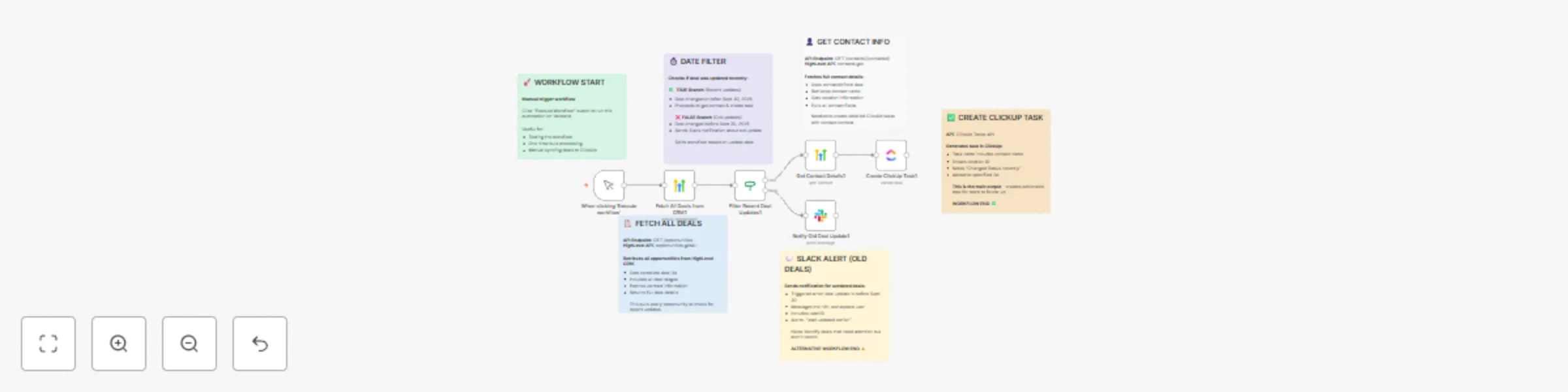
This workflow automates the tracking of deal stage updates in HighLevel CRM and syncs them with ClickUp for task management. It filters opportunities based on the most recent update date, creates actionable tasks in ClickUp for recent deals, and sends Slack alerts when older deal updates are detected. This ensures that your sales and operations teams stay aligned, reducing manual tracking and improving visibility of pipeline activity.

What This Template Does (Step-by-Step)

  • πŸ“‹ Fetch All Deals from HighLevel CRM
  • Pulls a complete list of opportunities with contact details and deal stages.
  • ⏱ Filter Recent Deal Updates
  • Checks if a deal was updated on/after a specific date (e.g., Sept 30, 2025).
  • πŸ”€ Route Deals via If Node
  • βœ… Recent Updates β†’ Proceed to get contact details & create a task in ClickUp.
  • ❌ Older Updates β†’ Trigger a Slack notification for awareness.
  • πŸ‘€ Get Contact Information
  • Retrieves full contact details (name, location ID, etc.) from HighLevel for better context in tasks.
  • πŸ—‚ Create ClickUp Task
  • Generates a new ClickUp task containing deal and contact information, ensuring your team has actionable follow-up tasks.
  • πŸ’¬ Send Slack Notification
  • Notifies a specified Slack user when a deal update is older than the defined threshold, highlighting deals that may need attention.

Prerequisites

  • HighLevel CRM account & API credentials
  • ClickUp account & API credentials
  • Slack workspace & API credentials
  • n8n instance (cloud or self-hosted)

Step-by-Step Setup

  • Connect HighLevel CRM β†’ Fetch all opportunities.
  • Apply Date Filter (If Node) β†’ Split deals into recent vs. old updates.
  • Recent Deals β†’ Fetch contact details β†’ Create task in ClickUp.
  • Old Deals β†’ Send Slack notification to assigned user.

Customization Ideas

🎯 Adjust the date threshold for β€œrecent updates.” πŸ“’ Add Slack/Teams alerts for new deals as well. πŸ“š Sync ClickUp tasks into Notion or Airtable for reporting. πŸ’‘ Enrich ClickUp tasks with deal value, stage, or assigned salesperson.

Key Benefits

βœ… Keeps deal updates transparent and organized βœ… Ensures no recent deal activity is missed βœ… Automates ClickUp task creation for sales follow-ups βœ… Sends real-time Slack alerts for old updates βœ… 100% automated, customizable workflow

Perfect For

πŸ‘₯ Sales teams managing multiple deals daily 🏒 Companies using HighLevel CRM & ClickUp 🎯 Teams wanting instant visibility into pipeline changes πŸ“Š Managers tracking deal activity timelines

1.2 Logical Blocks

This catalog entry is organized from the workflow JSON. The node-level section below shows the executable blocks available for review before importing the template.

2. Block-by-Block Analysis

Block 1 - When clicking β€˜Execute workflow’

Type / Role
n8n-nodes-base.manualTrigger - manualTrigger
Config choices
Version 1

Block 2 - Sticky Note - Workflow Start

Type / Role
n8n-nodes-base.stickyNote - stickyNote
Config choices
Version 1

Block 3 - Sticky Note - Fetch Deals

Type / Role
n8n-nodes-base.stickyNote - stickyNote
Config choices
Version 1

Block 4 - Sticky Note - Date Filter

Type / Role
n8n-nodes-base.stickyNote - stickyNote
Config choices
Version 1

Block 5 - Sticky Note - Get Contact

Type / Role
n8n-nodes-base.stickyNote - stickyNote
Config choices
Version 1

Block 6 - Sticky Note - Create Task

Type / Role
n8n-nodes-base.stickyNote - stickyNote
Config choices
Version 1

Block 7 - Sticky Note - Slack Alert

Type / Role
n8n-nodes-base.stickyNote - stickyNote
Config choices
Version 1

Block 8 - Fetch All Deals from CRM1

Type / Role
n8n-nodes-base.highLevel - highLevel
Config choices
Version 2

Block 9 - Filter Recent Deal Updates1

Type / Role
n8n-nodes-base.if - if
Config choices
Version 2.2

Block 10 - Get Contact Details1

Type / Role
n8n-nodes-base.highLevel - highLevel
Config choices
Version 2

Block 11 - Create ClickUp Task1

Type / Role
n8n-nodes-base.clickUp - clickUp
Config choices
Version 1

Block 12 - Notify Old Deal Update1

Type / Role
n8n-nodes-base.slack - slack
Config choices
Version 2.3

3. Summary Table

Workflow Deal stage tracking automation with HighLevel CRM, ClickUp, and Slack
Complexity intermediate
Nodes 12
Categories CRM
Author Rahul Joshi
Published 03 Oct 2025

4. Reproducing the Workflow from Scratch

  1. 1. Download the workflow JSON

    Use the JSON export at /data/workflows/9239/9239.json as the source template for this automation.

  2. 2. Import the template into n8n

    Open n8n, import the downloaded JSON, and review each node before activating the workflow.

  3. 3. Configure credentials and variables

    Replace placeholder credentials, API keys, webhook URLs, account IDs, and environment-specific values with your own settings.

  4. 4. Test with sample data

    Run the workflow manually or in a staging workspace, inspect node output, and confirm downstream systems receive the expected data.

  5. 5. Activate and monitor

    Enable the workflow only after testing, then monitor executions, errors, and rate limits during the first production runs.

5. General Notes & Resources

Review imported nodes carefully before activation. This catalog entry is intended to help you inspect the workflow structure, understand required services, and find related templates faster.

Node names, credentials, schedules, webhook paths, and external service limits may need adjustment for your workspace.

Frequently asked questions

What does Deal stage tracking automation with HighLevel CRM, ClickUp, and Slack do?

Description This workflow automates the tracking of deal stage updates in HighLevel CRM and syncs them with ClickUp for task management. It filters opportunities based on the most recent update dat...

What do I need before importing this workflow?

Review the workflow JSON, configure any required credentials in n8n, and test the automation in a safe workspace before using it in production.

Can I customize this workflow?

Yes. Use the block-by-block analysis and the downloadable JSON to inspect each node, then adjust credentials, prompts, schedules, filters, or destinations for your CRM use case.