Daily swing trade ideas with GPT-4, Yahoo Finance, Google Sheets & Telegram

Workflow preview

Workflow preview
100%
Daily swing trade ideas with GPT-4, Yahoo Finance, Google Sheets & Telegram preview
Open on n8n.io

Important notice

This workflow is provided as-is. Please review and test before using in production.

1. Workflow Overview

Automated daily swing‑trade ideas from end‑of‑day (EOD) data, scored by an LLM, logged to Google Sheets, and pushed to Telegram. What this workflow does Fetches EOD quotes for a chosen stock univer...

Best for

  • AI Summarization automation workflows
  • Multimodal AI automation workflows
  • intermediate n8n builders looking for reusable templates

Tools used

n8n-nodes-base.httprequest, n8n-nodes-base.code, @n8n/n8n-nodes-langchain.openai, n8n-nodes-base.googlesheets, n8n-nodes-base.telegram, n8n-nodes-base.scheduletrigger, n8n-nodes-base.stickynote

Source and attribution

This workflow is cataloged by N8N Workflows and links back to its original n8n.io source page by Nishant.

Original n8n.io source

1.1 Workflow description

Title
Daily swing trade ideas with GPT-4, Yahoo Finance, Google Sheets & Telegram
Workflow name
Daily swing trade ideas with GPT-4, Yahoo Finance, Google Sheets & Telegram

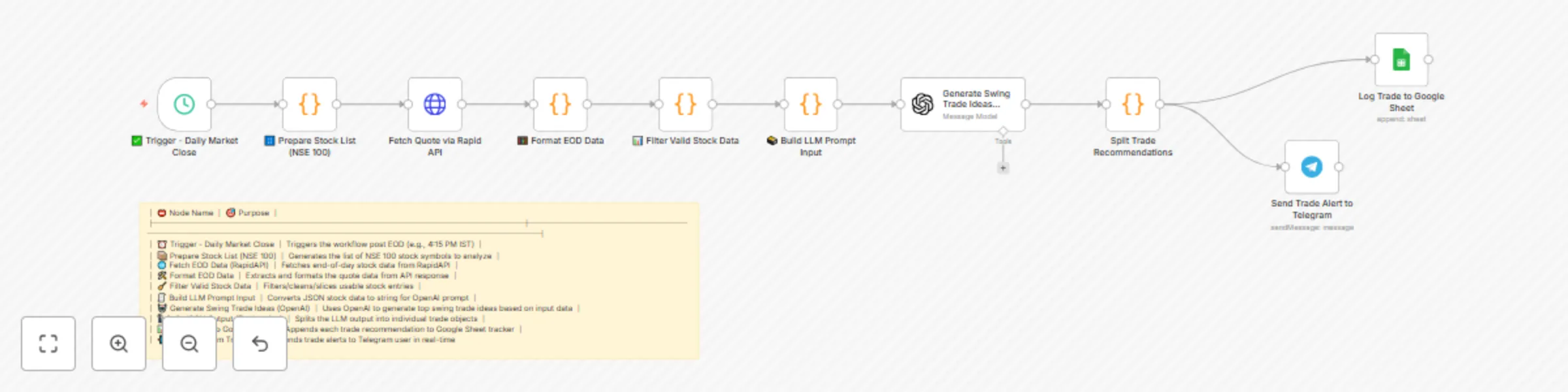
Automated daily swing‑trade ideas from end‑of‑day (EOD) data, scored by an LLM, logged to Google Sheets, and pushed to Telegram.


What this workflow does

  • Fetches EOD quotes for a chosen stock universe (example: NSE‑100 via RapidAPI).
  • Cleans & filters the universe using simple technical/quality gates (e.g., price/volume sanity, avoid illiquid names).
  • Packages market context and feeds it to OpenAI with a strict JSON schema to produce top swing‑trade recommendations (entry, target, stop, rationale).
  • Splits structured output into rows and logs them to a Google Sheet for tracking.
  • Sends an alert with the day’s trade ideas to Telegram (channel or DM).

Ideal for

  • Retail traders who want a daily, hands‑off idea generator.
  • PMs/engineers prototyping LLM‑assisted quant sidekicks.
  • Creators who publish daily trade notes to their audience.

Tech stack

  • n8n (orchestration)
  • RapidAPI (EOD quotes; pluggable data source)
  • OpenAI (LLM for idea generation)
  • Google Sheets (logging & performance tracker)
  • Telegram (alerts)

Prerequisites

  1. RapidAPI key with access to an EOD quotes endpoint for your exchange.
  2. OpenAI API key.
  3. Google account with a Sheet named Trade_Recommendations_Tracker (or update the node).
  4. Telegram bot token (via @BotFather) and destination chat ID.

> You can replace any of the above vendors with equivalents (e.g., Alpha Vantage, Twelve Data, Polygon, etc.). Only the HTTP Request + Format nodes need tweaks.


Environment variables

Key Example Used in
RAPIDAPI_KEY xxxxxxxxxxxxxxxxxxxxxxxx HTTP Request (quotes)
OPENAI_API_KEY sk-… OpenAI node
TELEGRAM_BOT_TOKEN 123456:ABC-DEF… Telegram node
TELEGRAM_CHAT_ID 5357385827 Telegram node

Google Sheet schema

Create a Sheet (tab: EOD_Ideas) with the headers:

Date, Symbol, Direction, Entry, Target, StopLoss, Confidence, Reason, SourceModel, UniverseTag

Node map (name → purpose)

  1. Trigger – Daily Market Close → Fires daily after market close (e.g., 4:15 PM IST).
  2. Prepare Stock List (NSE 100) → Provides stock symbols to analyze (static list or from a Sheet/API).
  3. Fetch EOD Data (RapidAPI) → Gets EOD data for all symbols in one or batched calls.
  4. Format EOD Data → Normalizes API response to a clean array (symbol, close, high, low, volume, etc.).
  5. Filter Valid Stock Data → Drops illiquid/invalid rows (e.g., volume > 200k, close > 50).
  6. Build LLM Prompt Input → Creates compact market context & JSON instructions for the model.
  7. Generate Swing Trade Ideas (OpenAI) → Returns strict JSON with top ideas.
  8. Split JSON Output (Trade‑wise) → Explodes the JSON array into individual items.
  9. Log Trade to Google Sheet → Appends each idea as a row.
  10. Send Trade Alert to Telegram → Publishes a concise summary to Telegram.

1.2 Logical Blocks

This catalog entry is organized from the workflow JSON. The node-level section below shows the executable blocks available for review before importing the template.

2. Block-by-Block Analysis

Block 1 - Fetch Quote via Rapid API

Type / Role
n8n-nodes-base.httpRequest - httpRequest
Config choices
Version 4.2

Block 2 - Split Trade Recommendations

Type / Role
n8n-nodes-base.code - code
Config choices
Version 2

Block 3 - Generate Swing Trade Ideas (OpenAI)

Type / Role
@n8n/n8n-nodes-langchain.openAi - openAi
Config choices
Version 1.8

Block 4 - Log Trade to Google Sheet

Type / Role
n8n-nodes-base.googleSheets - googleSheets
Config choices
Version 4.5

Block 5 - Send Trade Alert to Telegram

Type / Role
n8n-nodes-base.telegram - telegram
Config choices
Version 1.2

Block 6 - ✅ Trigger - Daily Market Close

Type / Role
n8n-nodes-base.scheduleTrigger - scheduleTrigger
Config choices
Version 1.2

Block 7 - 🔢 Prepare Stock List (NSE 100)

Type / Role
n8n-nodes-base.code - code
Config choices
Version 2

Block 8 - 🧮 Format EOD Data

Type / Role
n8n-nodes-base.code - code
Config choices
Version 2

Block 9 - 📊 Filter Valid Stock Data

Type / Role
n8n-nodes-base.code - code
Config choices
Version 2

Block 10 - 🗃️ Build LLM Prompt Input

Type / Role
n8n-nodes-base.code - code
Config choices
Version 2

Block 11 - Sticky Note

Type / Role
n8n-nodes-base.stickyNote - stickyNote
Config choices
Version 1

3. Summary Table

Workflow Daily swing trade ideas with GPT-4, Yahoo Finance, Google Sheets & Telegram
Complexity intermediate
Nodes 11
Categories AI Summarization, Multimodal AI
Author Nishant
Published 26 Aug 2025

4. Reproducing the Workflow from Scratch

  1. 1. Download the workflow JSON

    Use the JSON export at /data/workflows/7884/7884.json as the source template for this automation.

  2. 2. Import the template into n8n

    Open n8n, import the downloaded JSON, and review each node before activating the workflow.

  3. 3. Configure credentials and variables

    Replace placeholder credentials, API keys, webhook URLs, account IDs, and environment-specific values with your own settings.

  4. 4. Test with sample data

    Run the workflow manually or in a staging workspace, inspect node output, and confirm downstream systems receive the expected data.

  5. 5. Activate and monitor

    Enable the workflow only after testing, then monitor executions, errors, and rate limits during the first production runs.

5. General Notes & Resources

Review imported nodes carefully before activation. This catalog entry is intended to help you inspect the workflow structure, understand required services, and find related templates faster.

Node names, credentials, schedules, webhook paths, and external service limits may need adjustment for your workspace.

Frequently asked questions

What does Daily swing trade ideas with GPT-4, Yahoo Finance, Google Sheets & Telegram do?

Automated daily swing‑trade ideas from end‑of‑day (EOD) data, scored by an LLM, logged to Google Sheets, and pushed to Telegram. What this workflow does Fetches EOD quotes for a chosen stock univer...

What do I need before importing this workflow?

Review the workflow JSON, configure any required credentials in n8n, and test the automation in a safe workspace before using it in production.

Can I customize this workflow?

Yes. Use the block-by-block analysis and the downloadable JSON to inspect each node, then adjust credentials, prompts, schedules, filters, or destinations for your AI Summarization, Multimodal AI use case.