N

Nishant

3
Workflows

Workflows by Nishant
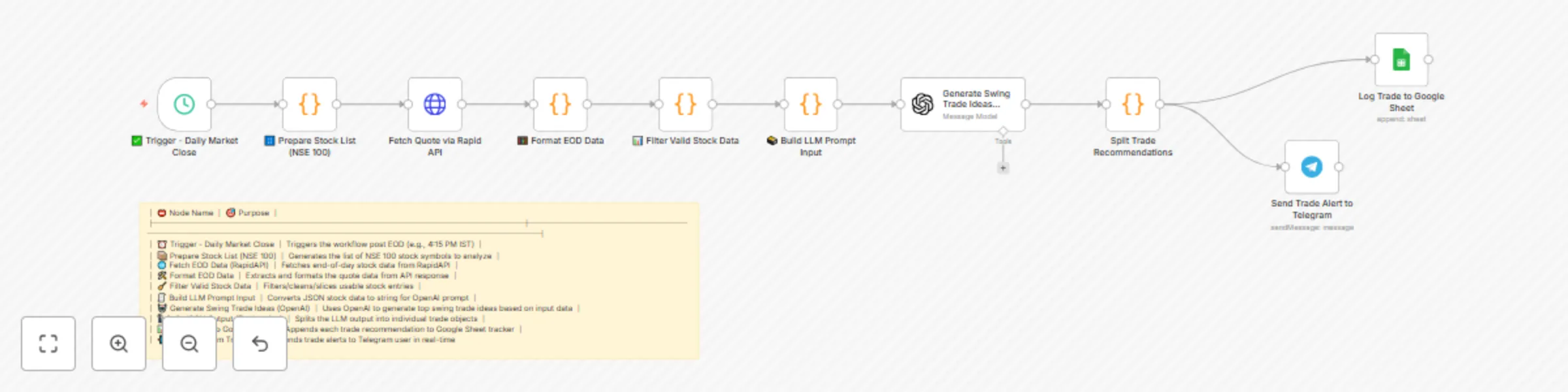
Workflow preview: Daily swing trade ideas with GPT-4, Yahoo Finance, Google Sheets & Telegram
Free intermediate

Daily swing trade ideas with GPT-4, Yahoo Finance, Google Sheets & Telegram

# **Automated daily swing‑trade ideas from end‑of‑day (EOD) data, scored by an LLM, logged to Google Sheets, and pushed to Telegram.** --- ## What this workflow does * **Fetches EOD quotes** for a chosen stock universe (example: **NSE‑100** via RapidAPI). * **Cleans & filters** the universe using simple technical/quality gates (e.g., price/volume sanity, avoid illiquid names). * **Packages market context** and feeds it to **OpenAI** with a strict **JSON schema** to produce **top swing‑trade recommendations** (entry, target, stop, rationale). * **Splits structured output** into rows and **logs** them to a **Google Sheet** for tracking. * **Sends an alert** with the day’s trade ideas to **Telegram** (channel or DM). --- ## Ideal for * Retail traders who want a **daily, hands‑off idea generator**. * PMs/engineers prototyping **LLM‑assisted quant sidekicks**. * Creators who publish **daily trade notes** to their audience. --- ## Tech stack * **n8n** (orchestration) * **RapidAPI** (EOD quotes; pluggable data source) * **OpenAI** (LLM for idea generation) * **Google Sheets** (logging & performance tracker) * **Telegram** (alerts) --- ## Prerequisites 1. **RapidAPI key** with access to an EOD quotes endpoint for your exchange. 2. **OpenAI API key**. 3. **Google account** with a Sheet named `Trade_Recommendations_Tracker` (or update the node). 4. **Telegram bot token** (via @BotFather) and destination **chat ID**. > You can replace any of the above vendors with equivalents (e.g., Alpha Vantage, Twelve Data, Polygon, etc.). Only the **HTTP Request** + **Format** nodes need tweaks. --- ## Environment variables | Key | Example | Used in | | -------------------- | -------------------------- | --------------------- | | `RAPIDAPI_KEY` | `xxxxxxxxxxxxxxxxxxxxxxxx` | HTTP Request (quotes) | | `OPENAI_API_KEY` | `sk-…` | OpenAI node | | `TELEGRAM_BOT_TOKEN` | `123456:ABC-DEF…` | Telegram node | | `TELEGRAM_CHAT_ID` | `5357385827` | Telegram node | --- ## Google Sheet schema Create a Sheet (tab: `EOD_Ideas`) with the headers: ``` Date, Symbol, Direction, Entry, Target, StopLoss, Confidence, Reason, SourceModel, UniverseTag ``` ## Node map (name → purpose) 1. **Trigger – Daily Market Close** → Fires daily after market close (e.g., 4:15 PM IST). 2. **Prepare Stock List (NSE 100)** → Provides stock symbols to analyze (static list or from a Sheet/API). 3. **Fetch EOD Data (RapidAPI)** → Gets EOD data for all symbols in one or batched calls. 4. **Format EOD Data** → Normalizes API response to a clean array (symbol, close, high, low, volume, etc.). 5. **Filter Valid Stock Data** → Drops illiquid/invalid rows (e.g., `volume > 200k`, `close > 50`). 6. **Build LLM Prompt Input** → Creates compact market context & JSON instructions for the model. 7. **Generate Swing Trade Ideas (OpenAI)** → Returns **strict JSON** with top ideas. 8. **Split JSON Output (Trade‑wise)** → Explodes the JSON array into individual items. 9. **Log Trade to Google Sheet** → Appends each idea as a row. 10. **Send Trade Alert to Telegram** → Publishes a concise summary to Telegram.

N
Nishant
AI Summarization
26 Aug 2025
2722
0

Workflow preview: AI-powered credit card recommendation system with OpenAI GPT, Telegram & Google Sheets
Free advanced

AI-powered credit card recommendation system with OpenAI GPT, Telegram & Google Sheets

Overview Confused which credit card to actually get or swipe? With 100+ cards in the market, hidden caps, and milestone rules, most people end up leaving rewards, perks, and cashback on the table. This workflow uses n8n + GPT + Google Sheets + Telegram to recommend the best credit card for each user’s lifestyle in under 3 seconds, while keeping the logic transparent with a ₹-value breakdown. What does this workflow do? This workflow: Captures User Inputs – Users answer a 7-question lifestyle quiz via Telegram. Stores Responses – Google Sheets logs all answers for resumption & deduplication. Scores Answers – n8n Function nodes map single & multi-select inputs into scores. Generates Recommendations – GPT analyses profile vs. 30+ card dataset. Breaks Down Value – Outputs a transparent table of rewards, milestones, lounge value. Delivers Results – Top 3 card picks returned instantly on Telegram. Why is this useful? Most card comparison tools only list features — they don’t personalise or calculate actual value. This workflow builds a decision engine: 🔍 Personalised → matches lifestyle to best-fit cards 💸 Transparent → shows value in real currency (rewards, milestones, lounges) ⏱ Fast → answers in under 3 seconds 🗂 Organised → Google Sheets keeps audit trail of every user + dedupe Tools used n8n (Orchestrator): Orchestration + logic branching Telegram: User-facing quiz bot Google Sheets: Database of credit cards + logs of user answers OpenAI (GPT): Analyses user profile & generates recommendations Who is this for? 🧑‍💻 Fintech product builders → see how AI can power recommendation engines 💳 Cardholders → understand which card fits their lifestyle best ⚙️ n8n makers → learn how to combine Sheets + GPT + chat interface into one workflow 🌍 How to adapt it for your country/location This workflow uses a credit card dataset stored in Google Sheets. To make it work for your country: Build your dataset → scrape or collect card details from banks, comparison sites, or official portals Fields to include: Fees, Reward rate, Lounge access, Forex markup, Reward caps, Milestones, Eligibility. You can use web crawlers (e.g., Apify, PhantomBuster) to automate data collection. Update the Google Sheet → replace the India dataset with your country’s cards. Adjust scoring logic → modify Function nodes if your cards use different reward structures (e.g., cashback %, miles, points value). Run the workflow → GPT will analyse against the new dataset and generate recommendations specific to your country. This makes the workflow flexible for any geography. Workflow Highlights ✅ End-to-end credit card recommendation pipeline (quiz → scoring → GPT → result) ✅ Handles single + multi-select inputs fairly with % match scoring ✅ Transparent value breakdown in local currency (rewards, milestones, lounge access) ✅ Google Sheets for persistence, dedupe & audit trail ✅ Delivers top 3 cards in <3 seconds on Telegram ✅ Fully customisable for any country by swapping the dataset

N
Nishant
AI Chatbot
22 Aug 2025
322
0

Workflow preview: LinkedIn content factory: Auto-generate posts with GPT-5, DALL·E & Google Sheets
Free advanced

LinkedIn content factory: Auto-generate posts with GPT-5, DALL·E & Google Sheets

Overview Tired of cookie-cutter “AI LinkedIn post generators”? This workflow goes beyond just text generation — it orchestrates the entire lifecycle of a LinkedIn post. From idea capture to deduplication, from GPT-powered drafting to automatic image generation and link storage, it creates ready-to-publish posts while keeping your content unique and audit-friendly. What does this workflow do? This workflow: Captures Ideas & Briefs – Inputs are logged in Google Sheets with audience, goals, and angles. Deduplicates Smartly – Avoids repeating hooks or ideas with fuzzy GPT-based dedupe + GSheet logs. Generates Posts – GPT (OpenAI) drafts sharp LinkedIn-ready posts based on your brief. Creates Images – Post hook + body is sent to an Image Gen model (DALL·E / SDXL) → PNG asset. Stores & Links – Final text + image uploaded to Google Drive with shareable links. Audit Trail – GSheets keeps full history: raw idea, draft, final post, assets, notes. Why is this useful? Most “AI post generators” just spit out text. This workflow builds a real publishing pipeline: 🔄 No duplicates → keeps posts fresh & original. 🖼 Images included → auto-generated visuals increase engagement on LinkedIn. 📊 Audit-ready → every post has a traceable log in Sheets. ⚡ Fast iteration → from half-baked thought → polished post in minutes. Tools used n8n (Orchestrator): Automates triggers, merges, retries, and Google connectors. OpenAI (LLM): Idea generation, drafting, fuzzy dedupe, and voice conformity. Google Sheets: Source of truth — stores ideas, dedupe logs, audit trail. Google Drive: Stores rendered images and shares links for publishing. Image Generation (DALL·E / SDXL): Creates header graphics from hook + body. Who is this for? 🧑‍💻 Product Managers / Founders who want to post consistently but don’t have time. 🎨 Creators who want to add unique visuals without hiring a designer. ⚙️ n8n Builders who want to see how AI + automation + storage can be stitched into one pipeline. Workflow Highlights ✅ Full content pipeline (ideas → images → final copy). ✅ GPT-based fuzzy dedupe to avoid repetition. ✅ Auto-generated images for higher engagement. ✅ Clean logs in Google Sheets for future reuse & audits. ✅ Ready-to-publish LinkedIn post in minutes.

N
Nishant
Content Creation
19 Aug 2025
1332
0