Block 1 - Run Every Day at 08:00 PT
- Type / Role
- n8n-nodes-base.scheduleTrigger - scheduleTrigger
- Config choices
- Version 1.2


 Early Deal
This workflow is provided as-is. Please review and test before using in production.
Automated Solana News Tracker with AI Powered Weekly Summaries Never miss important Solana ecosystem updates again. This production ready workflow automatically scrapes crypto news daily, intellige...
n8n-nodes-base.scheduletrigger, n8n-nodes-base.httprequest, n8n-nodes-base.stickynote, n8n-nodes-base.code, n8n-nodes-base.googlesheets, n8n-nodes-base.merge, n8n-nodes-base.if, n8n-nodes-base.aggregate
This workflow is cataloged by N8N Workflows and links back to its original n8n.io source page by Anatoly.
Original n8n.io sourceNever miss important Solana ecosystem updates again. This production-ready workflow automatically scrapes crypto news daily, intelligently filters duplicates, stores everything in Google Sheets, and generates AI-powered weekly summaries every Monday—completely hands-free.
🎯 What It Does:
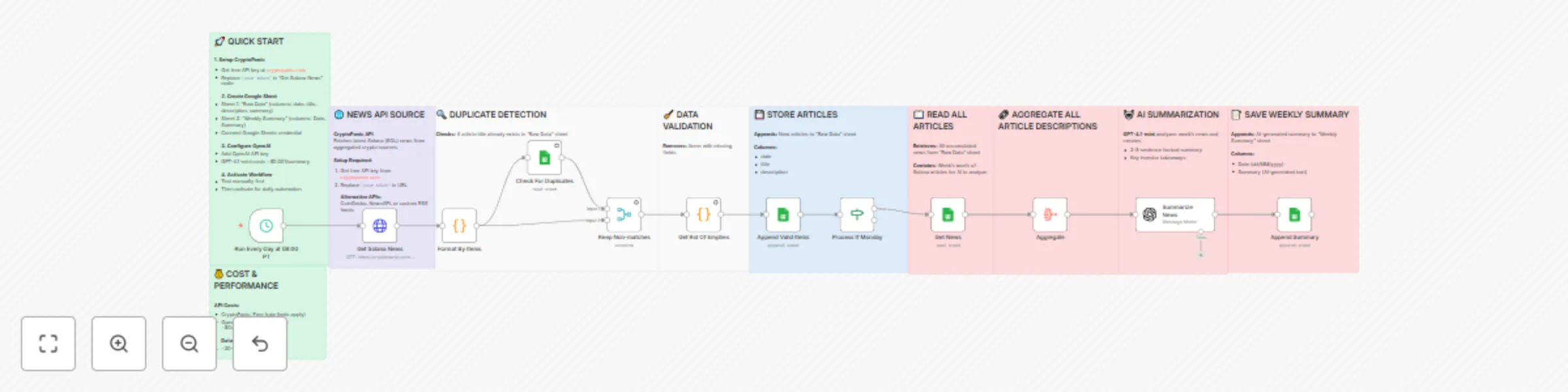
This intelligent automation runs on autopilot to keep you informed about Solana developments without manual monitoring. Every day at 8 AM PT, it fetches the latest Solana news from CryptoPanic, checks for duplicates against your existing database, and stores only new articles in Google Sheets. On Mondays, it takes an extra step: reading all accumulated articles from the past week and using GPT-4.1-mini to generate a concise, factual summary of key developments and investor takeaways.
💼 Perfect For:
Crypto traders tracking market-moving news • SOL investors monitoring ecosystem growth • Blockchain researchers building historical datasets • Content creators sourcing newsletter material • Portfolio managers needing daily briefings • Anyone wanting Solana updates without information overload
🔧 How It Works:
The workflow operates in two distinct modes based on the day of the week. During the daily collection phase (Tuesday-Sunday), it runs at 8 AM PT, fetches the latest Solana news from CryptoPanic, formats the data to extract titles, descriptions, and timestamps, checks each article against your Google Sheets database to identify duplicates, filters out any articles that already exist or have missing data, and appends only valid new articles to your "Raw Data" sheet.
On Mondays, the workflow performs all daily tasks plus an additional summarization step. After storing new articles, it retrieves all accumulated news from the "Raw Data" sheet, aggregates all article descriptions into a single text block, sends this consolidated information to GPT-4.1-mini with instructions to create a factual, spartan-toned summary highlighting key investor takeaways, and saves the AI-generated summary with a timestamp to the "Weekly Summary" sheet for historical reference.
✨ Key Features:
📋 Requirements:
⚡ Quick Setup:
Register for a free CryptoPanic API key and replace [your token] in the "Get Solana News" HTTP Request node URL. Create a new Google Spreadsheet with two sheets: one named "Raw Data" with columns for date, title, descripton (note the typo in template), and summary; another named "Weekly Summary" with columns for Date and Summary. Connect your Google Sheets OAuth2 credential to all Google Sheets nodes in the workflow. Add your OpenAI API credential to the "Summarize News" node. Test the workflow manually to ensure it fetches news and stores it correctly. Activate the workflow to enable daily automatic execution.
🚨 Please note, that you're not able to get news in real-time with a FREE CryptoPanic API. Consider their pro plan or another platform for real-time news scraping
You'll get new that's up to date as of yesterday.
🎁 What You Get:
Complete end-to-end automation with concise sticky note documentation at each workflow stage, pre-configured duplicate detection logic, AI summarization with investor-focused prompts optimized for factual analysis without hype, dual-sheet Google Sheets structure for raw data and summaries, flexible schedule trigger you can adjust to any timezone, example data in pinned format showing expected API responses, customization guides for different cryptocurrencies and summary frequencies, and troubleshooting checklist for common setup issues.
💰 Expected Costs & Performance:
CryptoPanic API is free with reasonable rate limits for personal use. OpenAI GPT-4.1-mini costs approximately $0.001 per summary, totaling about $0.05 per month for weekly summaries. The workflow typically processes 20-50 articles daily and generates one summary weekly from 140-350 accumulated articles. Daily executions complete in 5-10 seconds, while Monday runs with AI summarization take 15-20 seconds. Google Sheets provides free storage for up to 5 million cells, easily handling years of news data.
🔄 Customization Ideas:
Track different cryptocurrencies by changing the currencies parameter (btc, eth, ada, doge, etc.). Adjust the schedule trigger to run at different times matching your timezone. Modify the Monday check condition to generate summaries on different days or multiple times per week. Connect Slack, Discord, or Email nodes to receive instant notifications when summaries are generated. Edit the AI prompt to change tone, detail level, or focus on specific aspects like price action, development updates, or partnerships. Add conditional logic to send alerts only when certain keywords appear in news (like "hack," "partnership," or "upgrade").
This catalog entry is organized from the workflow JSON. The node-level section below shows the executable blocks available for review before importing the template.
| Workflow | Daily Solana news tracker with GPT-4.1-mini weekly summaries in Google Sheets |
|---|---|
| Complexity | advanced |
| Nodes | 22 |
| Categories | Market Research, AI Summarization |
| Author | Anatoly |
| Published | 18 Oct 2025 |
Use the JSON export at /data/workflows/9874/9874.json as the source template for this automation.
Open n8n, import the downloaded JSON, and review each node before activating the workflow.
Replace placeholder credentials, API keys, webhook URLs, account IDs, and environment-specific values with your own settings.
Run the workflow manually or in a staging workspace, inspect node output, and confirm downstream systems receive the expected data.
Enable the workflow only after testing, then monitor executions, errors, and rate limits during the first production runs.
Review imported nodes carefully before activation. This catalog entry is intended to help you inspect the workflow structure, understand required services, and find related templates faster.
Node names, credentials, schedules, webhook paths, and external service limits may need adjustment for your workspace.
Automated Solana News Tracker with AI Powered Weekly Summaries Never miss important Solana ecosystem updates again. This production ready workflow automatically scrapes crypto news daily, intellige...
Review the workflow JSON, configure any required credentials in n8n, and test the automation in a safe workspace before using it in production.
Yes. Use the block-by-block analysis and the downloadable JSON to inspect each node, then adjust credentials, prompts, schedules, filters, or destinations for your Market Research, AI Summarization use case.