Block 1 - Daily 9AM Trigger
- Type / Role
- n8n-nodes-base.scheduleTrigger - scheduleTrigger
- Config choices
- Version 1.1


 Early Deal
This workflow is provided as-is. Please review and test before using in production.
This n8n workflow automatically scrapes the latest posts from a specified Reddit subreddit every day at 9 AM and sends a neatly formatted HTML email summary to your inbox. It highlights new communi...
n8n-nodes-base.scheduletrigger, n8n-nodes-base.code, n8n-nodes-base.gmail, n8n-nodes-base.stickynote, n8n-nodes-base.httprequest
This workflow is cataloged by N8N Workflows and links back to its original n8n.io source page by Agentick AI.
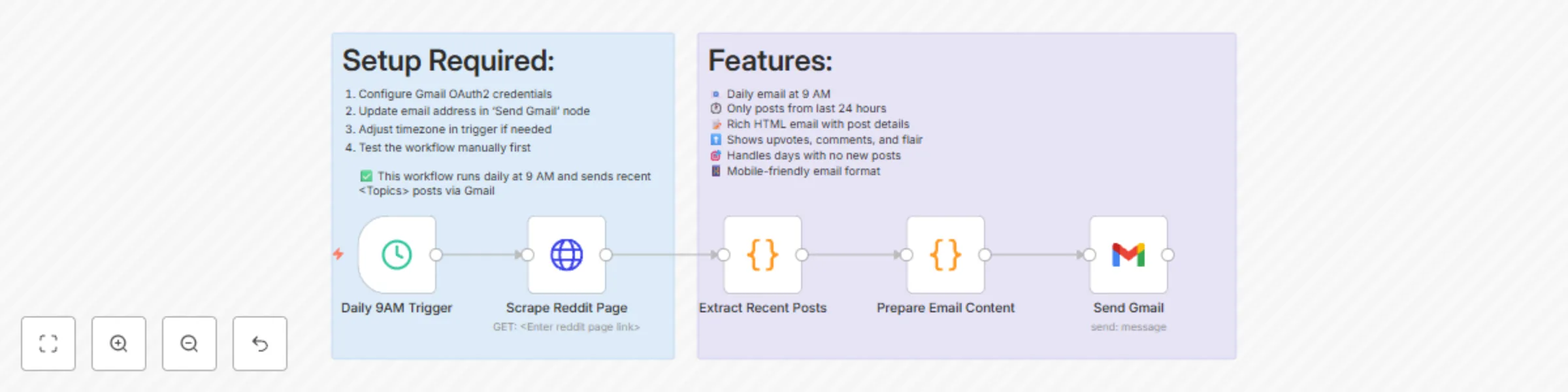
Original n8n.io sourceThis n8n workflow automatically scrapes the latest posts from a specified Reddit subreddit every day at 9 AM and sends a neatly formatted HTML email summary to your inbox. It highlights new community posts, including post details like title, author, flair, upvotes, comments, and a brief preview — making it ideal for content curators, community managers, or Reddit enthusiasts who want daily updates.
Trigger: The schedule node runs the workflow once every 24 hours at 9:00 AM.
Reddit Scrape: A request is made to the desired subreddit (defined in the HTTP Request node) to pull post data.
Filter & Format: JavaScript code filters posts created in the last 24 hours and transforms the data into structured summaries.
Email Composition: A dynamic HTML email is generated summarizing the post details. If no new posts are found, a fallback message is displayed.
Email Delivery: Gmail node sends the email with subject, content, and timestamp.
✅ Stay informed about the latest subreddit activity.
✅ Automate daily newsletters for Reddit topics.
✅ Monitor niche communities for engagement trends.
Reddit subreddit link (set in the HTTP Request node).
Gmail account with OAuth2 credentials set up in n8n.
User-Agent string customized for your Reddit scraping.
Adjust schedule as per your preferred timezone.
Google Sheet Setup (Not required for this workflow) No sheet integration is involved here.
You can personalize this workflow by:
Replacing the User-Agent value with a meaningful identifier to avoid Reddit rate-limiting.
Updating the subreddit URL in the HTTP Request node.
Changing the Gmail recipient address in the Send Gmail node.
Tweaking the HTML email styling in the Prepare Email Content node.
Adjusting schedule time/frequency in the Trigger node.
This catalog entry is organized from the workflow JSON. The node-level section below shows the executable blocks available for review before importing the template.
| Workflow | Daily Reddit posts digest to Gmail |
|---|---|
| Complexity | intermediate |
| Nodes | 7 |
| Categories | Personal Productivity |
| Author | Agentick AI |
| Published | 09 Jul 2025 |
Use the JSON export at /data/workflows/5804/5804.json as the source template for this automation.
Open n8n, import the downloaded JSON, and review each node before activating the workflow.
Replace placeholder credentials, API keys, webhook URLs, account IDs, and environment-specific values with your own settings.
Run the workflow manually or in a staging workspace, inspect node output, and confirm downstream systems receive the expected data.
Enable the workflow only after testing, then monitor executions, errors, and rate limits during the first production runs.
Review imported nodes carefully before activation. This catalog entry is intended to help you inspect the workflow structure, understand required services, and find related templates faster.
Node names, credentials, schedules, webhook paths, and external service limits may need adjustment for your workspace.
This n8n workflow automatically scrapes the latest posts from a specified Reddit subreddit every day at 9 AM and sends a neatly formatted HTML email summary to your inbox. It highlights new communi...
Review the workflow JSON, configure any required credentials in n8n, and test the automation in a safe workspace before using it in production.
Yes. Use the block-by-block analysis and the downloadable JSON to inspect each node, then adjust credentials, prompts, schedules, filters, or destinations for your Personal Productivity use case.