Agentick AI
Workflows by Agentick AI
Daily Reddit posts digest to Gmail
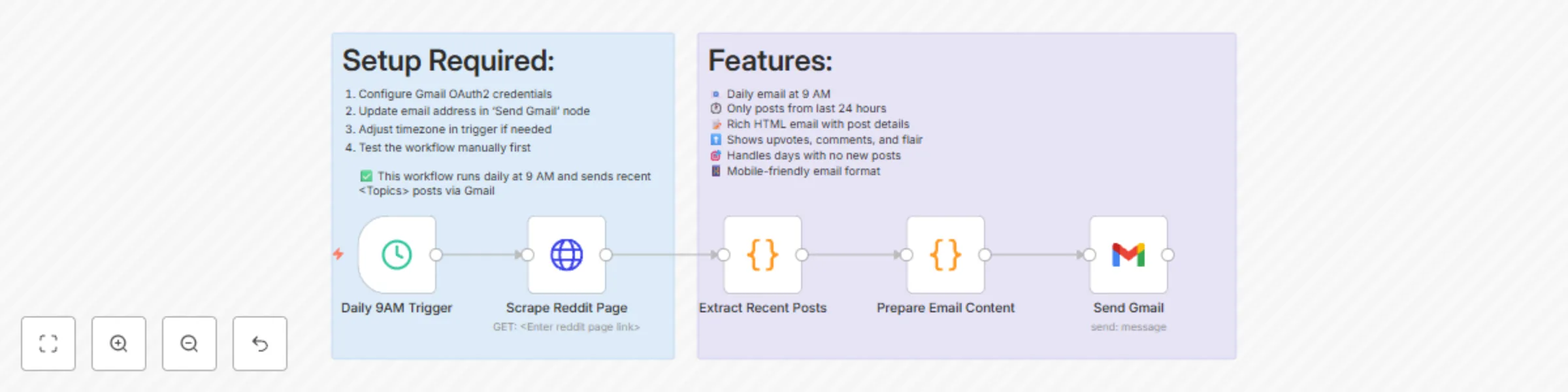
**This n8n workflow automatically scrapes the latest posts from a specified Reddit subreddit every day at 9 AM and sends a neatly formatted HTML email summary to your inbox. It highlights new community posts, including post details like title, author, flair, upvotes, comments, and a brief preview — making it ideal for content curators, community managers, or Reddit enthusiasts who want daily updates.** ## How It Works Trigger: The schedule node runs the workflow once every 24 hours at 9:00 AM. Reddit Scrape: A request is made to the desired subreddit (defined in the HTTP Request node) to pull post data. Filter & Format: JavaScript code filters posts created in the last 24 hours and transforms the data into structured summaries. Email Composition: A dynamic HTML email is generated summarizing the post details. If no new posts are found, a fallback message is displayed. Email Delivery: Gmail node sends the email with subject, content, and timestamp. ## Use Cases ✅ Stay informed about the latest subreddit activity. ✅ Automate daily newsletters for Reddit topics. ✅ Monitor niche communities for engagement trends. ## Requirements Reddit subreddit link (set in the HTTP Request node). Gmail account with OAuth2 credentials set up in n8n. User-Agent string customized for your Reddit scraping. Adjust schedule as per your preferred timezone. Google Sheet Setup (Not required for this workflow) No sheet integration is involved here. ## Customizing the Workflow You can personalize this workflow by: Replacing the User-Agent value with a meaningful identifier to avoid Reddit rate-limiting. Updating the subreddit URL in the HTTP Request node. Changing the Gmail recipient address in the Send Gmail node. Tweaking the HTML email styling in the Prepare Email Content node. Adjusting schedule time/frequency in the Trigger node.
Automated HR screening with VAPI AI calls, Gemini analysis & Google Sheets
*This workflow contains community nodes that are only compatible with the self-hosted version of n8n.* **This n8n template automates candidate outreach, call transcription, and structured feedback capture for HR teams and recruiters. It triggers on a new candidate row added in a Google Sheet, initiates a call using Vapi.ai, processes the transcript using Google Gemini, extracts key information like CTC, experience, and notice period, and then updates the same Google Sheet with parsed insights. This is ideal for recruiters or HR teams conducting high-volume candidate outreach and wanting to scale initial data collection using automated voice bots and AI transcription analysis.** ## How it works 1. Trigger: Listens for new rows added to a Google Sheet (e.g., a new candidate lead). 2. Call Initiation: Uses Vapi.ai to make a phone call to the candidate using an assistant bot. 3. Transcript Retrieval: After the call, fetches the conversation transcript from the Vapi API. 4. AI Transcript Analysis: Google Gemini parses the transcript and extracts structured fields like: - Work experience - Current & expected CTC - Notice period & negotiability - Work preferences and location 5. Data Mapping: Extracted insights are mapped to structured JSON fields. 6. Google Sheet Update: The same row in the source Sheet is updated with the collected information. ## Use Cases Pre-screening calls for job applicants Collecting missing candidate information asynchronously Replacing manual HR data entry with AI-powered automation Smart CRM updates from voice interactions ## Requirements Before you run this workflow, ensure the following: ✅ Google account with access to Google Sheets API ✅ Vapi.ai account with: - Assistant ID - Phone number ID - Active API key ✅ Google Gemini API (via PaLM) enabled ✅ n8n version 1.40.0 or later with relevant credentials configured ## How to use Import the workflow into n8n. Set up your credentials for: - Google Sheets Trigger - Google Sheets - Vapi.ai (add Bearer token) - Google Gemini Replace the placeholder values in: - Assistant ID - Phone number ID - Google Sheet ID and tab Start the workflow and add a row to the Google Sheet. Wait for the automated call and let the AI extract and populate the data. ## Customising this workflow Replace Google Gemini with OpenAI or Claude if preferred. Add sentiment analysis on the transcript using an LLM. Modify the Sheet column structure to add additional fields. Add a filter node to skip candidates with incomplete phone numbers. Use a Webhook trigger instead of Google Sheets to integrate with job portals or ATS.
Automated invoice data extraction with LlamaParse, Gemini 2.5 & Google Sheets
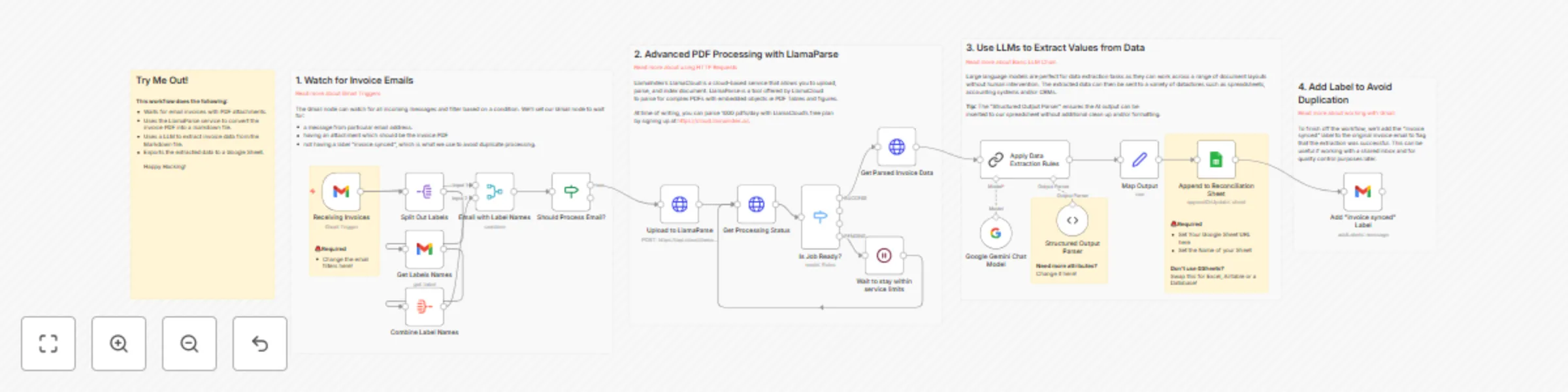
### This n8n template demonstrates how to automate invoice data extraction from PDF attachments received via Gmail. Using LlamaParse and Gemini LLM, this workflow parses structured fields like PO numbers, line items, tax amounts, and totals — and stores them neatly into a Google Sheet. Perfect for use cases such as: 💼 Finance teams managing vendor invoices 📊 Bookkeeping workflows 🔄 Automating monthly reconciliation ## Good to Know At the time of writing, LlamaParse and Gemini may involve API usage costs depending on your subscription tier. Check LlamaIndex Pricing and Gemini Pricing for updated info. LlamaParse provides Markdown-formatted parsed output which is then passed to an LLM for structured field extraction. Gemini models may be geo-restricted. If you encounter "model not found" errors, your region might not be supported. ## How it Works - Trigger: Watches your Gmail for new emails with PDF attachments. - Email Filter: Ensures we only parse fresh emails not already labeled as "invoice synced". - LlamaParse Upload: Uploads the PDF to LlamaParse’s parsing endpoint. - Status Polling: Periodically checks whether the parsing is complete. - Download Markdown: Once ready, it fetches the parsed invoice in Markdown format. - AI Parsing with Gemini: Sends the Markdown to Gemini LLM to extract structured JSON (like PO number, line items, taxes, etc.) using a predefined schema. - Google Sheets Upload: Stores extracted data into a predefined spreadsheet. - Labeling: Marks the email as “invoice synced” to avoid reprocessing. ## How to Use The trigger is based on Gmail, but you can replace this with a webhook or manual trigger for testing. ## Setup Instructions Gmail API - Enable Gmail API in Google Cloud Console. - Connect your Gmail account in n8n credentials. - Allow read + modify access. Google Sheets - Create a new Google Sheet with the following headers (row 1): Date | Vendor Name | Invoice Number | PO Number | Line Items | Subtotal | Tax | Total Amount - Connect Google Sheets in n8n and paste the Sheet ID in the node. - You can customise the google sheet basis your requirement. LlamaParse - Get a LlamaIndex API Key from LlamaIndex. - Use the LlamaParse upload and polling nodes to process your PDFs. Gemini (via Vertex AI) - Set up Gemini access in GCP. - Use the Gemini 2.5 Model. - Construct a structured prompt to extract required fields. Labeling - Create a Gmail label named "Invoice Synced" for tracking processed emails. ## Requirements Gmail account with API access LlamaParse (LlamaIndex) account with API Key Google Sheets API credentials Access to Gemini 2.5 model via Google Vertex AI ## Customising This Workflow This template is just the beginning. You can expand it to: - Auto-generate invoices back to vendors - Run duplicate checks before inserting into Sheets - Integrate with accounting tools like Zoho, QuickBooks, or Tally - Trigger Slack/Email notifications on specific vendors or high invoice amounts
LinkedIn job hunting & outreach automation with Apify, Gemini AI, and Gmail
**This n8n workflow automates the process of collecting job and decision-maker data, crafting AI-generated referral messages, and drafting them in Gmail—all using a combination of Apify, Google Sheets, LLMs, and email APIs.** ## Use cases 1. Auto-sourcing job postings from LinkedIn via Apify 2. Identifying decision-makers at relevant companies 3. Auto-drafting custom referral request messages using AI 4. Exporting structured data to Google Sheets and drafting Gmail messages for outreach ## Good to know - You can customize the filtering logic to target specific cities or companies. - Message creation uses the Gemini 2.0 Flash model and LangChain’s output parser for structured messages. - Email data is fetched using Anymailfinder, but can be replaced with other providers like Hunter.io. - Gmail API drafts the message, but you need to enable Gmail API access from your Google Cloud console. ## How it works Trigger - A Schedule Trigger runs the automation daily. Job Data Extraction - Apify pulls job listings using a predefined actor. - The HTTP response is split and structured using the Split Out node. Store Job Data - Job listings are saved to a Google Sheet. - The node maps key fields like title, company, location, and poster info. Decision-Maker Discovery - Another Apify actor pulls decision-maker data from LinkedIn. - This is split and filtered (e.g., by city or company name). Store Contacts - Contact details (name, title, location, etc.) are appended to another Google Sheet (n8n-sheet). Message Generation - A LLM Chain uses Gemini 2.0 Flash to generate short, custom LinkedIn messages. - The message respects rules like tone, length (<100 words), and personalization. Parse & Merge AI Output - The output is structured using Structured Output Parser and merged with contact data. Save Final Messages - The final headline and body are stored back into Google Sheets (n8n-sheet). Email Discovery - Get Email IDs node hits Anymailfinder API using the LinkedIn profile link. Draft in Gmail - Using Gmail API, the message is drafted in your inbox with subject and body auto-filled. ## How to use - Update Apify actor inputs to specify roles, companies, or locations. - Replace the manual Schedule Trigger with a webhook or form input if desired. - Update the Google Sheets document and sheet name in the relevant nodes. - Add your Gmail and Anymailfinder credentials in n8n settings. ## Requirements Google Sheets API access Gmail API access Apify account Gemini API key (via Google AI Studio) Anymailfinder (or alternate email discovery API) ## Customizing this workflow This framework is highly modular. You can: - Add more filters for company size, role, or hiring urgency - Use alternate LLMs (OpenAI, Claude, etc.) - Switch output channels (Slack, WhatsApp, etc.) - Plug in different CRM tools for follow-ups
Automated resume scoring with Gemini LLM, Gmail and Notion job profiles
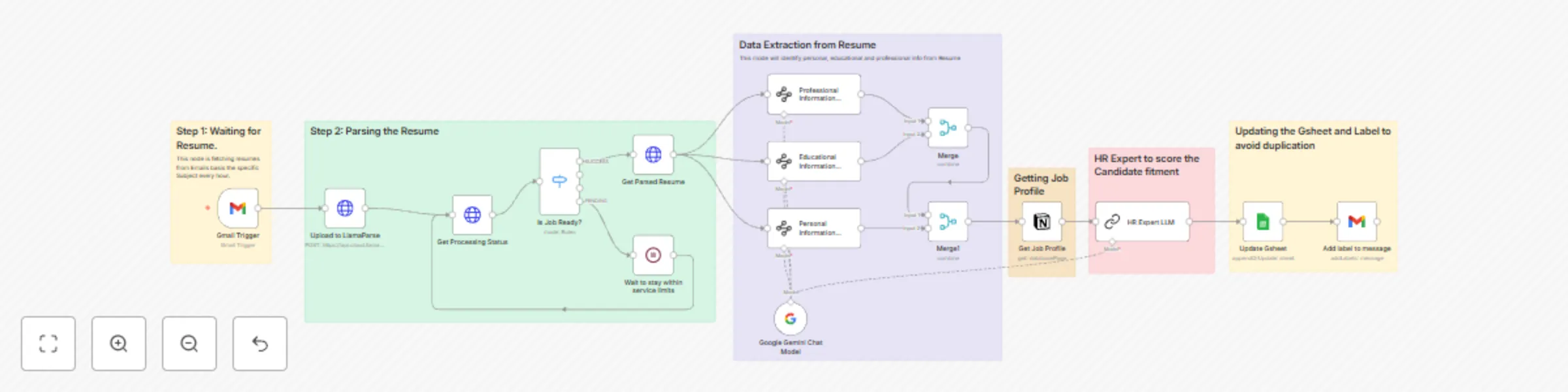
**This n8n template demonstrates how to use AI to score the all Resumes by matching it with Job profile** Problem Statement: A Hr person is flooded with resume and spends hours manually checking each to find most suitable ones. **How it works** 1. It is linked to Gmail Trigger which upon receving any mail with specific subject will check for the attachment. 2. Attachment will be parsed to understand the resume 3. Candidate informtion will be broken into Personal, Eductional and Professional type 4. Job profile will be pulled from Notion Board 5. A HR expert powered by Gemini LLM will score each profile on basis on its relevancy 6. Information will be updated back to Gsheet 7. Message lable will be updated back for clarity **How to use** 1. The gmail trigger node is used as an example but feel free to replace this with other triggers such as webhook or even a form. **Requirements** Gemini account for LLM Google sheet for upload Gmail as trigger Llama parse credentials