Daily crypto yield monitor: Track top Binance Earn APY rates with earnings calculator

Workflow preview

Workflow preview
100%
Daily crypto yield monitor: Track top Binance Earn APY rates with earnings calculator preview
Open on n8n.io

Important notice

This workflow is provided as-is. Please review and test before using in production.

1. Workflow Overview

Get top Binance Earn yields sent to Email This workflow automates the tracking of passive income opportunities on Binance by fetching real time Flexible Earn APY rates, calculating potential return...

Best for

  • Crypto Trading automation workflows
  • advanced n8n builders looking for reusable templates

Tools used

n8n-nodes-base.stickynote, n8n-nodes-base.scheduletrigger, n8n-nodes-base.code, n8n-nodes-base.crypto, n8n-nodes-base.httprequest, n8n-nodes-base.gmail, n8n-nodes-base.splitout, n8n-nodes-base.set

Source and attribution

This workflow is cataloged by N8N Workflows and links back to its original n8n.io source page by GYEONGJUN CHAE.

Original n8n.io source

1.1 Workflow description

Title
Daily crypto yield monitor: Track top Binance Earn APY rates with earnings calculator
Workflow name
Daily crypto yield monitor: Track top Binance Earn APY rates with earnings calculator

Get top Binance Earn yields sent to Email

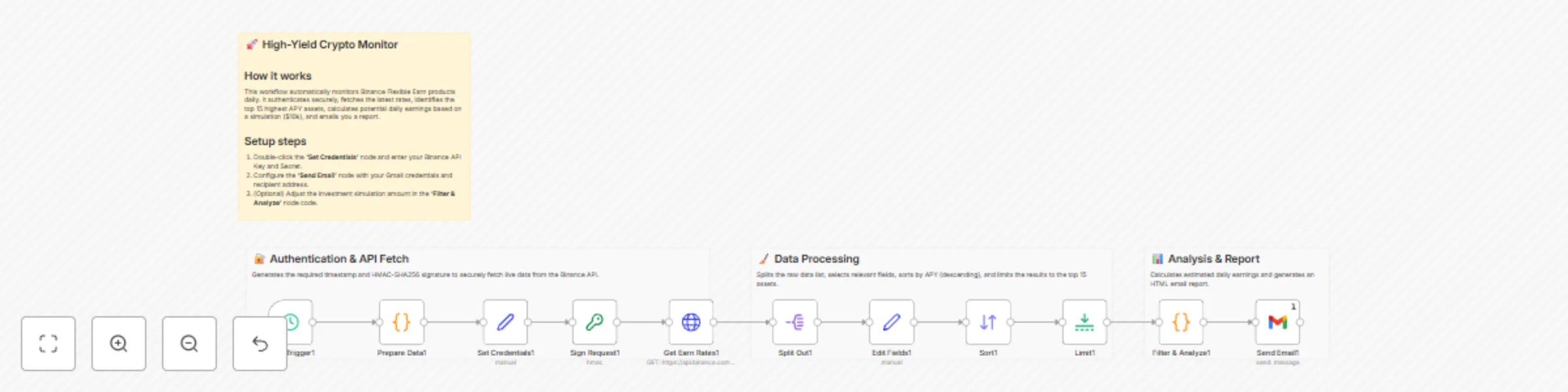
This workflow automates the tracking of passive income opportunities on Binance by fetching real-time Flexible Earn APY rates, calculating potential returns, and delivering a daily summary to your inbox.

Manually checking crypto savings rates is tedious. This template handles the complex authentication required by Binance (HMAC-SHA256 signing), filters through hundreds of assets to find the highest yields, and calculates exactly how much you would earn daily on a simulated capital amount.

πŸ‘₯ Who is this for?

  • Crypto Investors looking to maximize passive income on idle assets.
  • DeFi/CeFi Analysts monitoring market rate fluctuations.
  • Hodlers who want to ensure their assets are generating the best possible yield without daily manual checks.

βš™οΈ How it works

  1. Schedule Trigger: Initiates the workflow every 24 hours (customizable).
  2. Authentication Handler: Generates a timestamp and creates a secure HMAC-SHA256 signature required by the Binance API.
  3. Data Fetching: specific HTTP Request retrieves the full list of "Flexible Earn" products.
  4. Processing: The workflow splits the data, standardizes field names, and sorts all assets by Annual Percentage Rate (APR) in descending order.
  5. Analysis: It limits the list to the top 15 assets and calculates estimated daily earnings based on a $10,000 reference capital (customizable via code).
  6. Reporting: A formatted HTML email is sent via Gmail with the top opportunities.

πŸ› οΈ Setup Guide

  1. Binance API: Log in to Binance and create a Read-Only API Key.
  2. Configure Nodes:
    • Open the Set Credentials 1 node: Paste your API_KEY and SECRET_KEY in each field.
  3. Email Setup:
    • Open the Send Email node.
    • Select or connect your Gmail credentials.
    • Update the "To" address to your email.

πŸ”Œ Requirements

  • An active Binance account.
  • Binance API Key & Secret (Read-Only permissions are sufficient).
  • A Gmail account (or you can swap the Gmail node for Outlook/Slack/Telegram).

🎨 How to customize

  • Change Capital Calculation: Open the "Filter & Analyze" Code node and change const capital = 10000; to your actual portfolio size to see real projected earnings.
  • Filter Assets: Add an If node after the "Split Out" node to only filter for specific assets (e.g., USDT, BTC, ETH) if you don't want to see altcoins.
  • Change Frequency: Open the "Daily Trigger" node to run this hourly or weekly.

1.2 Logical Blocks

This catalog entry is organized from the workflow JSON. The node-level section below shows the executable blocks available for review before importing the template.

2. Block-by-Block Analysis

Block 1 - Main Sticky

Type / Role
n8n-nodes-base.stickyNote - stickyNote
Config choices
Version 1

Block 2 - Auth Group

Type / Role
n8n-nodes-base.stickyNote - stickyNote
Config choices
Version 1

Block 3 - Processing Group

Type / Role
n8n-nodes-base.stickyNote - stickyNote
Config choices
Version 1

Block 4 - Reporting Group

Type / Role
n8n-nodes-base.stickyNote - stickyNote
Config choices
Version 1

Block 5 - Daily Trigger1

Type / Role
n8n-nodes-base.scheduleTrigger - scheduleTrigger
Config choices
Version 1.1

Block 6 - Prepare Data1

Type / Role
n8n-nodes-base.code - code
Config choices
Version 2

Block 7 - Sign Request1

Type / Role
n8n-nodes-base.crypto - crypto
Config choices
Version 1

Block 8 - Get Earn Rates1

Type / Role
n8n-nodes-base.httpRequest - httpRequest
Config choices
Version 4.1

Block 9 - Filter & Analyze1

Type / Role
n8n-nodes-base.code - code
Config choices
Version 2

Block 10 - Send Email1

Type / Role
n8n-nodes-base.gmail - gmail
Config choices
Version 2.1

Block 11 - Split Out1

Type / Role
n8n-nodes-base.splitOut - splitOut
Config choices
Version 1

Block 12 - Edit Fields1

Type / Role
n8n-nodes-base.set - set
Config choices
Version 3.4

Block 13 - Sort1

Type / Role
n8n-nodes-base.sort - sort
Config choices
Version 1

Block 14 - Limit1

Type / Role
n8n-nodes-base.limit - limit
Config choices
Version 1

Block 15 - Set Credentials1

Type / Role
n8n-nodes-base.set - set
Config choices
Version 3.4

3. Summary Table

Workflow Daily crypto yield monitor: Track top Binance Earn APY rates with earnings calculator
Complexity advanced
Nodes 15
Categories Crypto Trading
Author GYEONGJUN CHAE
Published 02 Dec 2025

4. Reproducing the Workflow from Scratch

  1. 1. Download the workflow JSON

    Use the JSON export at /data/workflows/11426/11426.json as the source template for this automation.

  2. 2. Import the template into n8n

    Open n8n, import the downloaded JSON, and review each node before activating the workflow.

  3. 3. Configure credentials and variables

    Replace placeholder credentials, API keys, webhook URLs, account IDs, and environment-specific values with your own settings.

  4. 4. Test with sample data

    Run the workflow manually or in a staging workspace, inspect node output, and confirm downstream systems receive the expected data.

  5. 5. Activate and monitor

    Enable the workflow only after testing, then monitor executions, errors, and rate limits during the first production runs.

5. General Notes & Resources

Review imported nodes carefully before activation. This catalog entry is intended to help you inspect the workflow structure, understand required services, and find related templates faster.

Node names, credentials, schedules, webhook paths, and external service limits may need adjustment for your workspace.

Frequently asked questions

What does Daily crypto yield monitor: Track top Binance Earn APY rates with earnings calculator do?

Get top Binance Earn yields sent to Email This workflow automates the tracking of passive income opportunities on Binance by fetching real time Flexible Earn APY rates, calculating potential return...

What do I need before importing this workflow?

Review the workflow JSON, configure any required credentials in n8n, and test the automation in a safe workspace before using it in production.

Can I customize this workflow?

Yes. Use the block-by-block analysis and the downloadable JSON to inspect each node, then adjust credentials, prompts, schedules, filters, or destinations for your Crypto Trading use case.