Daily competitor WordPress analysis with charts, Gemini & Telegram reporting

Workflow preview

Workflow preview
100%
Daily competitor WordPress analysis with charts, Gemini & Telegram reporting preview
Open on n8n.io

Important notice

This workflow is provided as-is. Please review and test before using in production.

1. Workflow Overview

What this workflow does Every night at 22:00 (Asia/Ho Chi Minh), the workflow fetches the latest posts from multiple competitor WordPress RSS feeds, upserts them into Google Sheets, captures a dash...

Best for

  • Market Research automation workflows
  • advanced n8n builders looking for reusable templates

Tools used

n8n-nodes-base.scheduletrigger, n8n-nodes-base.limit, n8n-nodes-base.googlesheets, n8n-nodes-base.aggregate, @n8n/n8n-nodes-langchain.googlegemini, n8n-nodes-base.merge, n8n-nodes-base.telegram, n8n-nodes-base.httprequest

Source and attribution

This workflow is cataloged by N8N Workflows and links back to its original n8n.io source page by Cong Nguyen.

Original n8n.io source

1.1 Workflow description

Title
Daily competitor WordPress analysis with charts, Gemini & Telegram reporting
Workflow name
Daily competitor WordPress analysis with charts, Gemini & Telegram reporting

What this workflow does

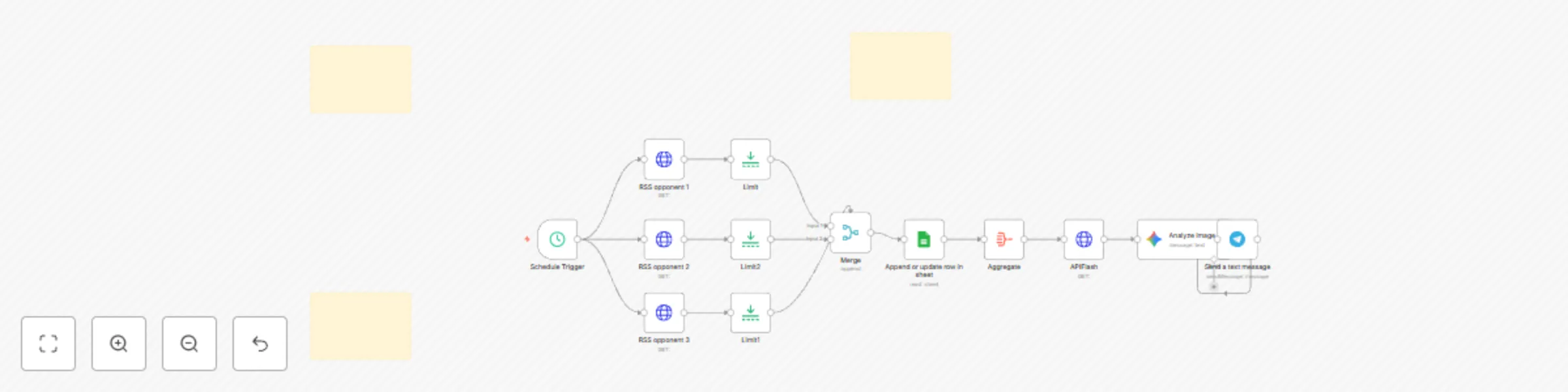
Every night at 22:00 (Asia/Ho_Chi_Minh), the workflow fetches the latest posts from multiple competitor WordPress RSS feeds, upserts them into Google Sheets, captures a dashboard screenshot (via ApiFlash), has Gemini Vision analyze the chart, and sends a concise insight report to Telegram.

Details

  • Schedule (22:00) → runs daily.
  • Fetch RSS → HTTP Request (or RSS Read) pulls each competitor’s /feed/ (standard WordPress RSS).
  • Normalize & limit → parse XML → JSON, keep the most recent 5 per site for the digest (you can raise/lower this).
  • Upsert to Google Sheets → match on link to avoid duplicates; store fields like guid, site, link, title, excerpt/description, content (if available), pubDate, updated.
  • Screenshot the dashboard → ApiFlash captures the Google Sheets dashboard (specific gid) with your line chart of monthly post counts.
  • Vision analysis → Gemini 1.5-Flash analyzes the chart image and returns a short executive summary, a Markdown table of values (≈ when estimated), insights, and recommended next steps.
  • Telegram push → posts the AI summary (and optionally the screenshot) to your channel/group.

Who it’s for

  • SEO/Content/Marketing teams tracking competitor publishing cadence.
  • Founders/PMs who want a nightly snapshot.
  • Competitive intelligence and analytics roles.

Requirements

  1. n8n (cloud or self-hosted).
  2. Google Sheets OAuth2, Telegram Bot, ApiFlash (access key), Google Gemini access.
  3. A Google Sheet with columns similar to: id/guid, site, link, title, excerpt, content, pubDate, updated.
  4. Setup
  5. Import the workflow JSON into n8n.
  6. Switch to RSS:
  • Option A (simple): replace HTTP nodes with RSS Read and paste each competitor’s https://{domain}/feed/.
  • Option B (keep HTTP): keep HTTP Request nodes, set Response: XML, then parse with XML node.
  1. Mapping to Sheets: point to your documentId and sheetName; set matching column = link for upsert.
  2. ApiFlash: add access_key and the Sheet URL with the correct gid that shows your chart; set scale_factor=2 (or higher for clarity).
  3. Gemini Vision: use model gemini-1.5-flash-latest with the included prompt (English output; Markdown table + insights + recommendations).
  4. Telegram: set bot credentials and chatId.
  5. Schedule: confirm 22:00 Asia/Ho_Chi_Minh (adjust as needed).
  6. Test: run once → verify rows append/update → see dashboard render → receive AI summary in Telegram.

Extending to more competitors

  • Clone an HTTP/RSS node for each additional competitor, update the /feed/ URL, and connect it to the Merge node.
  • No other changes are required—new data will be normalized, upserted, included in charts and in the AI summary automatically.
  • Tips & gotchas
  • WordPress RSS typically includes title, link, pubDate, guid, description, and sometimes content:encoded. If content:encoded is absent, fall back to description.
  • Keep the Sheet chart source range dynamic (e.g., open-ended ranges) so new rows are reflected automatically.
  • If a site’s RSS limits items, you can run multiple feeds (e.g., category feeds) or capture more history on the first run.

💡 About Margin AI

Margin Ai is an AI-services agency that acts as your AI Service Companion. We design intelligent, human-centric automation solutions—turning your team’s best practices into scalable workflows and tools. Industries like marketing, sales, and operations benefit from our tailored AI consulting, automation tools, and chatbot development.

1.2 Logical Blocks

This catalog entry is organized from the workflow JSON. The node-level section below shows the executable blocks available for review before importing the template.

2. Block-by-Block Analysis

Block 1 - Schedule Trigger

Type / Role
n8n-nodes-base.scheduleTrigger - scheduleTrigger
Config choices
Version 1.2

Block 2 - Limit

Type / Role
n8n-nodes-base.limit - limit
Config choices
Version 1

Block 3 - Append or update row in sheet

Type / Role
n8n-nodes-base.googleSheets - googleSheets
Config choices
Version 4.7

Block 4 - Limit1

Type / Role
n8n-nodes-base.limit - limit
Config choices
Version 1

Block 5 - Limit2

Type / Role
n8n-nodes-base.limit - limit
Config choices
Version 1

Block 6 - Aggregate

Type / Role
n8n-nodes-base.aggregate - aggregate
Config choices
Version 1

Block 7 - Analyze image

Type / Role
@n8n/n8n-nodes-langchain.googleGemini - googleGemini
Config choices
Version 1

Block 8 - Merge

Type / Role
n8n-nodes-base.merge - merge
Config choices
Version 3.2

Block 9 - Send a text message

Type / Role
n8n-nodes-base.telegram - telegram
Config choices
Version 1.2

Block 10 - APIFlash

Type / Role
n8n-nodes-base.httpRequest - httpRequest
Config choices
Version 4.2

Block 11 - RSS opponent 1

Type / Role
n8n-nodes-base.httpRequest - httpRequest
Config choices
Version 4.2

Block 12 - RSS opponent 3

Type / Role
n8n-nodes-base.httpRequest - httpRequest
Config choices
Version 4.2

Block 13 - RSS opponent 2

Type / Role
n8n-nodes-base.httpRequest - httpRequest
Config choices
Version 4.2

Block 14 - Sticky Note

Type / Role
n8n-nodes-base.stickyNote - stickyNote
Config choices
Version 1

Block 15 - Sticky Note1

Type / Role
n8n-nodes-base.stickyNote - stickyNote
Config choices
Version 1

Block 16 - Sticky Note2

Type / Role
n8n-nodes-base.stickyNote - stickyNote
Config choices
Version 1

3. Summary Table

Workflow Daily competitor WordPress analysis with charts, Gemini & Telegram reporting
Complexity advanced
Nodes 16
Categories Market Research
Author Cong Nguyen
Published 10 Sept 2025

4. Reproducing the Workflow from Scratch

  1. 1. Download the workflow JSON

    Use the JSON export at /data/workflows/8443/8443.json as the source template for this automation.

  2. 2. Import the template into n8n

    Open n8n, import the downloaded JSON, and review each node before activating the workflow.

  3. 3. Configure credentials and variables

    Replace placeholder credentials, API keys, webhook URLs, account IDs, and environment-specific values with your own settings.

  4. 4. Test with sample data

    Run the workflow manually or in a staging workspace, inspect node output, and confirm downstream systems receive the expected data.

  5. 5. Activate and monitor

    Enable the workflow only after testing, then monitor executions, errors, and rate limits during the first production runs.

5. General Notes & Resources

Review imported nodes carefully before activation. This catalog entry is intended to help you inspect the workflow structure, understand required services, and find related templates faster.

Node names, credentials, schedules, webhook paths, and external service limits may need adjustment for your workspace.

Frequently asked questions

What does Daily competitor WordPress analysis with charts, Gemini & Telegram reporting do?

What this workflow does Every night at 22:00 (Asia/Ho Chi Minh), the workflow fetches the latest posts from multiple competitor WordPress RSS feeds, upserts them into Google Sheets, captures a dash...

What do I need before importing this workflow?

Review the workflow JSON, configure any required credentials in n8n, and test the automation in a safe workspace before using it in production.

Can I customize this workflow?

Yes. Use the block-by-block analysis and the downloadable JSON to inspect each node, then adjust credentials, prompts, schedules, filters, or destinations for your Market Research use case.