Block 1 - 🕒 Auto Run (Scheduled)
- Type / Role
- n8n-nodes-base.scheduleTrigger - scheduleTrigger
- Config choices
- Version 1.2


 Early Deal
This workflow is provided as-is. Please review and test before using in production.
How it works This workflow automatically collects a list of companies from Google Sheets, searches for their competitors using SerpAPI, extracts up to 10 relevant competitor names with source links...
n8n-nodes-base.scheduletrigger, n8n-nodes-base.googlesheets, n8n-nodes-base.code, n8n-nodes-base.splitinbatches, n8n-nodes-base.httprequest, n8n-nodes-base.if, n8n-nodes-base.airtable, n8n-nodes-base.stickynote
This workflow is cataloged by N8N Workflows and links back to its original n8n.io source page by Avkash Kakdiya.
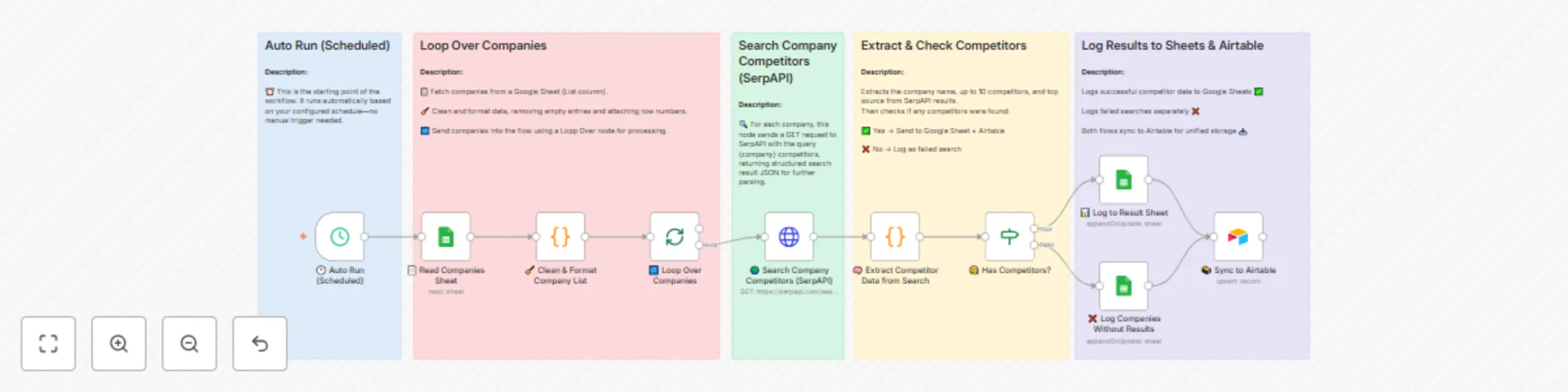
Original n8n.io sourceThis workflow automatically collects a list of companies from Google Sheets, searches for their competitors using SerpAPI, extracts up to 10 relevant competitor names with source links, and logs the results into both Google Sheets and Airtable. It runs on a set schedule, cleans and formats the company list, processes each entry individually, checks if competitors exist, and separates results into successful and “no competitors found” lists for organized tracking.
1. Trigger & Input
Auto Run (Scheduled) – Executes every day at the set time (e.g., 9 AM).
Read Companies Sheet – Pulls the list of companies from a Google Sheet (List column).
Clean & Format Company List – Removes empty rows, trims names, and attaches row numbers for tracking.
Loop Over Companies – Processes each company one at a time in batches.
2. Competitor Search
3. Data Extraction & Validation
Extract Competitor Data from Search – Parses SerpAPI results to:
Identify the company name
Extract up to 10 competitor names
Capture the top source URL
Count total search results
Has Competitors? – Checks if any competitors were found:
Yes → Proceeds to logging
No → Logs in “no results” list
4. Logging Results
Log to Result Sheet – Appends or updates competitor data into the results Google Sheet.
Log Companies Without Results – Records companies with zero competitors found in a separate section of the results sheet.
Sync to Airtable – Pushes all results (successful or not) into Airtable for unified storage and analysis.
Automated Competitor Research – Eliminates the need for manual Google searching.
Daily Insights – Runs automatically at your chosen schedule.
Clean Data Output – Stores structured competitor lists with sources for easy review.
Multi-Destination Sync – Saves to both Google Sheets and Airtable for flexibility.
Scalable & Hands-Free – Handles hundreds of companies without extra effort.
This catalog entry is organized from the workflow JSON. The node-level section below shows the executable blocks available for review before importing the template.
| Workflow | Daily competitor research automation using SerpAPI, Google Sheets & Airtable |
|---|---|
| Complexity | advanced |
| Nodes | 15 |
| Categories | Market Research, Multimodal AI |
| Author | Avkash Kakdiya |
| Published | 13 Aug 2025 |
Use the JSON export at /data/workflows/7313/7313.json as the source template for this automation.
Open n8n, import the downloaded JSON, and review each node before activating the workflow.
Replace placeholder credentials, API keys, webhook URLs, account IDs, and environment-specific values with your own settings.
Run the workflow manually or in a staging workspace, inspect node output, and confirm downstream systems receive the expected data.
Enable the workflow only after testing, then monitor executions, errors, and rate limits during the first production runs.
Review imported nodes carefully before activation. This catalog entry is intended to help you inspect the workflow structure, understand required services, and find related templates faster.
Node names, credentials, schedules, webhook paths, and external service limits may need adjustment for your workspace.
How it works This workflow automatically collects a list of companies from Google Sheets, searches for their competitors using SerpAPI, extracts up to 10 relevant competitor names with source links...
Review the workflow JSON, configure any required credentials in n8n, and test the automation in a safe workspace before using it in production.
Yes. Use the block-by-block analysis and the downloadable JSON to inspect each node, then adjust credentials, prompts, schedules, filters, or destinations for your Market Research, Multimodal AI use case.