Block 1 - Markdown1
- Type / Role
- n8n-nodes-base.markdown - markdown
- Config choices
- Version 1


 Early Deal
This workflow is provided as-is. Please review and test before using in production.
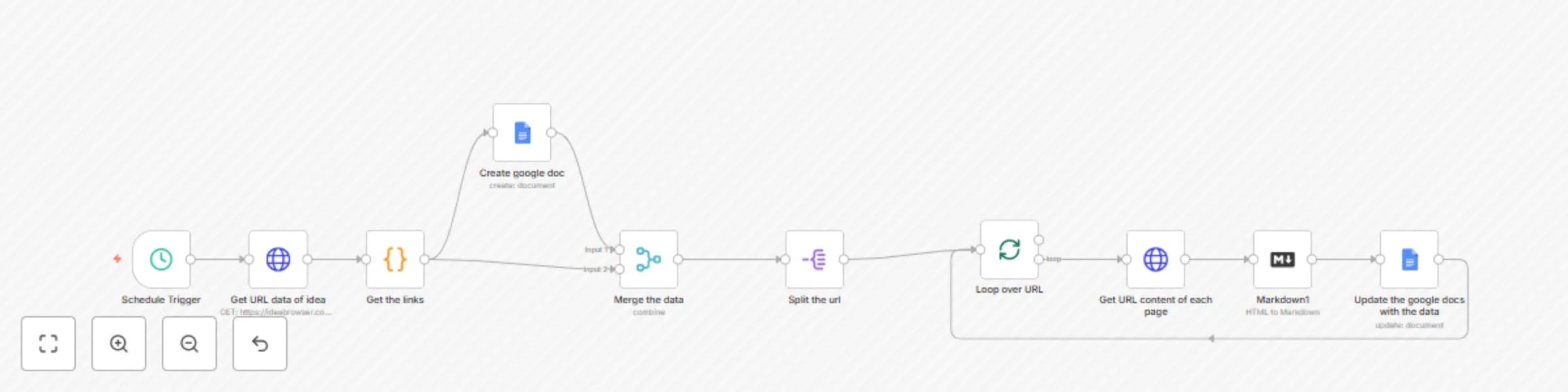
This automation runs daily at 8:00 AM to automatically collect and organize business idea insights from IdeaBrowser.com into a structured Google Docs document. The workflow performs the following a...
n8n-nodes-base.markdown, n8n-nodes-base.code, n8n-nodes-base.httprequest, n8n-nodes-base.googledocs, n8n-nodes-base.merge, n8n-nodes-base.splitout, n8n-nodes-base.splitinbatches, n8n-nodes-base.scheduletrigger
This workflow is cataloged by N8N Workflows and links back to its original n8n.io source page by mahavishnu.
Original n8n.io sourceThis automation runs daily at 8:00 AM to automatically collect and organize business idea insights from IdeaBrowser.com into a structured Google Docs document. The workflow performs the following actions: Data Collection: Fetches the "idea of the day" content from ideabrowser.com/idea-of-the-day using authenticated HTTP requests. Content Processing: Extracts the base idea path and generates links to all related insight pages including value ladder, market analysis, proof signals, execution plans, and community insights. The workflow also cleans the HTML content to extract readable text. Document Creation: Creates a new Google Docs document in a specified folder with a timestamp and idea name in the title format. Content Aggregation: Systematically visits each insight page (main idea page, value ladder, why now, proof signals, market gap, execution plan, value equation, value matrix, ACP, community signals, and keywords) and collects their content. Document Population: Processes the collected content through markdown formatting and appends it to the Google Docs document, creating a comprehensive report of the daily business idea with all its associated insights. Automated Scheduling: Runs automatically every day at 8 AM, ensuring you have fresh business idea analysis delivered to your Google Drive without manual intervention. This automation is perfect for entrepreneurs, business analysts, or anyone who wants to stay updated with curated business ideas and their detailed market analysis in an organized, searchable format.
This catalog entry is organized from the workflow JSON. The node-level section below shows the executable blocks available for review before importing the template.
| Workflow | Daily business idea insights aggregator from IdeaBrowser to Google Docs |
|---|---|
| Complexity | intermediate |
| Nodes | 10 |
| Categories | Market Research |
| Author | mahavishnu |
| Published | 12 Jun 2025 |
Use the JSON export at /data/workflows/4901/4901.json as the source template for this automation.
Open n8n, import the downloaded JSON, and review each node before activating the workflow.
Replace placeholder credentials, API keys, webhook URLs, account IDs, and environment-specific values with your own settings.
Run the workflow manually or in a staging workspace, inspect node output, and confirm downstream systems receive the expected data.
Enable the workflow only after testing, then monitor executions, errors, and rate limits during the first production runs.
Review imported nodes carefully before activation. This catalog entry is intended to help you inspect the workflow structure, understand required services, and find related templates faster.
Node names, credentials, schedules, webhook paths, and external service limits may need adjustment for your workspace.
This automation runs daily at 8:00 AM to automatically collect and organize business idea insights from IdeaBrowser.com into a structured Google Docs document. The workflow performs the following a...
Review the workflow JSON, configure any required credentials in n8n, and test the automation in a safe workspace before using it in production.
Yes. Use the block-by-block analysis and the downloadable JSON to inspect each node, then adjust credentials, prompts, schedules, filters, or destinations for your Market Research use case.