Block 1 - Schedule Trigger
- Type / Role
- n8n-nodes-base.scheduleTrigger - scheduleTrigger
- Config choices
- Version 1.2


 Early Deal
This workflow is provided as-is. Please review and test before using in production.
Daily AI News Digest with RSS, Llama 3.2 Summarization & Telegram Delivery AIDailyNews is an intelligent, privacy focused agent that automatically collects, summarizes, and delivers daily news upda...
n8n-nodes-base.scheduletrigger, n8n-nodes-base.set, n8n-nodes-base.filter, n8n-nodes-base.telegram, @n8n/n8n-nodes-langchain.chainllm, @n8n/n8n-nodes-langchain.lmollama, n8n-nodes-base.rssfeedread, n8n-nodes-base.merge
This workflow is cataloged by N8N Workflows and links back to its original n8n.io source page by Alberto.
Original n8n.io sourceDaily AI News Digest with RSS, Llama 3.2 Summarization & Telegram Delivery
AIDailyNews is an intelligent, privacy-focused agent that automatically collects, summarizes, and delivers daily news updates to your Telegram via local AI processing. It is designed to run entirely offline on devices like the Raspberry Pi 5, using no paid APIs or external cloud services.
Before you begin, ensure you have the following set up:
n8n Instance: A running instance of n8n.
Local LLM Server (Ollama): This workflow requires Ollama to be running locally with a downloaded language model (e.g., llama3.2:1b). It's designed for deployment on a home server or a device like a Raspberry Pi 5.
Telegram Bot: You need a Telegram bot with its API token. You can create one by talking to the BotFather.
Telegram Chat ID: You'll need the numeric ID of the user or group chat where the news digest will be sent.
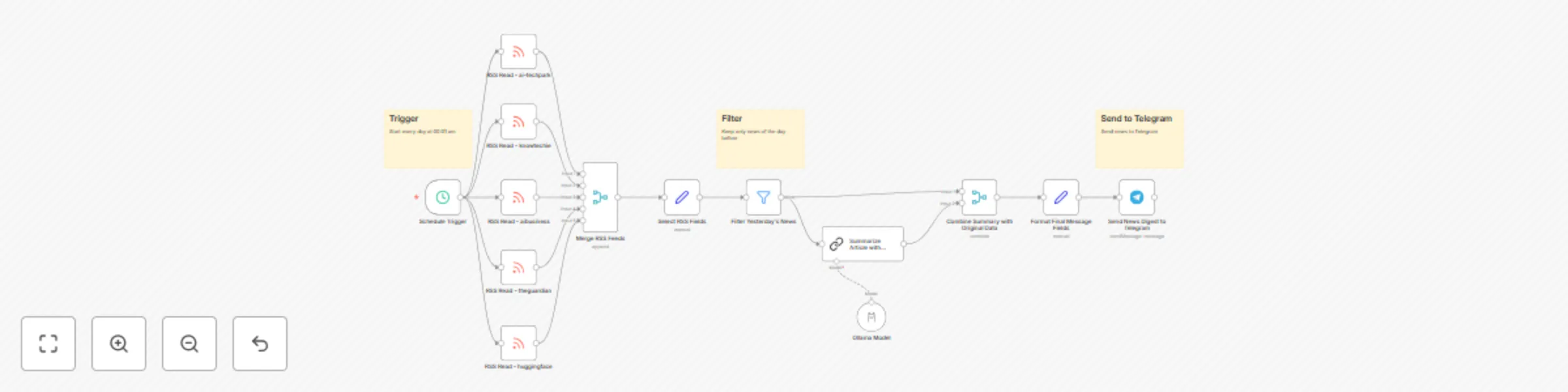
Scheduled Trigger: The workflow runs automatically on a daily schedule.
News Collection: It fetches the latest articles from multiple pre-configured RSS feeds.
Filtering: It filters the articles to keep only those published on the previous day, ensuring you get a daily recap.
Local Summarization: Each article's content is sent to your local Ollama instance. A large language model (LLM) like LLaMA 3.2 processes the text and generates a concise summary.
Formatting & Delivery: The summarized news, along with the title, author, and link, is formatted into a clean message and sent to your specified Telegram chat.
Configure the Schedule: The workflow is set to run daily by default. If you wish to change the time or frequency, adjust the settings in the Schedule Trigger node.
Add Your RSS Feeds: You can customize your news sources by modifying the RSS Read nodes. Change the URLs to your favorite feeds, or add/remove nodes to adjust the number of sources.
Configure the Ollama Model:
Click on the Ollama Model node.
Select your Ollama API credentials from the dropdown.
In the "Model" field, ensure the model name matches one that you have downloaded in Ollama (e.g., llama3.2:1b).
Configure the Telegram Node:
Click on the Send News Digest to Telegram node.
Select your Telegram API credentials.
In the Chat ID field, enter the numeric ID of the user or group you want to send the news to. (Tip: You can get this ID by sending a message to a bot like @userinfobot.)
Activate Workflow: Save your changes and activate the workflow. You will now receive a daily news digest in your Telegram chat.
Change the Summary Style: Modify the prompt in the Summarize Article with Ollama node to change how the news is summarized. For example, you could ask for a single-paragraph summary instead of bullet points.
Adjust Message Format: Edit the Text field in the Send News Digest to Telegram node to change the layout of the final message. You can use HTML for formatting like bold or italics.
This catalog entry is organized from the workflow JSON. The node-level section below shows the executable blocks available for review before importing the template.
| Workflow | Daily AI news digest with RSS, Llama 3.2 summarization & Telegram delivery |
|---|---|
| Complexity | advanced |
| Nodes | 17 |
| Categories | AI Summarization, Multimodal AI |
| Author | Alberto |
| Published | 14 Jul 2025 |
Use the JSON export at /data/workflows/6011/6011.json as the source template for this automation.
Open n8n, import the downloaded JSON, and review each node before activating the workflow.
Replace placeholder credentials, API keys, webhook URLs, account IDs, and environment-specific values with your own settings.
Run the workflow manually or in a staging workspace, inspect node output, and confirm downstream systems receive the expected data.
Enable the workflow only after testing, then monitor executions, errors, and rate limits during the first production runs.
Review imported nodes carefully before activation. This catalog entry is intended to help you inspect the workflow structure, understand required services, and find related templates faster.
Node names, credentials, schedules, webhook paths, and external service limits may need adjustment for your workspace.
Daily AI News Digest with RSS, Llama 3.2 Summarization & Telegram Delivery AIDailyNews is an intelligent, privacy focused agent that automatically collects, summarizes, and delivers daily news upda...
Review the workflow JSON, configure any required credentials in n8n, and test the automation in a safe workspace before using it in production.
Yes. Use the block-by-block analysis and the downloadable JSON to inspect each node, then adjust credentials, prompts, schedules, filters, or destinations for your AI Summarization, Multimodal AI use case.