A

Alberto

3
Workflows

Workflows by Alberto

Workflow preview: Create personal notes with voice transcription using local LLaMA and Telegram
Free advanced

Create personal notes with voice transcription using local LLaMA and Telegram

## PersonalNotesAssistant – Organize and Understand Your Thoughts with Local AI ## PersonalNotesAssistant is an offline-capable, AI-powered agent that helps you store, summarize, retrieve, and reflect on your personal notes and voice memos — all processed locally and sent via Telegram. Built to run efficiently on a Raspberry Pi 5, this agent supports a variety of note-taking styles and acts as your private memory extension. ## 🧠 What It Can Do Accept voice or text notes via Telegram Transcribe audio messages into clean, structured text (using Whisper) Automatically summarize or categorize notes with a local LLM Answer questions based on your past notes Retrieve relevant entries by topic, date, or keyword Help you journal or reflect by asking follow-up questions Work completely offline — no cloud or external APIs ## 🔧 How It Works Capture Notes via Telegram You send a voice message or text to your Telegram bot. The assistant supports both quick thoughts and long-form content. ## Transcription with Whisper (Local) If the input is a voice message, it is transcribed into text using Whisper running locally on your Raspberry Pi. ## AI Summarization & Tagging The transcribed or typed note is sent to LLaMA 3.2 via Ollama, which summarizes it, suggests tags, and stores it with metadata (e.g., timestamp, mood, theme). ## Storage & Retrieval Notes are stored in a local database (e.g., SQLite or JSON). You can later query the assistant with prompts like: “What did I say about stress last week?” “Summarize my ideas from this month.” “Show notes tagged with 'travel'.” Follow-Up & Reflection The agent can optionally engage with reflective prompts to help you deepen your thoughts or gain insight from what you’ve recorded. ## 💡 Use Cases Track personal growth, habits, or therapy progress Create voice memos while walking or commuting Maintain a structured journal without typing Use as a second brain to help you remember and revisit important thoughts ## 🔐 Privacy by Default Everything runs locally: No notes are uploaded to cloud platforms No audio is sent to third-party transcription services No LLM processing happens outside your device Ideal for privacy-minded users, psychologists, researchers, or digital minimalists who want AI assistance without surveillance. ## ⚙️ Technical Stack Raspberry Pi 5: Low-power edge device Whisper (local): For voice-to-text conversion Ollama + LLaMA 3.2: For summarization, classification, and retrieval Telegram Bot API: For input/output Custom Database (e.g., JSON/SQLite): For storing and querying notes ## 🧪 Real-Life Use This agent is actively used daily by the developer to log ideas, emotions, and plans. It has proven effective for lightweight journaling and context-aware memory assistance, even when offline.

A
Alberto
Personal Productivity
15 Jul 2025
1879
0
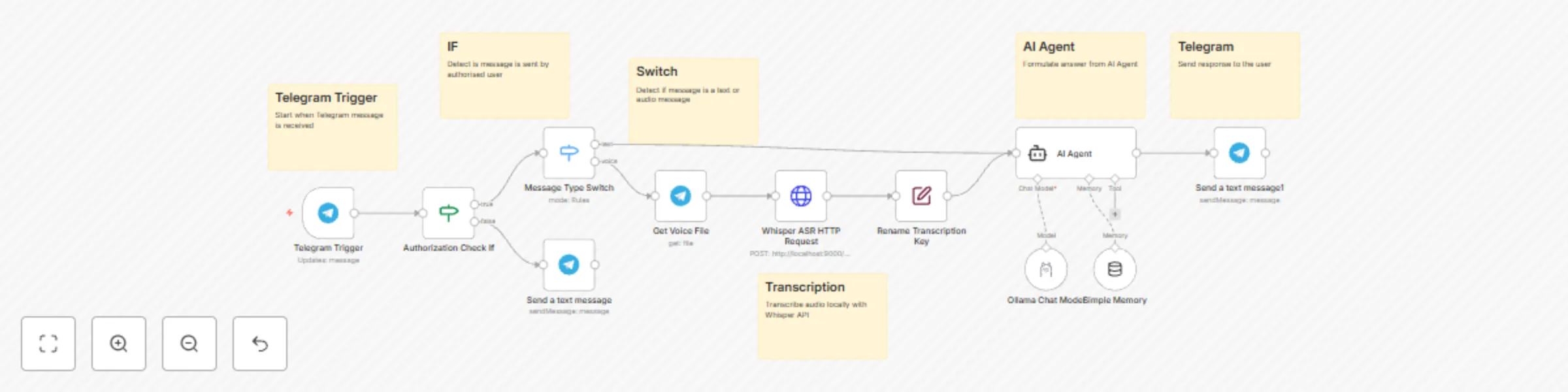
Workflow preview: Create a privacy-focused AI assistant with Telegram, Ollama, and Whisper
Free advanced

Create a privacy-focused AI assistant with Telegram, Ollama, and Whisper

Title: Create a Privacy-Focused AI Assistant with Telegram, Ollama, and Whisper PersonalAssistant is a fully-local, intelligent AI agent that assists you with daily tasks through voice or text interaction via Telegram. It is designed for users who want the convenience of a smart assistant without sacrificing privacy or relying on paid APIs or cloud infrastructure. ## Prerequisites Before you begin, ensure you have the following set up: n8n Instance: A running instance of n8n. Telegram Bot: A Telegram bot created with a valid API token. You can create one by talking to the BotFather. Ollama: Ollama running locally with a downloaded language model (e.g., llama3.2:1b). Whisper ASR API: A local API endpoint for audio transcription using a Whisper model. This workflow is pre-configured for an endpoint at http://localhost:9000/asr. ## What It Can Do Respond to general questions: Get answers about weather, facts, reminders, and more. Handle tasks: Create and manage to-do lists. Provide inspiration: Get motivational quotes or affirmations. Journaling assistant: Use prompts to support mental clarity. Speech-to-Text: Convert Telegram voice messages into text for the AI to process. ## How It Works Input Handling (Text or Voice): The workflow triggers when you send a voice note or text message to your Telegram bot. Authorization: It first checks if the message is from an authorized Telegram User ID. Routing: A switch directs the workflow based on the message type. Text messages go directly to the AI, while voice messages are first sent for transcription. Transcription: Voice messages are sent to your local Whisper ASR API to be converted into text. LLM Reasoning: The text is processed by a local language model (like LLaMA 3.2) via Ollama, which generates a smart response. Telegram Response: The final answer is sent back to you as a text message in Telegram. ## Setup Instructions Configure Telegram Credentials: In the Telegram Trigger node, select your Telegram API credentials from the dropdown menu. Do the same for all other Telegram nodes in the workflow. Set Your User ID: In the Authorization Check If node, you must set your personal Telegram User ID to allow access. Click on the node. In the "Value 2" field, enter your numeric Telegram User ID. Tip: You can find your ID by sending a message to a bot like @userinfobot. Configure Whisper API URL: If your Whisper ASR service is running on a different URL, update the Whisper ASR HTTP Request node. Click on the node. Change the URL from http://localhost:9000/asr to your endpoint. Configure the Ollama Model: In the Ollama Chat Model node, select your Ollama credentials and specify the model you wish to use (e.g., llama3.2:1b). Activate Workflow: Save and activate the workflow. You can now send messages to your bot! ## Customization Change the AI Persona: Modify the prompt in the AI Agent node to change the assistant's personality, tone, or instructions. Use a Different AI Model: Simply change the model name in the Ollama Chat Model node to experiment with different local LLMs. Adjust Memory: In the Simple Memory node, you can change the Context Window Length to control how many past conversations the AI remembers. Add More Tools: Expand the workflow by connecting the AI Agent to other nodes like a calendar, a to-do list app, or a web search tool. ## Privacy-First by Design All data processing—including speech recognition, reasoning, and generation—happens entirely offline on your local machine. No voice recordings are sent to cloud servers. No chat data leaves your device. Operates even without an internet connection (once set up).

A
Alberto
AI Chatbot
15 Jul 2025
1320
0

Workflow preview: Daily AI news digest with RSS, Llama 3.2 summarization & Telegram delivery
Free advanced

Daily AI news digest with RSS, Llama 3.2 summarization & Telegram delivery

Daily AI News Digest with RSS, Llama 3.2 Summarization & Telegram Delivery AIDailyNews is an intelligent, privacy-focused agent that automatically collects, summarizes, and delivers daily news updates to your Telegram via local AI processing. It is designed to run entirely offline on devices like the Raspberry Pi 5, using no paid APIs or external cloud services. ## Prerequisites Before you begin, ensure you have the following set up: n8n Instance: A running instance of n8n. Local LLM Server (Ollama): This workflow requires Ollama to be running locally with a downloaded language model (e.g., llama3.2:1b). It's designed for deployment on a home server or a device like a Raspberry Pi 5. Telegram Bot: You need a Telegram bot with its API token. You can create one by talking to the BotFather. Telegram Chat ID: You'll need the numeric ID of the user or group chat where the news digest will be sent. ## How It Works Scheduled Trigger: The workflow runs automatically on a daily schedule. News Collection: It fetches the latest articles from multiple pre-configured RSS feeds. Filtering: It filters the articles to keep only those published on the previous day, ensuring you get a daily recap. Local Summarization: Each article's content is sent to your local Ollama instance. A large language model (LLM) like LLaMA 3.2 processes the text and generates a concise summary. Formatting & Delivery: The summarized news, along with the title, author, and link, is formatted into a clean message and sent to your specified Telegram chat. ## Setup Instructions Configure the Schedule: The workflow is set to run daily by default. If you wish to change the time or frequency, adjust the settings in the Schedule Trigger node. Add Your RSS Feeds: You can customize your news sources by modifying the RSS Read nodes. Change the URLs to your favorite feeds, or add/remove nodes to adjust the number of sources. Configure the Ollama Model: Click on the Ollama Model node. Select your Ollama API credentials from the dropdown. In the "Model" field, ensure the model name matches one that you have downloaded in Ollama (e.g., llama3.2:1b). Configure the Telegram Node: Click on the Send News Digest to Telegram node. Select your Telegram API credentials. In the Chat ID field, enter the numeric ID of the user or group you want to send the news to. (Tip: You can get this ID by sending a message to a bot like @userinfobot.) Activate Workflow: Save your changes and activate the workflow. You will now receive a daily news digest in your Telegram chat. ## Customization Change the Summary Style: Modify the prompt in the Summarize Article with Ollama node to change how the news is summarized. For example, you could ask for a single-paragraph summary instead of bullet points. Adjust Message Format: Edit the Text field in the Send News Digest to Telegram node to change the layout of the final message. You can use HTML for formatting like bold or italics.

A
Alberto
AI Summarization
15 Jul 2025
1432
0