Block 1 - Telegram Trigger
- Type / Role
- n8n-nodes-base.telegramTrigger - telegramTrigger
- Config choices
- Version 1.2


 Early Deal
This workflow is provided as-is. Please review and test before using in production.
Title: Create a Privacy Focused AI Assistant with Telegram, Ollama, and Whisper PersonalAssistant is a fully local, intelligent AI agent that assists you with daily tasks through voice or text inte...
n8n-nodes-base.telegramtrigger, n8n-nodes-base.telegram, n8n-nodes-base.switch, n8n-nodes-base.if, n8n-nodes-base.httprequest, @n8n/n8n-nodes-langchain.agent, @n8n/n8n-nodes-langchain.lmchatollama, @n8n/n8n-nodes-langchain.memorybufferwindow
This workflow is cataloged by N8N Workflows and links back to its original n8n.io source page by Alberto.
Original n8n.io sourceTitle: Create a Privacy-Focused AI Assistant with Telegram, Ollama, and Whisper
PersonalAssistant is a fully-local, intelligent AI agent that assists you with daily tasks through voice or text interaction via Telegram. It is designed for users who want the convenience of a smart assistant without sacrificing privacy or relying on paid APIs or cloud infrastructure.
Before you begin, ensure you have the following set up:
n8n Instance: A running instance of n8n.
Telegram Bot: A Telegram bot created with a valid API token. You can create one by talking to the BotFather.
Ollama: Ollama running locally with a downloaded language model (e.g., llama3.2:1b).
Whisper ASR API: A local API endpoint for audio transcription using a Whisper model. This workflow is pre-configured for an endpoint at http://localhost:9000/asr.
Respond to general questions: Get answers about weather, facts, reminders, and more.
Handle tasks: Create and manage to-do lists.
Provide inspiration: Get motivational quotes or affirmations.
Journaling assistant: Use prompts to support mental clarity.
Speech-to-Text: Convert Telegram voice messages into text for the AI to process.
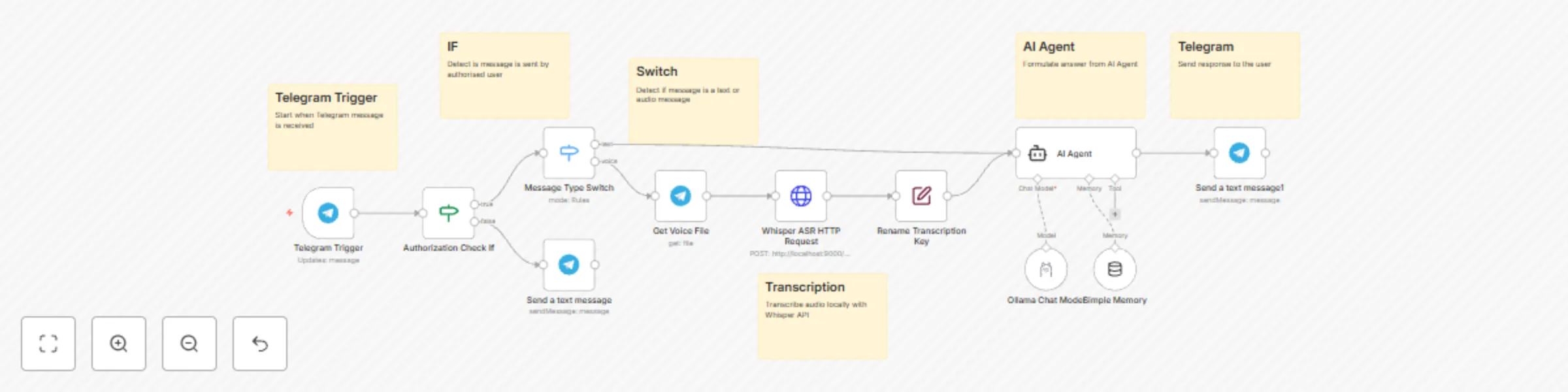
Input Handling (Text or Voice): The workflow triggers when you send a voice note or text message to your Telegram bot.
Authorization: It first checks if the message is from an authorized Telegram User ID.
Routing: A switch directs the workflow based on the message type. Text messages go directly to the AI, while voice messages are first sent for transcription.
Transcription: Voice messages are sent to your local Whisper ASR API to be converted into text.
LLM Reasoning: The text is processed by a local language model (like LLaMA 3.2) via Ollama, which generates a smart response.
Telegram Response: The final answer is sent back to you as a text message in Telegram.
Configure Telegram Credentials: In the Telegram Trigger node, select your Telegram API credentials from the dropdown menu. Do the same for all other Telegram nodes in the workflow.
Set Your User ID: In the Authorization Check If node, you must set your personal Telegram User ID to allow access.
Click on the node.
In the "Value 2" field, enter your numeric Telegram User ID.
Tip: You can find your ID by sending a message to a bot like @userinfobot.
Configure Whisper API URL: If your Whisper ASR service is running on a different URL, update the Whisper ASR HTTP Request node.
Click on the node.
Change the URL from http://localhost:9000/asr to your endpoint.
Configure the Ollama Model: In the Ollama Chat Model node, select your Ollama credentials and specify the model you wish to use (e.g., llama3.2:1b).
Activate Workflow: Save and activate the workflow. You can now send messages to your bot!
Change the AI Persona: Modify the prompt in the AI Agent node to change the assistant's personality, tone, or instructions.
Use a Different AI Model: Simply change the model name in the Ollama Chat Model node to experiment with different local LLMs.
Adjust Memory: In the Simple Memory node, you can change the Context Window Length to control how many past conversations the AI remembers.
Add More Tools: Expand the workflow by connecting the AI Agent to other nodes like a calendar, a to-do list app, or a web search tool.
All data processing—including speech recognition, reasoning, and generation—happens entirely offline on your local machine.
No voice recordings are sent to cloud servers.
No chat data leaves your device.
Operates even without an internet connection (once set up).
This catalog entry is organized from the workflow JSON. The node-level section below shows the executable blocks available for review before importing the template.
| Workflow | Create a privacy-focused AI assistant with Telegram, Ollama, and Whisper |
|---|---|
| Complexity | advanced |
| Nodes | 17 |
| Categories | AI Chatbot, Multimodal AI |
| Author | Alberto |
| Published | 14 Jul 2025 |
Use the JSON export at /data/workflows/6012/6012.json as the source template for this automation.
Open n8n, import the downloaded JSON, and review each node before activating the workflow.
Replace placeholder credentials, API keys, webhook URLs, account IDs, and environment-specific values with your own settings.
Run the workflow manually or in a staging workspace, inspect node output, and confirm downstream systems receive the expected data.
Enable the workflow only after testing, then monitor executions, errors, and rate limits during the first production runs.
Review imported nodes carefully before activation. This catalog entry is intended to help you inspect the workflow structure, understand required services, and find related templates faster.
Node names, credentials, schedules, webhook paths, and external service limits may need adjustment for your workspace.
Title: Create a Privacy Focused AI Assistant with Telegram, Ollama, and Whisper PersonalAssistant is a fully local, intelligent AI agent that assists you with daily tasks through voice or text inte...
Review the workflow JSON, configure any required credentials in n8n, and test the automation in a safe workspace before using it in production.
Yes. Use the block-by-block analysis and the downloadable JSON to inspect each node, then adjust credentials, prompts, schedules, filters, or destinations for your AI Chatbot, Multimodal AI use case.