Block 1 - OpenAI Model
- Type / Role
- @n8n/n8n-nodes-langchain.lmChatOpenAi - lmChatOpenAi
- Config choices
- Version 1


 Early Deal
This workflow is provided as-is. Please review and test before using in production.
QuantumDefender AI is a next generation intelligent cybersecurity assistant designed to harness the symbolic strength of quantum computing’s promise alongside cutting edge AI capabilities. This sop...
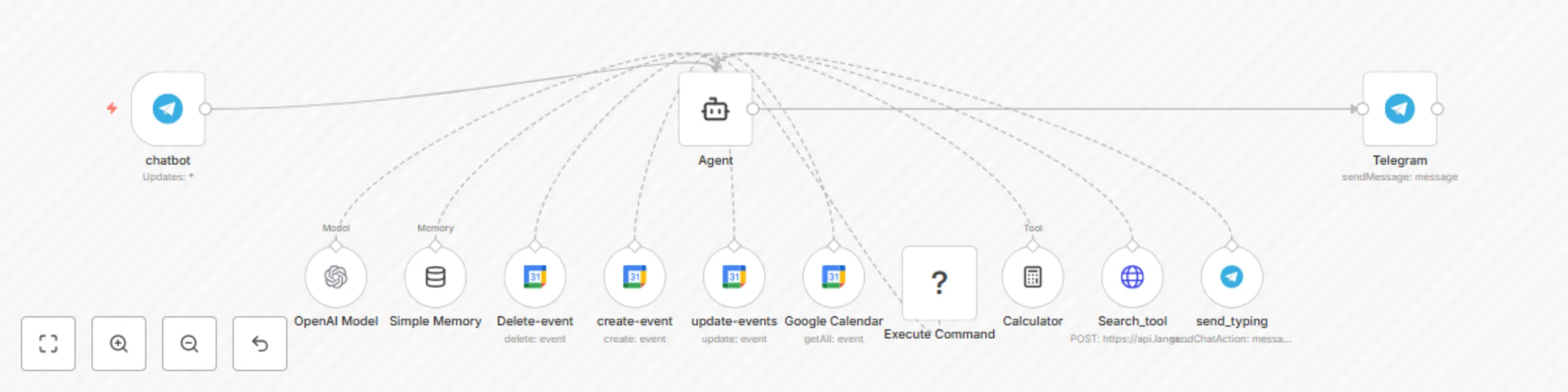
@n8n/n8n-nodes-langchain.lmchatopenai, @n8n/n8n-nodes-langchain.agent, @n8n/n8n-nodes-langchain.memorybufferwindow, n8n-nodes-base.telegram, n8n-nodes-base.googlecalendartool, n8n-nodes-base.executecommandtool, @n8n/n8n-nodes-langchain.toolcalculator, n8n-nodes-base.httprequesttool
This workflow is cataloged by N8N Workflows and links back to its original n8n.io source page by mariskarthick.
Original n8n.io sourceQuantumDefender AI is a next-generation intelligent cybersecurity assistant designed to harness the symbolic strength of quantum computing’s promise alongside cutting-edge AI capabilities. This sophisticated agent empowers SOC analysts, red teamers, and security researchers with rapid threat investigation, operational automation, and intelligent command execution—all driven by GPT-4 and integrated tools, accessible through Telegram or on any medium.
🔑 Key Features:
Expert-Level Cybersecurity Research & Analysis: Leverages powerful AI models to deliver clean, detailed, domain-specific insights across detection, remediation, and offensive security.
Command & Control: Executes Linux shell commands, autonomous scripts, and system operations securely in isolated environments.
Real-Time Web Intelligence: Utilizes integrated Langsearch API to provide timely internet research with contextual relevance.
Calendar & Scheduling Automation: Manage Google Calendar events or any similar application(create, update, delete, retrieve) dynamically from chat.
Multi-Tool Orchestration: Combines calculator functions, internet searches, command execution, and messaging for comprehensive operational support.
Telegram-native Chatbot: Delivers an adaptive, memory-informed, and interactive conversational experience with immediate typing indicators and high responsiveness.
Conversation & Session Management:
Maintains context-aware, session-based memory to enable smooth, multi-turn dialogues with individual users.
Sends “typing…” indicators during processing to ensure an interactive, user-friendly chat experience.
Operates exclusively within Telegram, delivering rich, timely responses and leveraging all Telegram bot capabilities.
Execution Intelligence & Safety:
Fully autonomous in deciding which tools to invoke, how frequently, and in what sequence to fulfill user requests comprehensively and responsibly.
Operates within a secure temporary folder environment to contain all command executions safely and avoid persistent or harmful side effects.
Enforces strict safety protocols to avoid running malicious or destructive commands, maintaining ethical standards and compliance.
Use Cases:
Cybersecurity researchers and operators seeking an intelligent assistant to accelerate investigations and automate routine tasks.
Red team professionals requiring on-the-fly command execution and information gathering integrated with tactical chat interactions.
SOC teams aiming to augment their alert triage and incident handling workflows with AI-powered analysis and action.
Anyone looking for a robust multi-tool AI chatbot integrated with real-world operational capabilities.
Setup Requirements:
OpenAI API key for GPT-4.1-nano language processing.
Telegram Bot API credentials with proper webhook setup to receive and respond to messages.
Google OAuth credentials for Calendar integration if calendar features are used.
SSH access credentials for executing commands on remote hosts, if remote execution is enabled.
Internet connectivity for the Langsearch web search API.
Customization & Extensibility: The workflow is built modularly with n8n’s flexible node system. Users can extend it by adding more tools, integrating other services (ticketing, threat intel, scanning tools), or modifying interaction logic to suit specialized operational needs and environments.
Created by Mariskarthick M Senior Security Analyst | Detection Engineer | Threat Hunter | Open-Source Enthusiast
This catalog entry is organized from the workflow JSON. The node-level section below shows the executable blocks available for review before importing the template.
| Workflow | Cybersecurity assistant with GPT-4, Telegram bot & command execution |
|---|---|
| Complexity | intermediate |
| Nodes | 13 |
| Categories | SecOps, AI Chatbot |
| Author | mariskarthick |
| Published | 05 Aug 2025 |
Use the JSON export at /data/workflows/7023/7023.json as the source template for this automation.
Open n8n, import the downloaded JSON, and review each node before activating the workflow.
Replace placeholder credentials, API keys, webhook URLs, account IDs, and environment-specific values with your own settings.
Run the workflow manually or in a staging workspace, inspect node output, and confirm downstream systems receive the expected data.
Enable the workflow only after testing, then monitor executions, errors, and rate limits during the first production runs.
Review imported nodes carefully before activation. This catalog entry is intended to help you inspect the workflow structure, understand required services, and find related templates faster.
Node names, credentials, schedules, webhook paths, and external service limits may need adjustment for your workspace.
QuantumDefender AI is a next generation intelligent cybersecurity assistant designed to harness the symbolic strength of quantum computing’s promise alongside cutting edge AI capabilities. This sop...
Review the workflow JSON, configure any required credentials in n8n, and test the automation in a safe workspace before using it in production.
Yes. Use the block-by-block analysis and the downloadable JSON to inspect each node, then adjust credentials, prompts, schedules, filters, or destinations for your SecOps, AI Chatbot use case.