Block 1 - New Vendor Intake
- Type / Role
- n8n-nodes-base.webhook - webhook
- Config choices
- Version 2


 Early Deal
This workflow is provided as-is. Please review and test before using in production.
Description Automates the intake, classification, and documentation of third party vendors. Evaluates vendor function, data access level, certification status, and applies AI driven risk tiering (L...
n8n-nodes-base.webhook, @n8n/n8n-nodes-langchain.openai, n8n-nodes-base.if, n8n-nodes-base.set, n8n-nodes-base.googlesheets, n8n-nodes-base.gmail, n8n-nodes-base.stickynote
This workflow is cataloged by N8N Workflows and links back to its original n8n.io source page by Adnan Tariq.
Original n8n.io sourceDescription
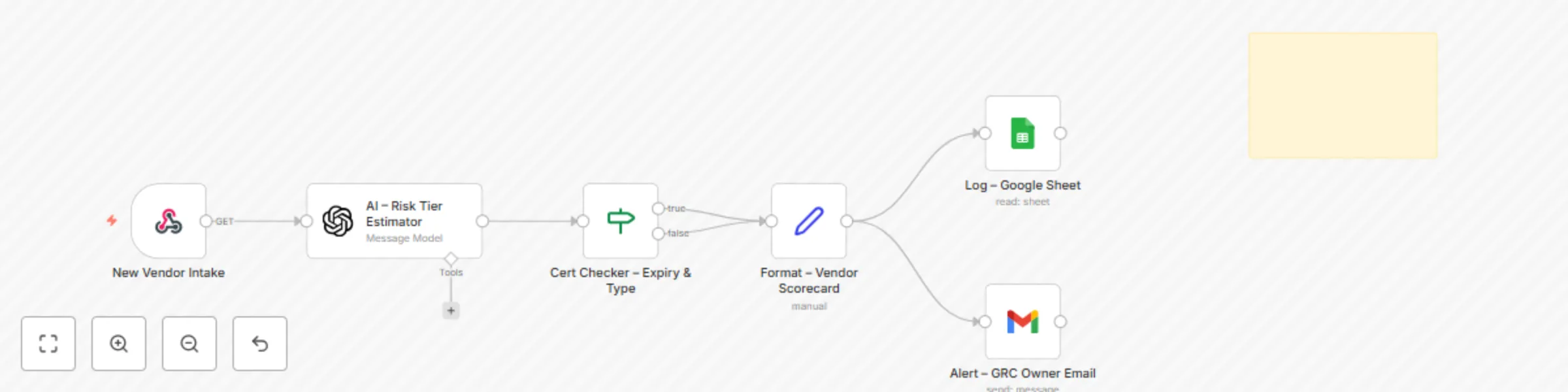
Automates the intake, classification, and documentation of third-party vendors. Evaluates vendor function, data access level, certification status, and applies AI-driven risk tiering (Low, Standard, Critical). Ensures standardized onboarding and scalable due diligence.
Who It’s For
Compliance and procurement teams onboarding vendors
GRC consultants managing supply chain risk
Security leads needing traceable vendor evidence
Audit teams validating third-party controls
How It Works
Trigger via intake form or webhook
AI engine assigns vendor risk tier based on context (certification, access type, data sensitivity)
If certifications (ISO 27001, SOC 2, IRAP, PCI DSS) are missing, status is flagged
Scorecard is formatted automatically with vendor details, risk tier, and timestamp
Logs results to Google Sheets for audit-ready evidence
Sends instant alerts for high-risk or uncertified vendors
Requirements
Google Sheets (OAuth2) connected for logging
Gmail/SMTP node for automated alerts (optional)
Intake form/webhook for vendor submissions
Mandatory fields in vendor intake:
Vendor Name
Function
Data Access
Access Type (Read/Write/API)
Certification (if any)
Owner (GRC)
File Templates
Vendor_Risk_Log.xlsx (auto-created sheet with audit-ready logs)
Intake form (customizable, connects via webhook)
Customization Tips
Modify AI prompt logic to reflect internal risk appetite
Add more certification checks (e.g., ISO 27701, FedRAMP)
Adjust alert thresholds (e.g., auto-notify only for Critical tier)
Extend integration to Slack/Teams or SIEM for escalation
Link logs to a dashboard for executive reporting
Compliance
ISO/IEC 27001: Controls A.15.1.1, A.15.1.2 (supplier relationships and information security)
SOC 2: Vendor management and risk classification
NIST 800-53: SR-3, SR-5 (supply chain risk and contractual requirements)
Essential Eight: Supports control validation via vendor documentation logging
Provides timestamped, structured logs suitable for external audits
Setup Instructions
Deploy the provided intake form or connect your own vendor submission process to the webhook.
Connect Google Sheets to store vendor logs (Vendor_Risk_Log.xlsx).
Connect Gmail/SMTP node for notifications (optional).
Customize AI prompt and certification logic if needed.
Run intake tests to validate risk tier assignment.
Confirm vendor logs and alerts are recorded correctly.
Supports
ISO 27001 Information Security
SOC 2 Compliance
PCI DSS v4.0
NIST CSF / 800-53
ACSC Essential Eight https://cyberpulsesolutions.com
This catalog entry is organized from the workflow JSON. The node-level section below shows the executable blocks available for review before importing the template.
| Workflow | CYBERPULSE AI GRC: Vendor risk evaluator |
|---|---|
| Complexity | intermediate |
| Nodes | 7 |
| Categories | AI Summarization, Multimodal AI |
| Author | Adnan Tariq |
| Published | 26 Aug 2025 |
Use the JSON export at /data/workflows/7860/7860.json as the source template for this automation.
Open n8n, import the downloaded JSON, and review each node before activating the workflow.
Replace placeholder credentials, API keys, webhook URLs, account IDs, and environment-specific values with your own settings.
Run the workflow manually or in a staging workspace, inspect node output, and confirm downstream systems receive the expected data.
Enable the workflow only after testing, then monitor executions, errors, and rate limits during the first production runs.
Review imported nodes carefully before activation. This catalog entry is intended to help you inspect the workflow structure, understand required services, and find related templates faster.
Node names, credentials, schedules, webhook paths, and external service limits may need adjustment for your workspace.
Description Automates the intake, classification, and documentation of third party vendors. Evaluates vendor function, data access level, certification status, and applies AI driven risk tiering (L...
Review the workflow JSON, configure any required credentials in n8n, and test the automation in a safe workspace before using it in production.
Yes. Use the block-by-block analysis and the downloadable JSON to inspect each node, then adjust credentials, prompts, schedules, filters, or destinations for your AI Summarization, Multimodal AI use case.