Block 1 - Sticky Note
- Type / Role
- n8n-nodes-base.stickyNote - stickyNote
- Config choices
- Version 1


 Early Deal
This workflow is provided as-is. Please review and test before using in production.
Description Automatically evaluates and maps AI governance responses to ISO 42001:2023 clause requirements using AI powered logic. Designed for GRC consultants, audit teams, and AI focused security...
n8n-nodes-base.stickynote, n8n-nodes-base.manualtrigger, n8n-nodes-base.googlesheets, n8n-nodes-base.set, n8n-nodes-base.splitout, n8n-nodes-base.merge, @n8n/n8n-nodes-langchain.openai, n8n-nodes-base.gmail
This workflow is cataloged by N8N Workflows and links back to its original n8n.io source page by Adnan Tariq.
Original n8n.io sourceDescription Automatically evaluates and maps AI governance responses to ISO 42001:2023 clause requirements using AI-powered logic. Designed for GRC consultants, audit teams, and AI-focused security programs to reduce time spent on manual clause interpretation and alignment.
Who’s It For: GRC Consultants handling AI governance controls
Internal Auditors preparing for ISO 42001 audits
Security teams implementing AI assurance frameworks
Organizations adopting Responsible AI principles
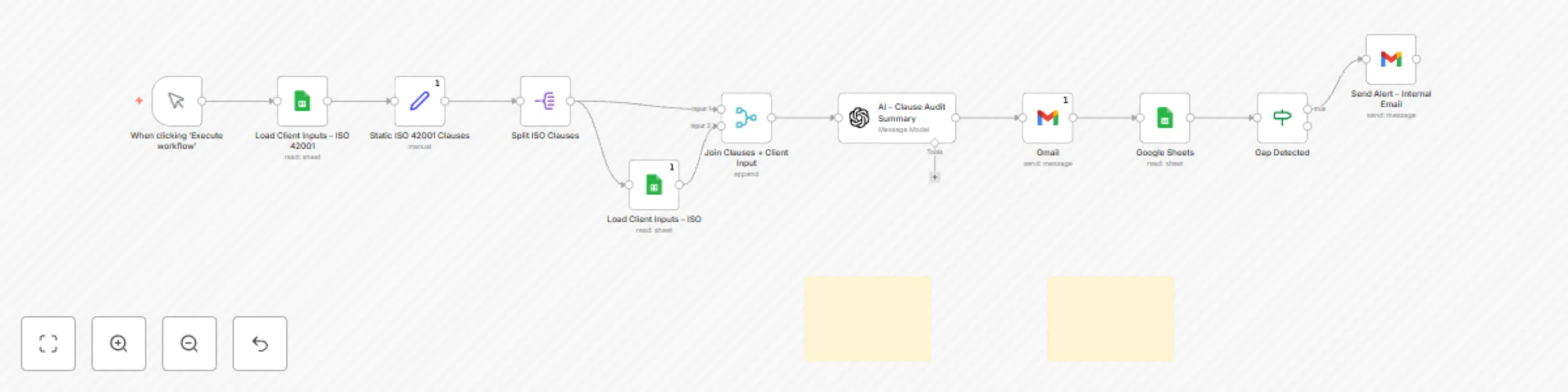
How It Works: Triggers manually or on schedule (e.g., clause review cycles)
Reads AI control responses from a connected Google Sheet
Uses AI to evaluate each response against ISO 42001 clauses
Flags compliance status (match / partial / gap) with clause mapping
Outputs a clean control map with automated summary
Requirements: Gmail or SMTP node for email
Google Sheets connected (OAuth)
OpenAI or AI node (optional but recommended for advanced clause interpretation)
Google Sheet Requirements: Columns: ClauseID, Clause_Description, Control_Response, Evaluation_Result
Each row must correspond to one ISO 42001 clause
Headers in the first row
Optional: add column for Suggested_Remediation
File Templates: ISO42001_Mapping_Template.xlsx
Includes: clause ID, clause text, response, result, suggested fix
Customization Tips: Modify clause response logic in the evaluation node (e.g., strict vs lenient mapping)
Enable multi-framework mapping (e.g., align to NIST AI RMF as well)
Auto-send mapping result to Drive or S3 as audit evidence
Ethics & Compliance: This module assists with clause interpretation and reporting only. It does not simulate AI models or assess ethical risk directly. For internal reporting, policy alignment, and audit preparation use only.
Setup Instructions: Copy the provided Google Sheet template (ISO42001_Mapping_Template.xlsx)
Fill in your control responses (row = clause)
Connect Google Sheets node using OAuth credentials
In the AI node:
Evaluate clause response using GPT or internal prompt
Flag match/partial/gap
Optional: auto-send report via email or upload to storage
Review results and update your compliance register accordingly
Supports: ISO 42001:2023
AI Governance Principles (OECD, NIST AI RMF)
SOCI Act compliance efforts (AI assurance layer)
ACSC AI oversight recommendations
This catalog entry is organized from the workflow JSON. The node-level section below shows the executable blocks available for review before importing the template.
| Workflow | CYBERPULSE AI GRC: automated ISO 42001 compliance evaluation |
|---|---|
| Complexity | intermediate |
| Nodes | 13 |
| Categories | Document Extraction, AI Summarization |
| Author | Adnan Tariq |
| Published | 07 Aug 2025 |
Use the JSON export at /data/workflows/7078/7078.json as the source template for this automation.
Open n8n, import the downloaded JSON, and review each node before activating the workflow.
Replace placeholder credentials, API keys, webhook URLs, account IDs, and environment-specific values with your own settings.
Run the workflow manually or in a staging workspace, inspect node output, and confirm downstream systems receive the expected data.
Enable the workflow only after testing, then monitor executions, errors, and rate limits during the first production runs.
Review imported nodes carefully before activation. This catalog entry is intended to help you inspect the workflow structure, understand required services, and find related templates faster.
Node names, credentials, schedules, webhook paths, and external service limits may need adjustment for your workspace.
Description Automatically evaluates and maps AI governance responses to ISO 42001:2023 clause requirements using AI powered logic. Designed for GRC consultants, audit teams, and AI focused security...
Review the workflow JSON, configure any required credentials in n8n, and test the automation in a safe workspace before using it in production.
Yes. Use the block-by-block analysis and the downloadable JSON to inspect each node, then adjust credentials, prompts, schedules, filters, or destinations for your Document Extraction, AI Summarization use case.