Block 1 - When clicking ‘Execute workflow’
- Type / Role
- n8n-nodes-base.manualTrigger - manualTrigger
- Config choices
- Version 1


 Early Deal
This workflow is provided as-is. Please review and test before using in production.
Description Automatically packages audit ready evidence files matched to control IDs from ISO 42001 or other frameworks. Fetches logs from Google Sheets, finds corresponding files in Google Drive, ...
n8n-nodes-base.manualtrigger, n8n-nodes-base.googlesheets, n8n-nodes-base.googledrive, n8n-nodes-base.merge, n8n-nodes-base.set, n8n-nodes-base.compression, n8n-nodes-base.gmail, n8n-nodes-base.stickynote
This workflow is cataloged by N8N Workflows and links back to its original n8n.io source page by Adnan Tariq.
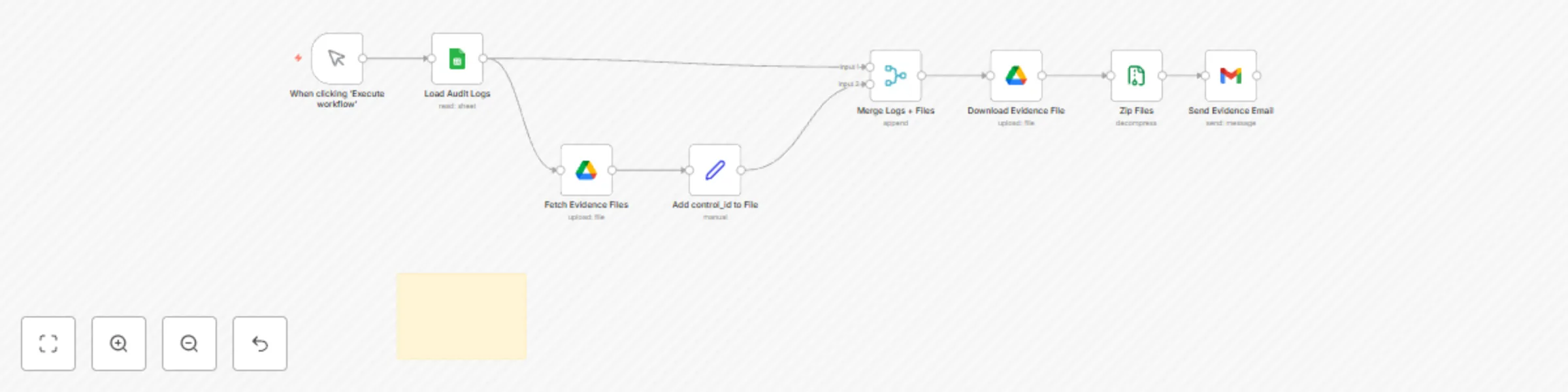
Original n8n.io sourceDescription Automatically packages audit-ready evidence files matched to control IDs from ISO 42001 or other frameworks. Fetches logs from Google Sheets, finds corresponding files in Google Drive, compresses them into a ZIP archive, and sends via email — no manual formatting required.
Who’s It For:
Compliance teams preparing audit documentation
GRC consultants managing multiple clients
Internal auditors requiring traceable evidence
How It Works:
Trigger manually or on schedule (e.g., daily)
Reads audit logs from Google Sheets
Searches Google Drive for files matching control_id
Downloads matched files
Zips them into an archive
Sends the archive via email (Gmail or SMTP)
Requirements:
Gmail or SMTP node for email delivery
Google Sheets connected (OAuth2)
Google Drive connected (OAuth2)
Google Sheet Requirements:
Columns: control_id, description, evidence_status, last_updated
One row per control ID or log entry
Headers must be in the first row
Log sheet must be shared with your service account or n8n-connected user
File Templates:
Audit_AutoPack_Sheet_Template.xlsx
Evidence files in Google Drive named using control ID (e.g., ISO42001-5.1.pdf)
Customization Tips:
Adjust ZIP archive name in the “Zip Files” node
Customize email subject, body, and recipient
Use a different Drive folder per client or audit phase
Ethics & Compliance:
Ensures audit trail and evidence traceability
Prevents unauthorized edits or file mismatches
Setup Instructions
Copy the provided Google Sheet template (linked in File Templates).
Fill in your audit logs (columns: control_id, description, status, last_updated).
Connect Google Sheets node using OAuth credentials.
In the Gmail node:
Set recipient email (e.g., [email protected])
Choose “Send binary data” and attach ZIP
Trigger via Cron node (e.g., daily) or manually
(Optional) Connect Drive or S3 node to store a backup copy
Supports:
ISO 42001 AI Governance
PCI DSS v4.0
NIST CSF / SOCI Act
ACSC Essential Eight
This catalog entry is organized from the workflow JSON. The node-level section below shows the executable blocks available for review before importing the template.
| Workflow | CYBERPULSE AI GRC: automate compliance audit documentation |
|---|---|
| Complexity | intermediate |
| Nodes | 9 |
| Categories | Document Extraction |
| Author | Adnan Tariq |
| Published | 07 Aug 2025 |
Use the JSON export at /data/workflows/7079/7079.json as the source template for this automation.
Open n8n, import the downloaded JSON, and review each node before activating the workflow.
Replace placeholder credentials, API keys, webhook URLs, account IDs, and environment-specific values with your own settings.
Run the workflow manually or in a staging workspace, inspect node output, and confirm downstream systems receive the expected data.
Enable the workflow only after testing, then monitor executions, errors, and rate limits during the first production runs.
Review imported nodes carefully before activation. This catalog entry is intended to help you inspect the workflow structure, understand required services, and find related templates faster.
Node names, credentials, schedules, webhook paths, and external service limits may need adjustment for your workspace.
Description Automatically packages audit ready evidence files matched to control IDs from ISO 42001 or other frameworks. Fetches logs from Google Sheets, finds corresponding files in Google Drive, ...
Review the workflow JSON, configure any required credentials in n8n, and test the automation in a safe workspace before using it in production.
Yes. Use the block-by-block analysis and the downloadable JSON to inspect each node, then adjust credentials, prompts, schedules, filters, or destinations for your Document Extraction use case.