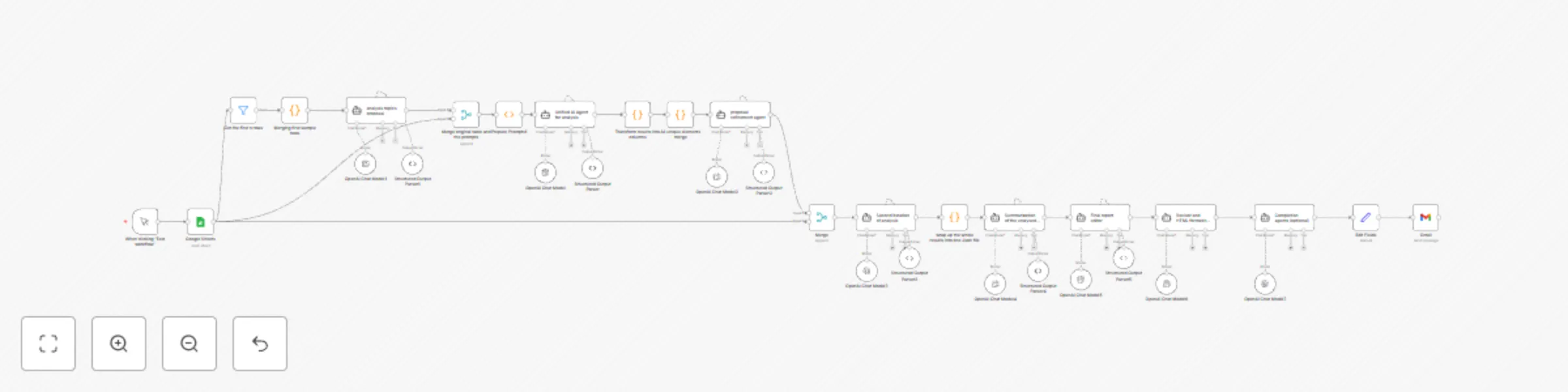
Customer feedback analysis with AI, QuickChart & HTML report generator

Workflow preview

Workflow preview
100%
Customer feedback analysis with AI, QuickChart & HTML report generator preview
Open on n8n.io

Important notice

This workflow is provided as-is. Please review and test before using in production.

1. Workflow Overview

Generative Customer Insights from Feedback Data using AI Agents & Charts This workflow automates the analysis of customer feedback or social media data from Google Sheets using DeepSeek LLM, transf...

Best for

  • Market Research automation workflows
  • AI Summarization automation workflows
  • advanced n8n builders looking for reusable templates

Tools used

n8n-nodes-base.manualtrigger, n8n-nodes-base.googlesheets, @n8n/n8n-nodes-langchain.lmchatopenai, n8n-nodes-base.function, @n8n/n8n-nodes-langchain.outputparserstructured, @n8n/n8n-nodes-langchain.agent, n8n-nodes-base.merge, n8n-nodes-base.code

Source and attribution

This workflow is cataloged by N8N Workflows and links back to its original n8n.io source page by hippolyte-hu.

Original n8n.io source

1.1 Workflow description

Title
Customer feedback analysis with AI, QuickChart & HTML report generator
Workflow name
Customer feedback analysis with AI, QuickChart & HTML report generator

Generative Customer Insights from Feedback Data using AI Agents & Charts

This workflow automates the analysis of customer feedback or social media data from Google Sheets using DeepSeek LLM, transforming raw text into structured semantic insights. The workflow also generates data visualizations and produces a final HTML report, ready for email delivery.


Table of Contents


What This Workflow Does

This workflow performs automated semantic analysis on unstructured feedback data (from Google Sheets), using LLM-based agents and a sequence of transformations. It achieves:

  • Prompt proposal generation: AI generates generalizable prompts for various analysis dimensions.
  • Row-level analysis: Each row of data is evaluated against all prompts.
  • Output merging and refinement: Raw analysis outputs are merged, deduplicated, and semantically clustered.
  • Visualization and report generation: QuickChart is used to create graphs, and an HTML report is produced.
  • Email delivery: The full report is sent automatically via Gmail.

Pre-conditions and Requirements

  • API Keys

    • DeepSeek API Key
    • Gmail OAuth2 (for sending results)
  • Google Sheet Access

    • A preformatted Google Sheet containing social listening feedback
    • The sheet must include at least 20 rows for sample prompt generation
  • n8n Configuration

    • Nodes used: Google Sheets, LangChain (LLM/Agent/Parser), Function, Merge, QuickChart (via URL), Gmail
    • Ensure all credentials are configured properly in n8n’s credential manager

Step-by-Step Workflow Explanation

  1. Google Sheet Import

    • Retrieves feedback rows from a specific Google Sheet tab
    • Filters to the first 20 rows for prompt generation
  2. Prompt Proposal Agent

    • AI generates 3–6 row-level analysis prompts in a structured JSON format
    • Prompts must be agnostic to product names and column headers
  3. Prompt Injection and Pairing

    • Each row is paired with all prompts
    • Combined into a single dataset for row-by-row LLM evaluation
  4. First Iteration of Analysis

    • An LLM answers all injected prompts row-by-row
    • Output is parsed and transformed into structured fields
  5. Semantic Merging and Refinement

    • Merged lists of values from all rows
    • AI clusters synonyms and regenerates improved prompt definitions
  6. Second Iteration of Analysis

    • The refined prompts are used to re-analyze each row
    • A new structured output per row is generated and merged into one object
  7. Summarization and Visualization

    • AI generates summaries per dimension (e.g., sentiment)
    • QuickChart visualizations are created and URL-encoded
    • Cross-dimensional insights and a global narrative are generated
  8. Final Report Generation and Emailing

    • A final HTML report is generated
    • Sent to the specified email using Gmail node

Example Results

Customization Guide

1. Modify Data Source

  • Change the Google Sheet ID or sheet tab
  • Add filters for specific time periods or product names

2. Adjust Prompt Definitions

  • Refine the initial prompt agent instruction to tailor the type of analysis

3. Swap LLM Models

  • Replace DeepSeek with OpenAI or another LLM via LangChain nodes

4. Visual Styling

  • Customize QuickChart configurations to adjust chart types, colors, legends

5. Report Format

  • Update the final HTML prompt to reflect brand design or restructure sections

6. Add Report Destinations

  • Replace Gmail with Google Drive upload, Notion page creation, or Slack post

This end-to-end AI-powered social listening workflow enables scalable, repeatable, and customizable insights generation from unstructured customer feedback.

1.2 Logical Blocks

This catalog entry is organized from the workflow JSON. The node-level section below shows the executable blocks available for review before importing the template.

2. Block-by-Block Analysis

Block 1 - When clicking ‘Test workflow’

Type / Role
n8n-nodes-base.manualTrigger - manualTrigger
Config choices
Version 1

Block 2 - Google Sheets

Type / Role
n8n-nodes-base.googleSheets - googleSheets
Config choices
Version 4.5

Block 3 - OpenAI Chat Model

Type / Role
@n8n/n8n-nodes-langchain.lmChatOpenAi - lmChatOpenAi
Config choices
Version 1.2

Block 4 - Prepare Prompts1

Type / Role
n8n-nodes-base.function - function
Config choices
Version 1

Block 5 - Structured Output Parser

Type / Role
@n8n/n8n-nodes-langchain.outputParserStructured - outputParserStructured
Config choices
Version 1.2

Block 6 - analysis topics proposal

Type / Role
@n8n/n8n-nodes-langchain.agent - agent
Config choices
Version 1.8

Block 7 - OpenAI Chat Model1

Type / Role
@n8n/n8n-nodes-langchain.lmChatOpenAi - lmChatOpenAi
Config choices
Version 1.2

Block 8 - Structured Output Parser1

Type / Role
@n8n/n8n-nodes-langchain.outputParserStructured - outputParserStructured
Config choices
Version 1.2

Block 9 - Merge original table and the prompts

Type / Role
n8n-nodes-base.merge - merge
Config choices
Version 3.1

Block 10 - OpenAI Chat Model2

Type / Role
@n8n/n8n-nodes-langchain.lmChatOpenAi - lmChatOpenAi
Config choices
Version 1.2

Block 11 - Unified AI Agent for analysis

Type / Role
@n8n/n8n-nodes-langchain.agent - agent
Config choices
Version 1.8

Block 12 - Transform results into columns

Type / Role
n8n-nodes-base.code - code
Config choices
Version 2

Block 13 - All unique elements merge

Type / Role
n8n-nodes-base.code - code
Config choices
Version 2

Block 14 - Structured Output Parser2

Type / Role
@n8n/n8n-nodes-langchain.outputParserStructured - outputParserStructured
Config choices
Version 1.2

Block 15 - proposal refinement agent

Type / Role
@n8n/n8n-nodes-langchain.agent - agent
Config choices
Version 1.8

Block 16 - OpenAI Chat Model3

Type / Role
@n8n/n8n-nodes-langchain.lmChatOpenAi - lmChatOpenAi
Config choices
Version 1.2

Block 17 - Second iteration of analysis

Type / Role
@n8n/n8n-nodes-langchain.agent - agent
Config choices
Version 1.8

Block 18 - Structured Output Parser3

Type / Role
@n8n/n8n-nodes-langchain.outputParserStructured - outputParserStructured
Config choices
Version 1.2

Block 19 - Merge

Type / Role
n8n-nodes-base.merge - merge
Config choices
Version 3.1

Block 20 - Summarization of the unalysed results

Type / Role
@n8n/n8n-nodes-langchain.agent - agent
Config choices
Version 1.8

Block 21 - OpenAI Chat Model4

Type / Role
@n8n/n8n-nodes-langchain.lmChatOpenAi - lmChatOpenAi
Config choices
Version 1.2

Block 22 - Structured Output Parser4

Type / Role
@n8n/n8n-nodes-langchain.outputParserStructured - outputParserStructured
Config choices
Version 1.2

Block 23 - OpenAI Chat Model5

Type / Role
@n8n/n8n-nodes-langchain.lmChatOpenAi - lmChatOpenAi
Config choices
Version 1.2

Block 24 - Final report editor

Type / Role
@n8n/n8n-nodes-langchain.agent - agent
Config choices
Version 1.8

Showing the first 24 of 34 workflow blocks. Download the JSON for the full node graph.

3. Summary Table

Workflow Customer feedback analysis with AI, QuickChart & HTML report generator
Complexity advanced
Nodes 34
Categories Market Research, AI Summarization
Author hippolyte-hu
Published 21 Apr 2025

4. Reproducing the Workflow from Scratch

  1. 1. Download the workflow JSON

    Use the JSON export at /data/workflows/3642/3642.json as the source template for this automation.

  2. 2. Import the template into n8n

    Open n8n, import the downloaded JSON, and review each node before activating the workflow.

  3. 3. Configure credentials and variables

    Replace placeholder credentials, API keys, webhook URLs, account IDs, and environment-specific values with your own settings.

  4. 4. Test with sample data

    Run the workflow manually or in a staging workspace, inspect node output, and confirm downstream systems receive the expected data.

  5. 5. Activate and monitor

    Enable the workflow only after testing, then monitor executions, errors, and rate limits during the first production runs.

5. General Notes & Resources

Review imported nodes carefully before activation. This catalog entry is intended to help you inspect the workflow structure, understand required services, and find related templates faster.

Node names, credentials, schedules, webhook paths, and external service limits may need adjustment for your workspace.

Frequently asked questions

What does Customer feedback analysis with AI, QuickChart & HTML report generator do?

Generative Customer Insights from Feedback Data using AI Agents & Charts This workflow automates the analysis of customer feedback or social media data from Google Sheets using DeepSeek LLM, transf...

What do I need before importing this workflow?

Review the workflow JSON, configure any required credentials in n8n, and test the automation in a safe workspace before using it in production.

Can I customize this workflow?

Yes. Use the block-by-block analysis and the downloadable JSON to inspect each node, then adjust credentials, prompts, schedules, filters, or destinations for your Market Research, AI Summarization use case.