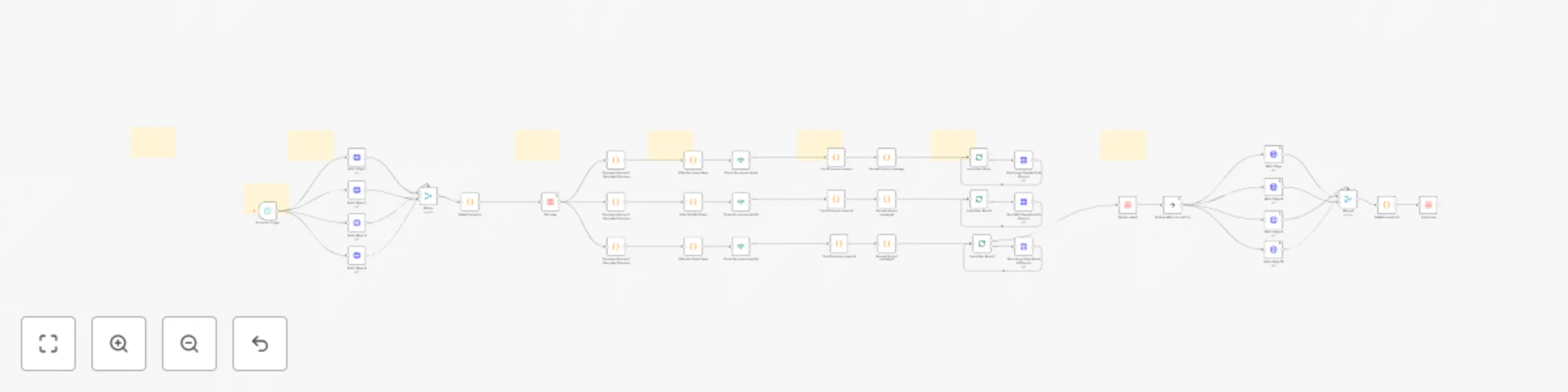
Crypto volume change Discord alerts (5-20%) with CoinGecko (Top 1000 coins)

Workflow preview

Workflow preview
100%
Crypto volume change Discord alerts (5-20%) with CoinGecko (Top 1000 coins) preview
Open on n8n.io

Important notice

This workflow is provided as-is. Please review and test before using in production.

1. Workflow Overview

Purpose and Audience This professional grade n8n workflow automation is designed for crypto traders, investors, and market analysts who need real time volume change alerts across different market c...

Best for

  • Crypto Trading automation workflows
  • advanced n8n builders looking for reusable templates

Tools used

n8n-nodes-base.httprequest, n8n-nodes-base.merge, n8n-nodes-base.code, n8n-nodes-base.if, n8n-nodes-base.datatable, n8n-nodes-base.splitinbatches, n8n-nodes-base.scheduletrigger, n8n-nodes-base.noop

Source and attribution

This workflow is cataloged by N8N Workflows and links back to its original n8n.io source page by Malik Hashir.

Original n8n.io source

1.1 Workflow description

Title
Crypto volume change Discord alerts (5-20%) with CoinGecko (Top 1000 coins)
Workflow name
Crypto volume change Discord alerts (5-20%) with CoinGecko (Top 1000 coins)

Purpose and Audience

This professional-grade n8n workflow automation is designed for crypto traders, investors, and market analysts who need real-time volume change alerts across different market cap segments. Whether you're day trading, swing trading, or conducting market research, this workflow keeps you informed of significant volume movements that often precede major price action.

What It Does

This automated system monitors the top 1,000 cryptocurrencies and sends detailed Discord notifications when significant volume changes are detected. The workflow intelligently segments coins into three market cap tiers:

  • Large Cap (>$1B): Alerts on volume changes >5%
  • Mid Cap ($100M-$1B): Alerts on volume changes >10%
  • Small Cap (<$100M): Alerts on volume changes >20%

Each alert includes comprehensive data: previous vs. current volume, volume change percentage and dollar amount, current price, 24h price change, market cap, volume/market cap ratio, and market cap rank. The system automatically filters out stablecoins and low-volume noise to ensure you only receive actionable alerts.

How It Works

The workflow operates on a 2-hour schedule (fully customizable) and executes the following process:

  1. Data Collection: Fetches fresh market data for 1,000 cryptocurrencies from CoinGecko API across 4 paginated requests
  2. Volume Analysis: Compares current volume against previously stored data to calculate percentage changes
  3. Tier Filtering: Segments coins by market cap and applies appropriate volume change thresholds
  4. Alert Generation: Identifies top 20 volume movers per tier and formats rich Discord embeds with detailed metrics
  5. Data Management: Automatically deletes old data and stores new baseline data for the next execution cycle
  6. Discord Delivery: Sends formatted alerts to your Discord channel with embedded guides explaining how to interpret the signals

The workflow includes built-in intelligence to handle rate limits, batch processing for Discord's 10-embed limit, and comprehensive error handling.

Who Is It For

  • Active cryptocurrency traders seeking early volume spike signals
  • Portfolio managers monitoring multiple market cap segments
  • Market researchers tracking crypto market dynamics
  • Trading communities wanting automated alert systems
  • Discord servers focused on crypto trading and analysis

How to Setup

Please watch the provided setup tutorial for complete step-by-step instructions. Setup time is approximately 15-20 minutes and requires:

The tutorial covers API configuration, Discord webhook setup, data table initialization, and schedule customization.

1.2 Logical Blocks

This catalog entry is organized from the workflow JSON. The node-level section below shows the executable blocks available for review before importing the template.

2. Block-by-Block Analysis

Block 1 - Fetch Page 1

Type / Role
n8n-nodes-base.httpRequest - httpRequest
Config choices
Version 4.1

Block 2 - Fetch Page 2

Type / Role
n8n-nodes-base.httpRequest - httpRequest
Config choices
Version 4.1

Block 3 - Fetch Page 3

Type / Role
n8n-nodes-base.httpRequest - httpRequest
Config choices
Version 4.1

Block 4 - Merge

Type / Role
n8n-nodes-base.merge - merge
Config choices
Version 3.2

Block 5 - Fetch Page 4

Type / Role
n8n-nodes-base.httpRequest - httpRequest
Config choices
Version 4.1

Block 6 - Data Processing

Type / Role
n8n-nodes-base.code - code
Config choices
Version 2

Block 7 - Check for volume alerts

Type / Role
n8n-nodes-base.if - if
Config choices
Version 2.2

Block 8 - Top 20 volume movers

Type / Role
n8n-nodes-base.code - code
Config choices
Version 2

Block 9 - Format discord message

Type / Role
n8n-nodes-base.code - code
Config choices
Version 2

Block 10 - Get rows

Type / Role
n8n-nodes-base.dataTable - dataTable
Config choices
Version 1

Block 11 - Loop Over Items

Type / Role
n8n-nodes-base.splitInBatches - splitInBatches
Config choices
Version 3

Block 12 - Filter For Large Caps

Type / Role
n8n-nodes-base.code - code
Config choices
Version 2

Block 13 - Filter For Mid Caps

Type / Role
n8n-nodes-base.code - code
Config choices
Version 2

Block 14 - Filter For Small Caps

Type / Role
n8n-nodes-base.code - code
Config choices
Version 2

Block 15 - Check for volume alerts1

Type / Role
n8n-nodes-base.if - if
Config choices
Version 2.2

Block 16 - Top 20 volume movers1

Type / Role
n8n-nodes-base.code - code
Config choices
Version 2

Block 17 - Format discord message1

Type / Role
n8n-nodes-base.code - code
Config choices
Version 2

Block 18 - Loop Over Items1

Type / Role
n8n-nodes-base.splitInBatches - splitInBatches
Config choices
Version 3

Block 19 - Check for volume alerts2

Type / Role
n8n-nodes-base.if - if
Config choices
Version 2.2

Block 20 - Top 20 volume movers2

Type / Role
n8n-nodes-base.code - code
Config choices
Version 2

Block 21 - Format discord message2

Type / Role
n8n-nodes-base.code - code
Config choices
Version 2

Block 22 - Loop Over Items2

Type / Role
n8n-nodes-base.splitInBatches - splitInBatches
Config choices
Version 3

Block 23 - Compare Volume & Calculate Changes (>5%)

Type / Role
n8n-nodes-base.code - code
Config choices
Version 2

Block 24 - Compare Volume & Calculate Changes (>10%)

Type / Role
n8n-nodes-base.code - code
Config choices
Version 2

Showing the first 24 of 46 workflow blocks. Download the JSON for the full node graph.

3. Summary Table

Workflow Crypto volume change Discord alerts (5-20%) with CoinGecko (Top 1000 coins)
Complexity advanced
Nodes 46
Categories Crypto Trading
Author Malik Hashir
Published 19 Dec 2025

4. Reproducing the Workflow from Scratch

  1. 1. Download the workflow JSON

    Use the JSON export at /data/workflows/11966/11966.json as the source template for this automation.

  2. 2. Import the template into n8n

    Open n8n, import the downloaded JSON, and review each node before activating the workflow.

  3. 3. Configure credentials and variables

    Replace placeholder credentials, API keys, webhook URLs, account IDs, and environment-specific values with your own settings.

  4. 4. Test with sample data

    Run the workflow manually or in a staging workspace, inspect node output, and confirm downstream systems receive the expected data.

  5. 5. Activate and monitor

    Enable the workflow only after testing, then monitor executions, errors, and rate limits during the first production runs.

5. General Notes & Resources

Review imported nodes carefully before activation. This catalog entry is intended to help you inspect the workflow structure, understand required services, and find related templates faster.

Node names, credentials, schedules, webhook paths, and external service limits may need adjustment for your workspace.

Frequently asked questions

What does Crypto volume change Discord alerts (5-20%) with CoinGecko (Top 1000 coins) do?

Purpose and Audience This professional grade n8n workflow automation is designed for crypto traders, investors, and market analysts who need real time volume change alerts across different market c...

What do I need before importing this workflow?

Review the workflow JSON, configure any required credentials in n8n, and test the automation in a safe workspace before using it in production.

Can I customize this workflow?

Yes. Use the block-by-block analysis and the downloadable JSON to inspect each node, then adjust credentials, prompts, schedules, filters, or destinations for your Crypto Trading use case.