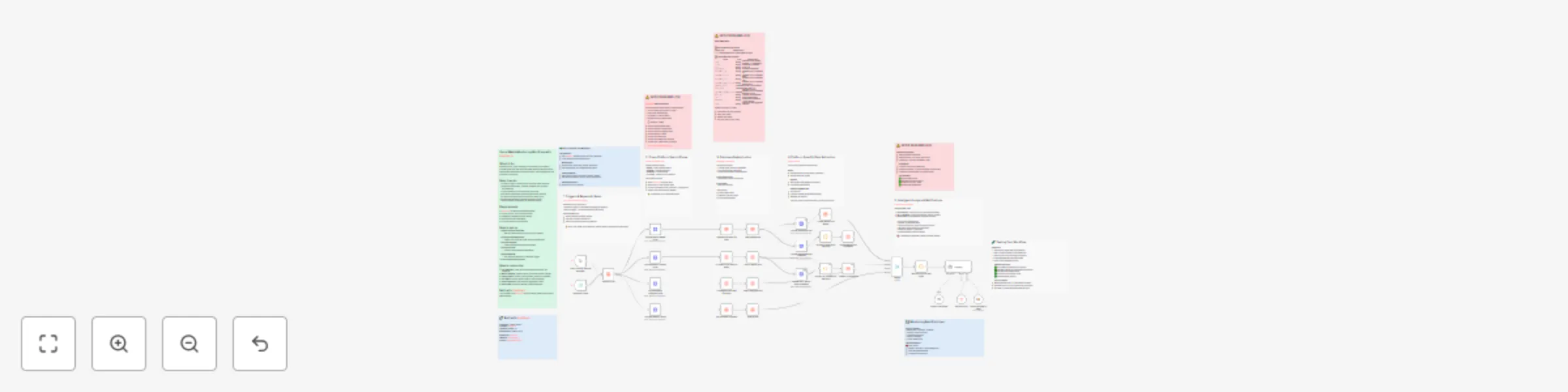
Cross-platform brand monitoring & analysis with AnySite API and GPT

Workflow preview

Workflow preview
100%
Cross-platform brand monitoring & analysis with AnySite API and GPT preview
Open on n8n.io

Important notice

This workflow is provided as-is. Please review and test before using in production.

1. Workflow Overview

Overview This n8n workflow automates brand monitoring across social media platforms (Reddit, LinkedIn, X, and Instagram) using the AnySite API . ...

Best for

  • Market Research automation workflows
  • AI Summarization automation workflows
  • advanced n8n builders looking for reusable templates

Tools used

n8n-nodes-base.manualtrigger, n8n-nodes-base.merge, @n8n/n8n-nodes-langchain.lmchatopenai, n8n-nodes-base.httprequest, @n8n/n8n-nodes-langchain.agent, n8n-nodes-base.datatable, n8n-nodes-base.code, n8n-nodes-base.scheduletrigger

Source and attribution

This workflow is cataloged by N8N Workflows and links back to its original n8n.io source page by Andrey.

Original n8n.io source

1.1 Workflow description

Title
Cross-platform brand monitoring & analysis with AnySite API and GPT
Workflow name
Cross-platform brand monitoring & analysis with AnySite API and GPT

Overview

This n8n workflow automates brand monitoring across social media platforms (Reddit, LinkedIn, X, and Instagram) using the AnySite API.
It searches posts mentioning your defined keywords, stores results in n8n Data Tables, analyzes engagement and sentiment, and generates a detailed AI-powered social media report automatically sent to your email.


Key Features

  • Multi-Platform Monitoring: Reddit, LinkedIn, X (Twitter), and Instagram
  • Automated Post Collection: Searches for new posts containing tracked keywords
  • Data Persistence: Saves all posts and comments in structured Data Tables
  • AI-Powered Reporting: Uses GPT (OpenAI API) to summarize and analyze trends, engagement, and risks
  • Automated Email Delivery: Sends comprehensive daily/weekly reports via Gmail
  • Comment Extraction: Collects and formats post comments for deeper sentiment analysis
  • Scheduling Support: Can be executed manually or automatically (e.g., every night)

How It Works

Triggers

The workflow runs:

  • Automatically (via Schedule Trigger) — e.g., once daily
  • Manually (via Manual Trigger) — for testing or on-demand analysis

Data Collection Process

  1. Keyword Loading:
    Reads all keywords from the Data Table “Brand Monitoring Words”

  2. Social Media Search:
    For each keyword, the workflow calls the AnySite API endpoints:

    • api/reddit/search/posts
    • api/linkedin/search/posts
    • api/twitter/search/posts (X)
    • api/instagram/search/posts
  3. Deduplication:
    Before saving, checks if a post already exists in the “Brand Monitoring Posts” table.

  4. Data Storage:
    Inserts new posts into the Data Table with fields like type, title, url, vote_count, comment_count, etc.

  5. Comments Enrichment:
    For Reddit and LinkedIn, retrieves and formats comments into JSON strings, then updates the record.

  6. AI Analysis & Report Generation:
    The AI Agent (OpenAI GPT model) aggregates posts, analyzes sentiment, engagement, risks, and generates a structured HTML email report.

  7. Email Sending:
    Sends the final report via Gmail using your connected account.


Setup Instructions

Requirements

  • Self-hosted or cloud n8n instance
  • AnySite API keyhttps://AnySite.io
  • OpenAI API key (GPT-4o or later)
  • Connected Gmail account (for report delivery)

Installation Steps

  1. Import the workflow
    Import the provided file:
    Social Media Monitoring.json

  2. Configure credentials

    • AnySite API: Add access-token header with your API key
    • OpenAI: Add your OpenAI API key in the “OpenAI Chat Model” node
    • Gmail: Connect your Gmail account (OAuth2) in the “Send a message in Gmail” node
  3. Create required Data Tables


1️⃣ Brand Monitoring Words

Field Type Description
word string Keyword or brand name to monitor

> Each row represents a single keyword to be tracked.


2️⃣ Brand Monitoring Posts

Field Type Description
type string Platform type (e.g., reddit, linkedin, x, instagram)
title string Post title or headline
url string Direct link to post
created_at string Post creation date/time
subreddit_id string (Reddit only) subreddit ID
subreddit_alias string (Reddit only) subreddit alias
subreddit_url string (Reddit only) subreddit URL
subreddit_description string (Reddit only) subreddit description
comment_count number Number of comments
vote_count number Votes, likes, or reactions count
subreddit_member_count number (Reddit only) member count
post_id string Unique post identifier
text string Post body text
comments string Serialized comments (JSON string)
word string Matched keyword that triggered capture

AI Reporting Logic

  • Collects all posts gathered during the run
  • Aggregates by keyword and platform
  • Evaluates sentiment, engagement, and risk signals
  • Summarizes findings with an executive summary and key metrics
  • Sends the Social Media Intelligence Report to your configured email

Customization Options

  • Schedule: Adjust the trigger frequency (daily, hourly, etc.)
  • Keywords: Add or remove keywords in the Brand Monitoring Words table
  • Report Depth: Modify system prompts in the “AI Agent” node to customize tone and analysis focus
  • Email Recipient: Change the target email address in the “Send a message in Gmail” node

Troubleshooting

Issue Solution
No posts found Check AnySite API key and keyword relevance
Duplicate posts Verify Data Table deduplication setup
Report not sent Confirm Gmail OAuth2 connection
AI Agent error Ensure OpenAI API key and model selection are correct

Best Practices

  • Use specific brand or product names in keywords for better precision
  • Run the workflow daily to maintain fresh insights
  • Periodically review and clean Data Tables
  • Adjust AI prompt parameters to refine analytical tone
  • Review AI-generated reports to ensure data quality

Author Notes

Created for automated cross-platform brand reputation monitoring, enabling real-time insights into how your brand is discussed online.

1.2 Logical Blocks

This catalog entry is organized from the workflow JSON. The node-level section below shows the executable blocks available for review before importing the template.

2. Block-by-Block Analysis

Block 1 - When clicking ‘Execute workflow’

Type / Role
n8n-nodes-base.manualTrigger - manualTrigger
Config choices
Version 1

Block 2 - Merge

Type / Role
n8n-nodes-base.merge - merge
Config choices
Version 3.2

Block 3 - OpenAI Chat Model

Type / Role
@n8n/n8n-nodes-langchain.lmChatOpenAi - lmChatOpenAi
Config choices
Version 1.2

Block 4 - AnySite Get Reddit Post

Type / Role
n8n-nodes-base.httpRequest - httpRequest
Config choices
Version 4.3

Block 5 - AnySite Search Reddit Posts

Type / Role
n8n-nodes-base.httpRequest - httpRequest
Config choices
Version 4.3

Block 6 - AnySite Get Reddit Post Comment

Type / Role
n8n-nodes-base.httpRequest - httpRequest
Config choices
Version 4.3

Block 7 - AI Agent

Type / Role
@n8n/n8n-nodes-langchain.agent - agent
Config choices
Version 3

Block 8 - Get word's list

Type / Role
n8n-nodes-base.dataTable - dataTable
Config choices
Version 1

Block 9 - AnySite Search LinkedIn Posts

Type / Role
n8n-nodes-base.httpRequest - httpRequest
Config choices
Version 4.3

Block 10 - AnySite Get LinkedIn Post Comments

Type / Role
n8n-nodes-base.httpRequest - httpRequest
Config choices
Version 4.3

Block 11 - AnySite Search Instagram Posts

Type / Role
n8n-nodes-base.httpRequest - httpRequest
Config choices
Version 4.3

Block 12 - AnySite Search X Posts

Type / Role
n8n-nodes-base.httpRequest - httpRequest
Config choices
Version 4.3

Block 13 - If LinkedIn post does not exist1

Type / Role
n8n-nodes-base.dataTable - dataTable
Config choices
Version 1

Block 14 - If Reddit post does not exist

Type / Role
n8n-nodes-base.dataTable - dataTable
Config choices
Version 1

Block 15 - If X post does not exist3

Type / Role
n8n-nodes-base.dataTable - dataTable
Config choices
Version 1

Block 16 - If Instagram post does not exist2

Type / Role
n8n-nodes-base.dataTable - dataTable
Config choices
Version 1

Block 17 - Insert Reddit post

Type / Role
n8n-nodes-base.dataTable - dataTable
Config choices
Version 1

Block 18 - Insert LinkedIn post

Type / Role
n8n-nodes-base.dataTable - dataTable
Config choices
Version 1

Block 19 - Insert Instagram post

Type / Role
n8n-nodes-base.dataTable - dataTable
Config choices
Version 1

Block 20 - Insert X post

Type / Role
n8n-nodes-base.dataTable - dataTable
Config choices
Version 1

Block 21 - Update Reddit post details

Type / Role
n8n-nodes-base.dataTable - dataTable
Config choices
Version 1

Block 22 - Convert comments to the string

Type / Role
n8n-nodes-base.code - code
Config choices
Version 2

Block 23 - Update Reddit post comments

Type / Role
n8n-nodes-base.dataTable - dataTable
Config choices
Version 1

Block 24 - Convert LN comments to the string

Type / Role
n8n-nodes-base.code - code
Config choices
Version 2

Showing the first 24 of 42 workflow blocks. Download the JSON for the full node graph.

3. Summary Table

Workflow Cross-platform brand monitoring & analysis with AnySite API and GPT
Complexity advanced
Nodes 42
Categories Market Research, AI Summarization
Author Andrey
Published 28 Oct 2025

4. Reproducing the Workflow from Scratch

  1. 1. Download the workflow JSON

    Use the JSON export at /data/workflows/10251/10251.json as the source template for this automation.

  2. 2. Import the template into n8n

    Open n8n, import the downloaded JSON, and review each node before activating the workflow.

  3. 3. Configure credentials and variables

    Replace placeholder credentials, API keys, webhook URLs, account IDs, and environment-specific values with your own settings.

  4. 4. Test with sample data

    Run the workflow manually or in a staging workspace, inspect node output, and confirm downstream systems receive the expected data.

  5. 5. Activate and monitor

    Enable the workflow only after testing, then monitor executions, errors, and rate limits during the first production runs.

5. General Notes & Resources

Review imported nodes carefully before activation. This catalog entry is intended to help you inspect the workflow structure, understand required services, and find related templates faster.

Node names, credentials, schedules, webhook paths, and external service limits may need adjustment for your workspace.

Frequently asked questions

What does Cross-platform brand monitoring & analysis with AnySite API and GPT do?

Overview This n8n workflow automates brand monitoring across social media platforms (Reddit, LinkedIn, X, and Instagram) using the AnySite API . ...

What do I need before importing this workflow?

Review the workflow JSON, configure any required credentials in n8n, and test the automation in a safe workspace before using it in production.

Can I customize this workflow?

Yes. Use the block-by-block analysis and the downloadable JSON to inspect each node, then adjust credentials, prompts, schedules, filters, or destinations for your Market Research, AI Summarization use case.