Block 1 - Sheet Row Added
- Type / Role
- n8n-nodes-base.googleSheetsTrigger - googleSheetsTrigger
- Config choices
- Version 1


 Early Deal
This workflow is provided as-is. Please review and test before using in production.
Prompt To Video (MagicHour API) with Music & YouTube Automate AI video creation, background music, YouTube uploads, and result logging — all from a single text prompt. Overview This n8n templa...
n8n-nodes-base.googlesheetstrigger, @n8n/n8n-nodes-langchain.chattrigger, n8n-nodes-base.set, @n8n/n8n-nodes-langchain.agent, @n8n/n8n-nodes-langchain.outputparserstructured, n8n-nodes-base.httprequest, n8n-nodes-base.if, n8n-nodes-base.wait
This workflow is cataloged by N8N Workflows and links back to its original n8n.io source page by Divyansh Chauhan.
Original n8n.io source🪄 Prompt To Video (MagicHour API) with Music & YouTube
Automate AI video creation, background music, YouTube uploads, and result logging — all from a single text prompt.
⚡ Overview
This n8n template turns a text prompt into a complete AI-generated video using the MagicHour API, adds background music, generates YouTube metadata, uploads to YouTube, and logs results in Google Sheets — all in one flow.
Perfect for creators, marketers, and startups producing YouTube content at scale — from daily AI Shorts to explainers or marketing clips.
🧩 Use Cases
🎥 Daily AI-generated Shorts
🧠 Product explainers
🚀 Marketing & brand automation
🔁 Repurpose blog posts into videos
💡 AI storytelling or creative projects
⚙️ How It Works
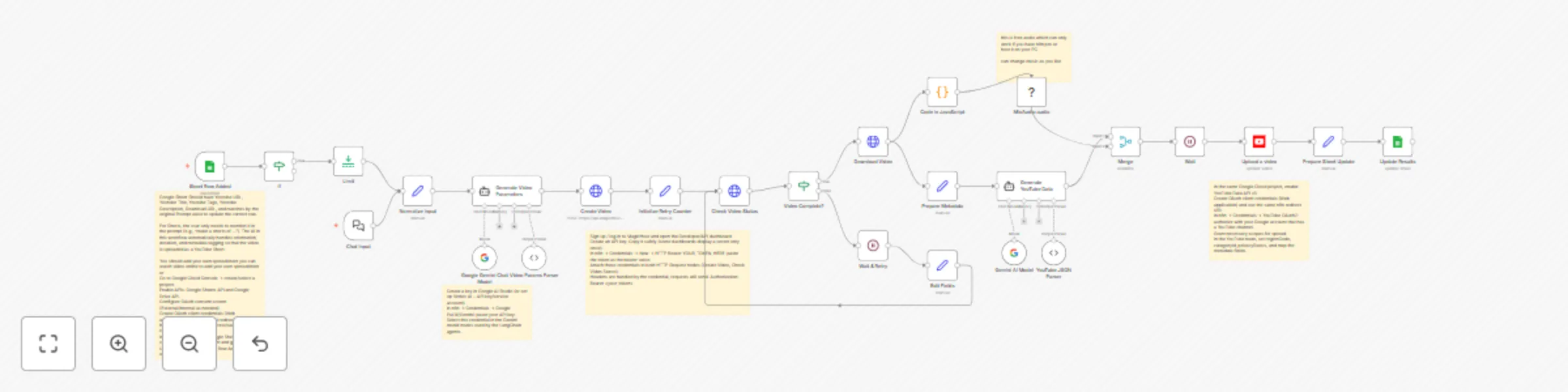
Trigger when a new row is added to Google Sheets or via Chat input.
Gemini parses and normalizes the text prompt.
MagicHour API generates the AI video.
Poll until the render completes.
(Optional) Mix background audio using MediaFX.
Gemini generates YouTube title, description, and tags.
Upload the video to YouTube with metadata.
Log YouTube URL, metadata, and download link back to Google Sheets.
🧰 Requirements Service Purpose MagicHour API Key Text-to-video generation Gemini API Key Prompt parsing & metadata YouTube OAuth2 Video uploads Google Sheets OAuth2 Trigger & logging (Optional) MediaFX Node Audio mixing 🗂️ Google Sheets Setup Column Description Prompt Text prompt for video Background Music URL (Optional) Royalty-free track Status Tracks flow progress YouTube URL Auto-filled after upload Metadata Title, tags, and description JSON Date Generated (Optional) Auto-filled with video creation date 📅 100 Daily Prompts Automation
You can scale this workflow to generate one video per day from a batch of 100 prompts in Google Sheets.
Setup Steps
Add 100 prompts to your Google Sheet — one per row.
Set the Status column for each to Pending.
Use a Cron Trigger in n8n to run the workflow once daily (e.g., at 9 AM).
Each run picks one Pending prompt, generates a video, uploads to YouTube, then marks it as Done.
Continues daily until all 100 prompts are processed.
Example Cron Expression 0 9 * * *
→ Runs the automation every day at 9:00 AM.
Node Sequence [Schedule Trigger (Daily)] → [Get Pending Prompt from Sheets] → [Gemini Prompt Parser] → [MagicHour Video Generation] → [Optional: MediaFX Audio Mix] → [Gemini Metadata Generator] → [YouTube Upload] → [Update Row in Sheets]
💡 Optional Enhancements:
Add a notification node (Slack, Discord, or Email) after each upload.
Add a counter check to stop after 100 videos.
Add a “Paused” column to skip specific rows.
🧠 Gemini Integration
Gemini handles:
JSON parsing for MagicHour requests
Metadata generation (title, description, tags)
Optional creative rewriting of prompts
🎧 Audio Mixing (Optional)
Install MediaFX Community Node → Settings → Community Nodes → n8n-nodes-mediafx
Use it to blend background music automatically into videos.
🪶 Error Handling
Avoid “Continue on Fail” in key nodes
Use IF branches for MagicHour API errors
Add retry/timeout logic for polling steps
🧱 Node Naming Tips
Rename generic nodes for clarity:
Merge → Merge Video & Audio
If → Check Video Completion
HTTP Request → MagicHour API Request
🚀 How to Use
Add MagicHour, Gemini, YouTube, and Sheets credentials
Replace background music with your own track
Use Google Sheets trigger or daily cron for automation
Videos are created, uploaded, and logged — hands-free
⚠️ Disclaimer
This template uses community nodes (MediaFX). Install and enable them manually. MagicHour API usage may incur costs based on video duration and quality.
🌐 SEO Keywords
MagicHour API, n8n workflow, AI video generator, automated YouTube upload, Gemini metadata, AI Shorts, MediaFX, Google Sheets automation, AI marketing, content automation.
This catalog entry is organized from the workflow JSON. The node-level section below shows the executable blocks available for review before importing the template.
Showing the first 24 of 31 workflow blocks. Download the JSON for the full node graph.
| Workflow | Create YouTube videos daily from Google Sheets using MagicHour + Gemini |
|---|---|
| Complexity | advanced |
| Nodes | 31 |
| Categories | Content Creation, Multimodal AI |
| Author | Divyansh Chauhan |
| Published | 17 Oct 2025 |
Use the JSON export at /data/workflows/9843/9843.json as the source template for this automation.
Open n8n, import the downloaded JSON, and review each node before activating the workflow.
Replace placeholder credentials, API keys, webhook URLs, account IDs, and environment-specific values with your own settings.
Run the workflow manually or in a staging workspace, inspect node output, and confirm downstream systems receive the expected data.
Enable the workflow only after testing, then monitor executions, errors, and rate limits during the first production runs.
Review imported nodes carefully before activation. This catalog entry is intended to help you inspect the workflow structure, understand required services, and find related templates faster.
Node names, credentials, schedules, webhook paths, and external service limits may need adjustment for your workspace.
Prompt To Video (MagicHour API) with Music & YouTube Automate AI video creation, background music, YouTube uploads, and result logging — all from a single text prompt. Overview This n8n templa...
Review the workflow JSON, configure any required credentials in n8n, and test the automation in a safe workspace before using it in production.
Yes. Use the block-by-block analysis and the downloadable JSON to inspect each node, then adjust credentials, prompts, schedules, filters, or destinations for your Content Creation, Multimodal AI use case.