D

Divyansh Chauhan

1
Workflow

Workflows by Divyansh Chauhan

Workflow preview: Create YouTube videos daily from Google Sheets using MagicHour + Gemini
Free advanced

Create YouTube videos daily from Google Sheets using MagicHour + Gemini

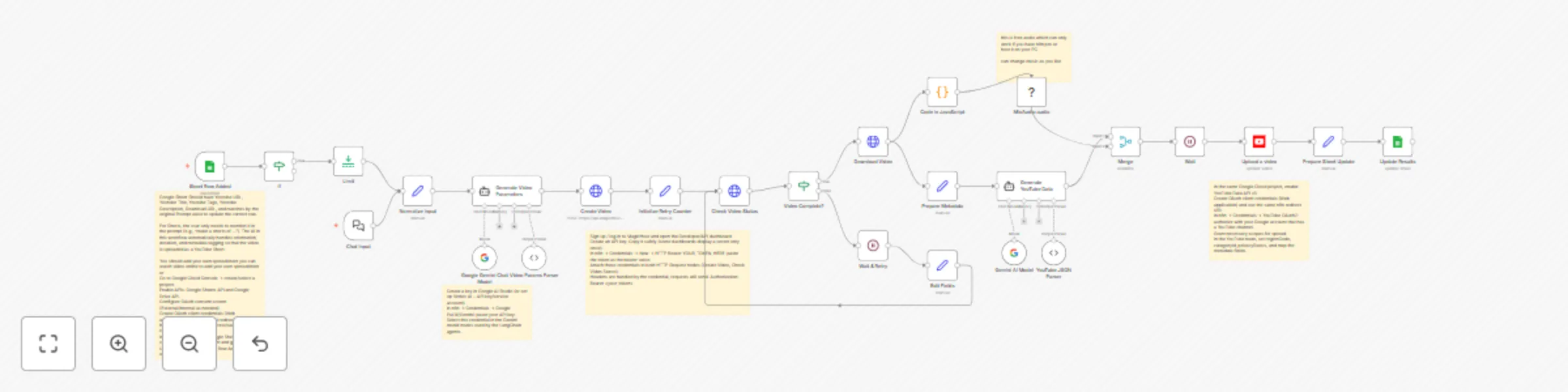
🪄 Prompt To Video (MagicHour API) with Music & YouTube Automate AI video creation, background music, YouTube uploads, and result logging — all from a single text prompt. ⚡ Overview This n8n template turns a text prompt into a complete AI-generated video using the MagicHour API, adds background music, generates YouTube metadata, uploads to YouTube, and logs results in Google Sheets — all in one flow. Perfect for creators, marketers, and startups producing YouTube content at scale — from daily AI Shorts to explainers or marketing clips. 🧩 Use Cases 🎥 Daily AI-generated Shorts 🧠 Product explainers 🚀 Marketing & brand automation 🔁 Repurpose blog posts into videos 💡 AI storytelling or creative projects ⚙️ How It Works Trigger when a new row is added to Google Sheets or via Chat input. Gemini parses and normalizes the text prompt. MagicHour API generates the AI video. Poll until the render completes. (Optional) Mix background audio using MediaFX. Gemini generates YouTube title, description, and tags. Upload the video to YouTube with metadata. Log YouTube URL, metadata, and download link back to Google Sheets. 🧰 Requirements Service Purpose MagicHour API Key Text-to-video generation Gemini API Key Prompt parsing & metadata YouTube OAuth2 Video uploads Google Sheets OAuth2 Trigger & logging (Optional) MediaFX Node Audio mixing 🗂️ Google Sheets Setup Column Description Prompt Text prompt for video Background Music URL (Optional) Royalty-free track Status Tracks flow progress YouTube URL Auto-filled after upload Metadata Title, tags, and description JSON Date Generated (Optional) Auto-filled with video creation date 📅 100 Daily Prompts Automation You can scale this workflow to generate one video per day from a batch of 100 prompts in Google Sheets. Setup Steps Add 100 prompts to your Google Sheet — one per row. Set the Status column for each to Pending. Use a Cron Trigger in n8n to run the workflow once daily (e.g., at 9 AM). Each run picks one Pending prompt, generates a video, uploads to YouTube, then marks it as Done. Continues daily until all 100 prompts are processed. Example Cron Expression 0 9 * * * → Runs the automation every day at 9:00 AM. Node Sequence [Schedule Trigger (Daily)] → [Get Pending Prompt from Sheets] → [Gemini Prompt Parser] → [MagicHour Video Generation] → [Optional: MediaFX Audio Mix] → [Gemini Metadata Generator] → [YouTube Upload] → [Update Row in Sheets] 💡 Optional Enhancements: Add a notification node (Slack, Discord, or Email) after each upload. Add a counter check to stop after 100 videos. Add a “Paused” column to skip specific rows. 🧠 Gemini Integration Gemini handles: JSON parsing for MagicHour requests Metadata generation (title, description, tags) Optional creative rewriting of prompts 🎧 Audio Mixing (Optional) Install MediaFX Community Node → Settings → Community Nodes → n8n-nodes-mediafx Use it to blend background music automatically into videos. 🪶 Error Handling Avoid “Continue on Fail” in key nodes Use IF branches for MagicHour API errors Add retry/timeout logic for polling steps 🧱 Node Naming Tips Rename generic nodes for clarity: Merge → Merge Video & Audio If → Check Video Completion HTTP Request → MagicHour API Request 🚀 How to Use Add MagicHour, Gemini, YouTube, and Sheets credentials Replace background music with your own track Use Google Sheets trigger or daily cron for automation Videos are created, uploaded, and logged — hands-free ⚠️ Disclaimer This template uses community nodes (MediaFX). Install and enable them manually. MagicHour API usage may incur costs based on video duration and quality. 🌐 SEO Keywords MagicHour API, n8n workflow, AI video generator, automated YouTube upload, Gemini metadata, AI Shorts, MediaFX, Google Sheets automation, AI marketing, content automation.

D
Divyansh Chauhan
Content Creation
17 Oct 2025
1955
0