Block 1 - Sticky Note
- Type / Role
- n8n-nodes-base.stickyNote - stickyNote
- Config choices
- Version 1


 Early Deal
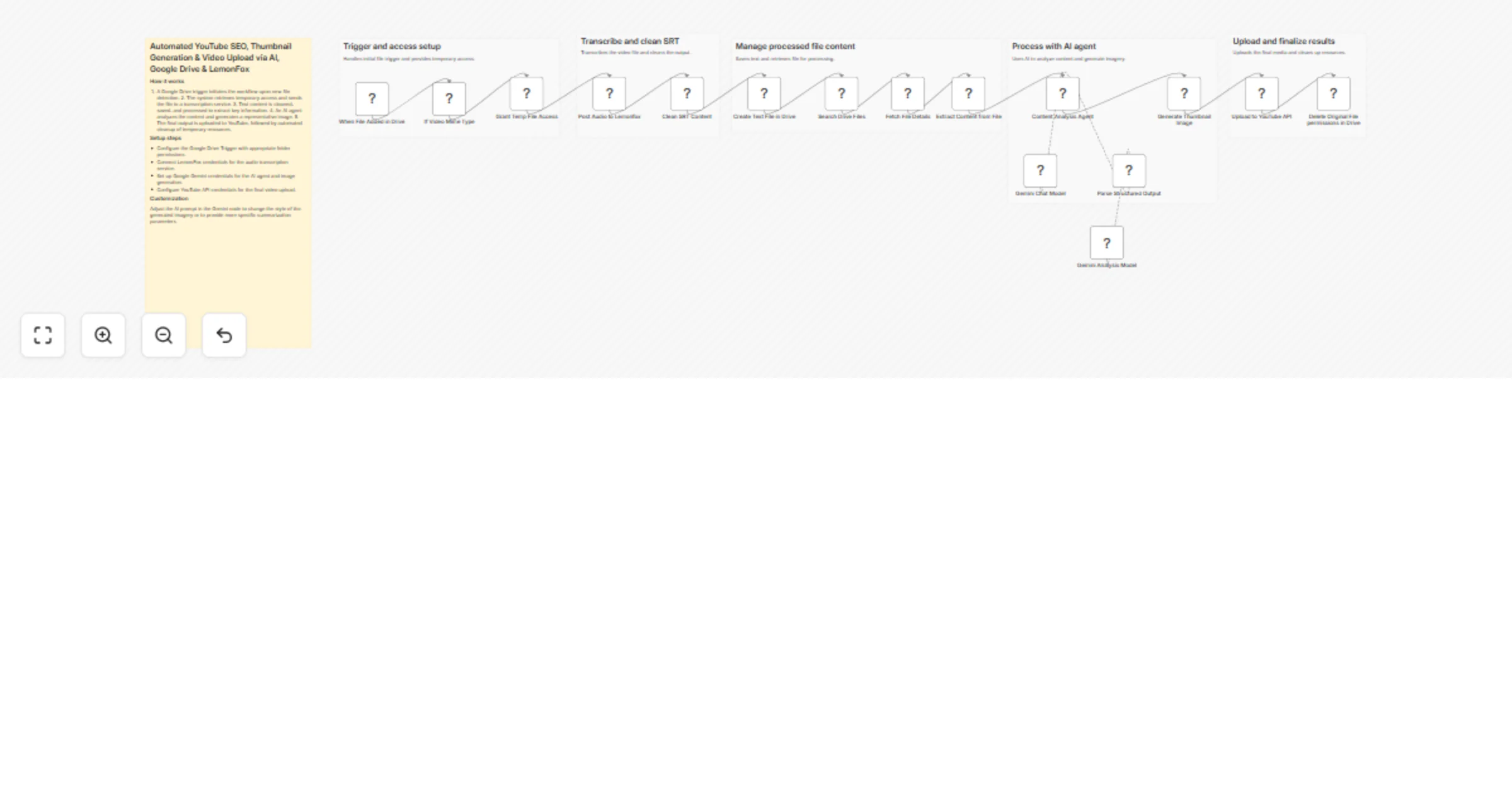
Automated YouTube SEO, Thumbnail Generation & Video Upload via AI, Google Drive & LemonFox Pre requesties: Video uploaded to gdrive. And sponsor file with the similar formart "videotitle sponsors.t...
n8n-nodes-base.stickynote, n8n-nodes-base.httprequest, n8n-nodes-base.googledrivetrigger, n8n-nodes-base.if, @n8n/n8n-nodes-langchain.agent, n8n-nodes-base.googledrive, n8n-nodes-base.extractfromfile, n8n-nodes-base.code
This workflow is cataloged by N8N Workflows and links back to its original n8n.io source page by iamvaar.
Original n8n.io sourceThis workflow is an end-to-end "Content-to-Publish" engine. I’ve broken it down by the specific stage of production:
| Node Name | What it does |
|---|---|
| When File Added in Drive | The Trigger: Watches your "transcript" folder. The moment you drop a video file here, the engine starts. |
| If Video Mime Type | The Gatekeeper: Ensures the file is actually a video (e.g., .mp4) and not a random document or image before proceeding. |
| Grant Temp File Access | The Key: Temporarily changes the Drive file's permissions to "Anyone with link" so external AI tools (LemonFox) can download and process it. |
| Node Name | What it does |
|---|---|
| Post Audio to Lemonfox | The Ears: Sends the video to LemonFox AI to extract the spoken word into a structured SRT (subtitle) format. |
| Clean SRT Content | The Editor: A JavaScript node that cleans up technical formatting issues and unescapes characters to make the text readable for the AI. |
| Create Text File in Drive | The Archive: Saves your clean transcript back to Google Drive for your records. |
| Search/Fetch Sponsor Info | The Researcher: Looks for a specific .txt file named after your video that contains sponsor details (Name/Email) so they can be credited. |
| Node Name | What it does |
|---|---|
| Content Analysis Agent | The Strategist: Uses Gemini to analyze the transcript and find the "Big Idea." It then writes a high-CTR Title, SEO Description, and Tags. |
| Parse Structured Output | The Translator: Ensures the AI's creative writing is formatted as strict JSON so the next "Upload" step can understand it. |
| Generate Thumbnail Image | The Artist: Takes a specific "Thumbnail Prompt" written by the AI and uses Gemini (Nano Banana) to generate a high-quality 16:9 image. |
| Node Name | What it does |
|---|---|
| Upload to YouTube API | The Publisher: Hits your upload endpoint, sending the original video link, the AI-generated metadata, and the AI-generated thumbnail. |
| Delete Original File Permissions | The Security Guard: Immediately revokes the "Anyone with link" access to your Google Drive file, locking it back down for privacy. |
This catalog entry is organized from the workflow JSON. The node-level section below shows the executable blocks available for review before importing the template.
| Workflow | Create YouTube SEO metadata and thumbnails from Google Drive videos with Gemini, LemonFox and upload-post |
|---|---|
| Complexity | advanced |
| Nodes | 22 |
| Categories | Content Creation, Multimodal AI |
| Author | iamvaar |
| Published | 23 Mar 2026 |
Use the JSON export at /data/workflows/14255/14255.json as the source template for this automation.
Open n8n, import the downloaded JSON, and review each node before activating the workflow.
Replace placeholder credentials, API keys, webhook URLs, account IDs, and environment-specific values with your own settings.
Run the workflow manually or in a staging workspace, inspect node output, and confirm downstream systems receive the expected data.
Enable the workflow only after testing, then monitor executions, errors, and rate limits during the first production runs.
Review imported nodes carefully before activation. This catalog entry is intended to help you inspect the workflow structure, understand required services, and find related templates faster.
Node names, credentials, schedules, webhook paths, and external service limits may need adjustment for your workspace.
Automated YouTube SEO, Thumbnail Generation & Video Upload via AI, Google Drive & LemonFox Pre requesties: Video uploaded to gdrive. And sponsor file with the similar formart "videotitle sponsors.t...
Review the workflow JSON, configure any required credentials in n8n, and test the automation in a safe workspace before using it in production.
Yes. Use the block-by-block analysis and the downloadable JSON to inspect each node, then adjust credentials, prompts, schedules, filters, or destinations for your Content Creation, Multimodal AI use case.