Block 1 - Wait
- Type / Role
- n8n-nodes-base.wait - wait
- Config choices
- Version 1


 Early Deal
This workflow is provided as-is. Please review and test before using in production.
Generate ready to publish short form videos from text prompts using AI Click on the image to ...
n8n-nodes-base.wait, n8n-nodes-base.if, n8n-nodes-base.httprequest, n8n-nodes-base.stopanderror, n8n-nodes-base.aggregate, n8n-nodes-base.stickynote, @n8n/n8n-nodes-langchain.openai, n8n-nodes-base.splitout
This workflow is cataloged by N8N Workflows and links back to its original n8n.io source page by 8Automator.
Original n8n.io sourceClick on the image to see the Example output in google drive
Transform simple text concepts into professional short-form videos complete with AI-generated visuals, narrator voice, background music, and dynamic text overlays - all automatically generated and ready for Instagram, TikTok, or YouTube Shorts.
This workflow demonstrates a cost-effective approach to video automation by combining AI-generated images with audio composition instead of expensive AI video generation. Processing takes 1-2 minutes and outputs professional 9:16 vertical videos optimized for social platforms.
The template serves as both a showcase and building block for larger automation systems, with sticky notes providing clear guidance for customization and extension.
Content creators, social media managers, and marketers who need consistent, high-quality video content without manual production work. Perfect for motivational content, storytelling videos, educational snippets, and brand campaigns.
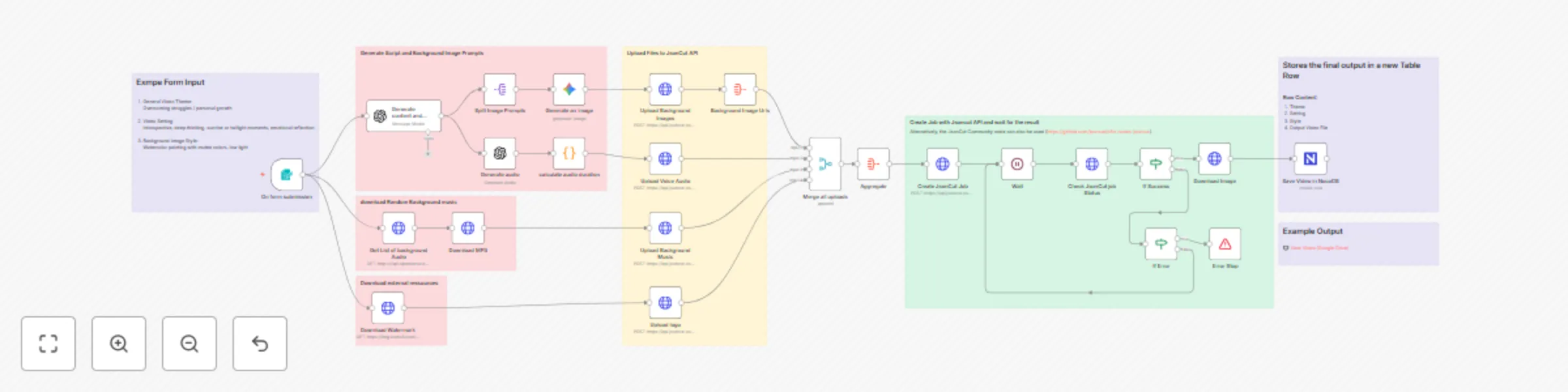
The workflow uses a form trigger to collect video theme, setting, and style preferences. ChatGPT generates cohesive scripts and image prompts, while Google Gemini creates themed background images and OpenAI TTS produces narrator audio. Background music is sourced from Openverse for CC-licensed tracks. All assets are uploaded to JsonCut API which composes the final video with synchronized overlays, transitions, and professional audio mixing. Results are stored in NocoDB for management.
x-api-keyThis template is designed as a foundation for larger automation systems. The modular structure allows easy modification of AI prompts for different content niches (business, wellness, education), replacement of the form trigger with RSS feeds or database triggers for automated content generation, integration with social media APIs for direct publishing, and customization of visual branding through JsonCut configuration.
The workflow can be extended for bulk processing, A/B testing multiple variations, or integration with existing content management systems. Sticky notes throughout the workflow provide detailed guidance for common customizations and scaling options.
This catalog entry is organized from the workflow JSON. The node-level section below shows the executable blocks available for review before importing the template.
Showing the first 24 of 32 workflow blocks. Download the JSON for the full node graph.
| Workflow | Create viral storytelling videos with GPT, Gemini & JsonCut from text prompts |
|---|---|
| Complexity | advanced |
| Nodes | 32 |
| Categories | Content Creation, Multimodal AI |
| Author | 8Automator |
| Published | 15 Oct 2025 |
Use the JSON export at /data/workflows/9687/9687.json as the source template for this automation.
Open n8n, import the downloaded JSON, and review each node before activating the workflow.
Replace placeholder credentials, API keys, webhook URLs, account IDs, and environment-specific values with your own settings.
Run the workflow manually or in a staging workspace, inspect node output, and confirm downstream systems receive the expected data.
Enable the workflow only after testing, then monitor executions, errors, and rate limits during the first production runs.
Review imported nodes carefully before activation. This catalog entry is intended to help you inspect the workflow structure, understand required services, and find related templates faster.
Node names, credentials, schedules, webhook paths, and external service limits may need adjustment for your workspace.
Generate ready to publish short form videos from text prompts using AI Click on the image to ...
Review the workflow JSON, configure any required credentials in n8n, and test the automation in a safe workspace before using it in production.
Yes. Use the block-by-block analysis and the downloadable JSON to inspect each node, then adjust credentials, prompts, schedules, filters, or destinations for your Content Creation, Multimodal AI use case.