Create & validate digital certificates with PDF Generator API and Gmail

Workflow preview

Workflow preview
100%
Create & validate digital certificates with PDF Generator API and Gmail preview
Open on n8n.io

Important notice

This workflow is provided as-is. Please review and test before using in production.

1. Workflow Overview

Automated Certificate Creation & Verification (PDF Template based) Overview This n8n workflow provides a complete end to end system for creating, distributing, and verifying digital certificates...

Best for

  • Document Extraction automation workflows
  • advanced n8n builders looking for reusable templates

Tools used

n8n-nodes-base.datatable, n8n-nodes-base.code, n8n-nodes-base.if, n8n-nodes-base.gmail, n8n-nodes-base.webhook, n8n-nodes-base.respondtowebhook, n8n-nodes-base.stickynote, @pdfgeneratorapi/n8n-nodes-pdf-generator-api.pdfgeneratorapi

Source and attribution

This workflow is cataloged by N8N Workflows and links back to its original n8n.io source page by Paolo Ronco.

Original n8n.io source

1.1 Workflow description

Title
Create & validate digital certificates with PDF Generator API and Gmail
Workflow name
Create & validate digital certificates with PDF Generator API and Gmail

Automated Certificate Creation & Verification (PDF Template-based)

πŸ” Overview

This n8n workflow provides a complete end-to-end system for creating, distributing, and verifying digital certificates, using PDF Generator API templates instead of raw HTML.

It is designed as a production-ready MVP, fully functional and tested, that can be imported and adapted with minimal configuration.

The workflow exposes public endpoints to:

  • generate personalized certificates as PDFs
  • assign unique Certification IDs
  • email certificates automatically
  • verify certificate authenticity via API

🎯 Typical use cases

This workflow is ideal for:

  • training providers and academies
  • online courses and bootcamps
  • internal company certifications
  • workshops and events
  • proof-of-completion documents

Any scenario where certificates must be generated automatically and verified reliably.


βš™οΈ What this workflow does

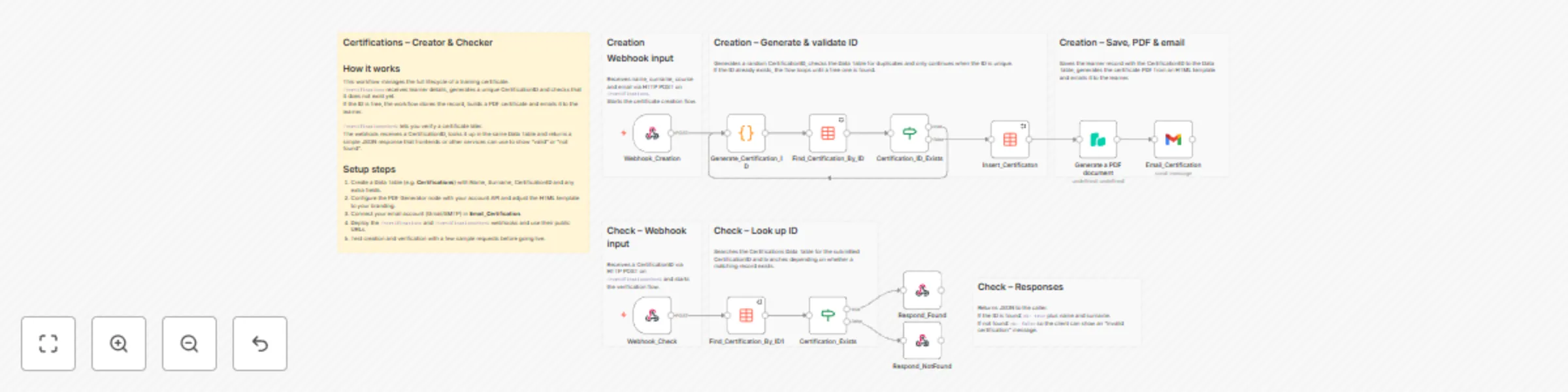
1️⃣ Certificate creation (Webhook)

Endpoint

POST /certifications2

When triggered, the workflow:

  1. Receives candidate data (name, surname, course, email)
  2. Generates a unique Certification ID
  3. Ensures the ID does not already exist
  4. Stores certificate data in an n8n Data Table
  5. Generates a PDF using a PDF Generator API template
  6. Sends the certificate via email as a PDF attachment

2️⃣ PDF generation (Template-based)

Instead of HTML, the workflow sends a JSON payload to a predefined PDF template.

Example payload:

{
  "Candidate": "John Doe",
  "CourseName": "Advanced n8n Automation",
  "DueDate": "2025-01-10",
  "ID": "LQ4Z5H8R2A1F"
}

The PDF layout (fonts, colors, logos, formatting) is fully managed via the PDF Generator API Template UI, keeping the workflow clean and maintainable.


3️⃣ Email delivery

  • Uses Gmail OAuth2
  • Sends a customizable email
  • Attaches the generated certificate PDF automatically

4️⃣ Certificate verification

Endpoint

GET /certificationscheck?id=CERTIFICATION-ID

This endpoint:

  • checks if the Certification ID exists
  • returns validation status and candidate info

Example response (valid):

{
  "ok": true,
  "name": "John",
  "surname": "Doe"
}

This enables public, API-based certificate verification.


πŸ›  Requirements

Before importing the workflow, you need:

  1. n8n instance (cloud or self-hosted)

  2. n8n Data Table with the following fields:

    • Name (string)
    • Surname (string)
    • CertificationID (string)
  3. PDF Generator API account

  4. Gmail OAuth2 credentials

  5. Ability to expose webhook endpoints publicly


πŸš€ Setup guide

Step 1 – Import the workflow

  • Open n8n
  • Go to Workflows β†’ Import
  • Paste the provided workflow JSON

Step 2 – Configure the Data Table

Create (or reuse) an n8n Data Table with these fields:

Field Type
Name string
Surname string
CertificationID string

Update the following nodes to reference your Data Table:

  • Insert_Certification
  • Find_Certification_By_ID
  • Find_Certification_By_ID1

Step 3 – Configure PDF Generator API

  • Create a PDF template in PDF Generator API

  • Add placeholders such as:

    • {Candidate}
    • {CourseName}
    • {DueDate}
    • {ID}
  • In n8n, set credentials on the Generate a PDF document node

⚠️ Placeholder names must exactly match the JSON keys used in the workflow.


Step 4 – Configure email credentials

  • Open the Email Certificate node
  • Set Gmail OAuth2 credentials
  • Customize subject and message body if needed

Step 5 – Activate the workflow

  • Click Activate

  • Your endpoints are now live:

    • /certifications2
    • /certificationscheck

πŸ§ͺ Status & notes

  • This workflow is an MVP, but already production-ready

  • Designed to be:

    • modular
    • reusable
    • easy to extend
  • Recommended version for new implementations

  • HTML-based version is kept only for reference/backward compatibility


πŸ’‘ Customization ideas

You can easily extend this workflow by:

  • adding QR codes to certificates
  • storing additional metadata
  • integrating with LMS platforms
  • adding a public verification webpage
  • switching email provider

1.2 Logical Blocks

This catalog entry is organized from the workflow JSON. The node-level section below shows the executable blocks available for review before importing the template.

2. Block-by-Block Analysis

Block 1 - Insert_Certificaton

Type / Role
n8n-nodes-base.dataTable - dataTable
Config choices
Version 1

Block 2 - Generate_Certification_ID

Type / Role
n8n-nodes-base.code - code
Config choices
Version 2

Block 3 - Find_Certification_By_ID

Type / Role
n8n-nodes-base.dataTable - dataTable
Config choices
Version 1

Block 4 - Certification_ID_Exists

Type / Role
n8n-nodes-base.if - if
Config choices
Version 2.2

Block 5 - Email_Certification

Type / Role
n8n-nodes-base.gmail - gmail
Config choices
Version 2.1

Block 6 - Webhook_Check

Type / Role
n8n-nodes-base.webhook - webhook
Config choices
Version 2.1

Block 7 - Find_Certification_By_ID1

Type / Role
n8n-nodes-base.dataTable - dataTable
Config choices
Version 1

Block 8 - Certification_Exists

Type / Role
n8n-nodes-base.if - if
Config choices
Version 2.2

Block 9 - Respond_Found

Type / Role
n8n-nodes-base.respondToWebhook - respondToWebhook
Config choices
Version 1.4

Block 10 - Respond_NotFound

Type / Role
n8n-nodes-base.respondToWebhook - respondToWebhook
Config choices
Version 1.4

Block 11 - Sticky Note1

Type / Role
n8n-nodes-base.stickyNote - stickyNote
Config choices
Version 1

Block 12 - Sticky Note2

Type / Role
n8n-nodes-base.stickyNote - stickyNote
Config choices
Version 1

Block 13 - Sticky Note4

Type / Role
n8n-nodes-base.stickyNote - stickyNote
Config choices
Version 1

Block 14 - Sticky Note6

Type / Role
n8n-nodes-base.stickyNote - stickyNote
Config choices
Version 1

Block 15 - Webhook_Creation

Type / Role
n8n-nodes-base.webhook - webhook
Config choices
Version 2.1

Block 16 - Sticky Note7

Type / Role
n8n-nodes-base.stickyNote - stickyNote
Config choices
Version 1

Block 17 - Sticky Note8

Type / Role
n8n-nodes-base.stickyNote - stickyNote
Config choices
Version 1

Block 18 - Sticky Note10

Type / Role
n8n-nodes-base.stickyNote - stickyNote
Config choices
Version 1

Block 19 - Generate a PDF document

Type / Role
@pdfgeneratorapi/n8n-nodes-pdf-generator-api.pdfGeneratorApi - pdfGeneratorApi
Config choices
Version 1

3. Summary Table

Workflow Create & validate digital certificates with PDF Generator API and Gmail
Complexity advanced
Nodes 19
Categories Document Extraction
Author Paolo Ronco
Published 17 Dec 2025

4. Reproducing the Workflow from Scratch

  1. 1. Download the workflow JSON

    Use the JSON export at /data/workflows/11886/11886.json as the source template for this automation.

  2. 2. Import the template into n8n

    Open n8n, import the downloaded JSON, and review each node before activating the workflow.

  3. 3. Configure credentials and variables

    Replace placeholder credentials, API keys, webhook URLs, account IDs, and environment-specific values with your own settings.

  4. 4. Test with sample data

    Run the workflow manually or in a staging workspace, inspect node output, and confirm downstream systems receive the expected data.

  5. 5. Activate and monitor

    Enable the workflow only after testing, then monitor executions, errors, and rate limits during the first production runs.

5. General Notes & Resources

Review imported nodes carefully before activation. This catalog entry is intended to help you inspect the workflow structure, understand required services, and find related templates faster.

Node names, credentials, schedules, webhook paths, and external service limits may need adjustment for your workspace.

Frequently asked questions

What does Create & validate digital certificates with PDF Generator API and Gmail do?

Automated Certificate Creation & Verification (PDF Template based) Overview This n8n workflow provides a complete end to end system for creating, distributing, and verifying digital certificates...

What do I need before importing this workflow?

Review the workflow JSON, configure any required credentials in n8n, and test the automation in a safe workspace before using it in production.

Can I customize this workflow?

Yes. Use the block-by-block analysis and the downloadable JSON to inspect each node, then adjust credentials, prompts, schedules, filters, or destinations for your Document Extraction use case.