P

Paolo Ronco

7
Workflows

Workflows by Paolo Ronco

Workflow preview: Create & validate digital certificates with PDF Generator API and Gmail
Free advanced

Create & validate digital certificates with PDF Generator API and Gmail

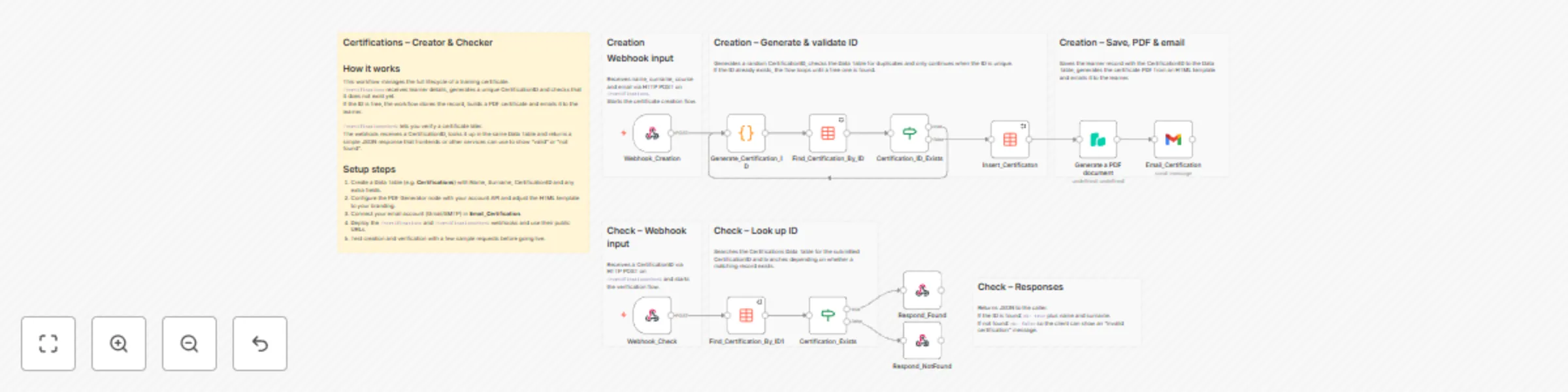
## Automated Certificate Creation & Verification (PDF Template-based) ## 🔍 Overview This n8n workflow provides a **complete end-to-end system for creating, distributing, and verifying digital certificates**, using **PDF Generator API templates** instead of raw HTML. It is designed as a **production-ready MVP**, fully functional and tested, that can be imported and adapted with minimal configuration. The workflow exposes public endpoints to: * generate personalized certificates as PDFs * assign unique Certification IDs * email certificates automatically * verify certificate authenticity via API --- ## 🎯 Typical use cases This workflow is ideal for: * training providers and academies * online courses and bootcamps * internal company certifications * workshops and events * proof-of-completion documents Any scenario where certificates must be **generated automatically and verified reliably**. --- ## ⚙️ What this workflow does ### 1️⃣ Certificate creation (Webhook) **Endpoint** ``` POST /certifications2 ``` When triggered, the workflow: 1. Receives candidate data (name, surname, course, email) 2. Generates a **unique Certification ID** 3. Ensures the ID does not already exist 4. Stores certificate data in an n8n Data Table 5. Generates a PDF using a **PDF Generator API template** 6. Sends the certificate via email as a PDF attachment --- ### 2️⃣ PDF generation (Template-based) Instead of HTML, the workflow sends a **JSON payload** to a predefined PDF template. Example payload: ```json { "Candidate": "John Doe", "CourseName": "Advanced n8n Automation", "DueDate": "2025-01-10", "ID": "LQ4Z5H8R2A1F" } ``` The PDF layout (fonts, colors, logos, formatting) is fully managed via the **PDF Generator API Template UI**, keeping the workflow clean and maintainable. --- ### 3️⃣ Email delivery * Uses Gmail OAuth2 * Sends a customizable email * Attaches the generated certificate PDF automatically --- ### 4️⃣ Certificate verification **Endpoint** ``` GET /certificationscheck?id=CERTIFICATION-ID ``` This endpoint: * checks if the Certification ID exists * returns validation status and candidate info Example response (valid): ```json { "ok": true, "name": "John", "surname": "Doe" } ``` This enables **public, API-based certificate verification**. --- ## 🛠 Requirements Before importing the workflow, you need: 1. **n8n instance** (cloud or self-hosted) 2. **n8n Data Table** with the following fields: * `Name` (string) * `Surname` (string) * `CertificationID` (string) 3. **PDF Generator API account** 4. **Gmail OAuth2 credentials** 5. Ability to expose webhook endpoints publicly --- ## 🚀 Setup guide ### Step 1 – Import the workflow * Open **n8n** * Go to **Workflows → Import** * Paste the provided workflow JSON --- ### Step 2 – Configure the Data Table Create (or reuse) an n8n Data Table with these fields: | Field | Type | | --------------- | ------ | | Name | string | | Surname | string | | CertificationID | string | Update the following nodes to reference your Data Table: * `Insert_Certification` * `Find_Certification_By_ID` * `Find_Certification_By_ID1` --- ### Step 3 – Configure PDF Generator API * Create a **PDF template** in PDF Generator API * Add placeholders such as: * `{Candidate}` * `{CourseName}` * `{DueDate}` * `{ID}` * In n8n, set credentials on the **Generate a PDF document** node ⚠️ Placeholder names **must exactly match** the JSON keys used in the workflow. --- ### Step 4 – Configure email credentials * Open the **Email Certificate** node * Set Gmail OAuth2 credentials * Customize subject and message body if needed --- ### Step 5 – Activate the workflow * Click **Activate** * Your endpoints are now live: * `/certifications2` * `/certificationscheck` --- ## 🧪 Status & notes * This workflow is an **MVP**, but already production-ready * Designed to be: * modular * reusable * easy to extend * Recommended version for new implementations * HTML-based version is kept only for reference/backward compatibility --- ## 💡 Customization ideas You can easily extend this workflow by: * adding QR codes to certificates * storing additional metadata * integrating with LMS platforms * adding a public verification webpage * switching email provider

P
Paolo Ronco
Document Extraction
17 Dec 2025
145
0
Workflow preview: Automate RSS to Instagram with AI-generated content and Cloudinary
Free advanced

Automate RSS to Instagram with AI-generated content and Cloudinary

### **What it does** - Reads and aggregates news from one or more RSS feeds (customizable by category). - Uses AI to select the most relevant or engaging articles. - Generates a caption and headline with a natural, professional tone. - Creates a realistic AI-generated image to match the topic. - Uploads the image to Cloudinary and publishes the post directly to Instagram through the Meta Graph API. - Runs automatically on schedule (default: every 5 hours) — no manual steps required. ### **Why it’s different** - Works with any subject or niche, from tech to fashion, news, travel, and more. - Includes a guide with curated RSS feed sources by category — ready to plug in. - AI-driven content generation for text and visuals, tuned for professional results. - Fully automated workflow — from discovery to publishing. - Self-hosted and scalable, with no vendor lock-in. ### **What’s included** - Workflow JSON file (import-ready for n8n). - PDF deployment guide (written together), covering: - how to set up RSS sources by category; - configuring APIs (OpenAI, Cloudinary, Meta Graph); - scheduling and testing the workflow; - recommended best practices for stability and scaling.

P
Paolo Ronco
Social Media
15 Dec 2025
60
0
Workflow preview: Convert WordPress articles to multilingual voiceovers with Google TTS and OpenAI
Free advanced

Convert WordPress articles to multilingual voiceovers with Google TTS and OpenAI

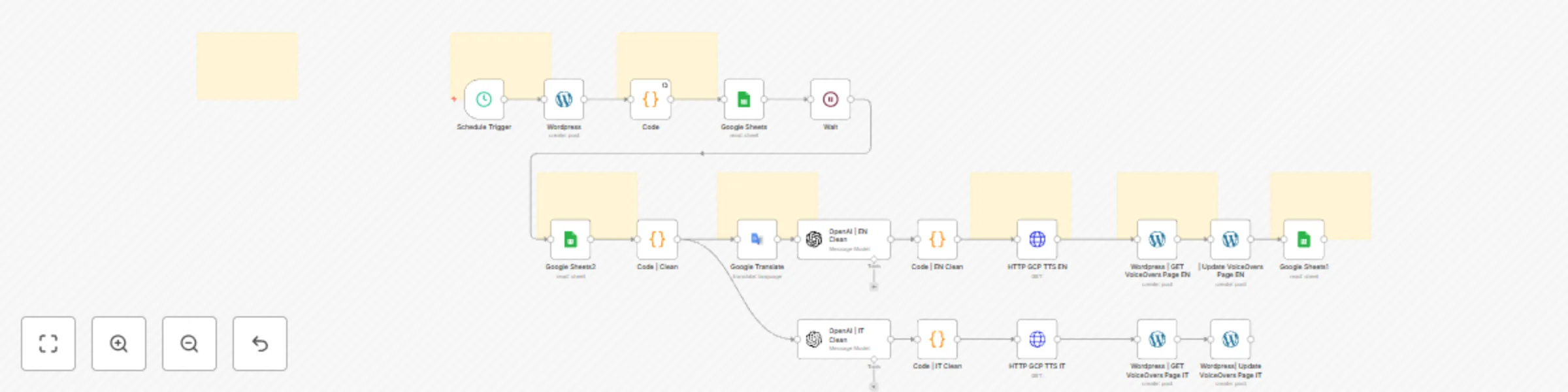
## WordPress → AI VoiceOver Automation (n8n + Google Cloud) Automatically convert your WordPress articles into multilingual voiceovers with professional-quality audio. Want to add **audio versions** of your WordPress posts? Looking for a workflow that is **fully automated, scalable, and customizable**? This complete automation system generates **high-quality voiceovers** in multiple languages (IT + EN by default), updates your WordPress site, and logs everything in Google Sheets — all without writing a single line of code. --- ## What is this product? This is a full end-to-end automation solution that integrates: * **n8n**: the automation engine orchestrating all steps * **OpenAI**: for advanced text cleaning and normalization * **Google Translate** for automatic multilingual processing (optional) * **Google Cloud Text-to-Speech (Long Audio)**: to create realistic long-form audio * **Google Sheets** for status tracking and full audit trail * **WordPress** both the content source and the final publishing platform With just a few minutes of setup, this system can: ✔ fetch your WordPress posts ✔ clean the text professionally ✔ translate them (optional) ✔ generate natural-sounding long-form audio ✔ automatically publish audio players to your VoiceOver page ✔ log each processed post in Google Sheets --- ## ✨ Key Features ### Automatic VoiceOver generation (IT + EN) Uses Google’s Long Audio TTS to generate high-quality, natural speech — not the typical "robotic" TTS. ### Built-in multilingual support Includes an English translation pipeline by default (you can add more languages easily). ### Real-time tracking with Google Sheets Every processed post is logged with: ID, Title, Date, Content, Link, Status (done). ### Fully automated scheduling Run the automation hourly, daily, or on any custom schedule inside n8n. ### Automatic WordPress page updates The workflow inserts the audio players directly into your WordPress VoiceOver page. ### Extensible and customizable You can add: * additional languages * different voices * notification steps (Telegram, Email, Slack) * alternative content sources (RSS, Notion, API) --- ## What’s included with your purchase 1️⃣ **Complete n8n Workflow (JSON)** Ready to import into your n8n instance — fully structured and modular. 2️⃣ **Google Cloud TTS Microservice (Full Code)** Includes: * `main.py` (FastAPI long-TTS endpoint) * `Dockerfile` * `requirements.txt` Deployable on Cloud Run in minutes. 3️⃣ **Professional documentation (Notion + ZIP)** Step-by-step setup guides for: * WordPress setup * n8n configuration * Google Cloud setup (TTS, Translate, Sheets, IAM, Cloud Run) * Deploying the microservice * Connecting everything inside n8n * Full Troubleshooting & FAQ 4️⃣ **Lifetime documentation updates** Whenever improvements or optimizations are released, you get access automatically. --- ## ⭐ Who is this for? Perfect for: * Bloggers * Content creators * Digital publishers * Marketing agencies * SEO and accessibility specialists * Businesses with multilingual blogs * Anyone who wants to turn their written content into audio at scale No coding or technical expertise required. --- ## Minimum technical requirements * A WordPress site * An n8n instance (self-hosted or cloud) * A Google Cloud account * An OpenAI API key * A Google Sheet (template included) The setup guide walks you through every step. --- ## What you get * ✔ Full n8n workflow * ✔ Complete TTS microservice code * ✔ Detailed documentation (Notion + ZIP) * ✔ Google Sheets template * ✔ Setup guides, diagrams, examples * ✔ Full Troubleshooting + extensive FAQ * ✔ Lifetime documentation updates --- ## Why choose this automation? Because it gives you: * Hands-free voiceover production * A scalable way to repurpose written content * Modern, reliable infrastructure powered by Google Cloud * A modular system you can extend as your project grows You don’t need to build anything from scratch — everything is ready for you.

P
Paolo Ronco
Content Creation
14 Dec 2025
20
0
Workflow preview: Create and send tech news digests with RSS, Gemini AI and Gmail
Free advanced

Create and send tech news digests with RSS, Gemini AI and Gmail

This workflow automates the entire lifecycle of collecting, filtering, summarizing, and delivering the most important daily news in **technology, artificial intelligence, cybersecurity, and the digital industry**. It functions as a **fully autonomous editorial engine**, combining dozens of RSS feeds, structured data processing, and an LLM (Google Gemini) to transform a large volume of raw articles into a concise, high–value daily briefing delivered straight to your inbox. Read: [Full setup Guide](https://paoloronco.it/n8n-template-rss-tech-news-to-your-inbox/) --- ## ✅ **1. Scheduled Automation** The workflow begins with a **Schedule Trigger**, which runs at predefined intervals. Every execution generates a fresh briefing that reflects the most relevant news from the **past 24 hours**. --- ## ✅ **2. Massive Multi-Source RSS Collection** The workflow gathers content from over 25 curated RSS feeds covering: ### **🔐 Cybersecurity** (The Hacker News, Krebs on Security, SANS, CVE feeds, Google Cloud Threat Intelligence, Cisco Talos, etc.) ### **🤖 Artificial Intelligence** (Google Research, MIT News, AI News, OpenAI News) ### **💻 Technology & Digital Industry** (Il Sole 24 Ore, Cybersecurity360, Graham Cluley, and more) ### **⚙️ Nvidia Ecosystem** (Nvidia Newsroom, Nvidia Developer Blog, Nvidia Blog) Each RSS feed is handled by a **dedicated node**, which ensures: * source isolation * easier debugging * no single point of failure The feeds are grouped using category-specific **Merge** nodes (Cyber1/2/3, AI, Nvidia), enabling modular scalability. --- ## ✅ **3. Unified Feed Aggregation** All category merges feed into the **Merge_All** node, creating a single combined dataset of articles from every source. --- ## ✅ **4. Intelligent Filtering (last 24 hours only)** The **Filter** node removes: * articles older than **24 hours** (based on `isoDate`) * invalid items * duplicated or redundant entries This keeps the briefing strictly relevant to the current day. --- ## ✅ **5. Chronological Sorting** The **Sort – Articles by Date** node orders all remaining items in descending date order. More recent or time-sensitive news is therefore prioritized. --- ## ✅ **6. Data Normalization (JavaScript Code)** A dedicated Code node transforms all incoming items into **one clean JSON object**: ```json { "articles": [ { "title": "...", "content": "...", "link": "...", "isoDate": "..." } ] } ``` This standardized structure becomes the input for the LLM summarization stage. --- ## ✅ **7. AI Editorial Processing – Google Gemini** The node **LLM – News Summarizer** is the workflow’s editorial brain. A complex prompt instructs Gemini to behave like the **editor-in-chief of a major tech newspaper**, enforcing strict rules: ### Selection rules: * choose only **8–10 truly important stories** * ignore low-value content (minor product releases, clickbait, rumors…) ### Relevance criteria: * AI research & foundation models * Big Tech developments * cybersecurity incidents * regulation and digital policy * semiconductors, cloud, and infrastructure * digital rights, governance, sovereignty ### Deduplication: If multiple feeds report the same story, only one version is kept. ### Output format: Gemini must output **a valid JSON object** containing: * `subject`: the email subject line * `html`: a fully structured HTML body grouped into categories Each news item ends with a **clickable HTML source link**, NEVER plaintext URLs. This step condenses dozens of articles into a **polished, editorial-grade briefing**. --- ## ✅ **8. HTML Newsletter Assembly (Code Node)** The **Build Final Newsletter HTML** node: * safely parses the JSON from the LLM * cleans any ```json fences or extra text * validates `subject` and `html` fields * embeds the content into a **modern, responsive HTML email template** The output is a single item containing: * the final email subject * the final HTML body Ready to be sent. --- ## ✅ **9. Automatic Email Delivery** The **Send Final Digest Email** (Gmail node): * uses the generated subject * sends the curated HTML newsletter * delivers it to the configured recipient(s) * uses a custom sender name (“n8n News”) The result is a fully automated **Tech & AI Daily Briefing** delivered with zero manual effort. --- # **In Summary: What This Workflow Achieves** ✔ Collects news from **25+ high-quality RSS sources** ✔ Normalizes, filters, and sorts all items automatically ✔ Uses **Google Gemini** to select only the stories that truly matter ✔ Generates a coherent, readable, professional-looking HTML newsletter ✔ Sends the result via email every day Perfect for: * daily executive briefings * technology and cybersecurity monitoring * automated newsletter production * internal knowledge distribution * competitive intelligence workflows

P
Paolo Ronco
Social Media
3 Dec 2025
2096
0
Workflow preview: Automated digital certificate creator & validator with PDF generation
Free advanced

Automated digital certificate creator & validator with PDF generation

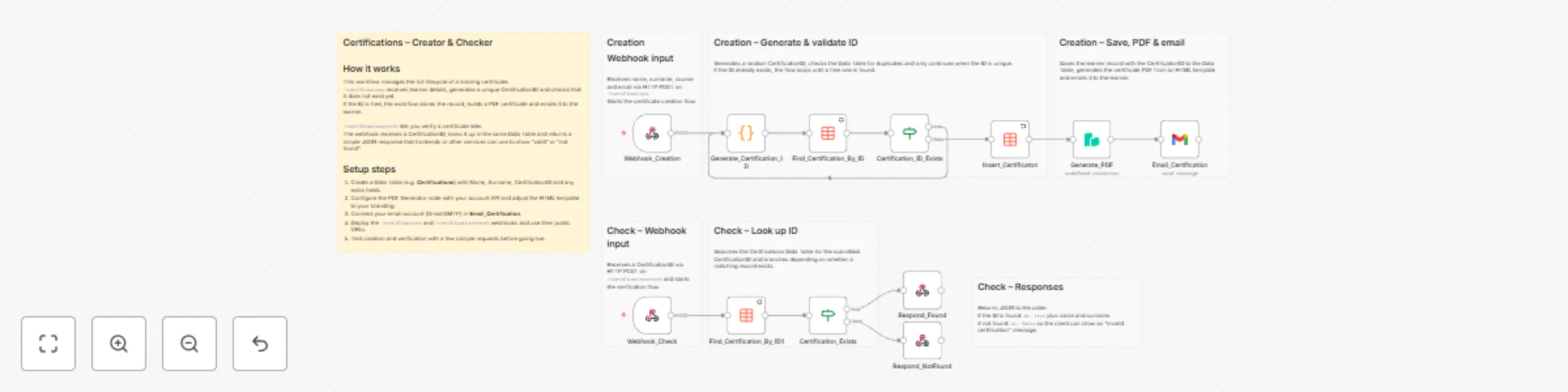
A complete workflow to **create, send, and verify digital certificates** fully automated with n8n.Perfect for courses, events, onboarding, internal training, or product education. ![image.png](fileId:3413) Visit my website for the: [full deploy guide]((https://paoloronco.it/n8n-template-certification-creator-checker/)) See my Templates on Github: [paoloronco/n8n-templates](https://github.com/paoloronco/n8n-templates)) [Example-certificate](./Assets/Example-Certificate.pdf) ### ✔ 1. Certificate Generation When a **POST webhook** request arrives, the workflow: * reads name, surname, course, and email * generates a **unique Certification ID** * saves everything in the Data Table ### ✔ 2. Data Storage Every issued certificate is recorded in an **n8n Data Table** containing: * Name * Surname * CertificationID This creates a permanent, searchable certificate registry. ### ✔ 3. PDF Creation Uses **PDF Generator API** to create a professional PDF certificate from an HTML template: * fully customizable (layout, colors, branding) * includes candidate data, course, ID, and date ### ✔ 4. Email Delivery The workflow automatically sends the certificate to the recipient using Gmail OAuth2 with: * a predefined subject * the PDF attached * a customizable message ### ✔ 5. Verification System A public endpoint `/certificationscheck` allows: * validation of Certification IDs * returning the candidate’s name and surname if valid * responding with `ok: true/false` ### ✔ 6. Included Mini Verification Website A ready-to-use HTML file allows users to: * enter a Certification ID * verify its authenticity * view name and surname if the certificate exists * Fully customizable (CSS, texts, branding). * * * ## 🛠 Requirements Before using this workflow, you must have: 1. **n8n Data Table** with ID fields: * `Name` (string) * `Surname` (string) * `CertificationID` (string) 2. **PDF Generator API account**Credentials set in n8n as `pdfGeneratorApi`. 3. **Gmail OAuth2 credentials**Configured in n8n as `gmailOAuth2`. 4. Ability to call **HTTP POST endpoints** from your website, backend, forms, etc. * * * ## 🚀 Installation ### **1. Import workflow** In n8n: * Go to **Workflows → Import** * Paste the JSON provided in this repository ### **2. Configure Data Table** Update the following nodes to point to your Data Table: * `Insert_Certificaton` * `Find_Certification_By_ID` * `Find_Certification_By_ID1` Make sure the Data Table has the fields: | Field | Type | | --- | --- | | Name | string | | Surname | string | | CertificationID | string | ### **3. Configure Credentials** In the workflow: * Node **Generate_PDF** → set PDF Generator API credentials * Node **Email_Certification** → set Gmail OAuth2 credentials ### **4. Activate Workflow** Click **Activate** in n8n. * * * ## 🔧 How the Workflow Works ### 🧩 1. Webhook `/certifications` Receives candidate data and triggers the workflow. `POST https://YOUR-N8N-DOMAIN.com/webhook/certification Headers: name: John surname: Doe course: email: [email protected]` ### 🧩 2. Unique ID Generation A Code node creates a random alphanumeric ID.If it already exists, a new one is generated. ### 🧩 3. Data Table Insert Stores the certificate data for future lookup. ### 🧩 4. PDF Generation Builds a PDF from the (fully editable) HTML template. ### 🧩 5. Email Sending Delivers the certificate to the candidate. * * * ## 🔍 Certificate Verification (`/certificationscheck`) ### API Behavior Send a `POST` request `https://YOUR-N8N-DOMAIN.com/webhook/certificationcheck with header` `id: CERTIFICATION-ID`. **Valid ID:** `{ "ok": "true", "name": "John", "surname": "Doe" }` **Invalid ID:** `{ "ok": "false" }` This request can be made **manually** (from tools like Postman, cURL, or your backend), **or automatically through the HTML verification page** included in the GitHub repository (the `Cerification_Check.html` template) found in your project files

P
Paolo Ronco
Document Extraction
21 Nov 2025
68
0
Workflow preview: Automatic email invoice archiving & data extraction with Gmail, Drive & AI
Free advanced

Automatic email invoice archiving & data extraction with Gmail, Drive & AI

# Automated Invoice Archiving Automatically fetch, store, and extract key information from invoices received via email from your ISP or utility provider (electricity, gas, telecom, water, etc.).The workflow saves the invoices to Google Drive (or optionally to your personal FTP/SFTP server) and logs all invoice details into Google Sheets via AI-powered extraction. ![Asset1.png](fileId:3405) Read: [Full setup Guide](https://paoloronco.it/n8n-template-automated-invoice-archiving/) ### How it works 1. **Scheduled Trigger**Runs the workflow at a selected interval (e.g., every hour). You can freely adjust the timing. 2. **Gmail – Fetch Messages**Reads your Gmail inbox and retrieves only messages coming from your ISP/utility provider’s email address, filtering for messages with PDF attachments. 3. **Gmail – Download Invoice** Fetches the full email content and downloads the attached invoice (PDF). 4. **Google Drive – Upload File** Uploads the invoice into a specific Google Drive folder of your choice. 5. **(Optional) Upload to FTP/SFTP** Sends a copy of the invoice to your personal server via secure FTP/SFTP. 6. **AI Extraction Pipeline** * **Extract PDF Text** – converts the PDF into text (OCR not required if text-based). * **AI Agent (OpenRouter)** – understands the invoice content and extracts structured fields (invoice number, date, provider name, total amount, tax info, line items, etc.) * **Code Node** – sanitizes and parses the JSON from the AI model. 7. **Google Sheets – Append Invoice Data**Adds a new row to your Google Sheet with all parsed invoice fields. 8. **(Optional) Cleanup**Automatically deletes:– the Gmail message– the temporary file in Google Drive(Useful when you only want your FTP or Sheets copy.) ### Parameters to configure | Parameter | Description | Recommended configuration | | --- | --- | --- | | **Gmail Credentials** | OAuth2 credentials needed to read and delete emails. | Create OAuth credentials on Google Cloud → enable Gmail API → paste Client ID & Secret into n8n → “Connect OAuth2”. | | **Sender Email Filter** | Email address your provider uses to send invoices. | Example: `[email protected]`, `[email protected]`, `[email protected]` | | **Google Drive Folder** | Destination folder for saving invoices. | Copy the folder ID from the Drive URL and paste it into `folderId`. | | **Google Drive Credentials** | OAuth2 connection for file uploads/deletions. | Same Google Cloud project → enable Drive API → OAuth connect in n8n. | | **FTP/SFTP Server (optional)** | Upload invoices to your private server. | Host / IP · Port · Username · Password or SSH Key · Destination path (e.g. `/home/user/invoices/`). | | **AI Model (OpenRouter)** | Large-language model used to parse invoice text. | Example: `gpt-4.1`, `llama-3.1`, or any preferred OpenRouter model. | | **Google Sheets Document** | Destination spreadsheet for structured data. | Create a Sheet → add columns (Vendor, Invoice Number, Date, Amount, Service Type, etc.) → insert `documentId` & sheet name. | | **Sheets Credentials (Service Account)** | Used for writing into Google Sheets. | Create Service Account → download JSON → add to n8n → share the Sheet with the Service Account email. | | **Trigger Interval** | How often the workflow checks for new invoices. | Every hour · every 30 minutes · daily at set ti | ## Node-by-node breakdown ### **1. Schedule Trigger** Runs at the interval you choose (default: hourly).Start → triggers entire workflow. * * * ### **2. Gmail – Get Many Messages** Filters inbox items using: * **Sender email** (your ISP/utility address) * **Has attachment** * **Unread or recent messages** Downloads metadata + attachment references. * * * ### **3. Filter – Contains Attachment** Ensures only messages with binary attachments continue. * * * ### **4. Gmail – Get Invoice** Downloads: * Full email JSON * The invoice PDF (binary data) * * * ### **5. Google Drive – Upload File** Uploads invoice PDF with a dynamic filename: `{{ $json.from.value[0].name }}-{{ $json.date }}.pdf` Requires: * Google Drive OAuth2 credentials * Folder ID (destination directory) * * * ### **6. HTTP Request – Download File** Retrieves the raw PDF file from Google Drive for further processing. * * * ### **7. (Optional) FTP/SFTP Upload** Uploads the PDF to your server using: * Host / IP * Port (default 22) * Username * Password or private key * Destination path Filename is sanitized to ensure Unix compatibility. * * * ### **8. (Optional) Delete Temporary File** Deletes the Google Drive file if you don’t want duplicates. * * * ### **9. (Optional) Delete Gmail Message** Removes the original email once processed (optional inbox cleanup). * * * ### **10. Extract from File (PDF → Text)** Reads the PDF and extracts raw text for AI processing. * * * ### **11. OpenRouter Chat Model** LLM backend for the AI agent. Provides: * invoice parsing * field extraction * structured reasoning * * * ### **12. AI Agent – Extract Invoice Fields** The agent is instructed to return **strict JSON only**, containing keys such as: * `vendor_name` * `invoice_number` * `invoice_date` * `total_amount` * `tax_details` * `line_items[]` * `po_number` * `po_date` Works for most standard PDF invoices. * * * ### **13. Code – Clean & Parse JSON** Sanitizes the AI output: * Removes markdown fences * Extracts valid JSON * Parses into a clean JS object If the AI output is malformed, debugging info is returned. * * * ### **14. Google Sheets – Append Data** Appends the extracted fields into a structured row.Example mappings: * **Vendor** → `{{ $json.vendor_name }}` * **Invoice Number** → `{{ $json.invoice_number }}` * **Date** → `{{ $json.invoice_date }}` * **Amount** → `{{ $json.total_amount }}` * **Service Type** → `{{ $json.line_items[0].description }}` * * * ## 💡 Tips & best practices * Add multiple sender filters if you have **more than one utility provider**. * Ensure invoices are **text-based PDFs** for best extraction results. * Use Google Drive as a reliable long-term archive, or keep only FTP if you prefer local storage. * Create charts in Google Sheets for tracking: * Monthly utility cost trends * Year-over-year comparison * Consumption spikes (if included in invoices) * * * ## ⚠️ Important notes * Utility invoices contain **personal and financial data**. Keep your FTP/SFTP server secure. * Google APIs require proper OAuth2 or Service Account setup; misconfiguration may cause permission errors. * This workflow is for **personal automation**, not a replacement for official fiscal archiving. * AI extraction quality depends on invoice formatting and the model you choose.

P
Paolo Ronco
Invoice Processing
17 Nov 2025
293
0
Workflow preview: Sync Amazon Luna Prime games to Google Sheets with automatic updates
Free advanced

Sync Amazon Luna Prime games to Google Sheets with automatic updates

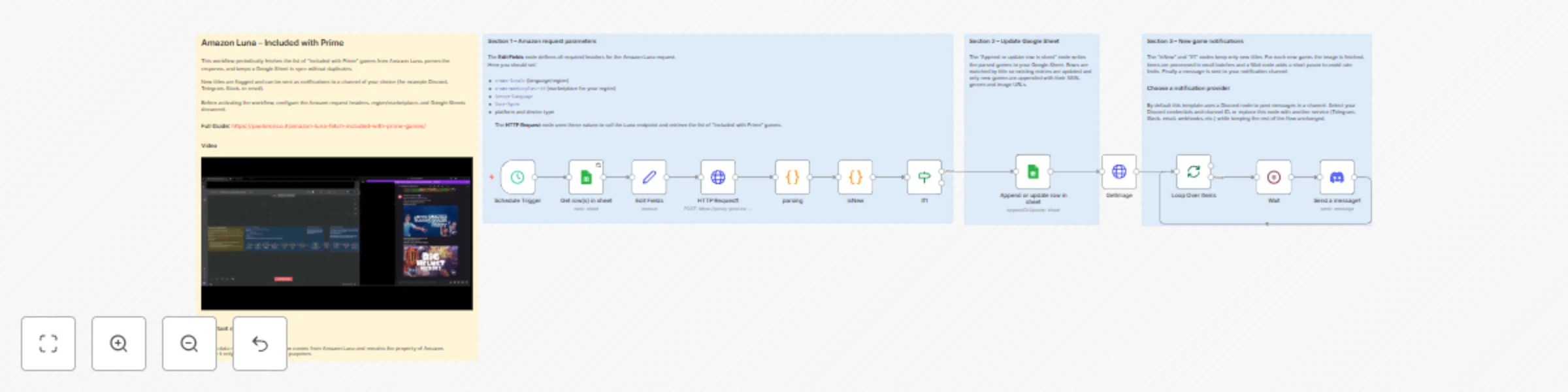
## Amazon Luna Prime Games Catalog Tracker (Auto-Sync to Google Sheets)** Automatically fetch, organize, and maintain an updated catalog of **Amazon Luna – Included with Prime** games.This workflow regularly queries Amazon’s official Luna endpoint, extracts complete metadata, and syncs everything into Google Sheets without duplicates. Ideal for: * tracking monthly **Prime Luna rotations** * keeping a personal archive of games * monitoring **new games appearing on Amazon Games / Prime Gaming**, so you can instantly play titles you’re interested in * building dashboards or gaming databases * powering notification systems (Discord, Telegram, email, etc.) * * * ### **Overview** Amazon Luna’s “Included with Prime” lineup changes frequently, with new games added and old ones removed.Instead of checking manually, this n8n template fully automates the process: * Fetches the latest list from Amazon’s backend * Extracts detailed metadata from the response * Syncs the data into Google Sheets * Avoids duplicates by updating existing rows * Supports all major Amazon regions Once configured, it runs automatically—keeping your game catalog correct, clean, and always up to date. * * * #### 🛠️ **How the workflow works** **1. Scheduled Trigger** Starts the workflow on a set schedule (default: every 5 days at 3:00 PM).You can change both frequency and time freely. **2. HTTP Request to Amazon Luna** Calls Amazon Luna’s regional endpoint and retrieves the full **“Included with Prime”** catalog. **3. JavaScript Code Node – Data Extraction** Parses the JSON response and extracts structured fields: * Title * Genres * Release Year * ASIN * Image URLs * Additional metadata The result is a clean, ready-to-use dataset. **4. Google Sheets – Insert or Update Rows** Each game is written into the selected Google Sheet: * Existing games get updated * New games are appended The **Title** acts as the unique identifier to prevent duplicates. * * * ## ⚙️ **Configuration Parameters** | Parameter | Description | Recommended values | | --- | --- | --- | | **x-amz-locale** | Language + region | `it_IT` 🇮🇹 · `en_US` 🇺🇸 · `de_DE` 🇩🇪 · `fr_FR` 🇫🇷 · `es_ES` 🇪🇸 · `en_GB` 🇬🇧 · `ja_JP` 🇯🇵 · `en_CA` 🇨🇦 | | **x-amz-marketplace-id** | Marketplace backend ID | `APJ6JRA9NG5V4` 🇮🇹 · `ATVPDKIKX0DER` 🇺🇸 · `A1PA6795UKMFR9` 🇩🇪 · `A13V1IB3VIYZZH` 🇫🇷 · `A1RKKUPIHCS9HS` 🇪🇸 · `A1F83G8C2ARO7P` 🇬🇧 · `A1VC38T7YXB528` 🇯🇵 · `A2EUQ1WTGCTBG2` 🇨🇦 | | **Accept-Language** | Response language | Example: `it-IT,it;q=0.9,en;q=0.8` | | **User-Agent** | Browser-like request | Default or updated UA | | **Trigger interval** | Refresh frequency | Every 5 days at 3:00 PM (modifiable) | | **Google Sheet** | Storage output | Select your file + sheet | You can adapt these headers to fetch data from any supported country. * * * 💡 **Tips & Customization** #### 🌍 Regional catalogs Duplicate the HTTP Request + Code + Sheet block to track multiple countries (US, DE, JP, UK…). #### 🧹 No duplicates The workflow updates rows intelligently, ensuring a clean catalog even after many runs. #### 🗂️ Move data anywhere Send the output to: * Airtable * Databases (MySQL, Postgres, MongoDB…) * Notion * CSV * REST APIs * BI dashboards #### 🔔 Add notifications (Discord, Telegram, Email, etc.) You can pair this template with a notification workflow.When used with **Discord**, the notification message can include: * game title * description or metadata * **the game’s image**, automatically downloaded and attached This makes notifications visually informative and perfect for tracking new Prime titles. * * * ### 🔒 **Important Notes** * All retrieved data belongs to **Amazon**. * The workflow is intended for **personal, testing, or educational use only**. * Do not republish or redistribute collected data without permission.

P
Paolo Ronco
Miscellaneous
12 Nov 2025
27
0