Create & upload AI-generated ASMR YouTube Shorts with Seedance, Fal AI, and GPT-4

Workflow preview

Workflow preview
100%
Create & upload AI-generated ASMR YouTube Shorts with Seedance, Fal AI, and GPT-4 preview
Open on n8n.io

Important notice

This workflow is provided as-is. Please review and test before using in production.

1. Workflow Overview

//ASMR AI Workflow Who is this for? Content Creators, YouTube Automation Enthusiasts, and AI Hobbyists looking to autonomously generate and publish unique, s...

Best for

  • Content Creation automation workflows
  • Multimodal AI automation workflows
  • advanced n8n builders looking for reusable templates

Tools used

n8n-nodes-base.code, n8n-nodes-base.httprequest, n8n-nodes-base.wait, @n8n/n8n-nodes-langchain.toolthink, @n8n/n8n-nodes-langchain.lmchatopenai, @n8n/n8n-nodes-langchain.agent, @n8n/n8n-nodes-langchain.outputparserstructured, n8n-nodes-base.scheduletrigger

Source and attribution

This workflow is cataloged by N8N Workflows and links back to its original n8n.io source page by Bilel Aroua.

Original n8n.io source

1.1 Workflow description

Title
Create & upload AI-generated ASMR YouTube Shorts with Seedance, Fal AI, and GPT-4
Workflow name
Create & upload AI-generated ASMR YouTube Shorts with Seedance, Fal AI, and GPT-4

//ASMR AI Workflow

Who is this for?

Content Creators, YouTube Automation Enthusiasts, and AI Hobbyists looking to autonomously generate and publish unique, satisfying ASMR-style YouTube Shorts without manual effort.

What problem does this solve?

This workflow solves the creative bottleneck and time-consuming nature of daily content creation. It fully automates the entire production pipeline, from brainstorming trendy ideas to publishing a finished video, turning your n8n instance into a 24/7 content factory.

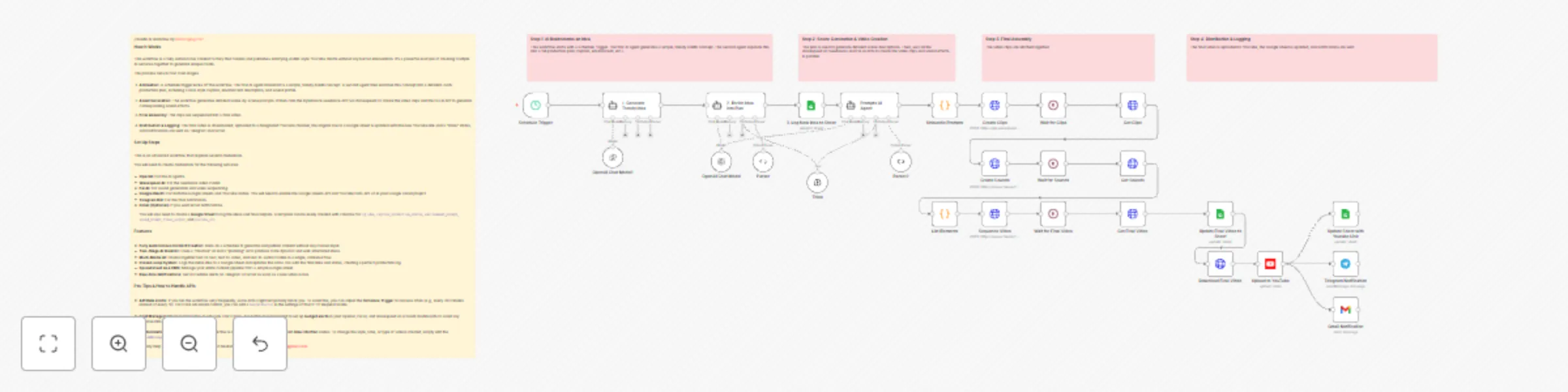
What this workflow does

1. Two-Stage AI Ideation & Planning:

  • Uses an initial AI agent to brainstorm a short, viral ASMR concept based on current trends.
  • A second "Planning" AI agent then takes this concept and expands it into a detailed, structured production plan, complete with a viral-optimized caption, hashtags, and descriptions for the environment and sound.

2. Multi-Modal Asset Generation:

  • Video: Feeds detailed scene prompts to the ByteDance Seedance text-to-video model (via Wavespeed AI) to generate high-quality video clips.
  • Audio: Simultaneously calls the Fal AI text-to-audio model to create custom, soothing ASMR sound effects that match the video's theme.
  • Assembly: Automatically sequences the video clips and sound into a single, cohesive final video file using an FFMPEG API call.

3. Closed-Loop Publishing & Logging:

  • Logging: Initially logs the new idea to a Google Sheet with a status of "In Progress".
  • Publishing: Automatically uploads the final, assembled video directly to your YouTube channel, setting the title and description from the AI's plan.
  • Updating: Finds the original row in the Google Sheet and updates its status to "Done", adding a direct link to the newly published YouTube video.
  • Notifications: Sends real-time alerts to Telegram and/or Gmail with the video title and link, confirming the successful publication.

Setup

Credentials: You will need to create credentials in your n8n instance for the following services:

  • OpenAI API
  • Wavespeed AI API (for Seedance)
  • Fal AI API
  • Google OAuth Credential (enable YouTube Data API v3 and Google Sheets API in your Google Cloud Project)
  • Telegram Bot Credential
  • (Optional) Gmail OAuth Credential

Configuration: This is an advanced workflow. The initial setup should take approximately 15-20 minutes.

  • Google Sheet: Create a Google Sheet with these columns: idea, caption, production_status, youtube_url. Add the Sheet ID to the Google Sheets nodes in the workflow.
  • Node Configuration: In the Telegram Notification node, enter your own Chat ID. In the Gmail Notification node, update the recipient email address.
  • Activate: Once configured, save and set the workflow to "Active" to let it run on its schedule.

How to customize

  • Creative Direction: To change the style or theme of the videos (e.g., from kinetic sand to soap cutting), simply edit the systemMessage in the "2. Enrich Idea into Plan" and "Prompts AI Agent" nodes.

  • Initial Ideas: To influence the AI's starting concepts, modify the prompt in the "1. Generate Trendy Idea" node.

  • Video & Sound: To change the video duration or sound style, adjust the parameters in the "Create Clips" and "Create Sounds" nodes.

  • Notifications: Add or remove notification channels (like Slack or Discord) after the "Upload to YouTube" node.

1.2 Logical Blocks

This catalog entry is organized from the workflow JSON. The node-level section below shows the executable blocks available for review before importing the template.

2. Block-by-Block Analysis

Block 1 - Unbundle Prompts

Type / Role
n8n-nodes-base.code - code
Config choices
Version 2

Block 2 - Create Sounds

Type / Role
n8n-nodes-base.httpRequest - httpRequest
Config choices
Version 4.2

Block 3 - Get Sounds

Type / Role
n8n-nodes-base.httpRequest - httpRequest
Config choices
Version 4.2

Block 4 - Wait for Sounds

Type / Role
n8n-nodes-base.wait - wait
Config choices
Version 1.1

Block 5 - List Elements

Type / Role
n8n-nodes-base.code - code
Config choices
Version 2

Block 6 - Sequence Video

Type / Role
n8n-nodes-base.httpRequest - httpRequest
Config choices
Version 4.2

Block 7 - Get Final Video

Type / Role
n8n-nodes-base.httpRequest - httpRequest
Config choices
Version 4.2

Block 8 - Wait for Final Video

Type / Role
n8n-nodes-base.wait - wait
Config choices
Version 1.1

Block 9 - Think

Type / Role
@n8n/n8n-nodes-langchain.toolThink - toolThink
Config choices
Version 1

Block 10 - OpenAI Chat Model

Type / Role
@n8n/n8n-nodes-langchain.lmChatOpenAi - lmChatOpenAi
Config choices
Version 1.2

Block 11 - Prompts AI Agent

Type / Role
@n8n/n8n-nodes-langchain.agent - agent
Config choices
Version 1.9

Block 12 - Parser

Type / Role
@n8n/n8n-nodes-langchain.outputParserStructured - outputParserStructured
Config choices
Version 1.2

Block 13 - Schedule Trigger

Type / Role
n8n-nodes-base.scheduleTrigger - scheduleTrigger
Config choices
Version 1.2

Block 14 - Parser2

Type / Role
@n8n/n8n-nodes-langchain.outputParserStructured - outputParserStructured
Config choices
Version 1.2

Block 15 - Create Clips

Type / Role
n8n-nodes-base.httpRequest - httpRequest
Config choices
Version 4.2

Block 16 - Wait for Clips

Type / Role
n8n-nodes-base.wait - wait
Config choices
Version 1.1

Block 17 - Get Clips

Type / Role
n8n-nodes-base.httpRequest - httpRequest
Config choices
Version 4.2

Block 18 - Download Final Video

Type / Role
n8n-nodes-base.httpRequest - httpRequest
Config choices
Version 4.2

Block 19 - Upload to YouTube

Type / Role
n8n-nodes-base.youTube - youTube
Config choices
Version 1

Block 20 - Telegram Notification

Type / Role
n8n-nodes-base.telegram - telegram
Config choices
Version 1.2

Block 21 - OpenAI Chat Model1

Type / Role
@n8n/n8n-nodes-langchain.lmChatOpenAi - lmChatOpenAi
Config choices
Version 1.2

Block 22 - Gmail Notification

Type / Role
n8n-nodes-base.gmail - gmail
Config choices
Version 2.1

Block 23 - 1. Generate Trendy Idea

Type / Role
@n8n/n8n-nodes-langchain.agent - agent
Config choices
Version 1.9

Block 24 - Note: AI Ideation

Type / Role
n8n-nodes-base.stickyNote - stickyNote
Config choices
Version 1

Showing the first 24 of 32 workflow blocks. Download the JSON for the full node graph.

3. Summary Table

Workflow Create & upload AI-generated ASMR YouTube Shorts with Seedance, Fal AI, and GPT-4
Complexity advanced
Nodes 32
Categories Content Creation, Multimodal AI
Author Bilel Aroua
Published 21 Jun 2025

4. Reproducing the Workflow from Scratch

  1. 1. Download the workflow JSON

    Use the JSON export at /data/workflows/5110/5110.json as the source template for this automation.

  2. 2. Import the template into n8n

    Open n8n, import the downloaded JSON, and review each node before activating the workflow.

  3. 3. Configure credentials and variables

    Replace placeholder credentials, API keys, webhook URLs, account IDs, and environment-specific values with your own settings.

  4. 4. Test with sample data

    Run the workflow manually or in a staging workspace, inspect node output, and confirm downstream systems receive the expected data.

  5. 5. Activate and monitor

    Enable the workflow only after testing, then monitor executions, errors, and rate limits during the first production runs.

5. General Notes & Resources

Review imported nodes carefully before activation. This catalog entry is intended to help you inspect the workflow structure, understand required services, and find related templates faster.

Node names, credentials, schedules, webhook paths, and external service limits may need adjustment for your workspace.

Frequently asked questions

What does Create & upload AI-generated ASMR YouTube Shorts with Seedance, Fal AI, and GPT-4 do?

//ASMR AI Workflow Who is this for? Content Creators, YouTube Automation Enthusiasts, and AI Hobbyists looking to autonomously generate and publish unique, s...

What do I need before importing this workflow?

Review the workflow JSON, configure any required credentials in n8n, and test the automation in a safe workspace before using it in production.

Can I customize this workflow?

Yes. Use the block-by-block analysis and the downloadable JSON to inspect each node, then adjust credentials, prompts, schedules, filters, or destinations for your Content Creation, Multimodal AI use case.